Power management software for Computers
Power management is a feature that efficiently manages and optimizes the power consumption of computer hardware thereby saving money and energy. Green Computing refers to the efficient use of computer resources using a computer power management software. Some of the green computing practices include, Server Virtualization, Power Management, Secured Network to reduce eWaste, Using Recycled Materials, and so on.
When it comes to an enterprise with multiple end users, power management for Windows, Mac, and Linux is necessary to keep power consumption costs down and be more resourceful. Optimized assets like desktops and laptops with the help of a power management program can be utilized longer at lesser costs.
Table of contents
- Why is PC Power Management important?
- Advantages of using power management software
- PC Power Management in Endpoint Central
- Key features of Power Management in Endpoint Central
- Supported Platforms
- Advent of Power Management
- How much energy does a computer use?
- How much can you save using computer Power Management?
Why is PC Power Management important?
The following factors stress the importance of PC power management:
- A PC power manager can optimize overall power consumption.
- It can save cost by means of conserving energy.
- Extending the lifetime of laptops and computers operating in the organization.
- Track and monitor power usage by computers and users using a PC power manager.
- Lower carbon footprint.
- Identify and eliminate excessive power usage with a comprehensive power management program
Advantages of using power management software
Power management is critical for enterprises to improve system efficiency, reduce operational costs, and meet sustainability goals. Hence, power management software has become critical in enabling enterprises and their IT teams to achieve these goals.
Here's a brief look at how power management software can help enterprises manage their endpoint fleet:
- CapEx Reduction
One of the main advantages of implementing PC power management software is the substantial reduction in electricity costs. Endpoint Central's unified endpoint management capabilities, coupled with power management functionalities allow IT admins to automatically configure and enforce power-saving policies such as scheduling sleep mode in PCs, shutting down idle computers, turning off monitors if they are idling for a specific time, etc.
These collective policies ensure minimal wastage of electricity, thereby ensuring a significant reduction in CapEx.
- Meeting Sustainability Goals and Energy Regulations
Another added advantage of implementing a PC or laptop power management software is the impact it has in enabling enterprises to achieve their sustainability goals.
These solutions help optimize energy usage across the managed endpoints, thus monitoring and creating energy-efficient power consumption policies, thereby helping enterprises align with their green initiatives including carbon footprint reduction.
- Improving Device Lifespan
Power optimization via power management software also directly increases the average endpoint lifespan of enterprises. By creating auto-shutdown or sleep policies during times of inactivity, the endpoint components are protected from overheating and excessive stress, thereby increasing their longevity.
- Improved Resource Usage and Allocation
PC and laptop power management solutions such as Endpoint Central offer a centralized console to monitor and configure power management in the managed endpoints. The increased longevity of the systems, added with the data-backed decisions, allows for a better allocation of resources and improved usage.
PC Power Management in Endpoint Central
Equipped with one of the best power management tools, Endpoint Central helps you to standardize the power settings in all the computers of the network at once. It provides the following PC power management options for Windows, Mac and Linux:
- Enables creating, modifying, and applying power schemes to 1000s of computers across all branches at once using the Power Management Configuration.
- Supports creating multiple schemes for various departments/divisions.
- Create power schemes with advanced options for Laptop power management.
- Hibernate or Standby an idle computer using the Remote Shutdown Tool
- Shutdown computers from remote using the Remote Shutdown Tool. The shutdown operation can be scheduled to happen at defined interval.
- Disable screen savers using the Registry Configuration and hide the Screen Saver tab from the users using the Security Policy Configuration so that they may not be able to activate it again.

Key Features of Power Management in Endpoint Central
- Apply power schemes
- Turn off screen saver
- Shutdown inactive computers
- Granular control
- Power management reports
Create and apply power schemes
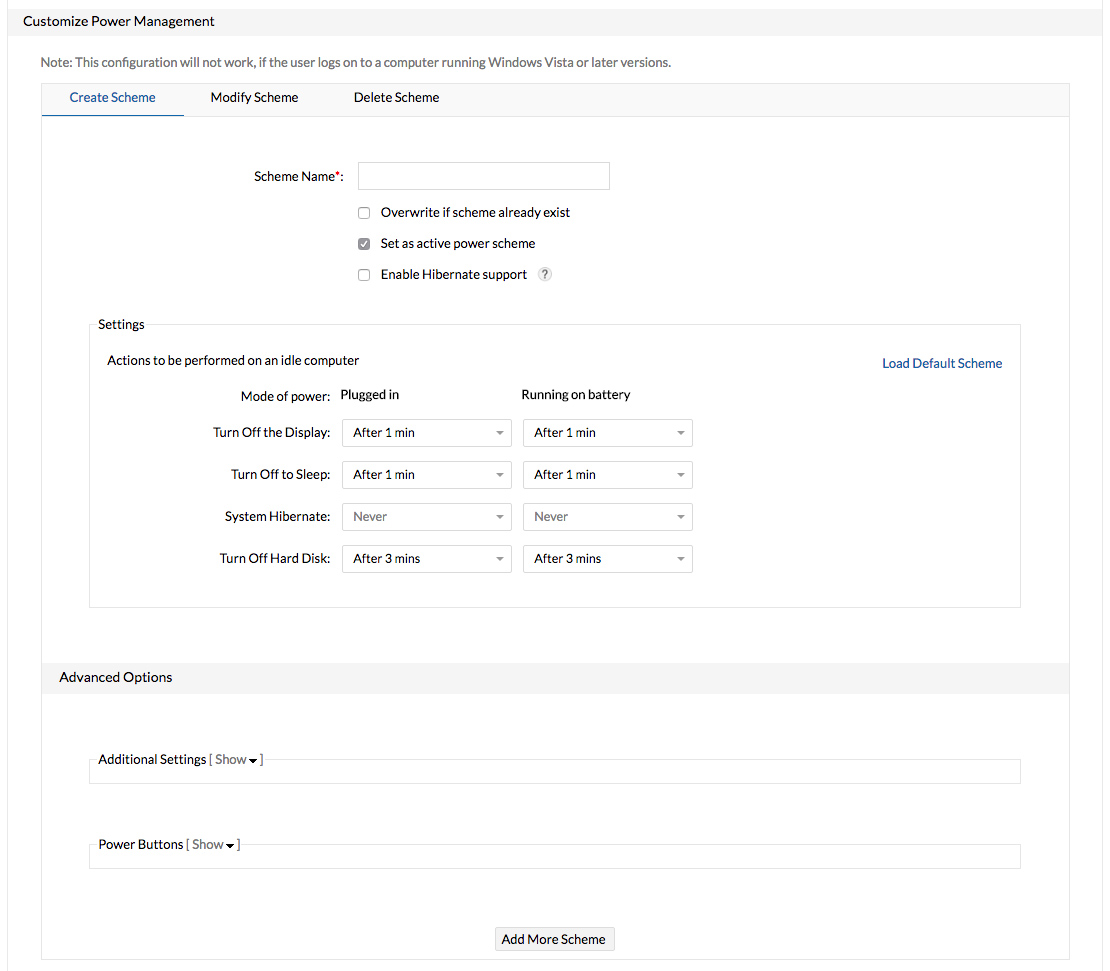
The Power Management Configuration in Endpoint Central allows you to create multiple power schemes for Windows, Mac and Linux that can be deployed to multiple computers. A variety of advanced power management settings can be applied based on the desired power saving scheme. For laptop power management, the advanced options allows you to specify what has to be done when the laptop is closed or when the power button is pressed.
Turn-off screen savers
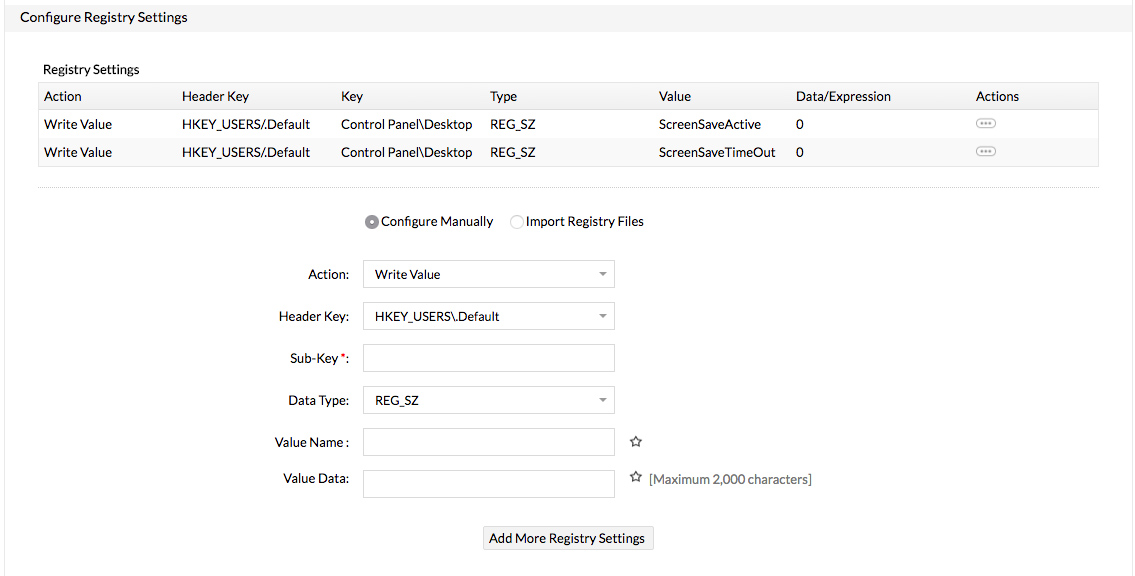
The screensavers were originally designed to save the CRT monitors from getting damaged by automatically changing the images on the screen during periods of user inactivity. With the advent of LCD monitors and technology improvements in modern CRT monitors, screensavers are no longer required to protect monitors from phosphor burn-in. A graphically more intensive screensaver will require more power than the normal screen and hinder PC power control. While turing off the monitor from the power schemes will help you save power irrespective of whether screensaver is enabled or not, you can use the Endpoint Central's Registry Configuration to turn off the screensavers in older models that do not support power schemes.
Shutdown inactive computers
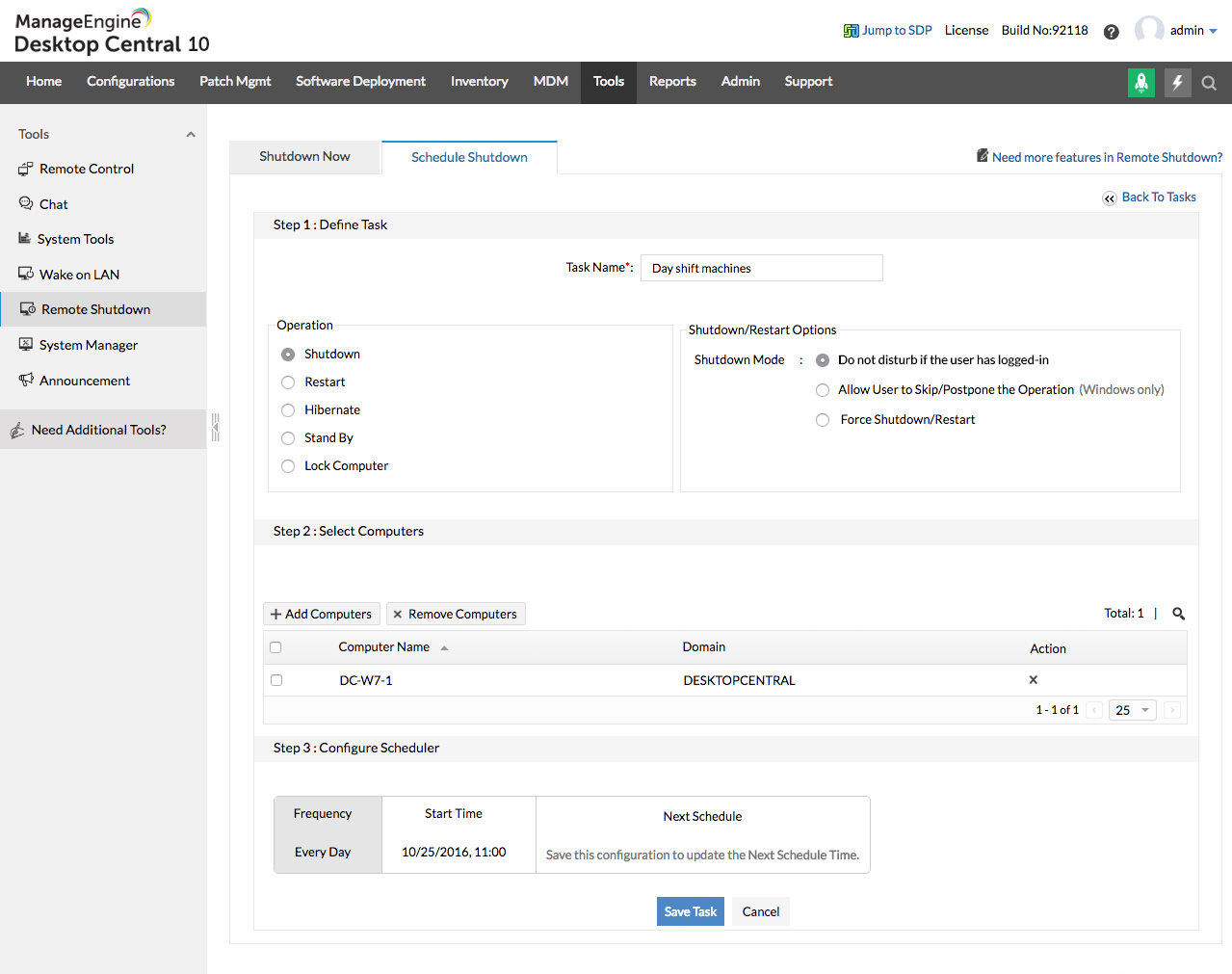
Considering a normal working hours of 40 hrs/week, shutting down the computers during non-office hours will alone let you save a whopping 76% on your energy consumption. For PC power control, Endpoint Central allows you to schedule remote shutdown tasks that can be scheduled to run on all weekdays. Our PC power management software helps you to shutdown all the computers during non-working hours. You can also manage power by creating multiple tasks to shutdown groups of computers at different times based on the employee working hours.
Granular control
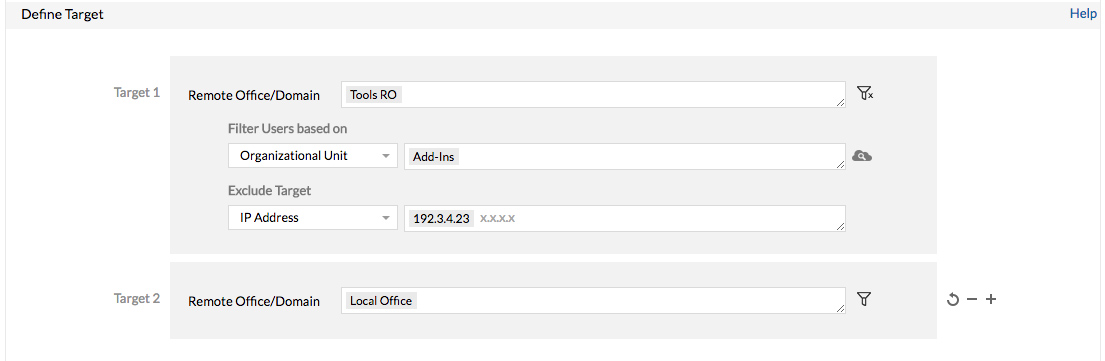
Endpoint Central gives you a complete control on the target computers to which the configuration has to be deployed. Our computer power management software allows you to manage power by creating a custom group of users/computers and apply different power schemes to have an efficient power management system in place. You can also exclude certain computers based on their OS and types from the selected targets allowing greater PC power control.
Supported Platforms
Broad platform support is critical to ensure that enterprises with heterogeneous IT environments can implement power management configurations. ManageEngine Endpoint Central offers power management for Windows and macOS.
The centralized dashboard enables IT admins to deploy centralized policies, monitor endpoints and configurations in real-time, and create detailed energy consumption reports for data-backed decisions and IT audits. To understand the power management configurations offered by Endpoint Central in-depth, refer to this page.
Advent of Power Management
The launch of the Energy Star program back in 1992 was one of the first manifestations of the green computing movement and paved the way for power management tools. Started by the US Environmental Protection Agency, it served as a kind of voluntary label awarded to the products that minimizes the power usage. Energy Star applied to Computer Monitors, Television Sets, Air Conditioners, Refrigerators, etc.
How much energy does a computer use?

A typical desktop computer comprises of CPU and a monitor. A computer running Intel P4, 2.4 GHz processor consumes 64.6 Watt per hour. Add another 50-100 Watt for the monitor. While the CPU consumes much litter energy when idle, the monitors on the other hand consume the same energy even when the computer is idle.
Let us do the math to calculate the average power consumption of a computer:
- Assuming that a 150 W computer is put to use day and night every day, the direct annual cost on electricity is $150 (at $0.1153/KWh)
- In contrast, if the same computer is used only during the normal working hours (40 hours a week), the cost would be $36
- The saving is $114 which is a stunning 76%
This is just for a single computer. As the number of computers increases, the saving on the electricity cost is huge. Just to give an example, for 2000 computers, the annual saving is $22,800 if you use a computer power management software.
Also, EPA estimates that the computers are active only 58% of time during working hours. The rest are used in non-computer activities such as phone calls, meetings, lunch, and refreshments. This idle time can be used to save additional power by adopting stringent power schemes to desktops PC power management software. Thus, computer power management is essential to cut unnecessary costs and save power.
How much money can you save with computer Power Management?
Power management for Windows, Mac and Linux can help you cut costs significantly. Use this power management calculator to know how much money you can save in your enterprise with a power management tool by following simple power management practices.
Conclusion
Whether the intentions are to save the planet or money, enterprises that adopt a power management tool will be benefited. Endpoint Central in addition to offering best-in-class desktop power management capabilities, also offers various other features like Software Deployment, Asset Management, Patch Management, Remote Control, Active Directory Reports, User Logon Reports, and Windows System Tools.




