ManageEngine Logo

SupportCenter Plus

Customer Support Software

 
Success Stories
"We did extensive testing of many customer support software and this is the best."
-Rasmus Hassing Larsen - Informi GIS A/S
» Download Free Edition | 30-Day Trial
 
Customer Case Tracking Previous Self-Service Portal Knowledge Base Customer Case Tracking Next
Customer Interaction Management

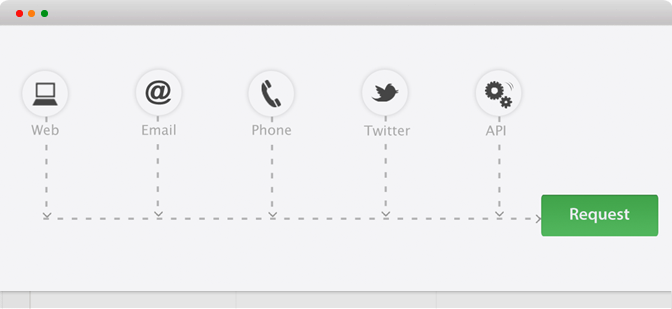
SupportCenter Plus enables customers to submit trouble tickets via a browser or through email. Even forum posts can be converted to tickets from version 6.0. It automates several key workflow tasks such as case routing, acknowledging requester/support rep notifications and handling of SLA rules. As a result, your support organization can now realize higher levels of productivity, keep everyone informed, provide superior service, improve problem resolution time, share knowledge effectively and keep customers happy.

Customer Case Tracking for Support
Ways to create Trouble Tickets
 

Features

Several Easy Ways to Create Trouble Tickets

Email to Request conversion
Automatically convert the emails sent to Help Desk into trouble tickets.

Web Enabled

With SupportCenter Plus being a 100% web-based Customer Support solution, enable your end users to submit support requests (trouble tickets) from anywhere, anytime using just a browser.

Forum Integration
Forum posts are considered as tickets and once replies are made then the tickets can be closed.

Customer Service Survey Settings
CVS Import
Customer Service Survey Settings
User Survey
 

Import from .CSV Files

Import customer Account, Contact and Sales details from .csv files.


User Survey

Conduct Customer Satisfaction & User Surveys. Also get User Survey related consolidated reports.

SLA Violation Report
Support Rep Notes

SLA Management Report
SLA Management
 

Support Rep Notes

Support Reps can add notes to the request to add related information like action taken.

Notify Support Reps

Automatically notify Support Reps when a new request is assigned to them.

Automatic Escalations

Escalate requests to different support reps within your staff and notify managers when cases are not resolved within specific time limits.

SLA Management

Create User, Department, Priority or Category based SLA rules and ensure compliance. More on SLA Management

Knowledge Base
Knowledge Base

Self-Service Portal
Self-Service Portal


Knowledge Base

Using the Searchable Knowledge base, both the Support Reps and the end users can search for solutions to common problems. More on building a Knowledge Base

Self-Service Portal

End users can use the self service portal to submit new requests or check the status of their open requests. More on the benefits of having a Self-Service Portal

Customer Support Software Administrator Console
Administrator Console
 

My Tasks

Create follow-up tasks and never miss an appointment or forget an important call.

Keep End Users Informed

Automatic email response to Requesters on request creation and closure.

Flexible Request Form Customization

Add custom fields to the request form to capture information specific to your business needs

Automatic Case Routing

Automatically assign requests to support reps based on the type of request.

Customer Support Software Active Directory Integration
Active Directory Integration
 

Active Directory Integration

  • Import User information from Active Directory.
  • Keep your SupportCenter Plus database in sync with the Active Directory Database.
  • Support Representatives can login in to SupportCenter Plus through Active Directory authentication.
Customer Support Software Email Signatures
Email Signatures
 

Email Signatures

  • Define and Personalize your Email Signatures.
  • Automatic Addition of Email Signatures to all your replies.
Customer Support Software Canned Responses
Canned Responses
 

Canned Responses

Features

  • Create Predefined Responses for support queries.
  • Manage Canned Responses and share it with other Support Staff.
  • Different Variables and fields can be added in order to personalize the responses.
  • It can be made public or private according to your convenience.

Benefits

  • Reduces the response times on frequently asked questions.
  • Reduces the support costs considerably due to the reduction in response and resolution times.
  • It also can give a personal touch to your Support Responses with the available customizations.
Customer Case Tracking Previous Self-Service Portal Knowledge Base Customer Case Tracking Next
Customer SupportDesk