- HOME
- Compliance analytics
- How to level up your organization's Essential Eight maturity
How to level up your organization's Essential Eight maturity
- Last Updated: November 20, 2026
- 6 Views
- 10 Min Read

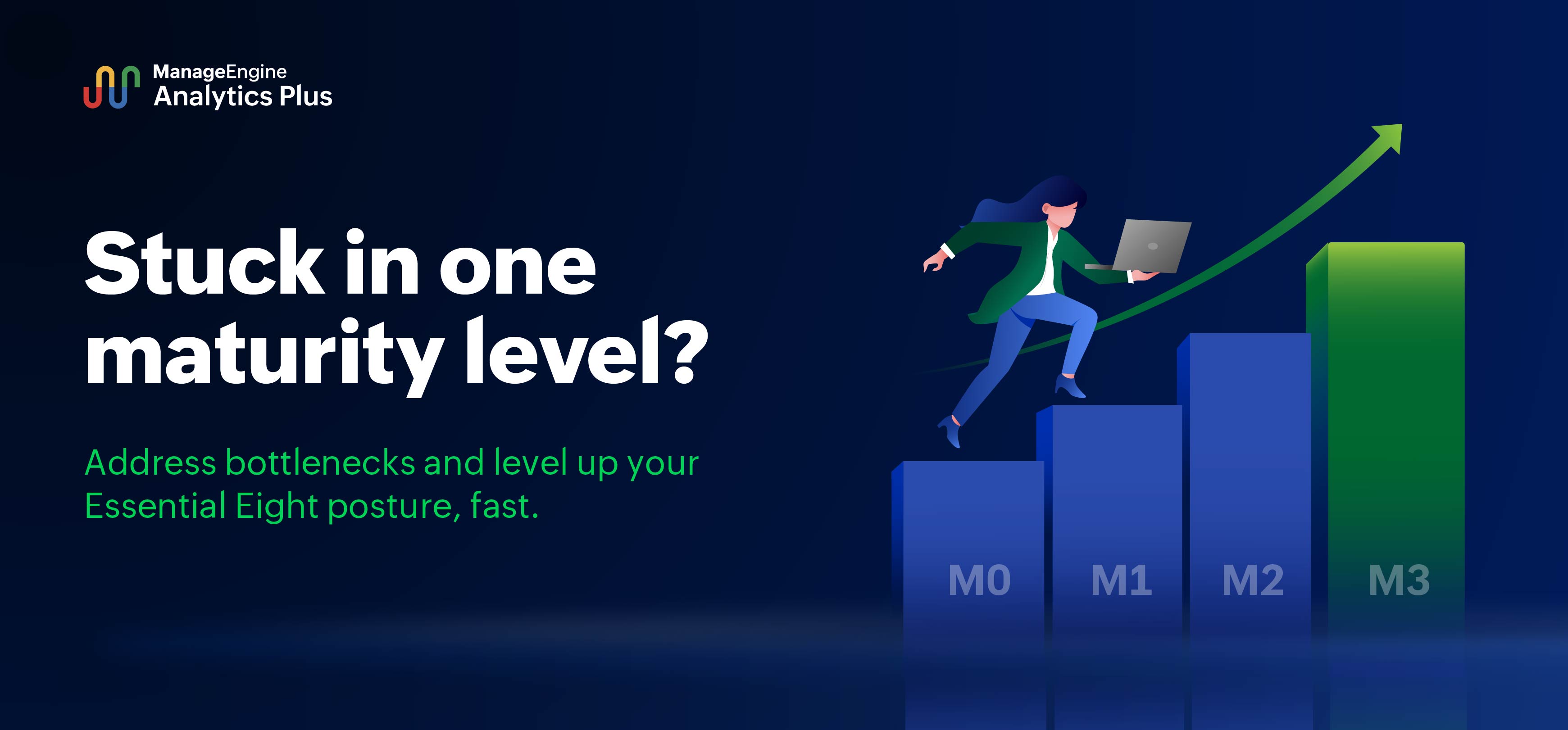
You spawn on a battlefield. You can’t unlock better armor, weapons, or supplies until you clear the level you’re on. Miss even one opponent, and you’re stuck at that level. This is the case when organizations try to level up their Essential Eight maturity.
What is Essential Eight maturity?
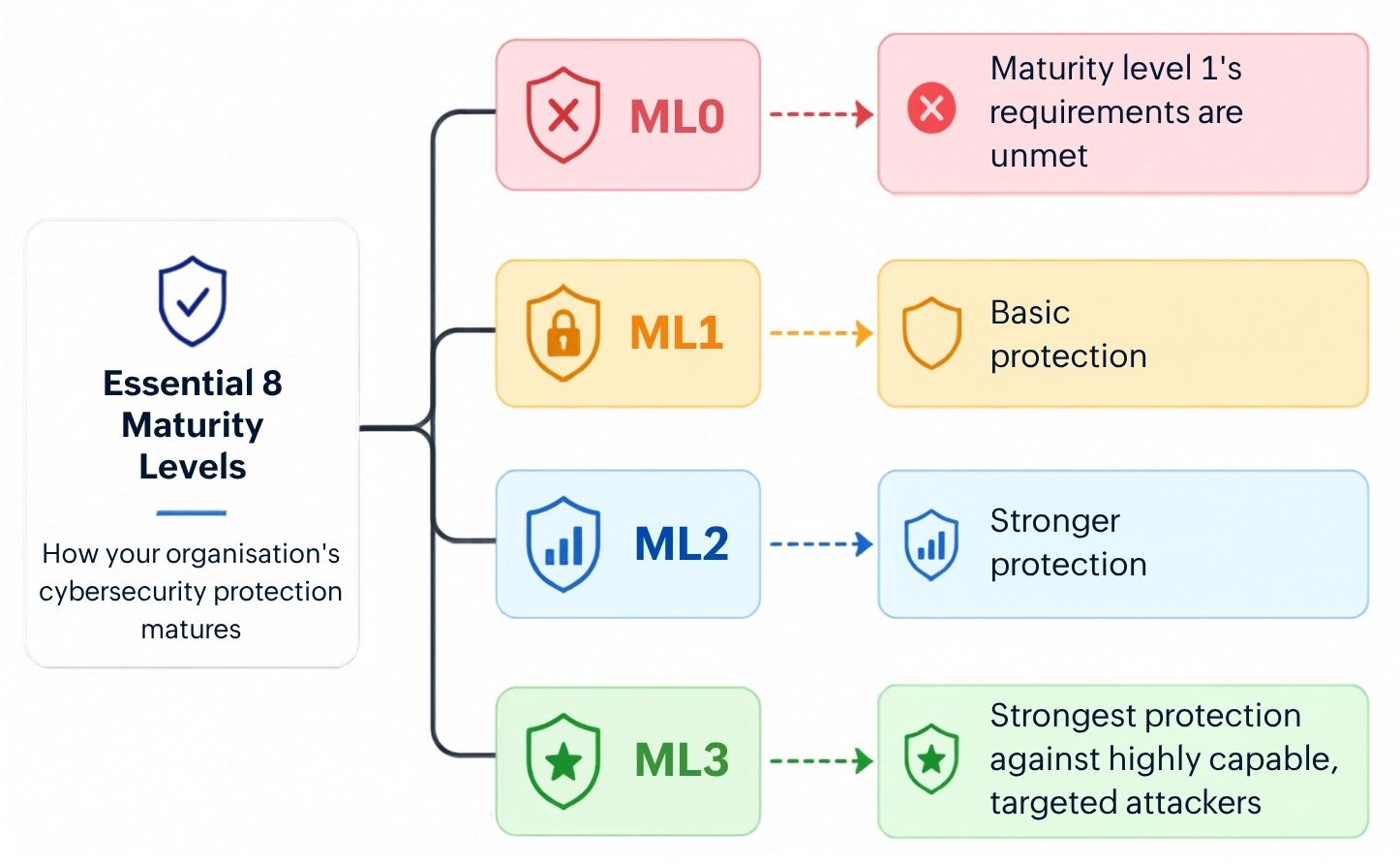
Essential Eight maturity measures how effectively an organization has implemented the eight baseline cybersecurity strategies outlined by the Australian Signals Directorate's Australian Cyber Security Centre (ACSC). The Essential Eight maturity model helps organizations understand how consistently their security controls are implemented and maintained by assessing each strategy against defined requirements across four maturity levels.
Here is the Essential Eight maturity model in a nutshell:
The crux?
As an organization advances in its Essential Eight maturity levels, it progressively becomes more difficult for attackers armed with sophisticated tools and techniques to target them.
But wait, here's the tricky part
An organization can have different maturity levels across its eight strategies because each strategy of Essential Eight is assessed individually.
However, to achieve an overall Essential Eight maturity level, all eight strategies must meet the requirements of the same maturity level. For example, an organization cannot consider itself ML3 if even one strategy remains at ML2.
Sounds tedious, doesn't it? Continue reading to know how you can streamline this process and make it simpler to get through.
How hard is it to level up Essential Eight maturity?
Reaching a higher Essential Eight maturity level is no easy feat. Level 1 can be achieved through quick wins like multi-factor authentication (MFA) and routine patching, but scaling up to Levels 2 and 3 gets increasingly difficult. The higher the Essential Eight maturity level, the tighter the controls it demands.
Here are some common bottlenecks faced by organizations eyeing a higher maturity level.
❗One framework. Four maturity levels. Eight strategies.
The Essential Eight maturity model requires organizations to understand where each strategy stands against the applicable maturity requirements. A control may exist, but that does not necessarily translate to the organization achieving the target maturity level. The consistency of enforcement, coverage across the environment, and supporting evidence also matter when preparing for an Essential Eight audit.
Tracking changes manually across the eight strategies right before each audit can become cumbersome and time-consuming. Teams end up entangled in spreadsheets, evidence repositories, and assessment scorecards just to understand where they stand in that given moment.
❗Compliance data is spread across multiple tools
The compliance data required as evidence for an Essential Eight audit is typically sourced from more than one system. Application control information may sit within an endpoint management platform. Operating system patch data may come from patch management tools. You may track MFA coverage through an identity provider, while you maintain backup status in a separate platform.
Each system does provide a useful view of its own controls. However, the real task for compliance begins when teams need to assess their organization's overall compliance posture—the first step toward achieving a higher Essential Eight maturity level.
Without a unified view, security teams have to manually collect and interpret compliance data from multiple sources before determining where gaps exist.
❗Essential Eight maturity can quietly regress without constant visibility
Achieving a maturity level is not the end of the journey. The environment will continue to change; new applications are installed, users are added or removed, privileges change, patches are released, configurations are allowed to drift, and backup jobs fail. A strategy that met its target Essential Eight maturity level during the last audit may no longer satisfy those requirements today.
This is exactly where point-in-time reporting can fall short. A report might accurately represent the environment in which it was created, but unfortunately, it cannot show what changed soon after.
Replace periodic chaos with continuous compliance monitoring
Continuous compliance monitoring changes the way organizations prepare to reach their next Essential Eight maturity level.
Instead of requiring organizations to reconcile compliance data scattered across the environment manually, ManageEngine Analytics Plus enables continuous compliance monitoring and visibility through unified compliance dashboards. This single-pane view consolidates and correlates compliance data from across your IT ecosystem into a single, framework-specific view.
One such consolidated dashboard—based entirely on the Essential Eight maturity model—brings every control into a single maturity-aligned view, allowing security teams to identify which areas are meeting requirements and which require attention.
By turning static, disconnected reports into live, correlated insights, security teams can take the three following steps.
✚ Identify gaps when aiming for the next maturity level
Continuous compliance monitoring helps surface changes and compliance gaps as they occur.
You can identify compliance gaps—like a critical application patch that remains outstanding, a user who receives elevated privileges, a configuration that deviates from the approved policy, or a failed backup as they happen—instead of letting them remain hidden until the next Essential Eight audit.
This turns your compliance analytics from a periodic reporting exercise to a perpetual security practice.
✚ Separate a control gap from an evidence gap
At its core, Essential Eight maturity is not only about whether a control has been implemented, but whether organizations can demonstrate, with supporting evidence, that the control is operating as required. An efficient compliance monitoring tool helps teams distinguish between "not implemented" versus "not evidenced."
If a control is operating but the evidence (e.g., required logs, records, or supporting compliance data) is unavailable, this remediation path is different from a control that is genuinely failing. This distinction helps teams prioritize remediation more effectively and reduce unnecessary hassles during an audit.
✚ Turn compliance data into actionable insights
Raw compliance data can show that something changed. Only context will tell you why it changed.
For example, a decline in patch compliance may occur alongside a change in endpoint inventory. A rise in privileged account access may coincide with a change in administrative access.
Correlating signals helps security teams move from identifying a compliance gap to understanding the factors contributing to it.
Inside a unified Essential Eight maturity dashboard
Analytics Plus' unified dashboard consolidates compliance data around the individual strategies. This allows teams to move from an overall maturity view into its underlying controls and the supporting evidence for each strategy.
The eight strategies are categorized into dedicated tabs. Let's take a quick look at each of them.
1. Patch Applications
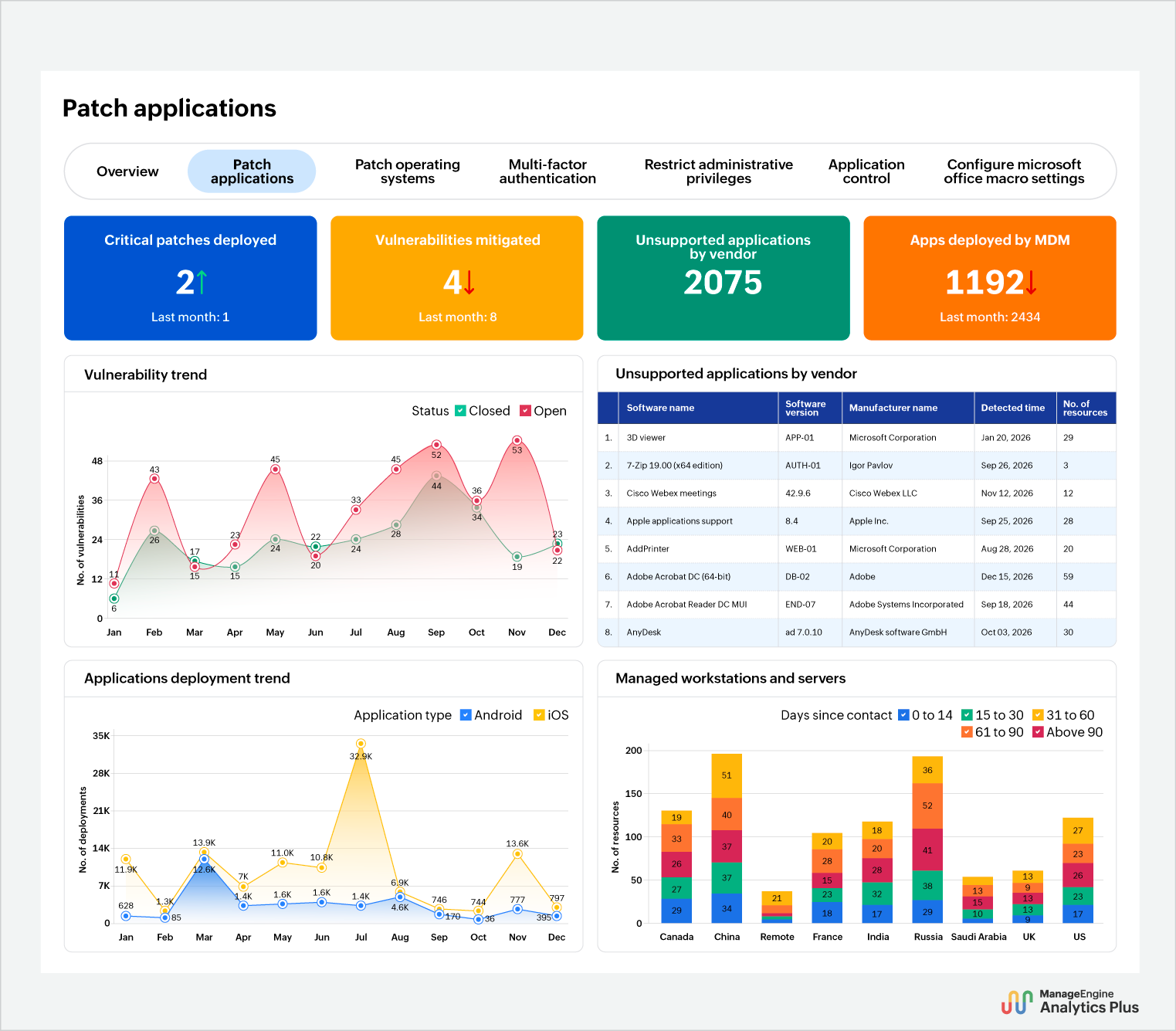
Tracking around the clock whether applications are patched or not sounds tedious. Application patch cycles vary across products, and critical vulnerabilities can emerge at any time without a warning. Manually checking different applications, endpoints, and patch management systems makes it difficult to maintain a consistent view of patch compliance.
The Patch applications tab in the unified Essential Eight compliance dashboard brings this information together in one place, so teams don't have to jump between applications, endpoints, and patch management tools to figure out what's still exposed. They can see which critical patches are pending, how patch compliance is changing, and where remediation needs to happen first.
2. Patch Operating Systems
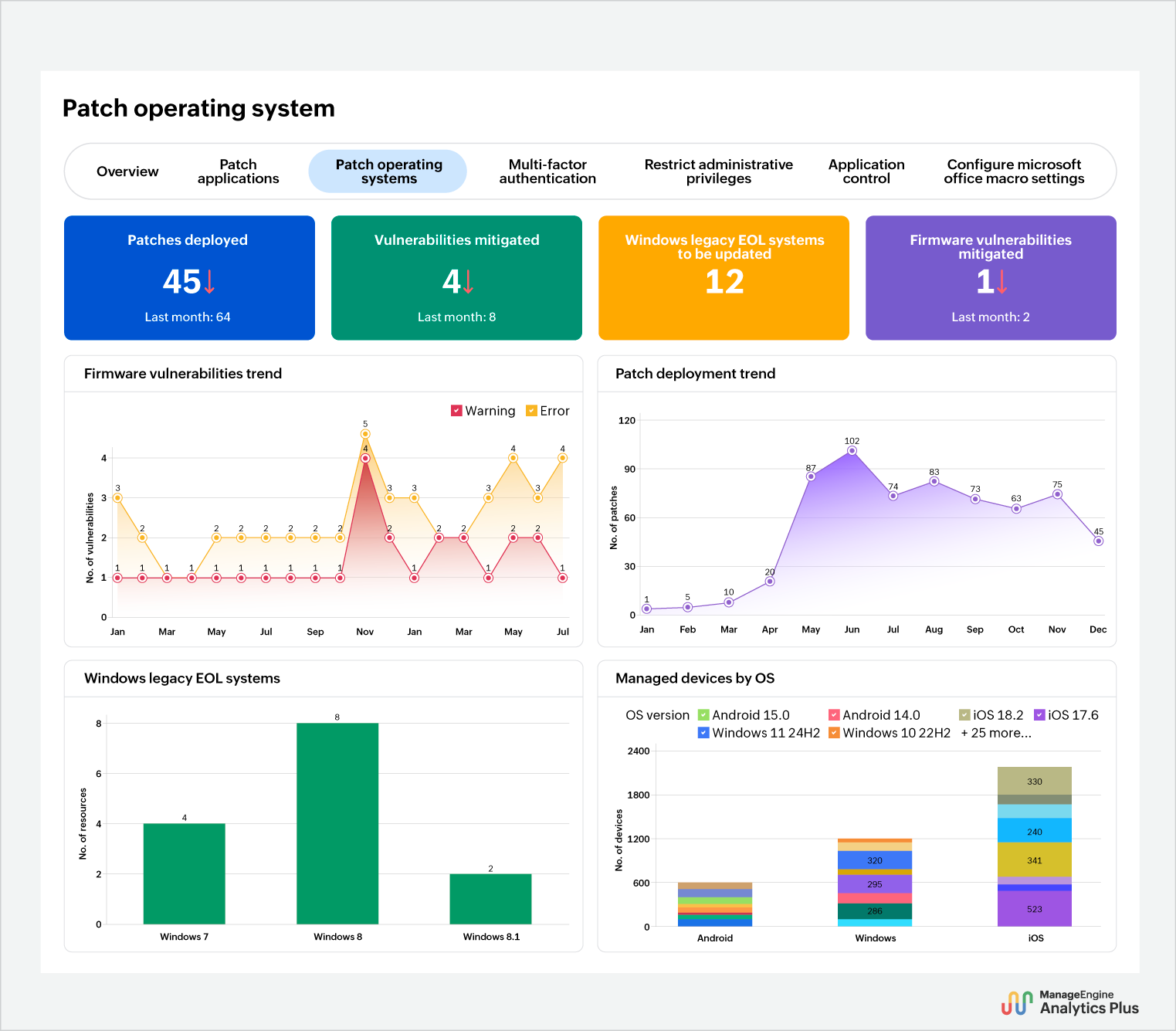
Operating system (OS) patching is another area where point-in-time reporting can paint a misleading picture. An organization may have strong patch compliance now but individual endpoints might fall behind later in time. Tracking this control across multiple device groups can make it difficult to maintain an accurate view of the current posture, particularly as the environment expands.
A single view of OS patch compliance from the Patch operating systems tab makes it easier to spot endpoints that have fallen behind. Teams can see where updates are missing and focus remediation on the systems that need attention, rather than repeatedly checking different device groups.
3. Multi-Factor Authentication
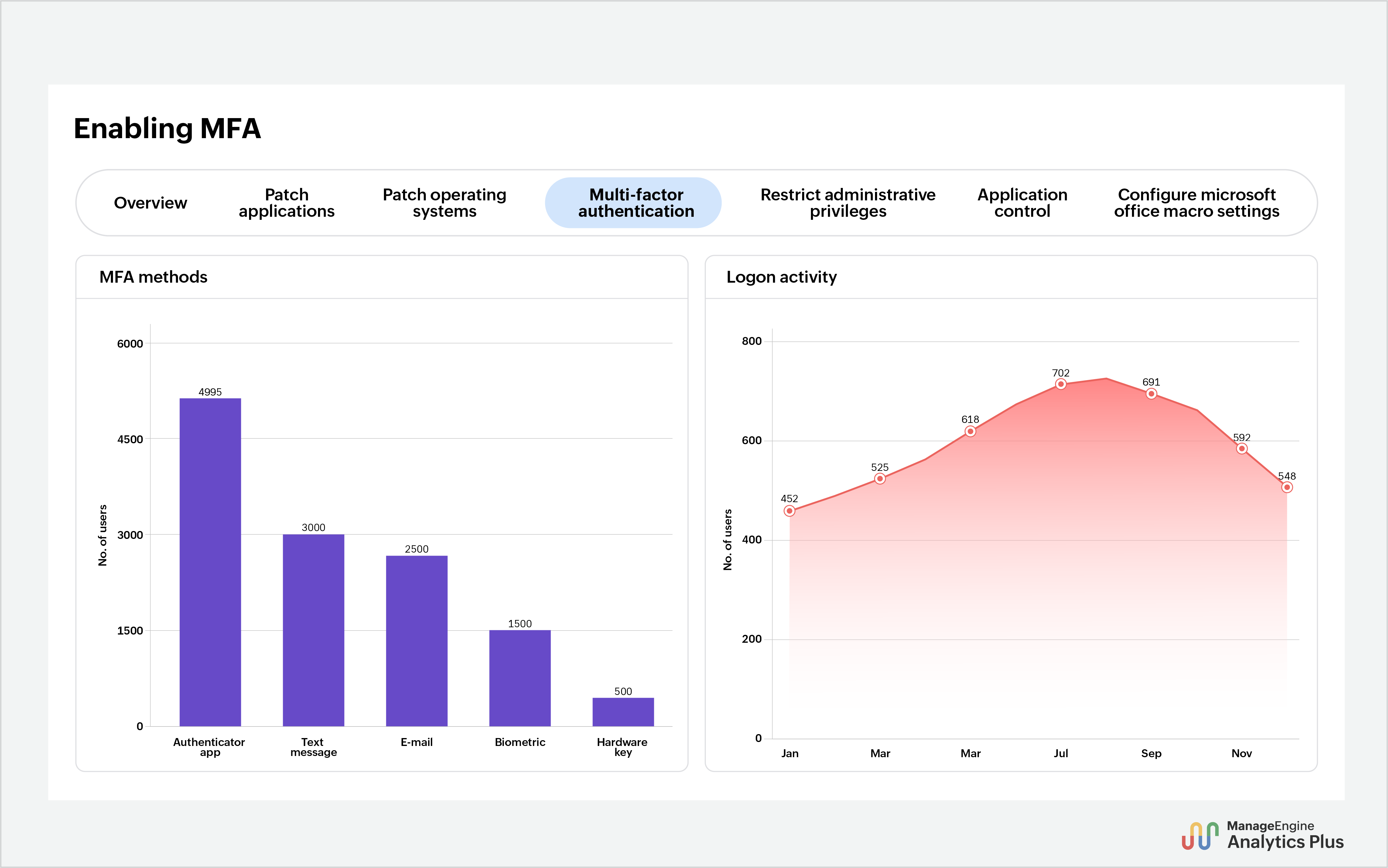
MFA is a passive protective shield that protects accounts if their credentials are compromised. But MFA coverage changes whenever users, applications, and remote access requirements change.
A newly created remote user without MFA can introduce a compliance gap immediately. Teams must check the identity platform, compare active users, and determine whether the required authentication controls are enabled to find that gap manually.
The Multi-factor authentication tab makes this easier to catch. Teams can see MFA coverage across users and access instances and identify where the required authentication controls are missing, without manually cross-referencing data from multiple systems.
4. Restrict Administrative Privileges
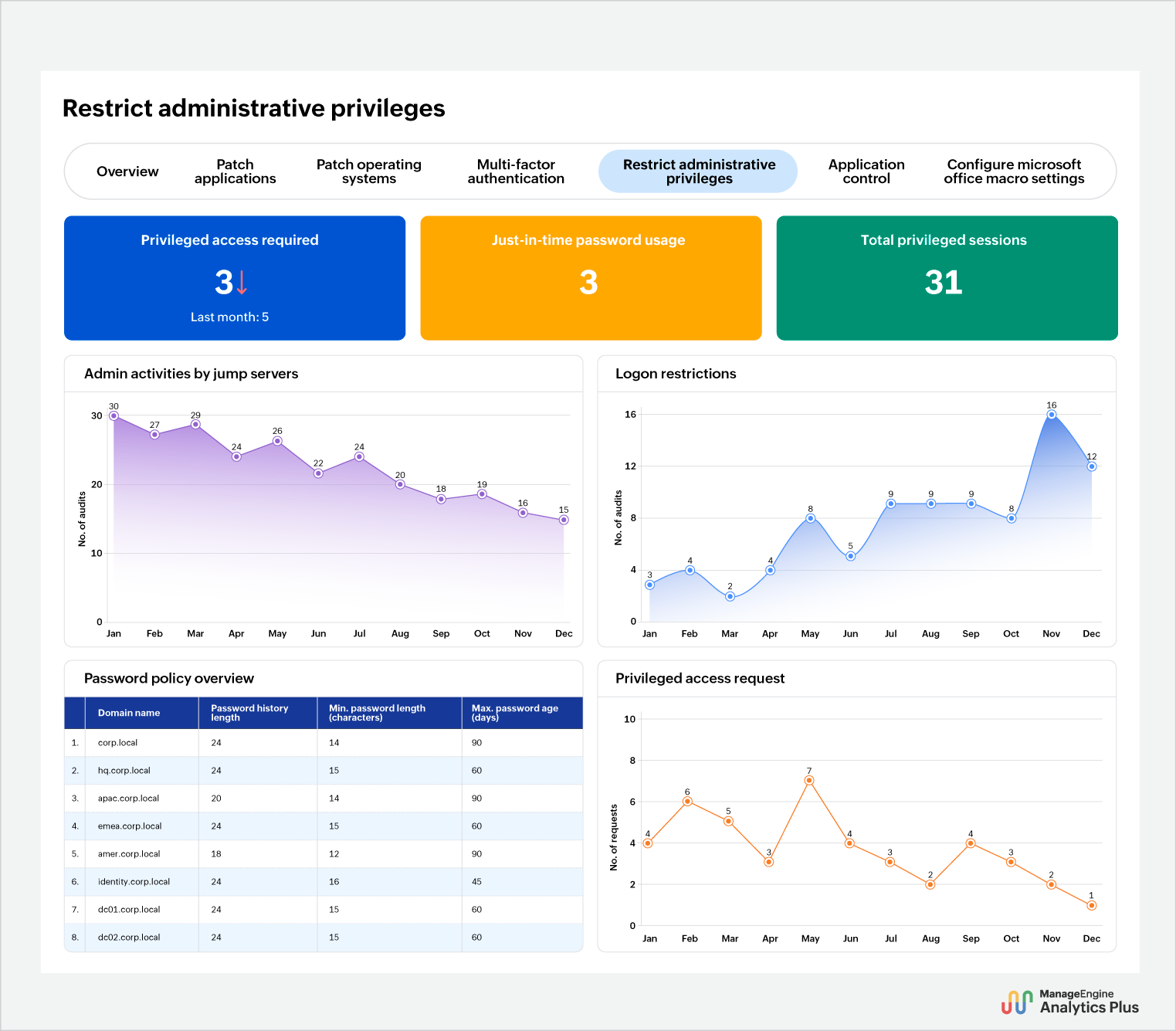
Administrative privileges can amplify the impact of a compromised account. The challenge lies in determining whether any access is still necessary in an ever-changing environment. Users will change roles and projects will end, but temporary privileges tend to become permanent.
The Restrict administrative privileges tab turns a quest of "Who still has administrative access and why?" into effortless insights security teams can continuously keep an eye on. Teams can identify excessive or unexpected administrative access and keep track of whether those privileges are still necessary as users change roles and responsibilities.
5. Application Control
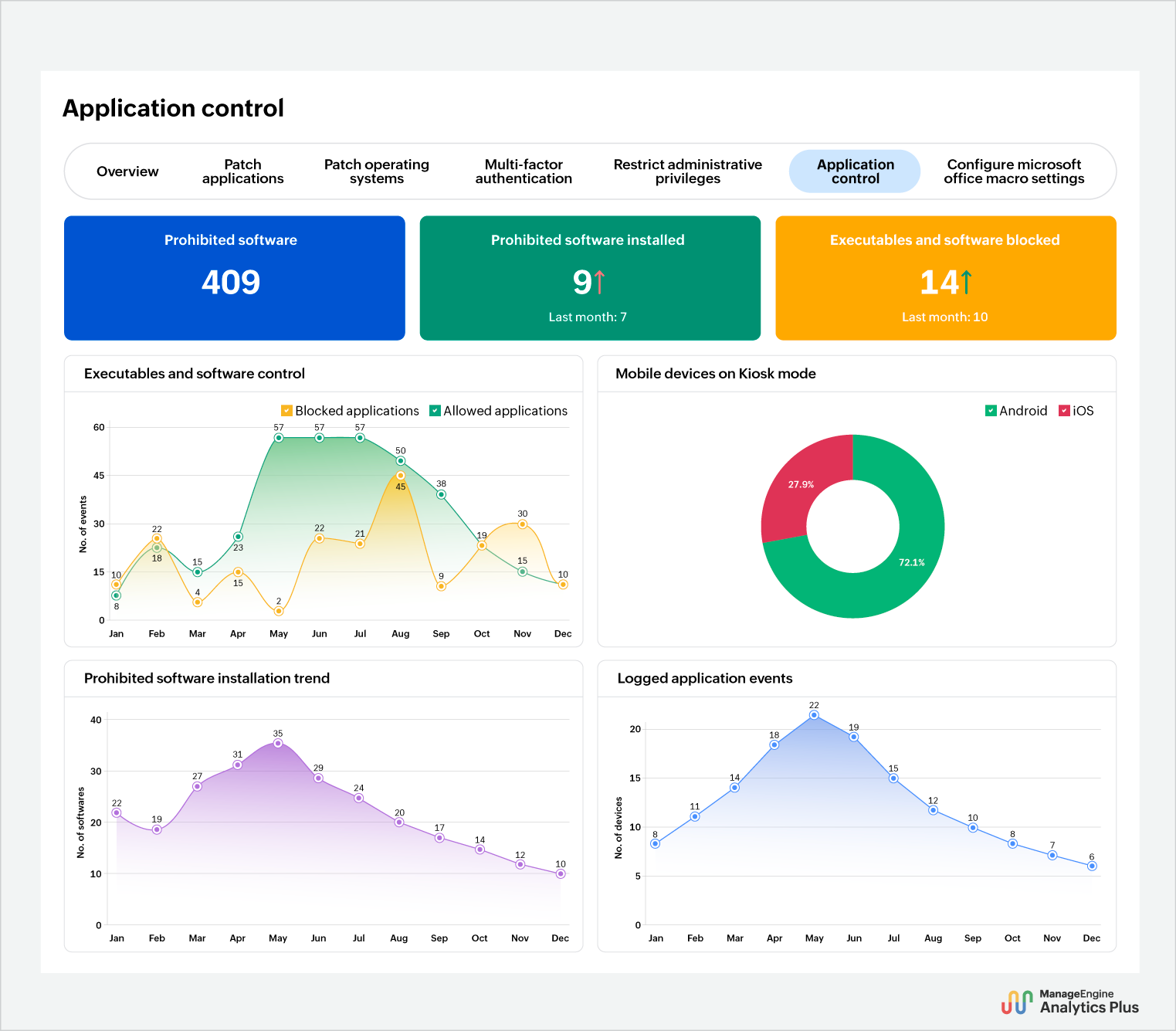
This Essential Eight strategy aims to prevent unauthorized or unapproved applications. It can become difficult to maintain this control as application inventories continuously change. New software, updated versions, and unauthorized applications (shadow IT) can create gaps between the approved application baseline and what is actually running across endpoints.
The Application control tab correlates application inventory and execution data to present approved and unapproved application activity, helping teams identify execution attempts outside the defined application control policy.
Teams gain constant visibility into whether the application control posture is keeping pace with changes in the endpoint environment.
6. Configure Microsoft Office Macro Settings
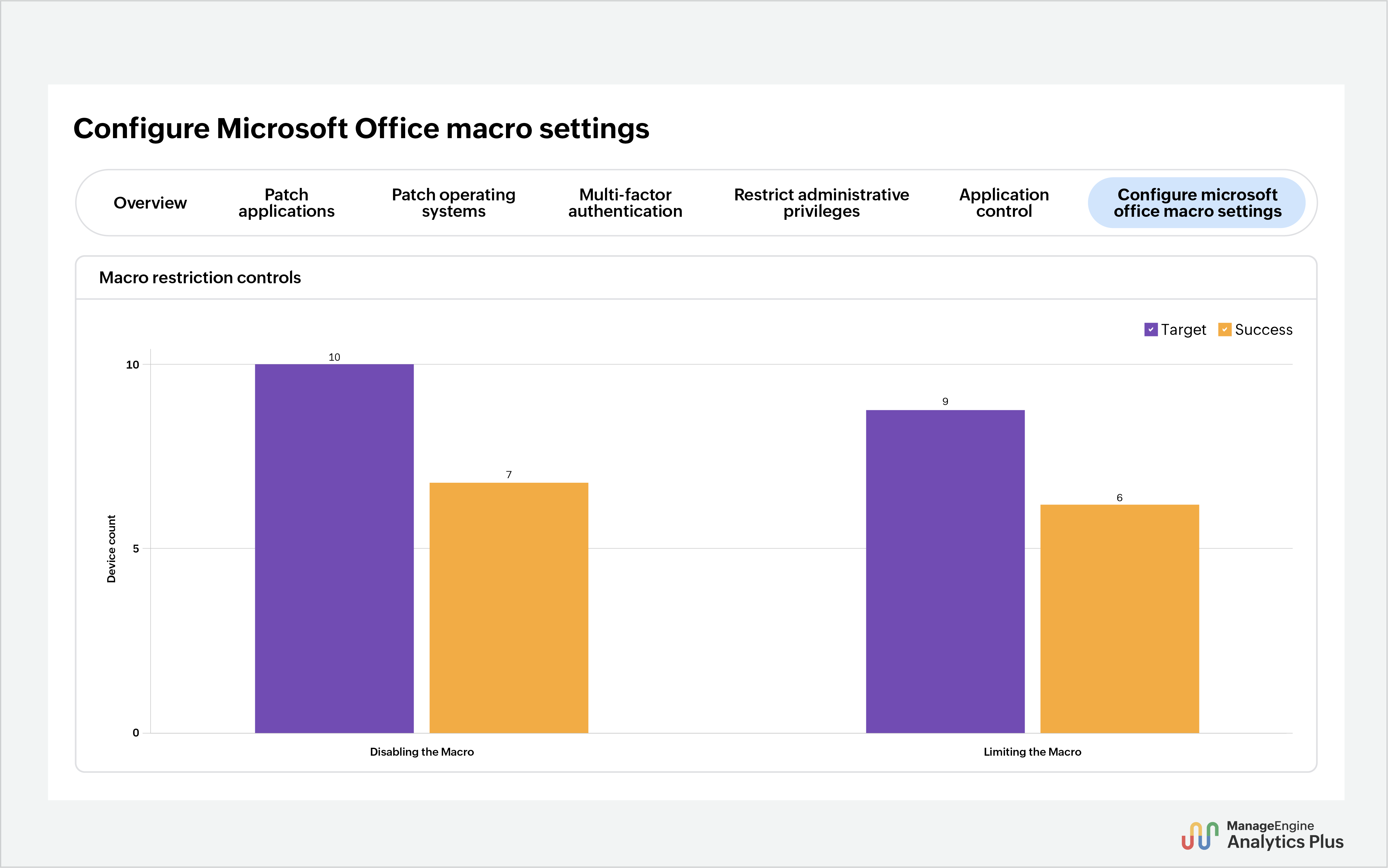
Microsoft Office macros can provide an avenue for malicious code execution when they aren't appropriately restricted. Macro settings may be configured once and not regularly re-verified. Configuration drift or exceptions introduced later can therefore remain hidden indefinitely.
The Configure Microsoft Office macro settings tab makes such deviations visible. Teams can see where macro configurations no longer match the approved policy and address configuration drift before it becomes an audit surprise.
7. User Application Hardening
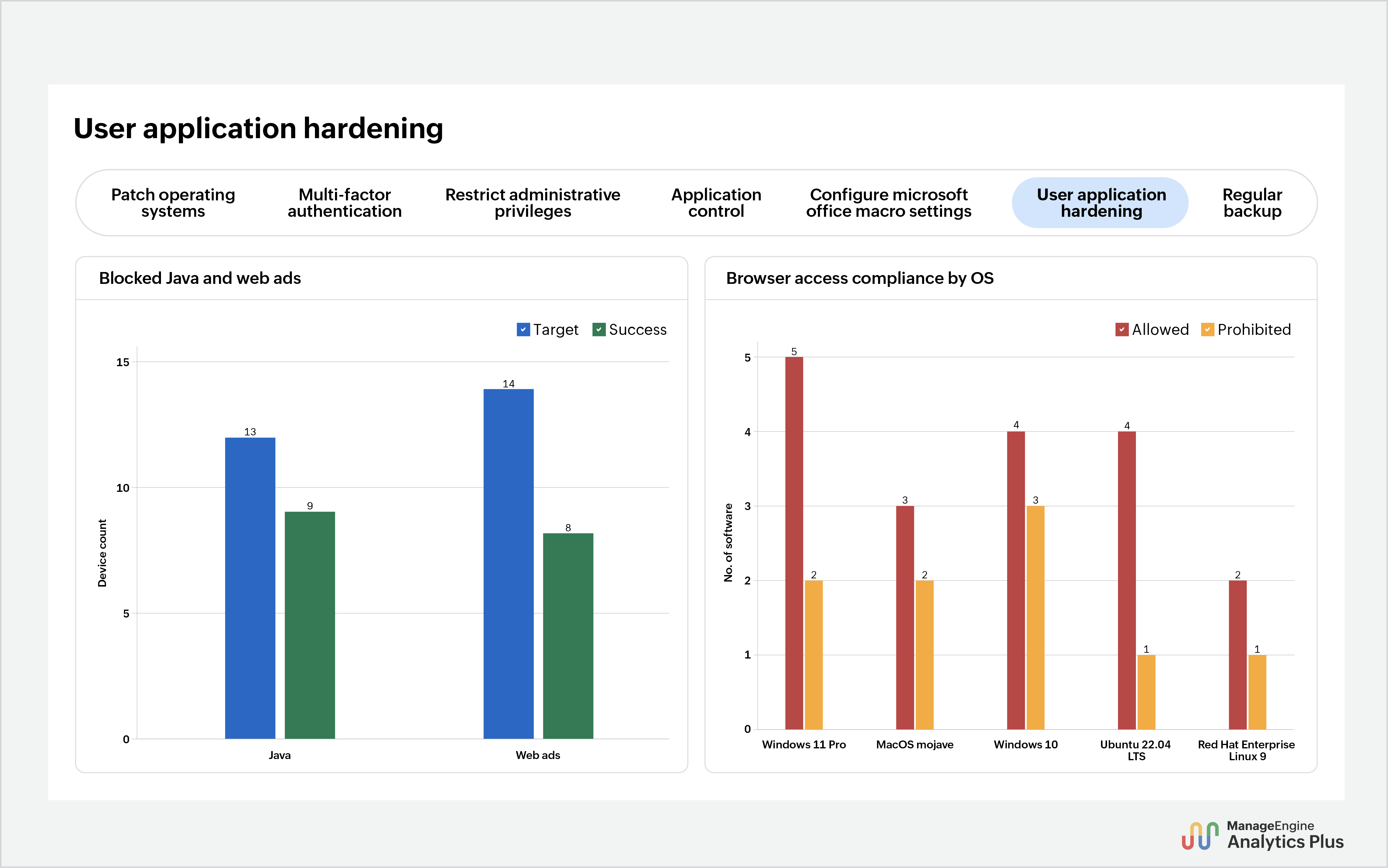
User application hardening reduces the attack surface of applications commonly used by employees, including web browsers and productivity applications. The difficulty is in maintaining a strong hardening configuration across a constantly changing environment.
The User application hardening tab shows where hardening configurations have fallen out of line across endpoints. Teams can use this view to spot affected systems and address configuration gaps before they weaken the organization's security posture.
8. Regular Backups
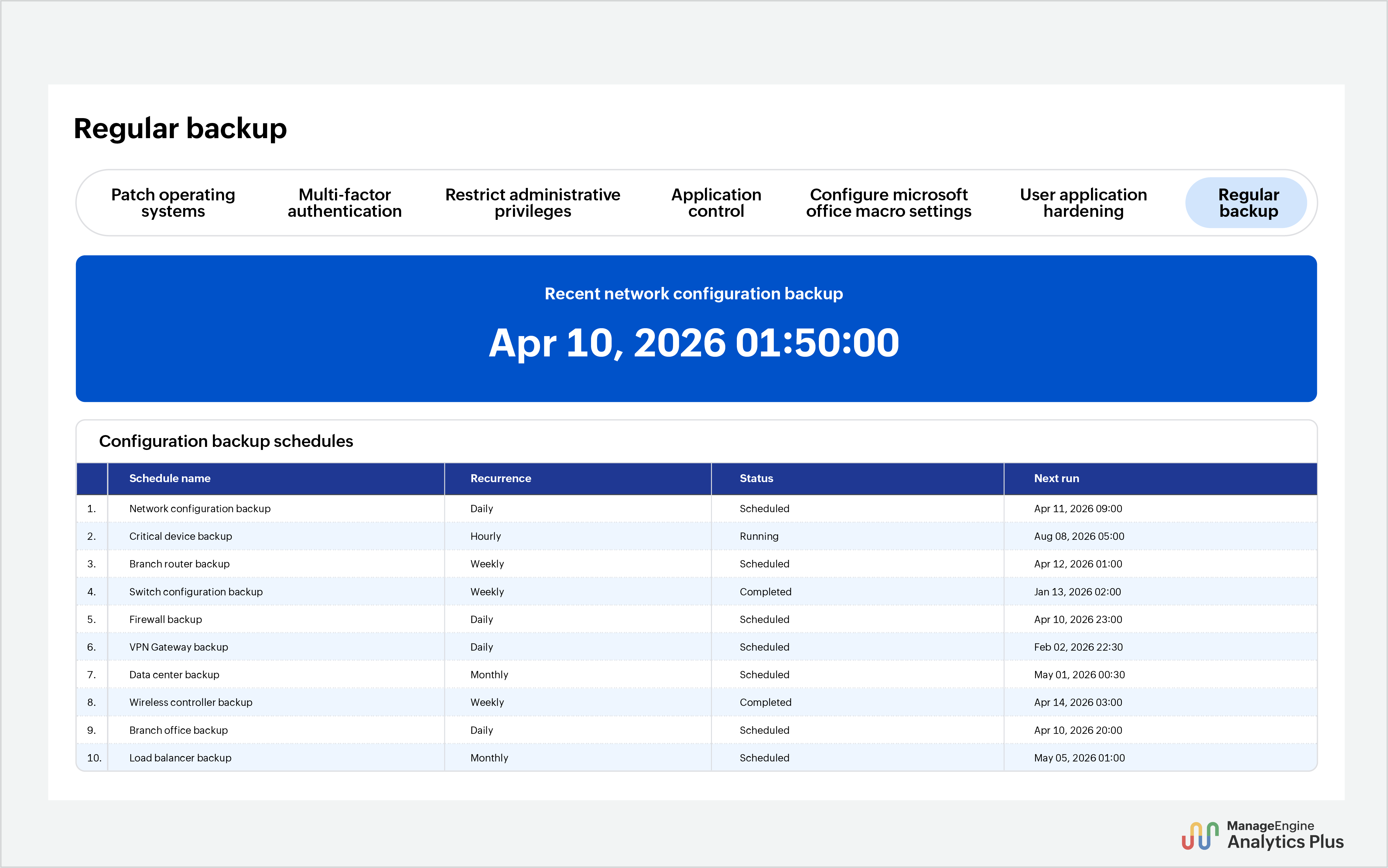
Regular backups are intended to ensure critical data can be recovered after a cybersecurity incident or system failure. But having a backup session configured isn't the same as being ready to recover. Backups can fail or be incomplete, configurations can change, and recovery tests can be missed.
Teams can look beyond whether a backup job is configured with the help of the Regular backup tab in the unified Essential Eight dashboard. It correlates backup status and recovery-related evidence, making it easier to spot failed and incomplete backups and identify where recovery readiness needs attention.
Gear up to hit the next Essential Eight maturity level
An Essential Eight maturity level provides an important snapshot of an organization's security posture, but that posture can change over time. A unified dashboard helps teams continuously understand where they stand, detect maturity regression earlier, and prioritize remediation efforts on the areas that matter most.
The goal should no longer be to spend every audit reconstructing what happened. It should be to continuously understand where the organization stands today, what changed, why it changed, and what needs attention next. Only then can organizations confidently clear audits and scale to higher Essential Eight maturity levels.
More compliance dashboards on the way!
We’re continuously expanding our library of prebuilt compliance dashboards to help organizations simplify reporting across more frameworks. If you’re searching for a specific compliance dashboard, reach out to us at analyticsplus-eval@manageengine.com.
FAQs
1. Who should comply with the Essential Eight maturity requirements?
While the Essential Eight maturity model is generally recommended by the ACSC for organizations to protect their networks, Australian Government non-corporate Commonwealth entities are required to implement the Essential Eight under the Protective Security Policy Framework (PSPF).
Certain critical infrastructure providers may also be required to meet specific Essential Eight maturity requirements under applicable regulations. Other organizations are encouraged to adopt the Essential Eight maturity model as a cybersecurity best practice to strengthen their security posture and protect against cyber threats.
2. How does my organization achieve ACSC Essential Eight maturity model level 1?
An Essential Eight maturity ranking of level 0 (ML0) denotes significant security gaps and basic requirements being unmet. For organizations in ML0, to achieve Essential Eight Maturity Level 1 (ML1), you must implement the specified ML1 controls across all eight strategies like application and operating system patching, application control, and regular backups. Assess each strategy against the ACSC's Essential Eight maturity model, remediate identified gaps, and maintain supporting evidence. Unified compliance analytics will help you track implementation progress and prepare for an Essential Eight audit.
3. How does my organization achieve ACSC Essential Eight maturity model level 2?
To achieve ML2, organizations must implement the corresponding security controls of Essential Eight Maturity Level 2 across all eight strategies to address more sophisticated cyber threats. Start by assessing your current maturity, identifying gaps and prioritizing remediation with the Essential Eight compliance dashboard. Use compliance analytics to correlate patch status, access controls, application configurations, and backup evidence across your IT environment. Remember, all eight strategies must meet the target maturity level to achieve an overall ML2 rating.
4. How does my organization achieve ACSC Essential Eight maturity model level 3?
Essential Eight Maturity Level 3 (ML3) represents the highest maturity level and is designed to address highly capable adversaries and sophisticated targeted attacks. To achieve Essential Eight ML3, organizations must implement the specific ML3 controls across all eight strategies, validate that the controls operate effectively, and maintain supporting evidence. Continuous compliance monitoring helps you detect configuration changes, identify compliance gaps, and prioritize remediation before the issues cause a reduction in maturity level.
5. Is there an Essential Eight certification?
No, the ACSC does not certify organizations, nor does it mandate organizations to obtain independent certification for their Essential Eight maturity model implementation. However, Essential Eight compliance may be necessary under government directives, regulatory requirements, or contractual arrangements. Organizations should personally assess their implementation against the Essential Eight maturity model, maintain supporting compliance data, and monitor security controls continuously to demonstrate their compliance posture and stay audit-ready.