Email DLP best practices: A guide to prevent email data exfiltration

  •  
     
  • -Select-
By clicking 'Download PDF', you agree to processing of personal data according to the Privacy Policy.

Thank you!

The PDF link has been sent to your email.

We hope you enjoy reading and sharing these best practices.

Email is one of the most common channels through which sensitive data leaves an organization—it is externally connected, constantly in use, and nearly impossible to recall once sent. Whether the cause is a misdirected attachment, a disgruntled employee forwarding a customer list to a personal account, or an attacker who has compromised a mailbox and set up silent forwarding rules, the consequences are the same: sensitive data exposure.

This page covers 12 actionable best practices for building an email DLP program that prevents accidental and intentional data loss, enforces compliance, and holds up under real-world conditions.

Strategies to strengthen your email data security


Create and define email DLP policy scope

  • Determine whether DLP policies should cover emails sent to external recipients, internal employees, or both since each carries a different risk profile.
  • Define enforcement actions for each flow, such as blocking sensitive emails to external domains or encrypting, warning, or auditing internal emails.
  • Build policy exceptions for workflows that have legitimate data-sharing requirements.
 

Enforce deep content inspection across email body, subject line, and attachments

  • Inspect for instances of sensitive data in all components of an outbound email:
    • The body text
    • The subject line
    • The metadata and file names of attachments
    • The content of attachments
  • Extend inspection to common attachment formats, including compressed archives and password-protected files.
 

Discover and classify sensitive data

  • Define what counts as sensitive data in your organization—PII, PHI, PCI data, financial records, and intellectual property.
  • Scan file servers, endpoints, cloud storage, and other repositories to discover where that data resides across the organization.
  • Map sensitive data ownership by department and then align DLP controls with how each team stores, uses, and shares that data.
  • Establish sensitive data classifications labels—such as Public, Internal, Confidential, and Restricted—and define which labels can be shared via email.
  • Ensure classification tags are applied to file types commonly attached to emails—spreadsheets, PDFs, and database exports.
 

Use multiple detection methods in parallel to maximize coverage

  • Use pattern matching for structured data such as credit card numbers, national IDs, and similar identifiers.
  • Keyword and phrase detection can be used for content that doesn't follow a predictable pattern.
  • File fingerprinting detects known sensitive documents even if renamed or reformatted.
  • Implement optical character recognition to extract and inspect text embedded in images and scanned PDFs.
  • ML-based classifiers identifies sensitive content by analyzing the meaning and context of text, rather than relying on fixed patterns or keywords.
  • Tune detection thresholds to data type, recipient, content, and context—not just the presence of a specific term or pattern.
 

Enable role-based email privileges

  • Restrict which employees can send emails containing specific data types to external recipients. For example, only HR personnel should be able to email employee contracts externally.
  • Users and service accounts should able to send or forward only the data that their role requires.
  • Limit mailbox delegation to reduce the risk of users sending emails on behalf of other accounts.
  • Review and revoke excessive email permissions during offboarding, role changes, and periodic access reviews.
 

Block or restrict forwarding to personal email accounts

  • Block automatic email forwarding rules that forward corporate email to personal accounts.
  • Block or alert on file uploads to personal email accounts.
  • Apply heightened email security monitoring during high-risk periods such as resignation notice windows, performance management processes, and organizational restructuring.
  • Flag or restrict emails sent by accounts outside of normal working hours or from atypical geographic locations.
 

Encrypt outbound emails

  • Enforce mandatory TLS for all outbound email transmission.
  • Apply message-level encryption and data masking to protect sensitive emails at rest and in transit.
  • Trigger encryption automatically based on DLP policy rather than relying on employees to do so manually.
  • Use DLP policy controls to prevent forwarding or downloading of encrypted messages by anyone but the recipient.
 

Tune DLP policies to reduce false positives

  • Use false positive rates as your primary metric to evaluate policy accuracy.
  • Refine the policy with business context to narrow detection to genuinely risky scenarios such as conditions involving, recipient domain, sender role, data volume thresholds.
  • Establish a feedback loop to route false positive data to the team responsible for policy tuning.
  • Rerun policies in simulation mode after any significant change before pushing to enforcement.
 

Build a structured DLP response process

  • Define a tiered severity framework for DLP incident response based on data type, volume, and recipient.
  • Assign response SLAs by severity tier:
    • Review high-severity incidents immediately.
    • Review low-severity incidents in weekly batches.
  • Document a standard response workflow for each severity, such as who is notified, what evidence is collected, and whether the email is recalled or quarantined pending review.
  • Use distinct response workflows for different incident types:
    • True positives are actual policy violations and require containment and investigation.
    • False positives are incorrectly flagged activity that signal rules need to be tightened.
    • False negatives are missed violations, indicating that rules need to be expanded.
  • Track mean time to detect and mean time to respond for email DLP incidents. Use these metrics to drive continuous improvement in your response process.
 

Apply behavioral baselines to detect anomalous usage patterns

  • Establish a normal baseline for organizational email activity:
    • Typical outbound email volume
    • Recipient domains
    • Attachment sizes
    • Sending hours
  • Alert on statistically significant deviations from baselines. Examples include:
    • A user sending over 10 times their normal volume of emails to external domains
    • A user sending large attachments to a personal account for the first time
  • Monitor temporary and contract employees for signs of increasing outbound email volume, bulk downloads of shared data, or sudden use of personal accounts.
  • Correlate behavioral signals with content sensitivity and contextual risk factors to reduce false positives.
 

Map applicable regulations to email DLP requirements

  • The GDPR restricts how personal data of EU residents is shared externally and imposes breach notification obligations.
  • HIPAA requires encryption and access controls for ePHI transmitted via email.
  • The PCI DSS prohibits sending cardholder data over unencrypted email.
  • India's DPDP Act imposes obligations on processing and sharing personal data of Indian residents.
 

Monitor email activity logs and audit trails continuously

  • Enable comprehensive logging of sender, recipient, subject, attachment metadata, timestamp, and DLP policy matches for all outbound emails.
  • Retain logs for the period required by applicable regulations such as the GDPR, HIPAA, and the PCI DSS.
  • Cross-reference email logs with file access logs and endpoint activity to identify data exfiltration patterns.
  • Automate alerting on high-risk log events rather than relying on periodic manual review.

Email DLP with DataSecurity Plus

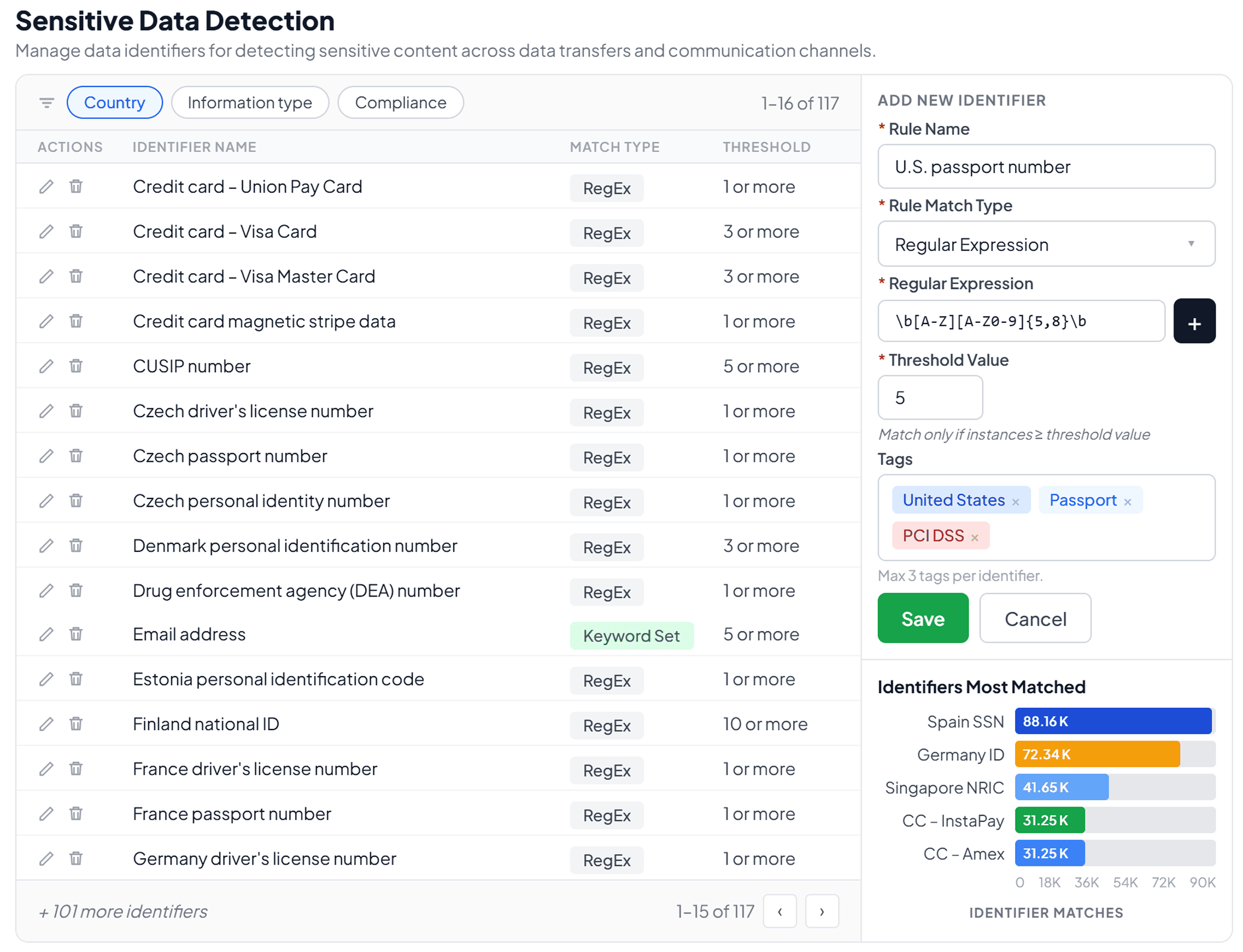
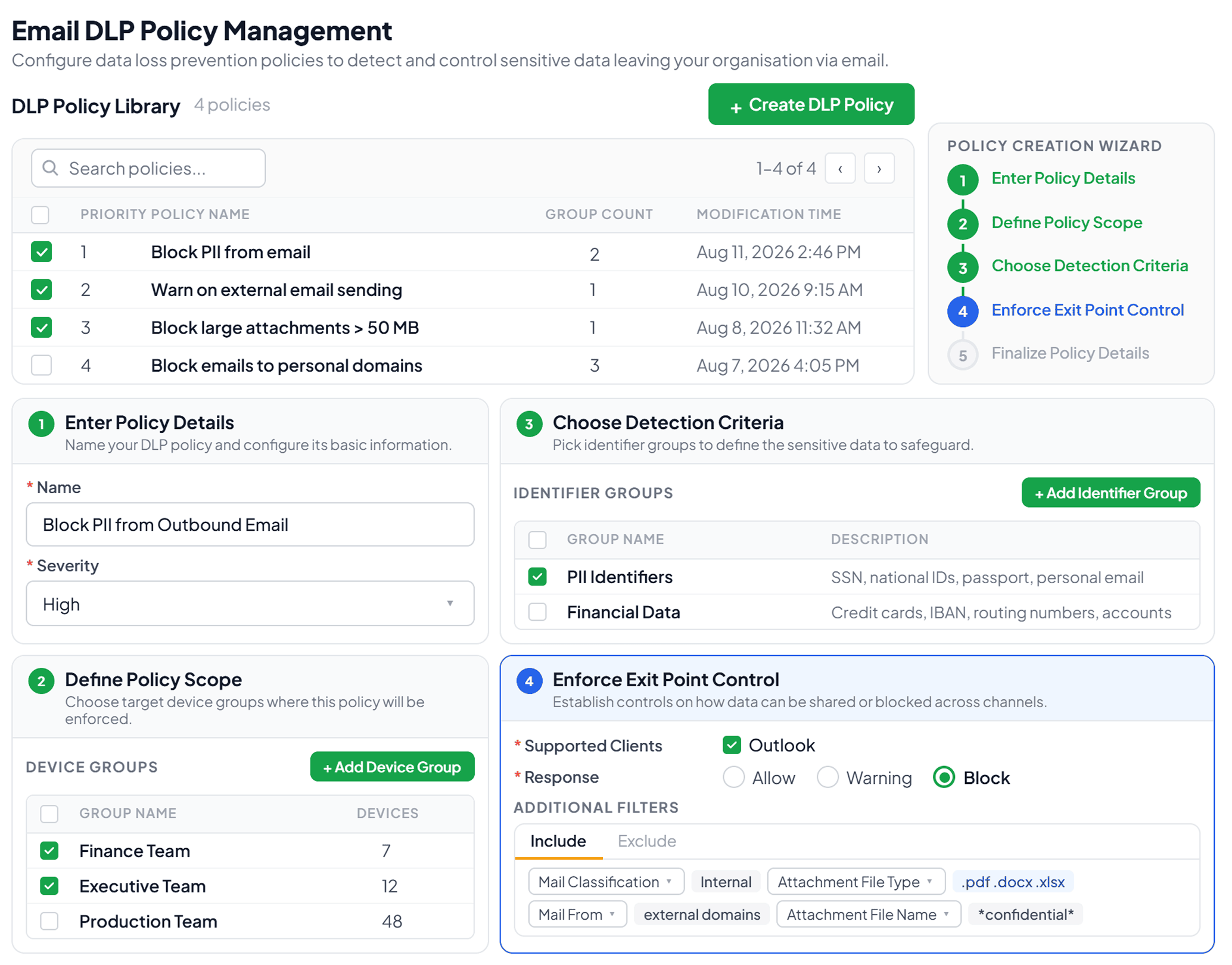
ManageEngine DataSecurity Plus gives security teams full control over what sensitive data can and cannot leave the organization through email. It detects sensitive information in email subjects and message bodies using over 100 predefined data identifiers covering national IDs, financial records, healthcare data, and more. DLP policies can be scoped to specific endpoints and user groups and enforced through granular exit controls that filter emails based on attachment name, size, and classification label. The result is email DLP that is comprehensive in coverage and targeted enough to enforce controls accurately. Learn more about DataSecurity Plus' email DLP capabilities.

  • Email DLP with DataSecurity Plus
  • Email DLP with DataSecurity Plus

FAQ

Email DLP monitors and enforces policies on outbound emails to prevent sensitive data from reaching unauthorized recipients. It inspects email content—body, subject line, and attachments—against predefined policies and takes a configured action when a match is detected. The action can be blocking, quarantining, encrypting, or warning the sender before the email is sent.

Enforce DLP policies that block or quarantine emails containing sensitive data addressed to personal domains such as Gmail, Yahoo, or Outlook.com. Block automatic forwarding rules at the mail server level so inbox rules cannot silently redirect corporate email to personal accounts. Block access to personal webmail on corporate networks and managed devices to prevent data exfiltration. Monitor for sudden spikes in outbound email volume during high-risk periods such as resignation windows or organizational restructuring. Apply file upload controls to prevent sensitive files from being uploaded to personal webmail accounts from corporate endpoints.

Several major regulations either explicitly require or imply email DLP controls:

  • GDPR: Article 32 requires organizations to implement appropriate technical measures to protect personal data, including encryption. Article 5 requires confidentiality and integrity controls. Any email containing personal data of European Union residents is subject to these obligations, regardless of where the sending organization is based.
  • HIPAA: The Security Rule (45 CFR §164.312) requires covered entities to implement access controls, transmission security, and integrity controls for ePHI. While HIPAA does not explicitly prohibit unencrypted email, it requires organizations to assess the risk and implement appropriate technical safeguards. Email DLP provides the enforcement mechanism for the minimum necessary standard.
  • PCI DSS: Requirement 4.2 explicitly prohibits capturing, transmitting, or storing cardholder data via end-user messaging technologies including email, unless encrypted. Every server an email containing cardholder data passes through becomes part of the Cardholder Data Environment, expanding compliance scope significantly.
  • DPDP Act: India's DPDP Act requires data fiduciaries to implement reasonable security safeguards to prevent unauthorized disclosure of personal data, including through email.
  • CCPA and CPRA: Requires businesses to implement reasonable security measures to protect personal data of California residents. Failure to do so exposes organizations to statutory damages of $100-$750 per consumer per violation in the event of a breach.

At a minimum, email DLP policies should cover the following data categories:

  • PII: National IDs, passport numbers, and contact details.
  • Financial data: Credit card numbers and bank account numbers.
  • PHI: Medical record numbers and diagnosis codes.
  • Authentication credentials: Passwords and API keys.
  • Intellectual property: Source code, product roadmaps, and unreleased financial results.

Organizations subject to the GDPR, HIPAA, the PCI DSS, or the DPDP Act should also map policies explicitly to the data categories those frameworks define.

Get DataSecurity Plus easily
installed, configured and running within minutes.

Download Now  
Email Download Link