Incident response in Log360

Most SOCs run incident response across three or four tools that don't integrate with each other. Log360 puts the work back in one place. AI-assisted investigation, an Incident Workbench, prebuilt playbooks, and two-way ITSM sync sit inside the same SIEM, so analysts move from alert to containment without switching consoles.

How Log360 benefits your organization


Accelerate investigations with AI:

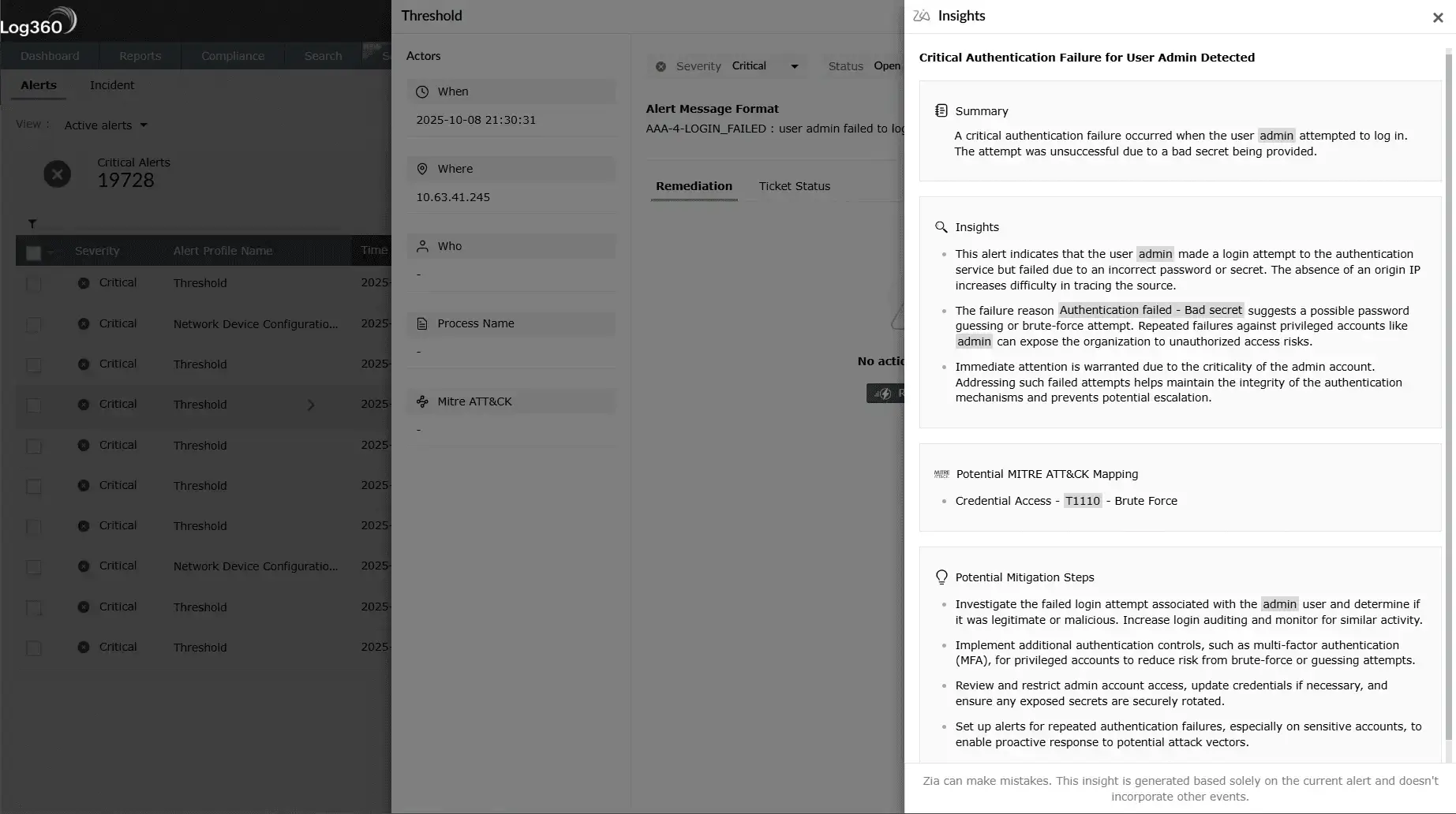
Zia Insights writes the incident summary, maps the activity to MITRE ATT&CK, and suggests remediation steps as soon as the alert fires, so analysts spend less time assembling context.


Centralize incident response life cycle:

Detection, triage, investigation, containment, and post-incident review all live in the same workbench. The actors widget pulls in the users and entities involved, and every change is captured in the audit trail.


Automate containment and close the IT loop:

Prebuilt and custom playbooks kick off the moment an incident is created. Native integration with ServiceDesk Plus, Jira, and Zendesk keeps security and IT aligned with two-way status and severity sync.


Measure what's working:

The incident analytics dashboard tracks MTTD, MTTI, MTTR, dwell time, and analyst workload, so the SOC can see where investigations stall and fix the cause.

How Log360 streamlines the incident management life cycle

Log360 supports incident response across four pillars: AI-assisted investigation, centralized incident management, automated containment, and operational analytics. Together, they keep handling consistent from the first alert to the final review.

  • AI-powered investigation with Zia insights
  • Centralized incident tracking and automated workflow
  • Automated containment and ITSM integration
  • Operational visibility and continuous improvement
  •  

AI-powered investigation with Zia insights

The hardest part of incident response usually isn't acting. It's working out what the alert actually means before you act. Zia Insights, Log360's investigation assistant, reads the raw alert and the surrounding logs before producing something an analyst can use in seconds.

  • Instant contextual summaries: Zia turns event chains into a short narrative that names the actor, the affected asset, and the suspicious behavior. Triage stops starting from a wall of fields.
  • MITRE ATT&CK mapping: Each incident is mapped to ATT&CK tactics and techniques automatically, which gives analysts a shared vocabulary and a hook back into your detection coverage.
  • Tailored remediation guidance: Zia recommends next steps that fit the incident type, from immediate containment moves to longer-term hardening. The suggestions are scoped to the incident, not pulled from a generic checklist.
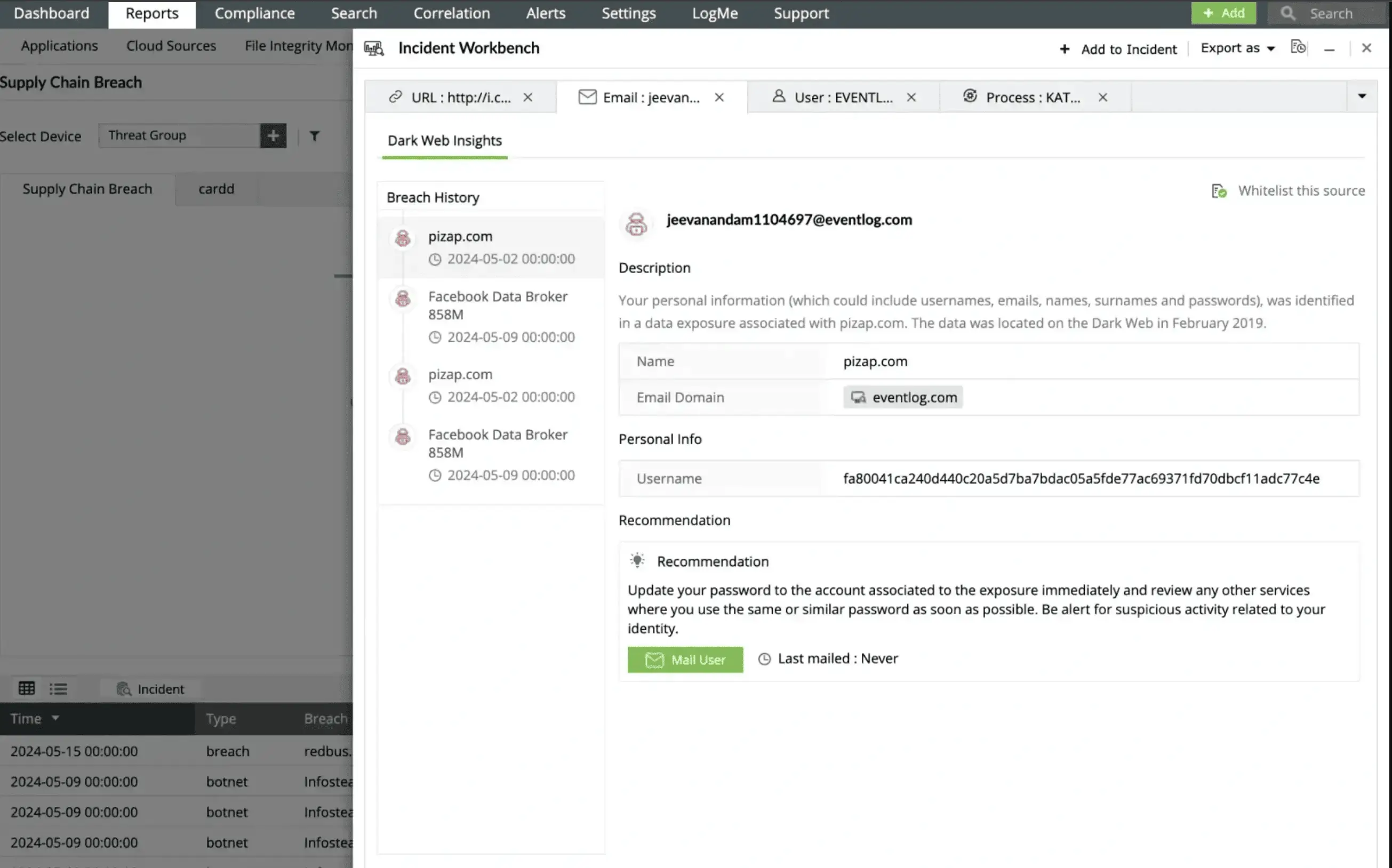
  • Threat intelligence enrichment: External IPs, URLs, and domains are scored against IP reputation feeds and dark-web monitoring data, then attached to the incident.

Benefit: Analysts spend less time assembling context and more time making decisions, which shortens MTTI and trims false escalations.

AI-powered playbook engine

Centralized incident tracking and automated workflow

Log360 keeps every active incident in one console so the SOC works from a single source of truth, from the moment an incident is created through to closure.

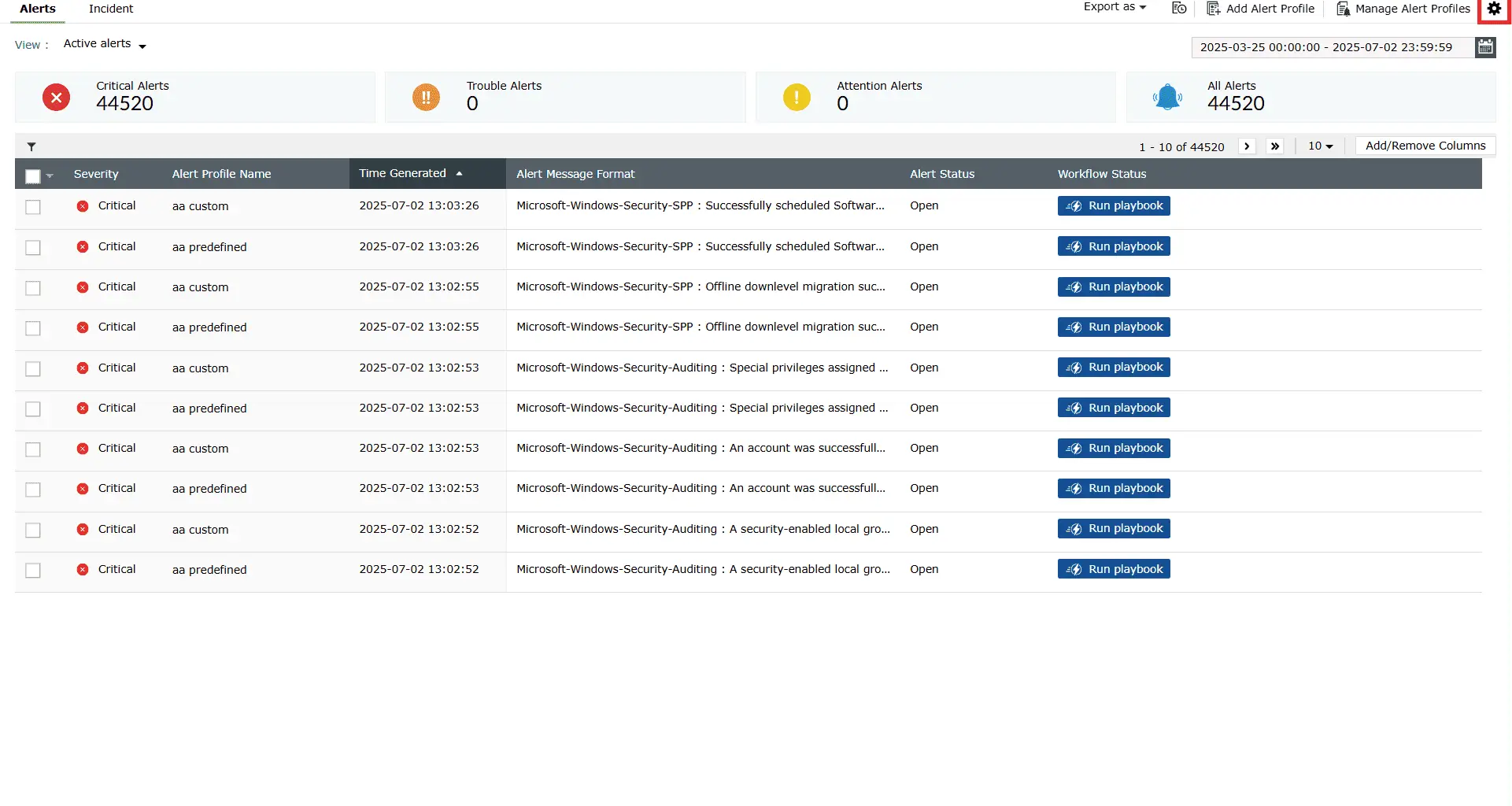
  • Unified incident dashboard: Filter by type, including: malware, phishing, data exfiltration, brute force, with assignee, status, and severity in one view for quick prioritization.
  • Flexible incident creation: Capture threats from multiple sources. Create incidents manually, escalate them automatically from alerts, convert UEBA anomalies into incidents, or generate them when alert thresholds are exceeded for a specific device or device group.
  • Full incident context and audit trail: Attach evidence from alerts, searches, and reports. Add analyst notes, edit properties, while every change is logged for compliance review.
  • Contextual insights with actors widget: The users, services, and processes responsible for the incident are surfaced automatically. Root cause work doesn't start from scratch.

Benefit: Investigations stop waiting on someone to gather context, because the platform has already gathered it.

Streamlined threat investigation with Zia Insights

Automated containment and ITSM integration

When the call to act is made, the response should already be running. Log360's playbook engine kicks off containment actions the moment an incident is created, and routes the same incident into the IT service desk so security and IT stay in step.

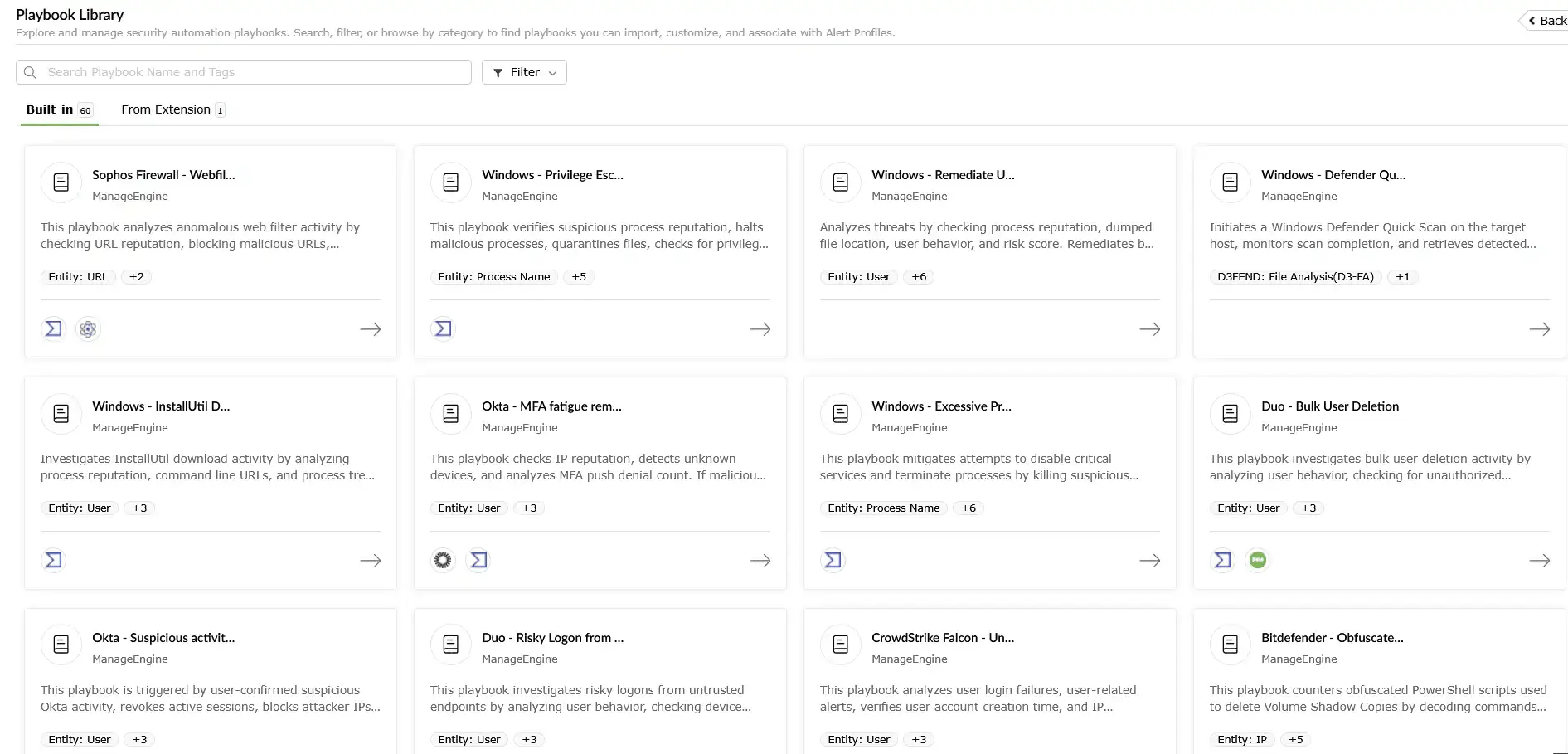
  • Incident response playbooks: Prebuilt and custom playbooks run predefined actions: Disable a user account, block a malicious IP, and isolate an endpoint the moment an alert fires. Build custom workflows in a drag-and-drop canvas. No scripting required, with Python available when you want extensibility.
  • Centralized credential management: Store and manage the usernames, passwords, and API tokens playbooks needed to authenticate with target systems and integrated security tools, all in one place.
  • Seamless two-way ITSM integration: Incidents create tickets automatically in ServiceDesk Plus, Jira, and Zendesk, with severity mapped to each platform's priority scheme. Status and severity sync in both directions, so the incident in Log360 and the ticket in the service desk stay aligned without anyone copy-pasting updates.
  • Direct actions from service desks: Marketplace extensions let IT operators run Log360 actions, such as exporting incidents, suppressing noisy alerts, kicking off a sub-playbook, from inside the service desk UI.

Benefit: The hand off between the SOC and IT is one of the longer dwell-time contributors in most incident timelines. Tightening it is usually a faster win for MTTR than adding more correlation rules.

MITRE ATT&CK-aligned dashboards

Operational visibility and continuous improvement

You can only improve what you measure. Log360 turns response activity into a feedback loop so the SOC sees where time goes and where the next improvement lives.

  • Execution history and playbook analytics: Detailed logs of every playbook execution. The management console lets you enable, edit, or clone workflows based on actual usage, and the Usage Analytics view surfaces execution volume and success rates for tuning.
  • Incident analytics dashboard: MTTD, MTTI, and MTTR at the incident, team, and analyst level. Incident volume and severity by source, category, and asset class. Dwell time and escalation rate to flag investigations that are getting stuck.
  • Unified security platform: Detection, investigation, automated response (SOAR), and compliance management all run on the same platform, which cuts tool sprawl and the licensing layers that come with it.

Benefit: The same view that proves response efficiency to leadership also tells the SOC where the next playbook needs to be built.

Automated response with MITRE ATT&CK-aligned playbooks

Real-world incident response with Log360 playbooks

ManageEngine Log360 helps SOC teams contain threats by running automated playbooks against specific security events. The scenarios below are drawn from the prebuilt playbook library. Each one follows the same enrich, decide, respond pattern, with severity and a MITRE technique on every incident.

  • Real-time ransomware containment on endpoints

    Log360 detects suspicious file-encryption behavior on a managed endpoint and runs a playbook to isolate the host and block lateral movement.

    Severity: Critical; MITRE: T1486 (Data Encrypted for Impact)

    Example scenario: A malware alert fires on an endpoint after unauthorized encryption processes typical of ransomware are detected.

  • Suspicious device detection and network quarantine

    Log360 identifies an unknown or anomalously behaving device on the network and executes a playbook to investigate and isolate it.

    Severity: High; MITRE: T1200 (Hardware Additions)

    Example scenario: An alert triggers for a device not in the asset inventory that is exhibiting suspicious network scanning activity and anomalous connection patterns.

How Log360 responds:

  • Enrich: Zia Insights writes the summary, classifies the activity as T1110, and pulls IP reputation, geolocation, and the user's recent authentication history.
  • Decide: The playbook branches on whether the source IP is malicious, whether the user is privileged, and whether prior alerts exist for the account.
  • Respond: Disable the account in AD, add a deny rule for the source IP on the configured firewall, notify the SOC, and open a high-priority ticket in ServiceDesk Plus with two-way sync.
  • Benefit: The account is contained before the credentials get tested against the next service, with the AI-written context and the service-desk ticket already in place when the analyst opens the incident.

How Log360 responds:

  • Enrich: The workbench renders the process tree. UEBA flags the user's recent lateral movement. Threat intel scores the related IOCs.
  • Decide: The analyst confirms the pattern in the workbench and runs the Endpoint Containment playbook.
  • Respond: Disable USB ports on the device, isolate or shut down the host, add deny rules for the related malicious IPs and domains, attach a forensic evidence pack to the incident, and update the linked service-desk ticket.
  • Benefit: Contains the ransomware attack within seconds, preserving business continuity and enabling swift forensic investigation with complete attack chain visibility.

How Log360 responds:

  • Enrich: The actors widget identifies the device, its connections, and the user account behind it. Zia Insights provides remediation guidance for unknown-device cases.
  • Decide: The analyst runs traceroute and ping diagnostics from the playbook to confirm the device's position on the network.
  • Respond: Disable the computer account in AD, add a deny rule for the device's IP on the network firewall, and log every step in the incident's audit trail.
  • Benefit: Suspicious assets are immediately isolated for investigation, preventing potential lateral movement while maintaining a complete, auditable action trail for regulatory compliance.

Bring incident response into one platform

Detection, investigation, containment, and ITSM coordination belong in the same workflow. Log360 keeps them there, with no per-execution fees, no separate agents, and no bolt-on modules.

Elevate your security posture

Elevate your security operations with Log360's unified SIEM platform. Designed for modern SOCs, Log360 combines scalable architecture with advanced detection capabilities and seamless extensibility across every phase of the security life cycle.


Scalable and resilient platform

Built on a distributed, high-availability architecture to support growing log volumes while ensuring uninterrupted collection, indexing, and analysis.

Learn more  
 

Real-time threat visibility

Delivers unified insights across endpoints, networks, and cloud environments, enabling faster detection, investigation, and response.

Learn more  
 

Advanced threat detection

Leverages over 2,000 MITRE ATT&CK–mapped correlation rules and UEBA to detect multi-stage attacks such as insider threats and anomalous user behavior.

Learn more  
 

External and dark web intelligence

Enriches alerts with real-time threat intelligence, adding IP reputation, geolocation, and risk-based prioritization to accelerate investigation and triage.

Learn more  
 

Streamlined compliance management

Simplifies adherence to over 30 regulatory mandates including the GDPR, HIPAA, the PCI DSS, and more with secure log archiving and audit-ready compliance reports.

Learn more  
 

Flexible, extensible security ecosystem

Integrates seamlessly across hybrid infrastructures and extends capabilities seamlessly without disrupting ongoing operations.

Learn more  

  •  

    We wanted to make sure that one, we can check the box for different security features that our clients are looking for us to have, and two, we improve our security so that we can harden our security footprint.

    Carter Ledyard

  •  

    The drill-down options and visual dashboards make threat investigation much faster and easier. It’s a truly user-friendly solution.

    Sundaram Business Services

  •  

    Log360 helped detect insider threats, unusual login patterns, privilege escalations, and potential data exfiltration attempts in real time.

    CIO, Northtown Automotive Companies

  •  

    Before Log360, we were missing a centralized view of our entire infrastructure. Now, we can quickly detect potential threats and respond before they escalate.Log360 has been invaluable for improving our incident response and ensuring compliance with audit standards. It’s a game-changer for our team.

    ECSO 911

Fill this form to schedule a
personalized web demo

  • By clicking " Submit", you agree to processing of personal data according to the Privacy Policy.

Your request for a demo has been submitted successfully. Our support technicians will get backto you at the earliest.

Frequently Asked Questions

Incident response is the process of detecting, investigating, containing, eradicating, and recovering from security incidents. It usually follows the NIST SP 800-61 incident response life cycle. Log360 supports every phase inside one SIEM platform, so the workflow doesn't fragment across separate detection, investigation, and ticketing tools.

Six phases: Preparation, detection and analysis, containment, eradication, recovery, and post-incident review. Each one maps to specific Log360 capabilities, from real-time correlation rules at the detection end through to the incident analytics dashboard at the review end.

A playbook is an automated workflow that runs predefined actions when a specific alert or incident is created. Log360 ships prebuilt playbooks for common scenarios and lets you build custom ones in a drag-and-drop playbook builder.

Zia Insights writes plain-language summaries of alerts, maps activity to MITRE ATT&CK techniques, enriches IOCs with threat intelligence, and recommends remediation steps that fit the incident type. The result is less time assembling context and more time deciding what to do.

Log360 creates tickets automatically when incidents are generated, with severity mapped to each platform's priority scheme, and keeps status and severity in sync both ways. Analysts can also run Log360 actions from inside the service desk through marketplace extensions.

Incident rules escalate alerts into trackable incidents based on conditions you set, for example when N alerts fire from one device or device group inside a time window. That removes the manual step of converting recurring alert patterns into incidents and keeps related alerts grouped under one Incident Workbench view.

Mean time to respond (MTTR) is the average time from incident detection to closure. Log360 cuts MTTR by combining AI-assisted triage, automated containment playbooks, and two-way ITSM sync, then tracking the result on the incident analytics dashboard so the SOC can see what's actually working.

From alerts to action

Leverage Log360's complete incident response framework to convert alerts into decisive defense. Discover hidden attack chains, automate threat containment, and accelerate incident resolution to safeguard critical infrastructure.