DHCP reservations for reliability: Maintaining consistent IP assignments for critical network devices with DDI Central

Modern enterprise networks support more than just computers, servers, and mobile devices. Organizations also rely on various connected devices and network infrastructure to support their day-to-day operations and maintain essential business functions.
These devices often communicate with centralized management platforms to exchange information, receive configurations, and perform their designated functions. For these interactions to work reliably, some devices need predictable IP addresses that remain consistent over time.
However, when devices rely on dynamic DHCP allocation, their assigned IP addresses may change as network configurations or address allocations change. This can create additional administrative work, particularly when other systems depend on their previously assigned IP addresses.
DHCP reservations help address this challenge by enabling administrators to associate a device's identifying details with a designated IP address. This ensures that the DHCP server consistently assigns the reserved address whenever the corresponding device requests an IP lease.
Understanding DHCP reservations for critical network devices
Unlike dynamic allocation, where a DHCP server assigns addresses from an available pool, DHCP reservations enable administrators to designate specific IP addresses for individual devices. By associating a device's MAC address or another supported client identifier with a reserved IP address, administrators can ensure that the device receives the same address whenever it connects to the network and requests a lease.
This is particularly useful for devices that communicate with centralized management systems, monitoring platforms, or other network services that rely on known IP addresses. With DHCP reservations, organizations can maintain predictable IP assignments without having to manually configure static IP addresses on every device.
A practical scenario: Managing critical network devices across an enterprise
Consider John, a network administrator responsible for maintaining the network infrastructure of a large organization. His network supports several essential devices, including IP surveillance cameras, routers, network printers, and VoIP phones. These devices communicate with centralized management platforms and other network services to perform their everyday functions.
To keep these devices accessible and manageable, John needs their IP addresses to remain consistent. However, when they rely on dynamic DHCP allocation, their assigned addresses may change as leases and network configurations change. This can create complications for systems that depend on previously assigned IP addresses, requiring John to investigate connectivity issues and update dependent configurations.
Manually configuring static IP addresses on every device would also increase administrative effort. John needs a more manageable way to maintain predictable IP assignments while continuing to use DHCP across the network.
To address these challenges, John needs more than just a way to reserve IP addresses. He also needs to simplify IP allocation, organize device configurations, and restrict problematic clients when necessary. Let's see how he uses DDI Central's DHCP reservation capabilities to tackle these everyday network administration challenges.
Bringing DDI Central into play
What if John could assign dedicated IP addresses to critical network devices through DHCP and manage those assignments centrally? With DDI Central, John can create DHCP host entries to reserve specific IP addresses for devices across his network. He can provide the appropriate device identification details, associate each host with its subnet, and assign a reserved IP address.
Once configured, the DHCP server assigns the reserved address whenever the corresponding device requests an IP lease. This enables John to maintain consistent IP assignments for essential devices such as surveillance cameras, routers, printers, and VoIP phones without manually configuring static IP addresses on each one. As the organization adds more devices, John can create additional host entries and manage their address assignments through DDI Central.
Managing DHCP reservations with DDI Central
Let's see how John can use DDI Central to manage device reservations centrally, instead of repeatedly troubleshooting IP address changes and updating dependent configurations.
Creating DHCP hosts for IPv4 and IPv6 devices
As new devices are added to the organization's network, John needs to ensure they receive consistent IP assignments. He starts by creating a DHCP host entry for an IPv4 surveillance camera, specifying its hostname, MAC address, fixed IP address, and subnet. He can also configure the DHCP options required by the device.
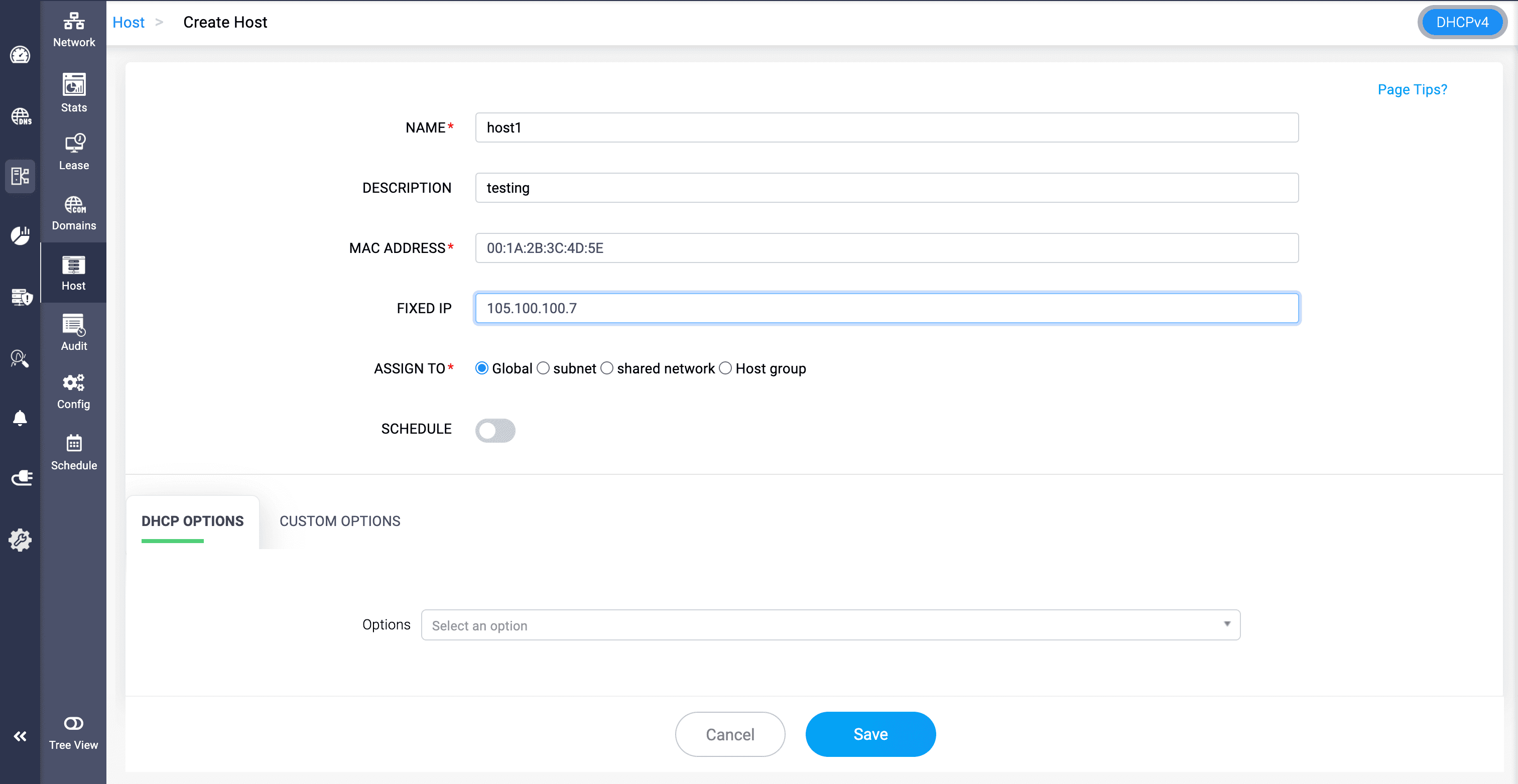
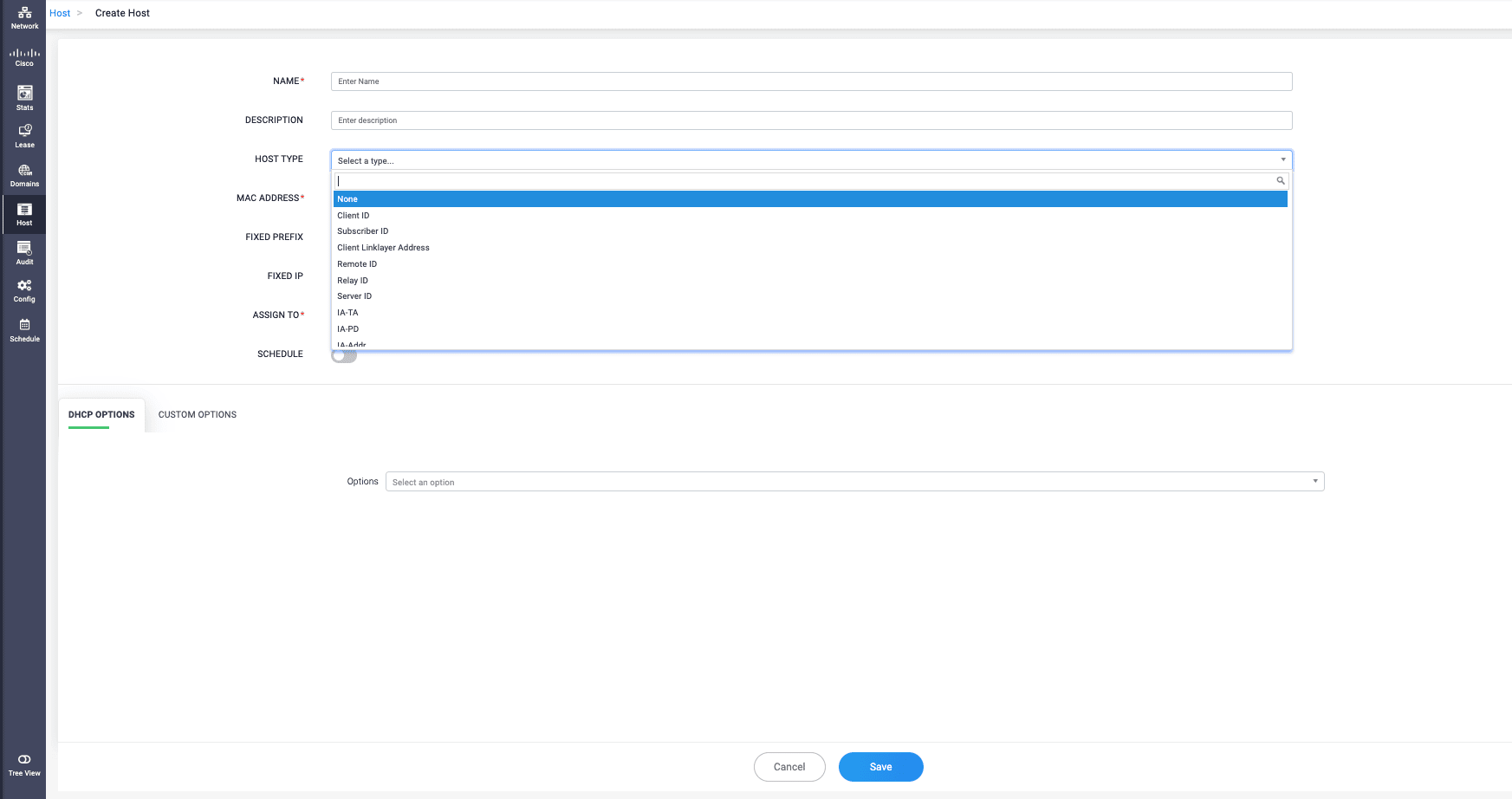
Next, John configures an IPv6-enabled device. Since DHCPv6 clients can be identified in different ways, he selects the appropriate host type in DDI Central, such as Client ID, Subscriber ID, Remote ID, or Client Linklayer Address, and provides the corresponding identifier. He then assigns the required fixed IPv6 address or prefix and associates the host with the relevant subnet.
A few days later, John identifies an unfamiliar device repeatedly requesting IP addresses. To prevent it from receiving DHCP leases, he creates a host entry for the device and enables the Deny Lease option.
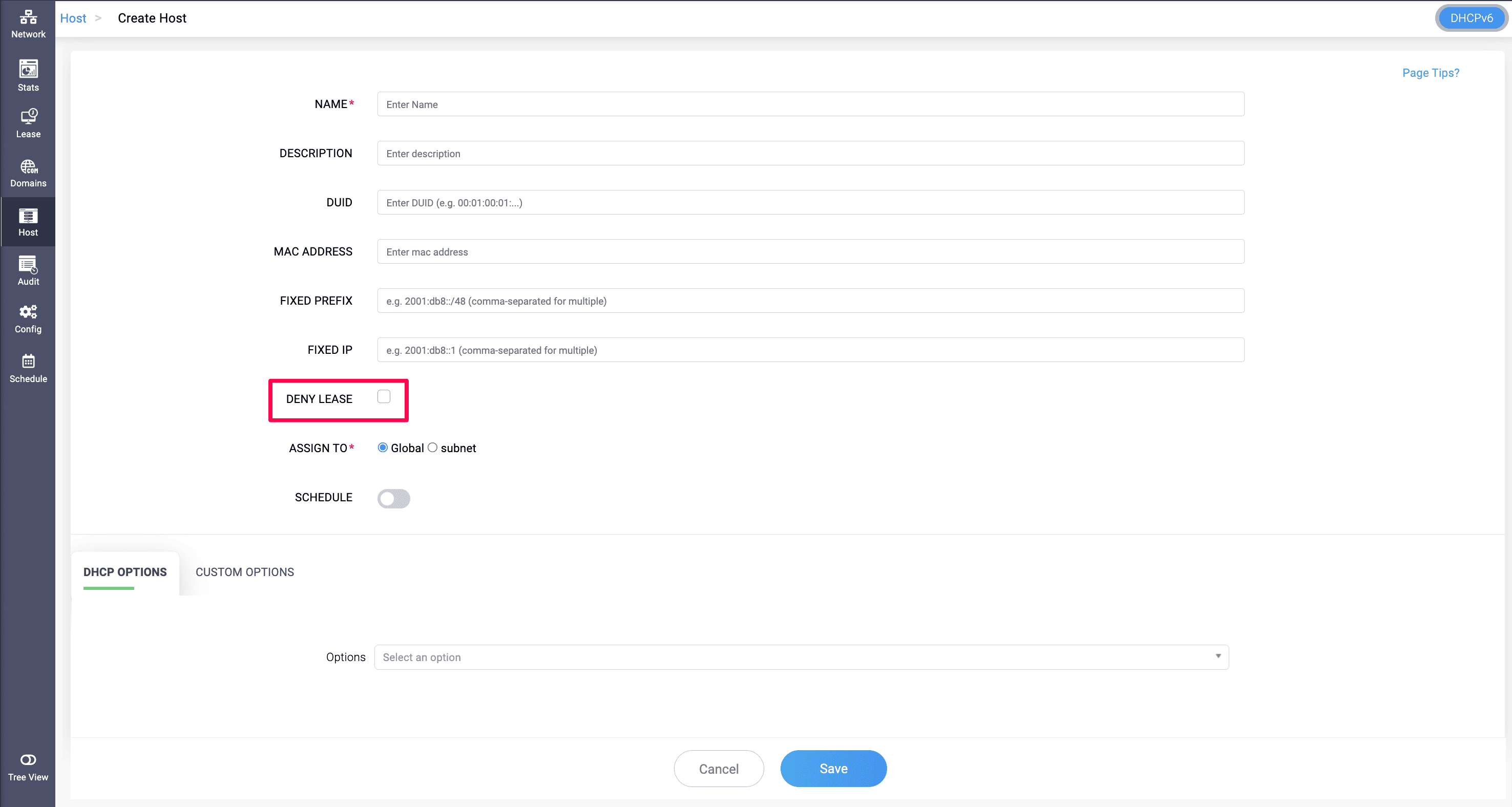
With DDI Central, John can create and manage IPv4 and IPv6 host entries, assign consistent addresses, and restrict specific devices from obtaining DHCP leases—all from a centralized console.
Finding an available IP address without guesswork
John's morning starts with an urgent request. An employee needs a device configured with a fixed IP address before they can get on with their work. John knows exactly which subnet the device belongs to, but there's one problem: He doesn't know which IP address is available.
He could go through the subnet and check the available addresses one by one, but that would mean spending time on a task that should be straightforward. With other requests already waiting, John needs a quicker way to get this done.
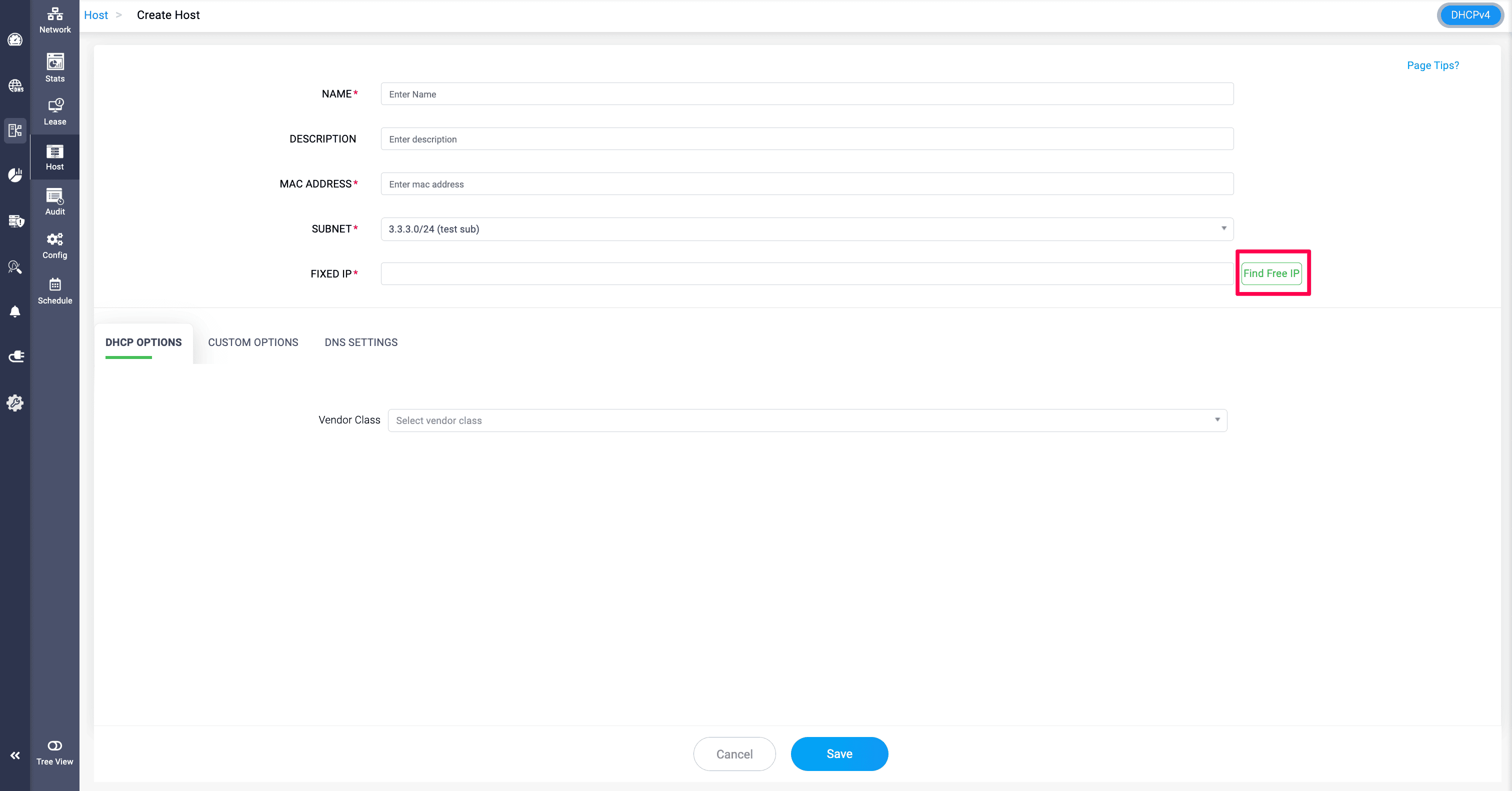
That's where DDI Central's Find Free IP capability comes in. Instead of manually searching for an available address, John selects the required subnet and uses the feature to identify the next available IP for the reservation. What could have turned into a tedious search is now a much simpler task, and the employee can get back to work without a lengthy wait.
Organizing DHCP hosts with host groups
As the organization expands its wireless infrastructure, one floor now has 25 access points serving a growing number of connected devices. Keeping track of the relevant DHCP host configurations individually is becoming a chore for John.
Whenever he needs to organize or manage these hosts, he finds himself dealing with one entry after another. It's not particularly difficult, but repeating the same administrative work across so many hosts is hardly an efficient use of his time.
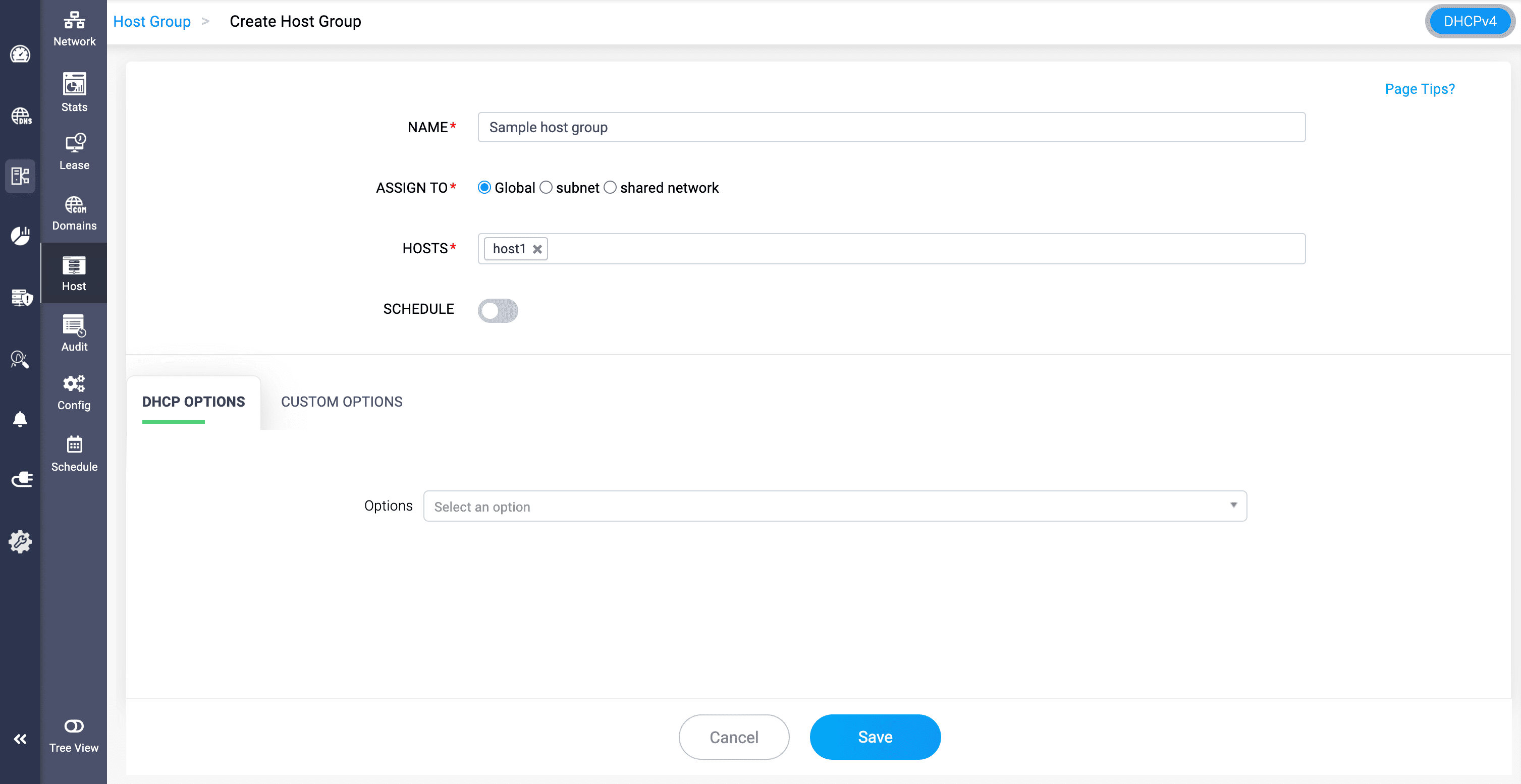
To bring some order to the process, John turns to DDI Central's Host Groups. He organizes related DHCP hosts into groups, making them easier to manage collectively rather than treating every host as an entirely separate entry. With the configurations better organized, John has a simpler way to manage the growing number of devices on his network.
Blocking a problematic device using its MAC address
Later, John's day takes an unexpected turn. He receives an alert about multiple devices experiencing network issues. After tracing the problem, he identifies one particular device as the source. There's a catch, though: The device already has a DHCP reservation, and John needs to prevent it from obtaining another IP lease while he investigates the issue. With the problem affecting other users, he doesn't have much time to spare.
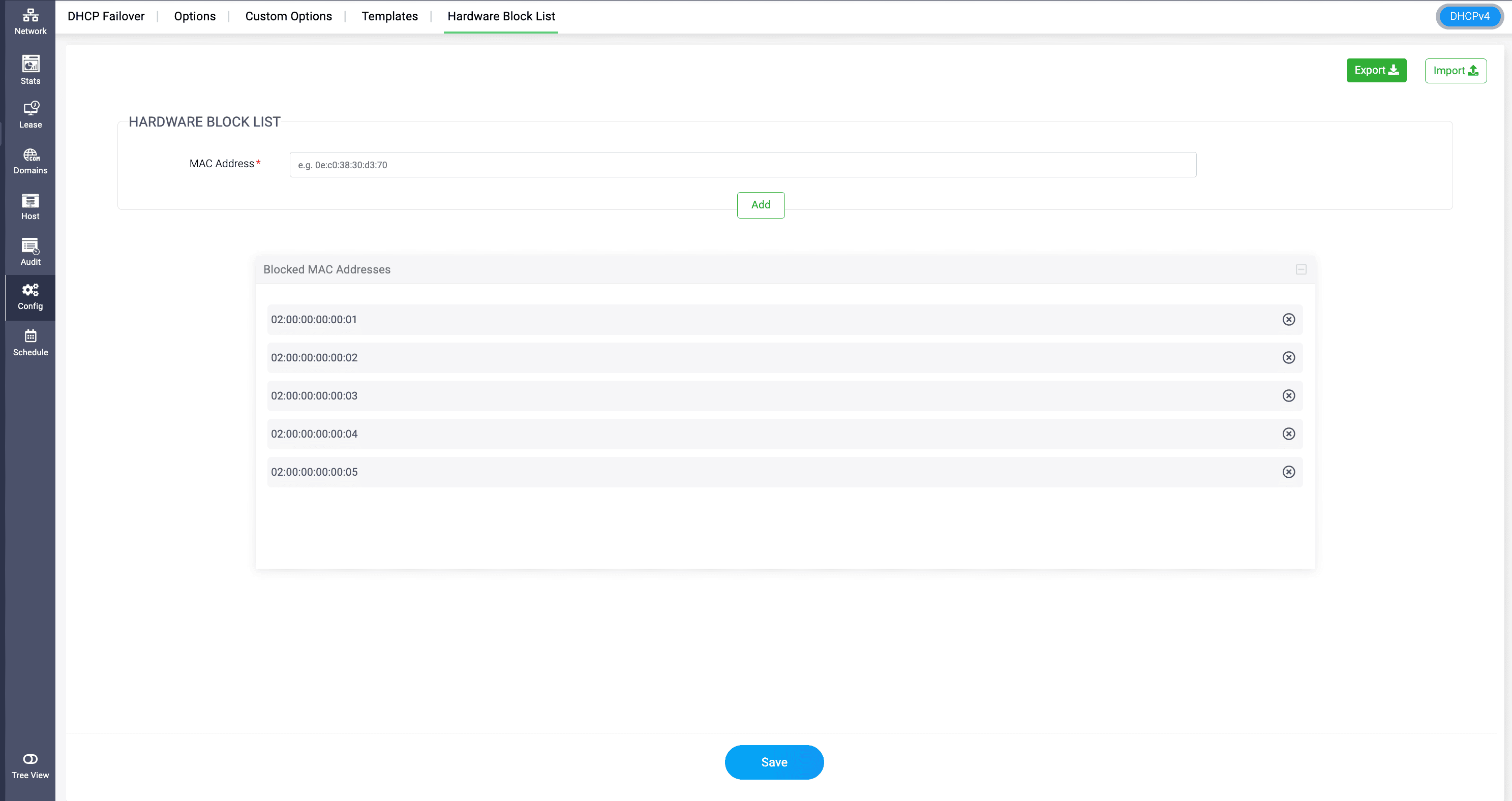
He opens DDI Central, locates the device, and uses MAC address blocking to restrict it based on its hardware address. By preventing the device from receiving DHCP leases, John can address the immediate concern while focusing on resolving the underlying issue.
Maintaining reliable IP assignments as your network grows
As enterprise networks expand, maintaining predictable IP assignments for critical devices becomes increasingly important. From surveillance cameras and VoIP phones to printers and network infrastructure, many devices depend on consistent addressing to communicate with other network services. DHCP reservations provide a practical way to maintain these assignments without relying on manual, static IP configurations.
With ManageEngine DDI Central, administrators can create and manage DHCP host reservations, identify available IP addresses, and organize and control host entries across their managed DHCP infrastructure. By simplifying reservation management, DDI Central helps organizations maintain predictable IP allocation and streamline the administration of their critical network devices.
Ready to implement DHCP Host reservation in your network? Start your 30-day free trial or book a personalized demo to explore DDI Central.