DNS filtering the smart way: 12 granular ways to protect your network

What if DNS could distinguish a security threat from a legitimate business need, a workday from a lunch break, and an authorized user from an unauthorized one?
It's 10:15am on a Tuesday.
A marketing executive opens YouTube to watch a product training video. Instead of the video, they're greeted with an access restriction. Across the office, a designer can't access a reference on Instagram. A sales representative is unable to research a prospect on LinkedIn. Meanwhile, the IT team is fielding complaints about websites that worked perfectly well yesterday.
The reason? The organization introduced stricter website-blocking policies to improve productivity and security. From management's perspective, social media can be distracting, streaming consumes bandwidth, and unrestricted internet access introduces security risks. But from the employees' perspective, the same websites can be essential tools for research, collaboration, training, and customer engagement.
That's the problem with blanket blocking. It treats every request as though it has the same purpose, the same risk, and the same business value.
But what if the network could be more discerning?
What if YouTube could be restricted for guest Wi-Fi users without disrupting employees attending training? What if a reporting portal could be resolvable during business hours but restricted afterward? What if a suspicious DNS query could be denied without interrupting legitimate DNS traffic?
This is where granular DNS filtering changes the conversation. And the technology behind it already exists in Windows DNS infrastructure.
DNS filtering: From blocking websites to making smarter decisions
Before a browser can connect to a website, it generally needs to discover the IP address associated with the domain.
That's where the Domain Name System (DNS) comes in. DNS is the internet's address directory: A device asks where a particular domain can be found, and the DNS infrastructure helps it find the corresponding destination.
Yet rather than blocking every request for a particular domain, what if DNS filtering could consider:
What domain is being requested?
Who is requesting it, based on the originating network?
When is the request being made?
Which type of DNS record is being requested?
How is the DNS query reaching the server?
Whichrequests should be exempt from a restriction?
Microsoft Windows DNS supports this kind of decision-making through DNS Query Resolution Policies (QRPs).
With ManageEngine DDI Central, administrators can configure and manage these native Windows DNS policies through a central management interface. Instead of writing a separate script for every restriction, administrators can bring together query attributes, conditions, actions, and exceptions to define more targeted DNS resolution behavior.
The objective isn't to deny as many DNS queries as possible. It's to deny the right queries while allowing legitimate DNS activity to continue.
Here are 12 situations where that distinction can make a meaningful difference.
1. The social media dilemma: Why should a work-hour restriction last all day?
Picture an organization where employees work anywhere from 9am to 7pm.
Management wants to minimize social media distractions during productive working hours. But that doesn't need to mean Facebook, Instagram, and YouTube should remain inaccessible throughout the entire day.
An employee may want to watch a few videos during their afternoon break, or catch up with friends between work sessions. A blanket restriction makes no distinction. Once a domain is blocked, everyone loses access, regardless of the time or purpose.
What if DNS filtering could follow the rhythm of the workday instead of imposing an all-day ban?
With DDI Central's native Windows DNS QRPs, administrators can define multiple time-based restrictions within a single policy.
For example, an organization could restrict selected social media domains during two separate intervals:
9am–12:30pm: Social media DNS queries are denied during the morning work session.
12:30pm–3pm: The restriction is lifted, allowing employees to access those websites during their designated break or flexible work period.
3pm–7pm: The restriction automatically applies again during the afternoon work session.
After 7pm: DNS queries return to normal resolution.
If the marketing team needs access to Instagram or YouTube to manage campaigns, monitor brand engagement, or research competitors, administrators can combine these time-based conditions with client subnet criteria, allowing designated departmental networks to remain outside the restriction.
Objective: Block selected social media domains between 9am–12:30pm and 3pm–7pm, while allowing normal resolution during breaks and after work.
DNS QRP criterion | Operator | Value |
FQDN | EQ | facebook.com, *.facebook.com, instagram.com, *.instagram.com, youtube.com, *.youtube.com |
Time of day | EQ | 09:00 - 12:30, 15:00 - 19:00 |
Client subnet | EQ | EmployeeLAN Subnet CIDR: 10.10.10.0/24 Usable client IP range: 10.10.10.1 – 10.10.10.254 |
Action: Deny
Result: A DNS filtering policy that respects both business productivity and employees' need for flexibility. Only the selected domains are denied during the two working-hour windows. Outside those windows, this policy doesn't restrict them.
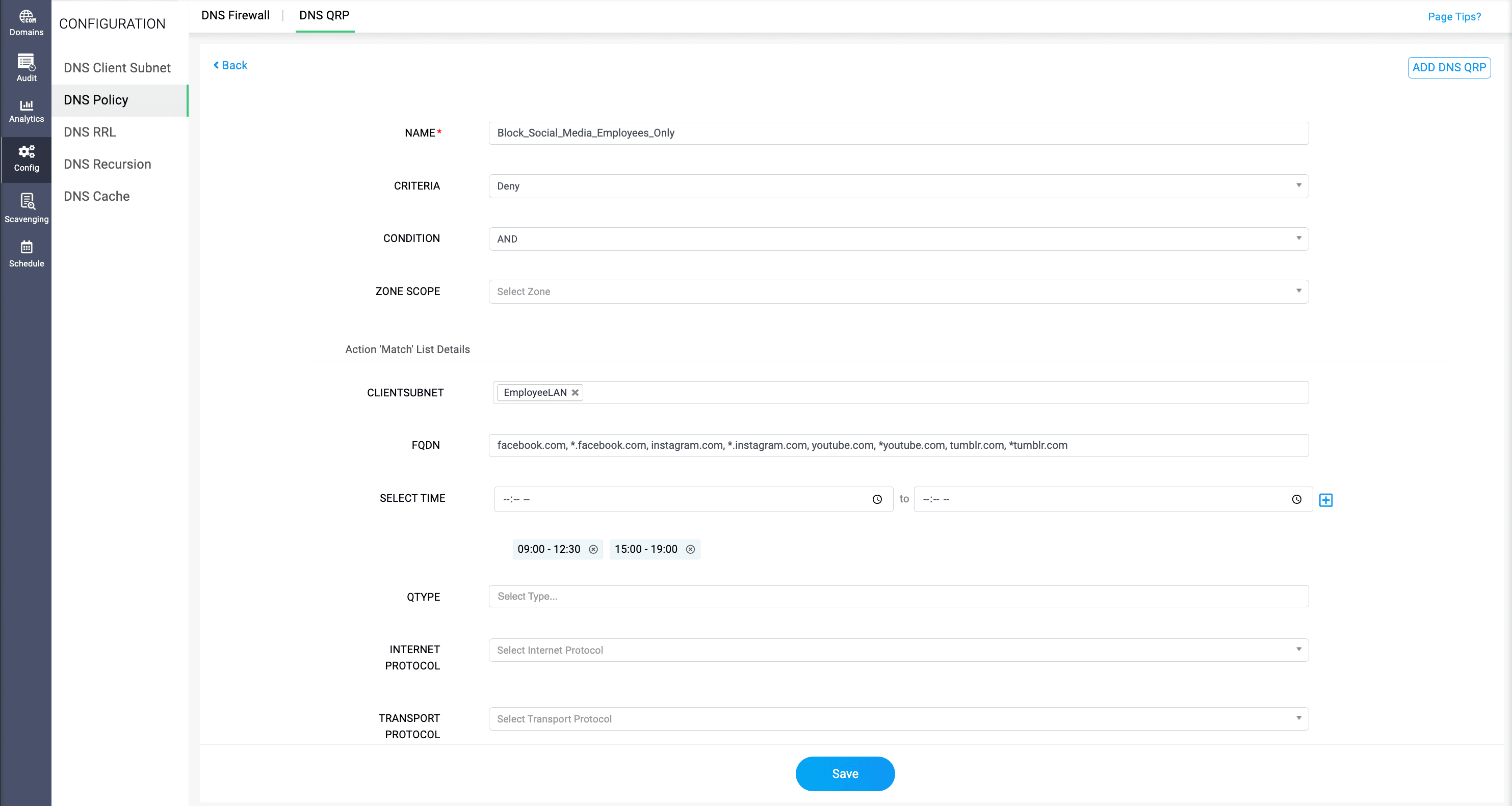
Rather than creating separate policies for every time slot or blocking employees indiscriminately, administrators can configure multiple restriction windows and apply them to the appropriate network segments.
Effective DNS filtering isn't about deciding which websites employees should never visit. It's about determining when restrictions make sense—and when they don't.
2. Guest Wi-Fi and the streaming problem: Why should everyone pay for someone else's bandwidth habits?
Picture a company hosting a large customer event.
Guests connect to the complimentary Wi-Fi, employees continue their regular work, and a sales team conducts an important video conference.
Meanwhile, some visitors begin streaming entertainment on the guest network.
The IT team wants to discourage unnecessary streaming, but blocking streaming platforms for the entire organization would create a new set of problems. Instead, they apply DNS restrictions to the guest network alone.
Objective: Deny entertainment-streaming DNS requests originating from the guest network without restricting employees.
DNS QRP criterion | Operator | Value |
Client subnet | EQ | GuestWiFi Subnet CIDR: 10.10.20.0/24 Usable client IP range: 10.10.20.1 – 10.10.20.254 |
FQDN | EQ | netflix.com, *.netflix.com, youtube.com, *.youtube.com |
Action: Deny
Result: Streaming-domain lookups from the guest subnet are denied. Corporate network lookups remain unaffected by this policy.
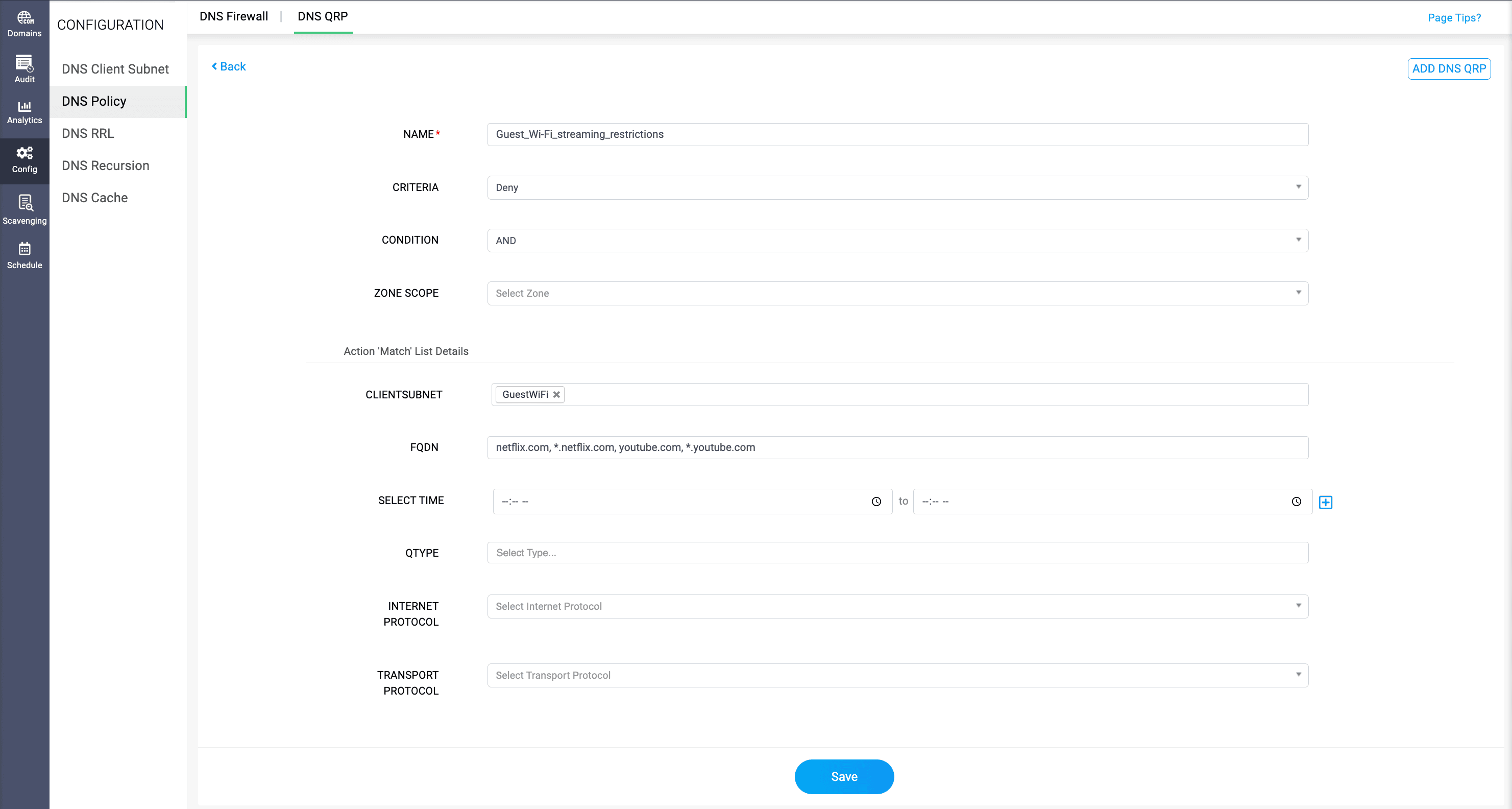
DDI Central allows administrators to use client subnet and FQDN criteria together, so queries for selected streaming domains can be denied when they originate from designated guest subnets. Meanwhile, employees on corporate networks remain unaffected.
The IT team can establish different DNS resolution boundaries for different network segments without treating every connected user identically.
DNS filtering doesn't guarantee bandwidth availability. Traffic shaping and quality-of-service controls may still be needed. But it illustrates an important principle: A network-wide problem doesn't always require a network-wide restriction.
3. The school computer lab: Can gaming be restricted without ruining the fun after class?
It's 11am at a school computer lab. Students are supposed to be completing their assignments. Instead, a few begin exploring online gaming platforms.
The administrator has two choices: tolerate the distraction or block gaming websites altogether.
But neither is especially appealing—schools increasingly use interactive digital resources, and students may have legitimate reasons to access certain platforms outside classroom hours. Faculty members may also need access for teaching or evaluation.
With a DNS QRP, the administrator can create restrictions that apply only when multiple conditions are satisfied: Gaming-related DNS queries are denied when they originate from student computer-lab subnets and fall within scheduled class hours. Meanwhile, faculty networks remain outside the restriction. After the configured time window, those same queries can proceed through normal DNS resolution.
Objective: Block gaming websites during classroom hours for students, without affecting faculty.
DNS QRP criterion | Operator | Value |
Client subnet | EQ | StudentLab Subnet CIDR: 10.10.30.0/24 Usable client IP range: 10.10.30.1 – 10.10.30.254 |
FQDN | EQ | roblox.com, *.roblox.com |
Time of day | EQ | 09:00 - 17:00 |
Action: Deny
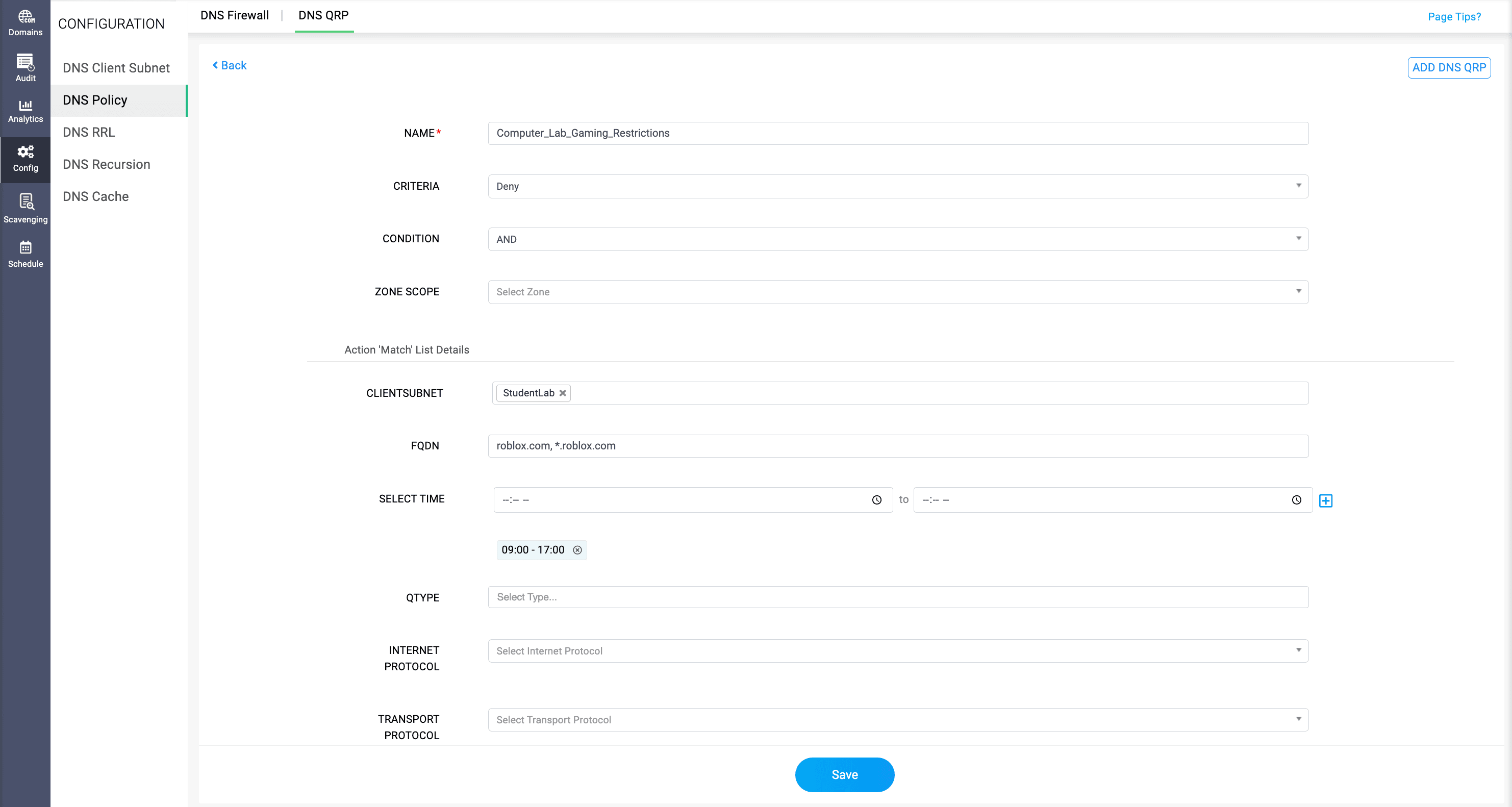
Result: Roblox-related DNS requests are denied from student lab subnets during school hours. Faculty subnets remain outside the rule, and student lookups resume normal processing after 5pm.
Instead of turning the school network into a permanently restricted environment, the administrator aligns DNS behavior with how the facilities are intended to be used.
The objective isn't to take away access. It's to make access appropriate to the situation.
4. Personal email in finance: Protect sensitive operations without disrupting corporate communication
Every organization needs email. But not every email service needs to be accessible from every network.
Imagine a financial services company handling confidential customer records, transaction reports, and internal financial information.
Its security team wants to limit access to personal webmail services from workstations in a sensitive finance department. Yet a blanket restriction on email-related domains would be disastrous. Employees still need corporate email, authentication services, and approved business communication tools.
Instead, the administrator can use DNS filtering to target specific personal webmail hostnames while restricting the policy to designated finance subnets.
Objective: Restrict selected personal webmail services from the finance network without affecting corporate email.
DNS QRP criterion | Operator | Value |
Client subnet | EQ | Finance Subnet CIDR: 10.10.40.0/24 |
FQDN | EQ | mail.yahoo.com, outlook.live.com |
Action: Deny
Result: Queries for those personal webmail hostnames are denied only from finance subnets. Corporate email is not targeted by this rule.
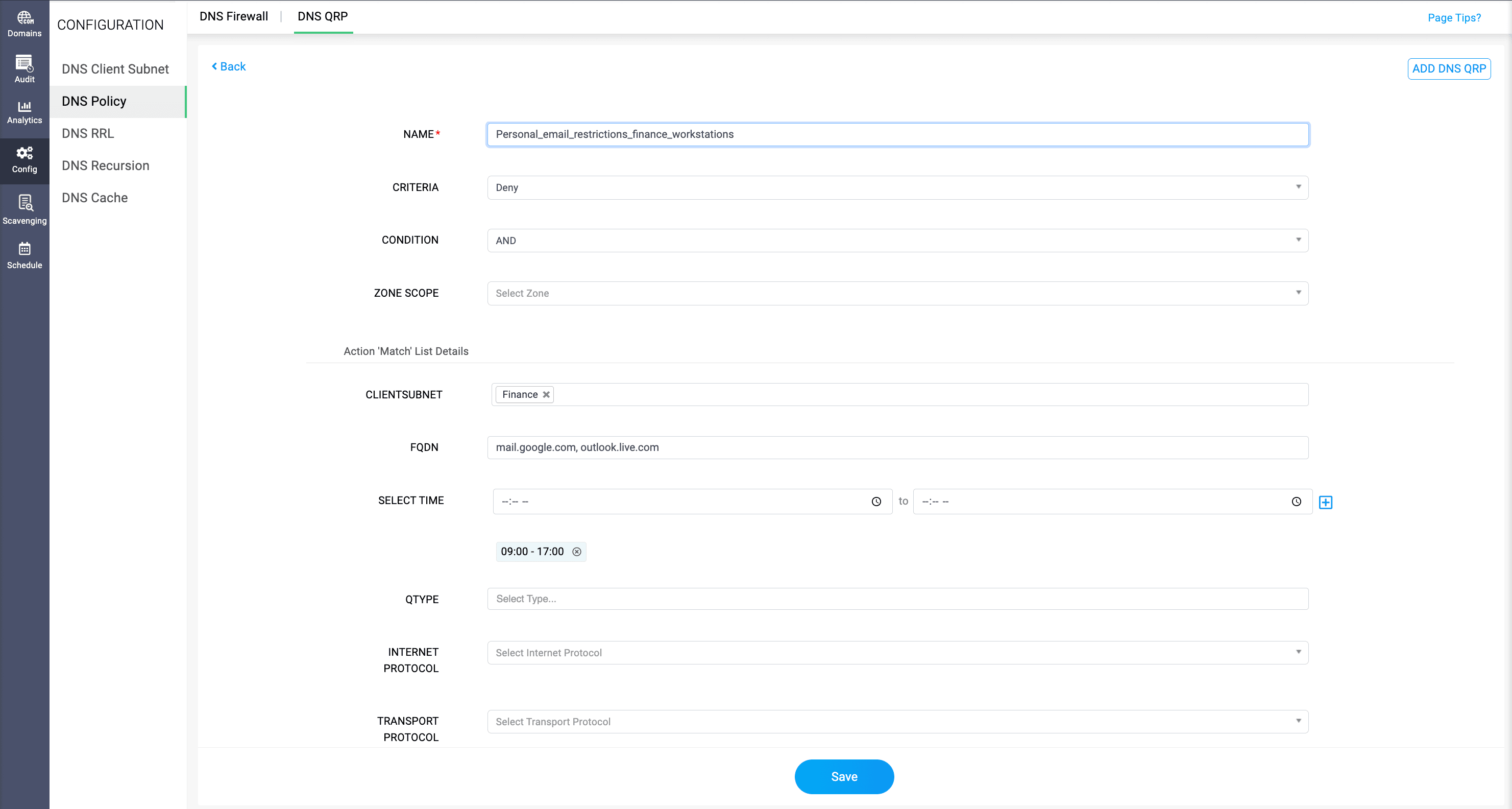
Corporate email domains and unrelated DNS services continue through normal query processing. This makes the restriction more relevant to the organization's security requirements and reduces unnecessary interruptions.
DNS filtering alone cannot prevent data exfiltration or replace data loss prevention controls. However, it can complement those protections by restricting resolution of specifically identified services.
Security improves when restrictions are built around actual risks rather than broad assumptions.
5. A malicious domain appears: Block the threat without disturbing everything else
A security analyst discovers a domain associated with a phishing campaign.
The domain has been reported through the organization's threat investigation process, and the security team wants to prevent employees and devices from resolving it.
Should the organization restrict an entire category of websites, block every unfamiliar domain, or interfere with legitimate DNS traffic just to stop one confirmed threat?
There's a better option. Using an FQDN-based DNS QRP, administrators can deny queries matching the identified malicious domain and, when appropriate, its subdomains. Other domain queries remain unaffected. This helps organizations respond to verified threats with greater precision.
Objective: Block a confirmed phishing domain and its subdomains without disturbing legitimate DNS queries.
DNS QRP criterion | Value |
FQDN | phishing.manageengine.com, *.phishing.manageengine.com |
Action: Deny
Result: Queries matching the identified malicious namespace are denied, while unrelated DNS lookups remain unaffected by this policy.
DDI Central brings the policy configuration into its centralized DNS management workflow, giving administrators a practical way to apply targeted restrictions across their managed Windows DNS environment.
Importantly, a DNS QRP enforces the domain criteria it has been given; it doesn't independently determine whether a domain is malicious. Threat identification and ongoing intelligence remain essential.
This ensures that a specific threat can receive a specific response without making unrelated DNS activity collateral damage.
6. Dynamic DNS: Useful service or unauthorized backdoor?
Dynamic DNS (DDNS) helps associate changing IP addresses with stable domain names. It has legitimate uses, from remote device management to maintaining access to systems with dynamically assigned public addresses. But the same convenience can be misused.
Suppose an organization discovers that unauthorized remote-access infrastructure relies on hostnames registered through a third-party DDNS provider.
Blocking every DDNS service across the organization would be excessive, particularly when legitimate business services rely on similar technology.
Instead, administrators can target specific unapproved DDNS hostnames or provider namespaces.
Objective: Deny DNS resolution for unapproved DDNS hostnames used by unauthorized remote-access infrastructure.
DNS QRP criterion | Value |
FQDN | remote-access-demo.ddns.net |
Client Subnet (optional) | RemoteAccessSegment Subnet CIDR: 10.10.50.0/24 Usable client IP range: 10.10.50.1 – 10.10.50.254 |
Condition: AND
Action: Deny
Result: The specific unapproved hostname is denied. Other DDNS providers and approved remote-access services are unaffected.
With FQDN matching, optionally combined with client subnet restrictions, administrators can use DDI Central to configure Windows DNS policies that deny resolution of those selected destinations. Approved domains and unrelated business applications can continue operating normally.
This doesn't stop every possible unauthorized remote-access mechanism, nor does it prevent DDNS updates by itself. What it does provide is a more selective way to enforce an organization's approved-domain policy.
The technology isn't the problem. The unauthorized use of it is.
7. The suspicious TXT query: Why block an entire domain when one query type is the concern?
Not all DNS queries ask the same question: Some request IPv4 addresses. Others request IPv6 addresses, mail server information, or text records.
TXT records, for instance, support several legitimate functions, including email authentication and domain verification. But TXT queries can also be misused in certain DNS tunneling techniques.
Imagine a security team investigating unusually frequent TXT requests directed at a suspicious domain. A heavy-handed response might block all TXT queries throughout the network. However, that could interfere with legitimate services relying on DNS text records.
Instead, administrators can combine two DNS filtering criteria: the queried domain and the requested DNS record type.
Objective: Block TXT requests associated with a suspicious domain, without disrupting other query types or unrelated TXT records.
DNS QRP criterion | Operator | Value |
FQDN | EQ | suspicious.manageengine.org |
Query Type | EQ | TXT |
Condition: AND
Action: Deny
How the policy is evaluated:
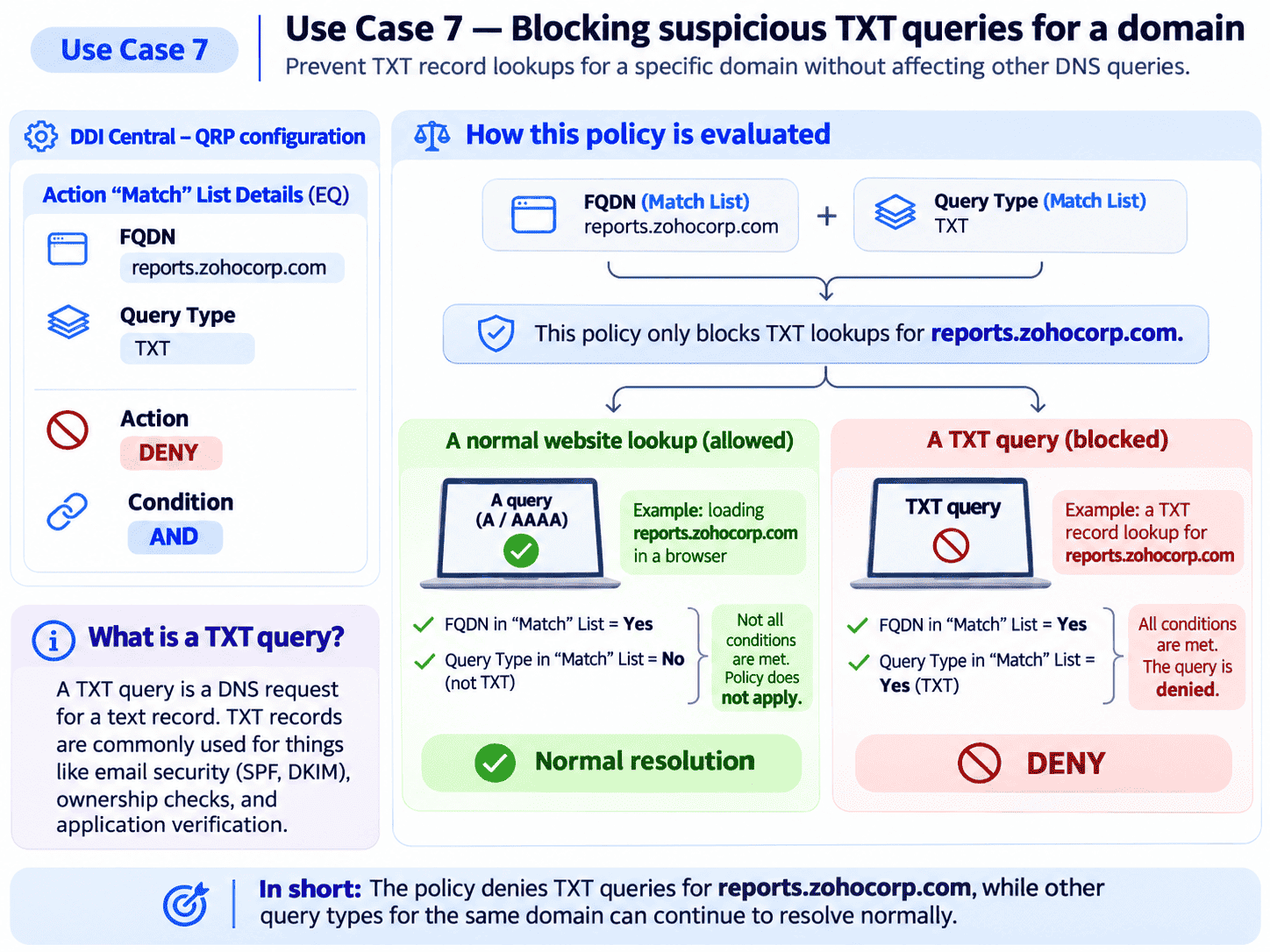
Result: TXT queries for the suspicious hostname are denied. A, AAAA, and other record requests can proceed through normal DNS processing.
Through DDI Central, administrators can configure a policy to deny TXT queries targeting the identified suspicious domain while leaving unrelated TXT queries untouched. Even other query types for that domain can be handled separately, depending on the organization's security decision.
This is DNS filtering at a finer level of precision. A targeted TXT restriction is not comprehensive DNS tunneling detection—other query types may also be abused. Nevertheless, it demonstrates how a security response can be limited to the behavior under investigation.
Sometimes, the difference between disruption and precision is knowing exactly what kind of DNS question you want to stop.
8. DNS ANY queries: Reduce unwanted query behavior without penalizing normal users
Most everyday DNS activity involves specific queries, such as looking up an A or AAAA record.
An ANY query is different. It requests information about the resource-record sets associated with a name. Depending on the DNS implementation, such queries can produce larger responses and may be relevant to DNS amplification concerns.
Now imagine an administrator noticing unwanted ANY queries from an untrusted network segment. Blocking all incoming DNS traffic would be an extreme response.
Instead, the administrator can use a QRP to combine the client subnet and query type criteria to deny ANY queries originating from the identified network.
Objective: Block ANY queries originating from an untrusted network segment while preserving ordinary DNS requests.
DNS QRP criterion | Operator | Value |
Client Subnet | EQ | UntrustedNetwork Subnet CIDR: 10.10.60.0/24 Usable Client IP range: 10.10.60.1 – 10.10.60.254 |
Query Type | EQ | ANY |
Condition: AND
Action: Deny
Result: ANY queries from the specified subnet are denied. A, AAAA, MX, TXT, and other specific query types remain unaffected by this rule.
Ordinary A and AAAA queries from that network can continue through normal resolution. The rest of the organization is unaffected by the targeted restriction.
DNS ANY filtering isn't a substitute for response-rate limiting or broader denial-of-service protections. It is one additional control in a layered DNS security strategy.
The most effective restriction is often the one legitimate users never notice.
9. Application maintenance: Why disrupt the whole network for one service?
It's 10pm, and an organization's HR application is entering a scheduled maintenance window.
The infrastructure team needs to perform backend updates and wants to discourage new DNS lookups for the application while the work takes place.
A broad DNS restriction would be unnecessary. Other applications, departments, and services still need to function.
With time-based FQDN filtering, the administrator can configure a policy that denies new DNS resolution requests for the HR portal during the designated maintenance period. At the end of the configured window, DNS resolution can resume normally without the same restriction being applied indefinitely. Other applications remain outside the policy.
Objective: Restrict new DNS lookups for an HR application during a scheduled maintenance window.
DNS QRP criterion | Operator | Value |
FQDN | EQ | hr.zohocorp.com |
Time of Day | EQ | 22:00-23:00 |
Action: Deny
Condition: AND
Result: DNS queries for the HR application are denied between 10pm and 11pm. Queries for other applications are unaffected.
The administrator can adjust the time window to match the actual maintenance schedule. This is especially useful when the organization has recurring maintenance schedules and wants DNS behavior to reflect those operating windows.
There is an important boundary: existing connections and previously cached DNS answers can remain usable. DNS filtering should therefore complement application maintenance controls, not replace them.
Maintenance of one application shouldn't needlessly become an interruption to the entire organization.
10. The after-hours reporting portal: Make access windows part of your DNS policy
Consider an internal financial reporting portal used by an operations team between 8am and 8pm. Outside those hours, the application isn't intended for routine business activity.
An administrator wants to restrict new DNS resolution requests for the portal after the approved window, without affecting unrelated services.
With a DNS QRP, administrators can define not only what should match a policy, but also what should not match. With DDI Central's Match and Does Not Match criteria, a policy can target the reporting portal and its approved client subnet while denying requests that fall outside the configured operating hours.
Objective: Allow normal DNS resolution for a reporting portal between 8am and 8pm, but restrict queries outside that window.
DNS QRP criterion | Operator | Value |
FQDN | EQ | reporting.zohocorp.com |
Client Subnet | EQ | Operations Subnet CIDR: 10.10.70.0/24 Usable client IP Range: 10.10.70.1 – 10.10.70.254 |
Time of Day | NOT EQ | 08:00-20:00 |
Action: Deny
Condition: AND
How the policy is evaluated:
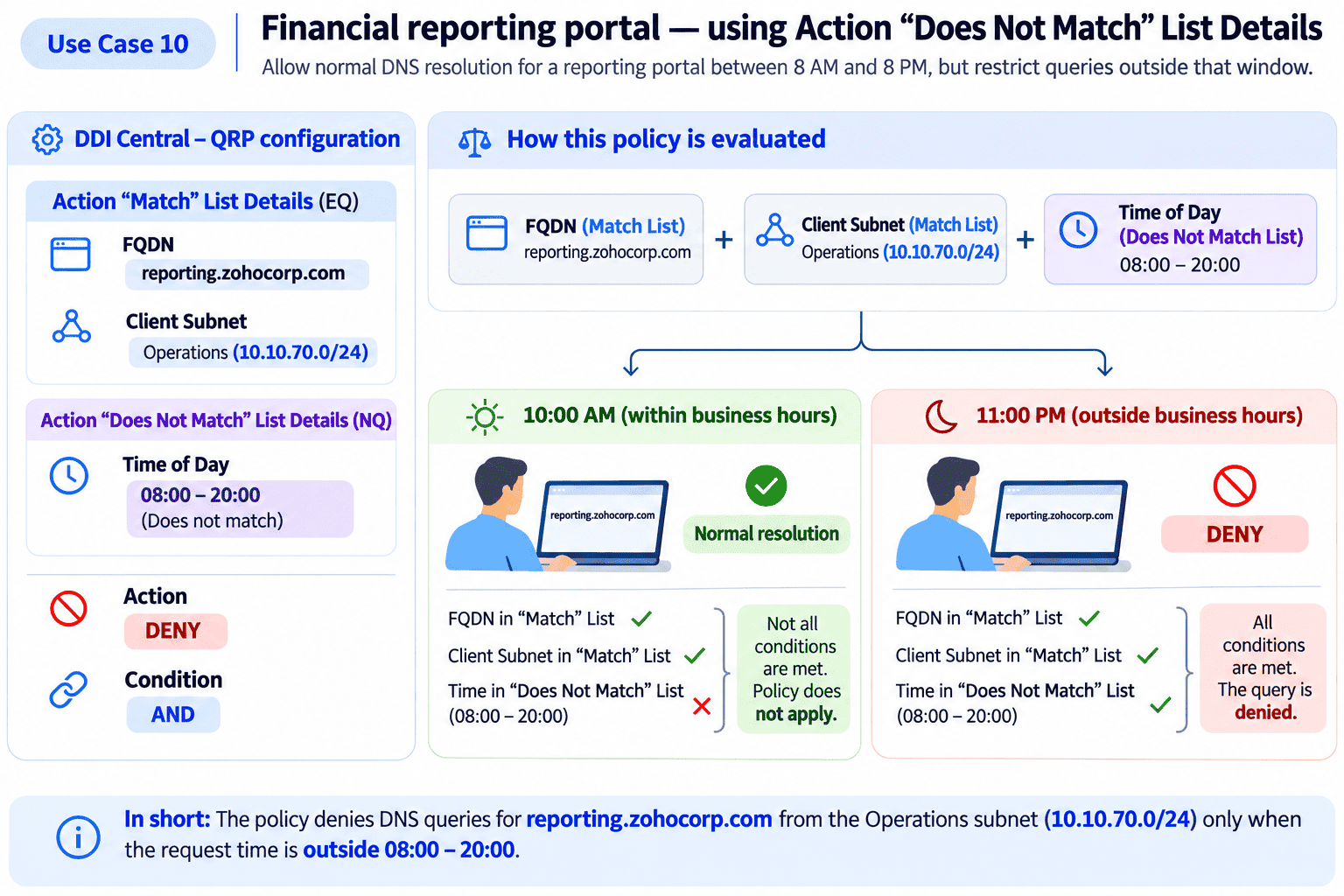
Result: During the business day, the hostname remains subject to normal resolution. After the approved window, matching queries are denied. Rather than building a permanent restriction and repeatedly reversing it, administrators can express the intended time boundary directly within the policy.
DNS filtering doesn't authenticate users or terminate sessions when the clock strikes 8pm. Those responsibilities belong to identity and application security systems. But it can add a useful DNS-layer restriction aligned with business operations.
Access policies become more meaningful when they reflect when a resource is actually intended to be used.
11. The IT-only network: Keep administrative services available to the people who need them
Imagine an enterprise hosting internal administration portals for network switches, backup infrastructure, monitoring tools, and server management.
The hostnames are meant for the IT operations team—not the general employee population. But the IT team doesn't want to make these services difficult for its own administrators to reach.
The answer lies in combining domain matching with network-based exceptions. Using DDI Central, the administrator can create a policy targeting an internal administrative DNS namespace while excluding approved IT subnets from the restriction.
DNS queries for those hostnames from unauthorized networks are denied. The authorized administrator network, however, remains unaffected by that rule.
Objective: Prevent general employees from resolving administrative hostnames while allowing IT administrators to continue resolving them.
DNS QRP criterion | Operator | Value |
FQDN | EQ | admin.zohocorp.com, *.admin.zohocorp.com |
Client Subnet | NOT EQ | IT_Admins Subnet CIDR: 10.10.80.0/24 Usable client IP range: 10.10.80.1 – 10.10.80.254 |
Action: Deny
Condition: AND
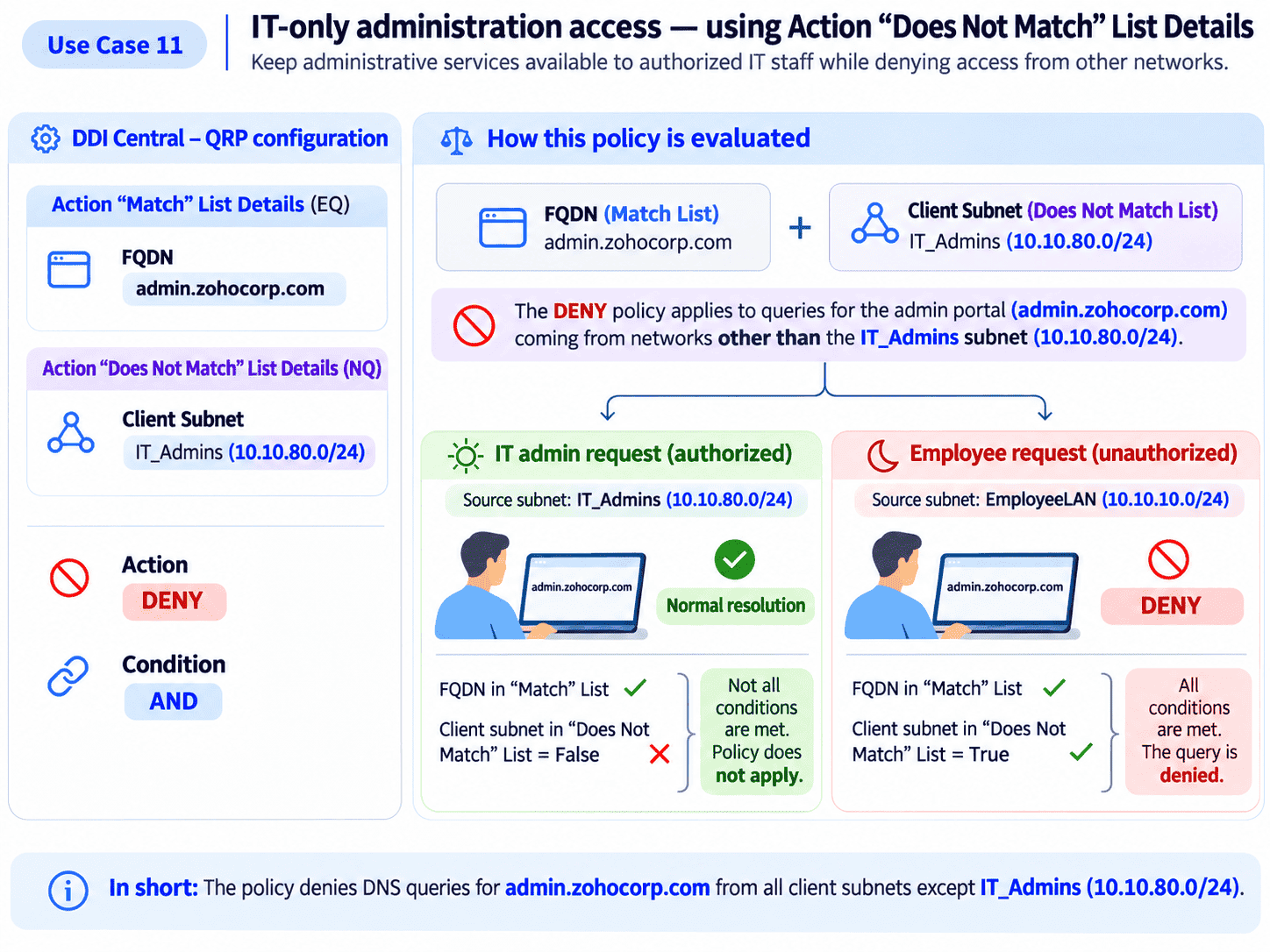
Result: DNS requests for administrative hostnames from networks other than the approved IT subnet are denied. Queries originating from IT_Admins do not match this Deny policy.
This demonstrates one of the most valuable aspects of granular DNS filtering: exceptions can be as deliberate as restrictions. Rather than creating obstacles for everyone, the policy preserves the intended path for authorized operations while reducing unnecessary exposure through DNS.
Of course, hiding administrative hostnames isn't sufficient security on its own. Firewalls, authentication, privileged access management, and network segmentation are still essential.
DNS can reinforce the same access boundaries already defined elsewhere in the infrastructure.
12. IPv4 versus IPv6: Can the same domain receive different treatment depending on how the query arrives?
For many employees, IPv4 and IPv6 are invisible details. They open a browser, enter a website address, and expect it to work. For network administrators managing a dual-stack environment, the distinction matters.
Consider an organization testing an internal application as it expands IPv6 adoption: The IT team wants DNS queries for a legacy application to be restricted when received over IPv6 while allowing normal DNS processing over IPv4. A broad domain block would make testing difficult because it would affect both protocols.
Windows DNS QRPs support a more specific approach: Administrators can combine the target FQDN with an Internet Protocol criterion, allowing a policy to distinguish DNS queries transported over IPv4 from those transported over IPv6. DDI Central exposes these native criteria through its Windows DNS QRP configuration interface.
One subtle detail makes this particularly useful: a DNS query transported over IPv6 doesn't necessarily request an IPv6 address. A client can send an A-record query over IPv6, just as it can request an AAAA record over IPv4.
Objective: Restrict DNS queries for a legacy application when they arrive over IPv6, without affecting IPv4 DNS transport.
DNS QRP criterion | Operator | Value |
FQDN | EQ | legacy.example.com |
Internet Protocol | NOT EQ | IPv6 |
Action: Deny
Result: DNS queries for the application arriving over IPv6 are denied. Identical queries arriving over IPv4 are outside this policy.
An alternative configuration is Internet Protocol NE, IPv4, which produces the same intended distinction when the only possible protocols are IPv4 and IPv6.
This criterion concerns the protocol transporting the DNS request, not whether the record requested is A or AAAA.
The administrator can distinguish the network protocol carrying the query from the DNS record type being requested. This helps teams create more precise DNS policies during network transitions, troubleshooting, and protocol-specific testing.
Even when two DNS requests look identical to an end user, their network context may justify different handling.
What these 12 scenarios mean for DNS filtering
The marketing employee needed a training video. The school needed fewer distractions during class. The finance department needed stronger boundaries around personal webmail. The security team needed to contain suspicious DNS activity. The operations team needed to manage application availability.
None of those situations called for denying every DNS request. They called for answering more meaningful questions:
Is the request coming from an authorized network?
Is it arriving during an approved window?
Does it target a restricted domain?
Is it asking for a particular record type?
Is there a legitimate exception?
Acting on these answers is the difference between blanket DNS blocking and context-aware DNS filtering.
Traditional blanket blocking | Granular DNS filtering |
Blocks a domain for everyone. | Can target designated client subnets. |
Applies the same restriction continuously. | Can apply restrictions during specified hours. |
Treats different DNS queries alike. | Can distinguish DNS query types. |
Creates broad access restrictions. | Can include narrowly defined exceptions. |
Often requires wider policy changes. | Supports more selective policy adjustments. |
Focuses primarily on what to deny. | Considers what should remain unaffected. |
Bring greater precision to Windows DNS filtering with ManageEngine DDI Central
Windows DNS QRPs already provide the underlying mechanisms for conditional query handling.
But in an enterprise with multiple DNS servers, policies, network segments, and changing business requirements, managing those configurations can become operationally demanding.
Administrators need more than the ability to create a rule. They need a practical way to understand the conditions, apply the appropriate action, define exceptions, and manage changes without unnecessary complexity.
DDI Central brings native Windows DNS QRP management into a central, intuitive interface.
Through its DNS management capabilities, administrators can work with policy criteria such as FQDN, client subnet, time of day, query type, Internet Protocol, and transport protocol. They can use combinations of matching and non-matching conditions to express specific DNS filtering requirements instead of relying exclusively on broad restrictions.
Since DDI Central brings DNS management together with DHCP and IP address management, teams can manage these foundational network services within a more unified operational environment.
The value is not simply having more blocking options. It's having the flexibility to make DNS management better reflect how the organization actually works.
Good network security shouldn't get in the way of good work
Remember the marketing executive who couldn't watch a training video? Or the employee whose perfectly legitimate task was interrupted by a blanket website restriction?
Security policies are supposed to protect the organization—not create unnecessary friction for the people keeping it running.
That doesn't mean every request should be allowed. But the decision should be informed by the context in which the request occurs.
The next time someone suggests blocking a website across your entire company, perhaps the better question isn't, "Can we block it?" It's, "Who actually needs to be restricted, when, and for what reason?"
The future of DNS filtering isn't about saying no to more requests. It's about knowing when to say no—and when to let legitimate work continue.
Make every DNS filtering policy more purposeful with DDI Central
Discover how DDI Central helps you manage native Windows DNS Query Resolution Policies with greater flexibility, precision, and centralized control.
Start your 30-day, free trial and explore granular DNS filtering in your own environment.
Book a personalized demo to see how DDI Central can simplify DNS policy management across your enterprise network.