Introducing DDI Central 5.6: Anomaly-aware, forecast-driven, monitoring-powered, Cisco-Smart DDI for modern networks
When we shipped DDI Central 5.5, we brought STIX/TAXII-powered threat intelligence into your DDI stack—enabling you to detect and respond to known threats in real time, using globally curated indicators of compromise. That release turned DNS and DHCP into active players in enterprise security.
But what about the threats that no one has flagged yet?
The ones silently evolving inside your infrastructure—concealed in query patterns, lease floods, and behavior too complex for signature-based tools?
With DDI Central 5.6, the game changes again.
5.6 puts machine learning at the heart of your DDI stack
This release introduces ML-driven anomaly detection and forecasting intelligence—designed not just to defend your network, but to understand it. Whether it's surfacing DNS tunneling and domain generation algorithm behaviors, predicting DHCP exhaustion, or forecasting DNS query surges before they happen, 5.6 brings machine learning to the heart of your DDI stack.
For the first time, DDI Central delivers real-time DNS record monitoring to enhance the resiliency of DNS responses. And with Cisco IOS-XR and IOS-XE integration, you benefit from end-to-end DNS, DHCP, and IP management for enterprise Cisco devices running native DHCP services.
In short, it’s not just smarter DDI. It’s self-aware by design—built to defend, forecast, and adapt.
What’s new in DDI Central 5.6—and why it matters
DDI Central 5.6 is packed with capabilities that blend machine learning, real-time telemetry, and automated control—all working together to elevate your DDI infrastructure from reactive to predictive, from manual to autonomous.
1. Anomaly detection: Detecting covert patterns that hide real sophisticated threats
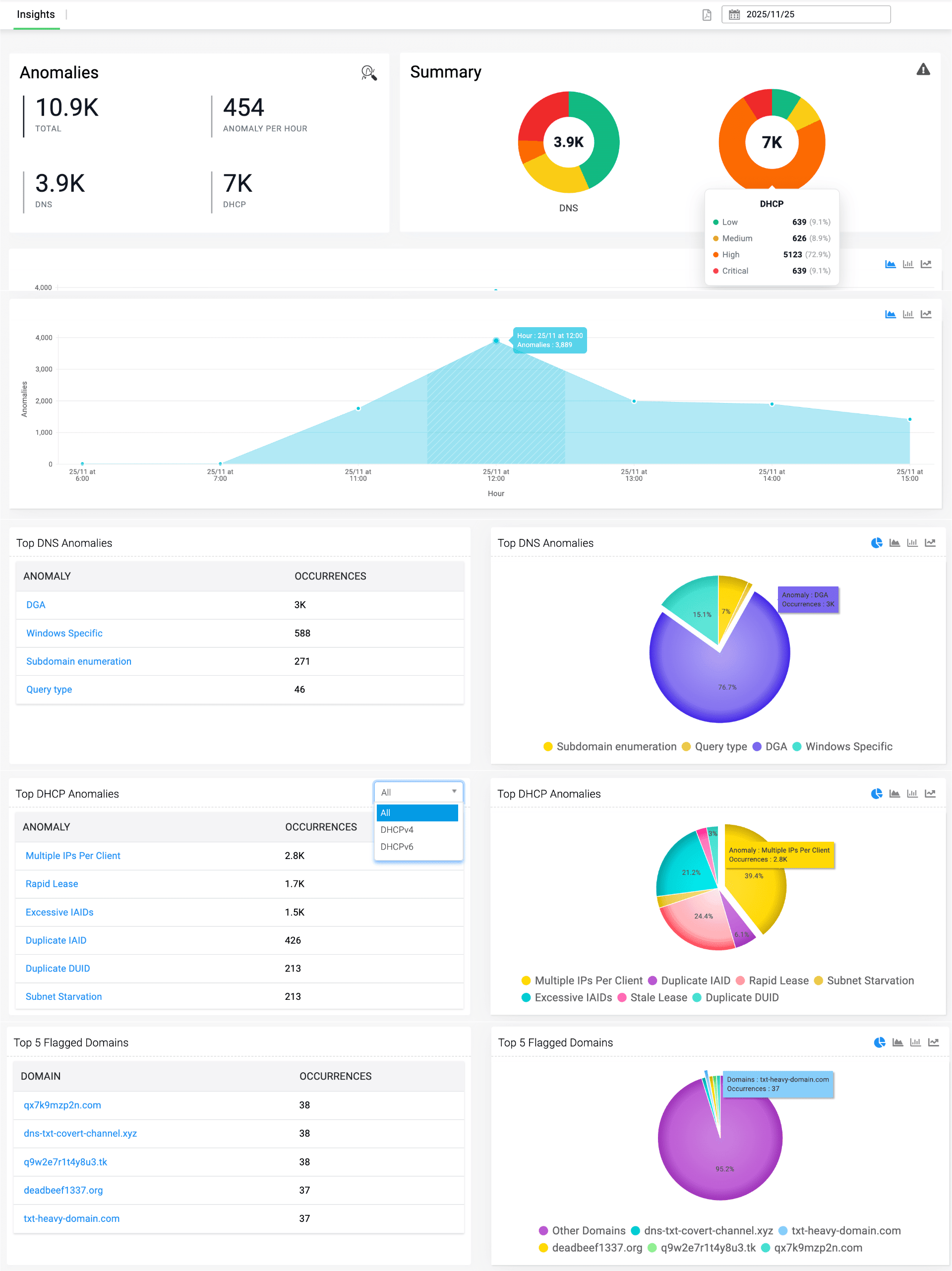
Figure 1.1: Your anomaly command center—summarizing DNS and DHCP risk posture, patterns, and top flagged domains side by side.
Turn weak signals into decisive security moves
Modern DNS and DHCP stacks hide real attacks in what looks like ordinary noise—duplicate leases, odd query bursts, strange destinations that don’t quite cross a signature’s line. In DDI Central 5.6, anomaly detection turns those weak signals into a continuous, ML-driven safety net that watches behavior across your DDI stack, ranks risk, and gives you the context to act with confidence—not guesswork.
Unified anomaly intelligence and risk snapshot
Instead of piecing together threats from raw logs and device views, DDI Central 5.6 gives you a single, correlated picture of DNS and DHCP anomalies across all clusters and sites. You see the true volume and “weight” of anomalies in one place, with risk stratified automatically into low, medium, high, and critical bands so teams can focus on what matters first. A time-series curve shows whether risk is building, flattening, or dropping—an early warning of creeping instability or emerging campaigns long before they surface as outages.
Drill from macro risk to the one bad actor
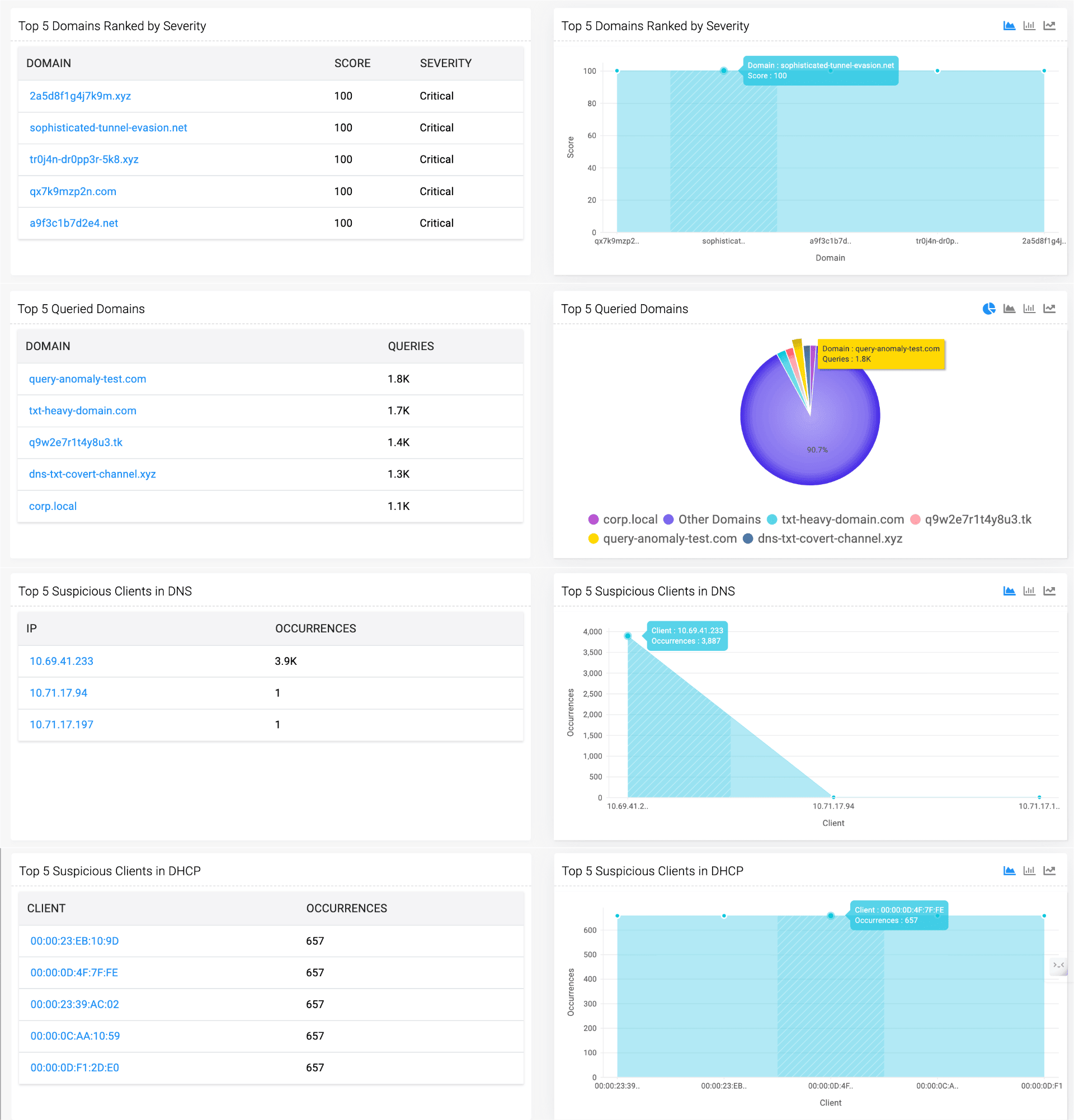
Figure 1.2: From domains to devices—rank critical domains and spotlight the DNS and DHCP clients generating the most suspicious activity.
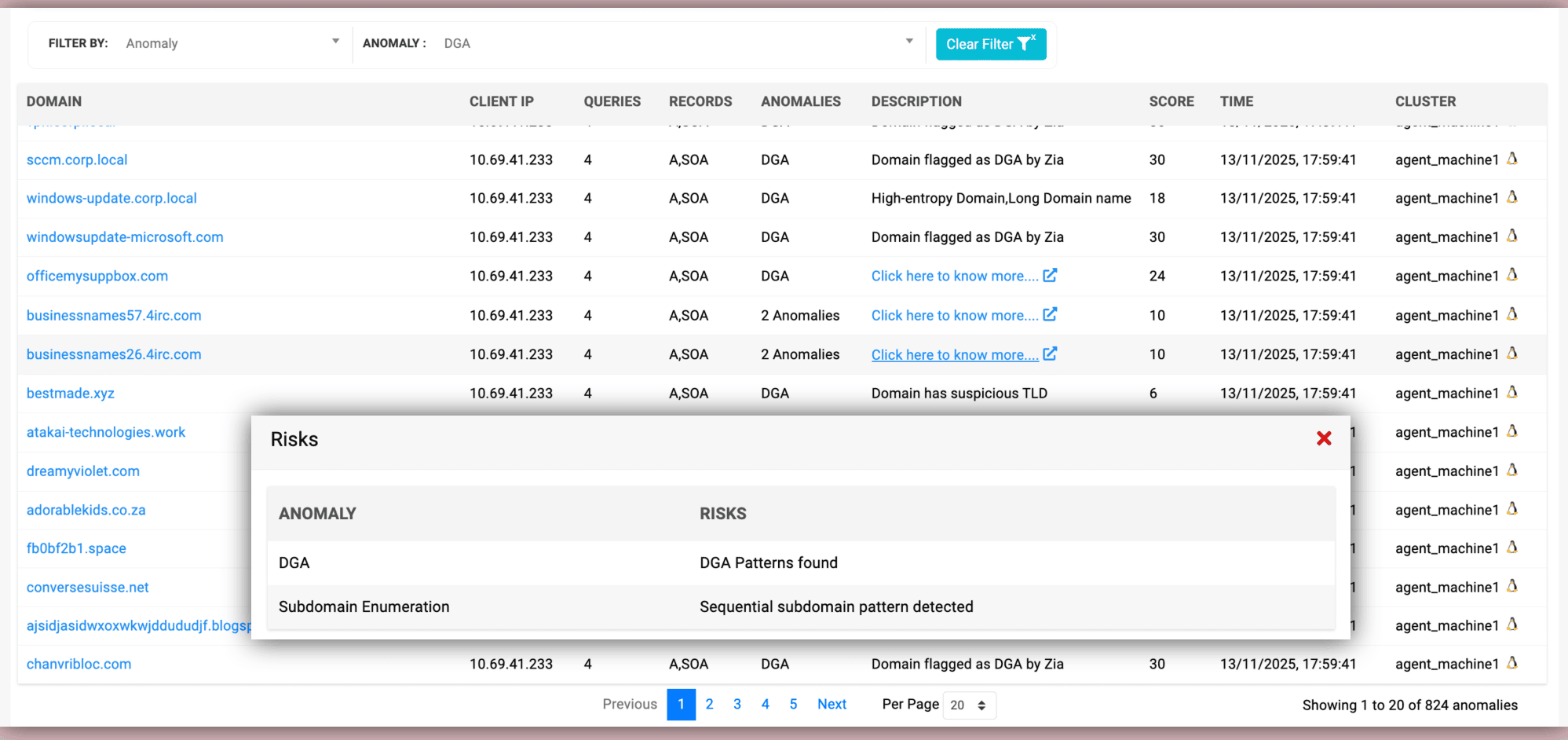
Figure 1.3: From anomaly label to root cause—popup risk details explain the exact patterns behind each suspicious domain.
From there, you can move seamlessly from “macro” to “micro.” Flagged domains are not just listed, but explained via dedicated DNS reports—why they were flagged, how heavily they’re queried, which ones dominate the risk surface, and whether your DNS traffic is flowing to a handful of dangerous destinations or a wide spread of suspicious ones. Misbehaving clients are highlighted with the evidence behind their risk scores, so admins can quickly decide whether they’re looking at malware, misconfiguration, or misuse.
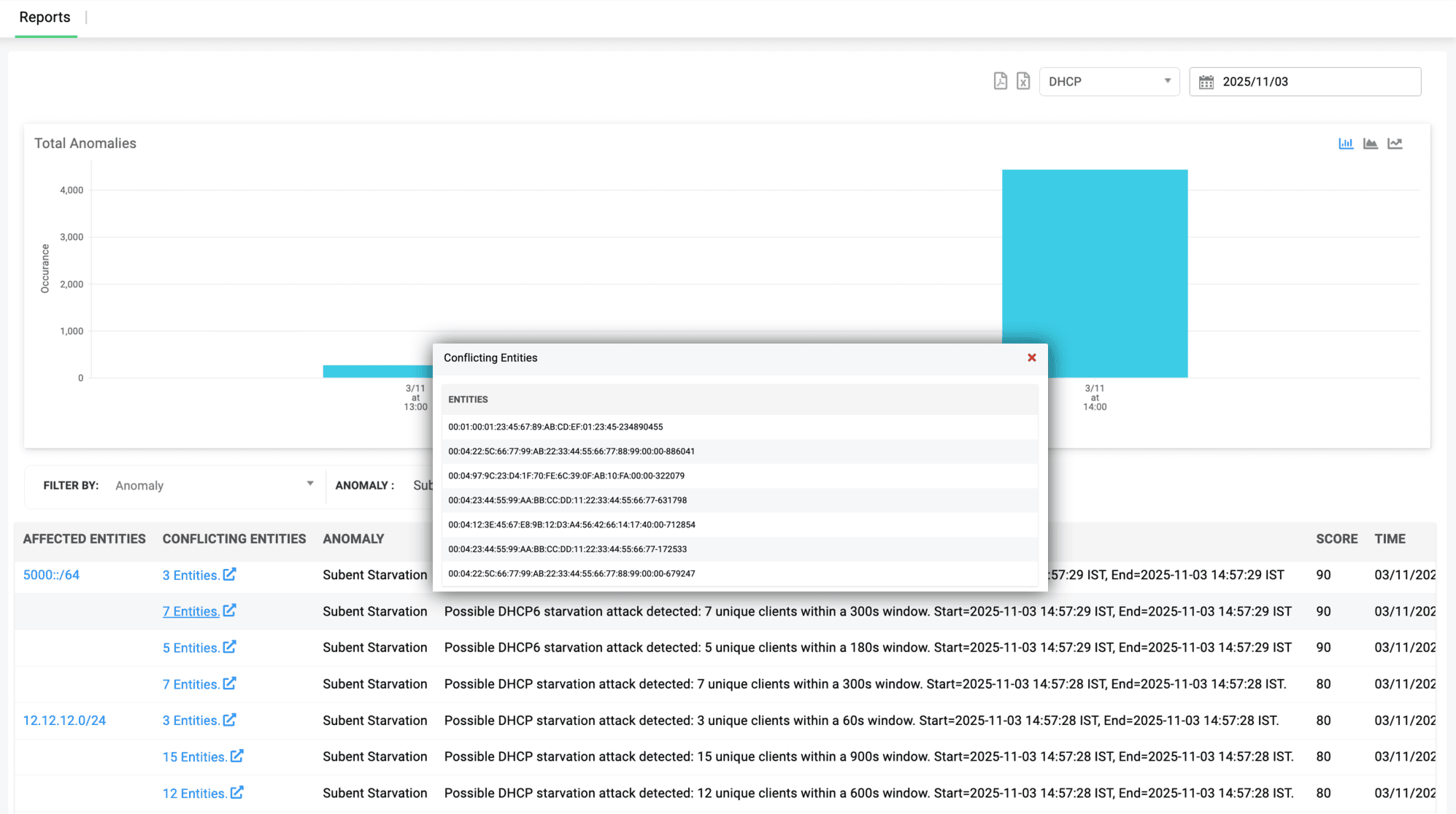
Figure 1.4: Drill into DHCP anomalies with precision—expand any event to review all affected and conflicting entities instantly.
On the DHCP side, anomaly reports trace instability back to concrete causes such as duplicate DUID/IAID storms or subnet starvation attempts, collapsing thousands of events into a navigable set of offenders and conflict groups. Drill-down filters by score, type, cluster, or entity make it trivial to move from a global anomaly pulse to the single lease, MAC, or IP that broke the rules—without ever scraping logs.
Automatic containment and guided investigation
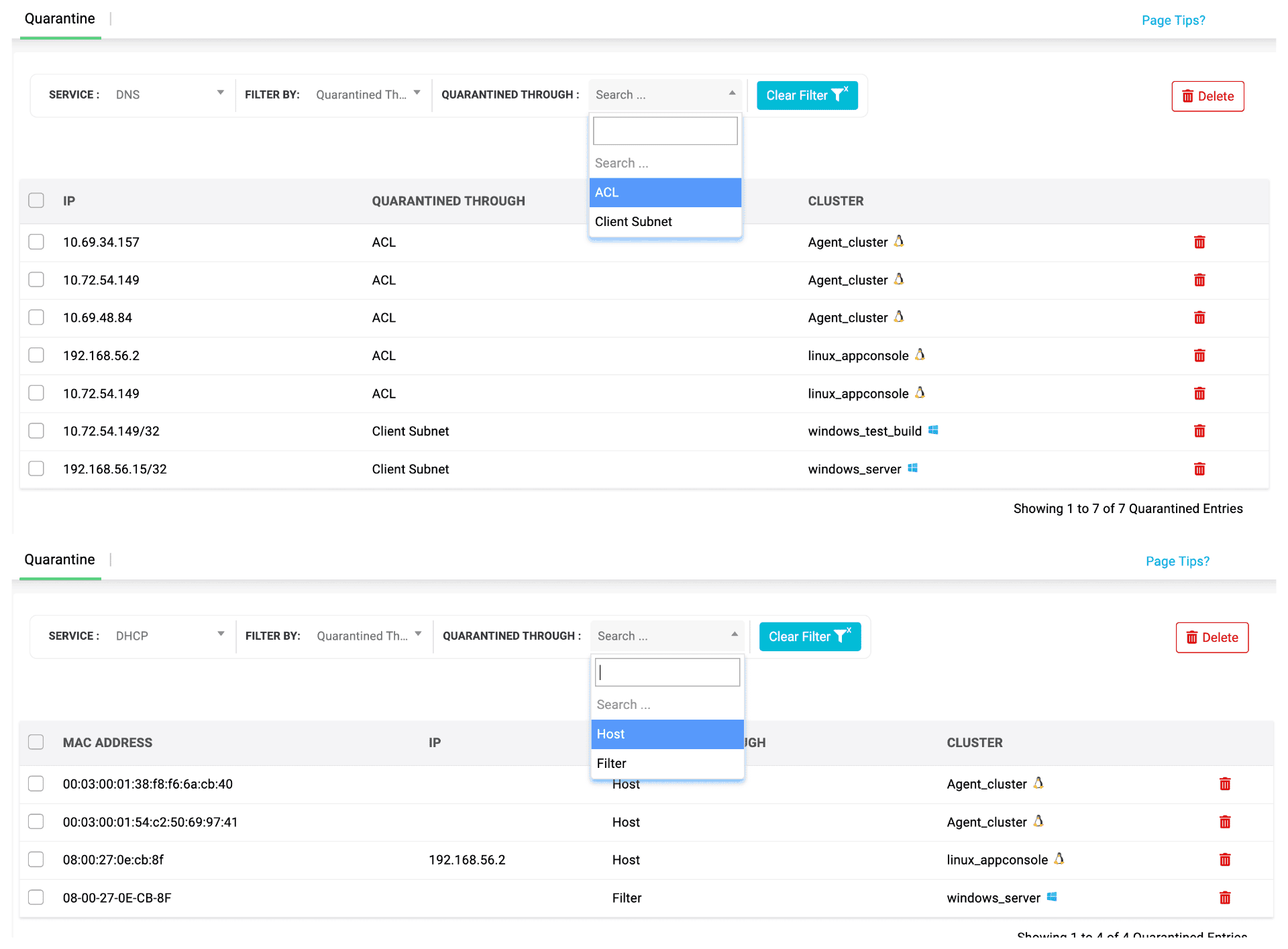
Figure 1.5: Drill into quarantined clients at a glance, with filters that reveal who was blocked, how, and on which cluster.
Detection is only half the story—what happens after something is flagged is where teams win or lose time. DDI Central 5.6 brings zero-touch containment into the anomaly pipeline, using DNS ACLs/restricted DHCP reservations on Linux and subnet/MAC-based isolation on Windows to automatically cut off suspicious domains and clients the moment they cross your defined thresholds. You decide how aggressive that line should be based on your terms. A single, consolidated view lists every blocked entity, with rich filters by score, cluster, method, and identifiers so you can quickly separate real threats from noise, drill into context, and decide which hosts can safely rejoin and which stay blocked. The result: clean, calm, evidence-led remediation—without packet-diving, war rooms, or risking reinfection.
There’s no packet-diving unless you want it; the system surfaces just enough evidence to keep investigations calm, structured, and fast, turning anomaly detection plus containment into a closed-loop workflow rather than a loose set of alerts.
2. DNS record monitoring: Real-time vigilance for every record
When a DNS record answers, users assume the service behind it is alive. With DDI Central 5.6, DNS record monitoring makes that assumption measurable—and enforceable. Every probe, every response, every failure is tracked in real time, and when an endpoint slips, DNS automatically pivots to the next healthy target. You’re not just resolving names anymore; you’re continuously proving service health and only serving endpoints that can actually respond.
Prove every answer, not just resolve it
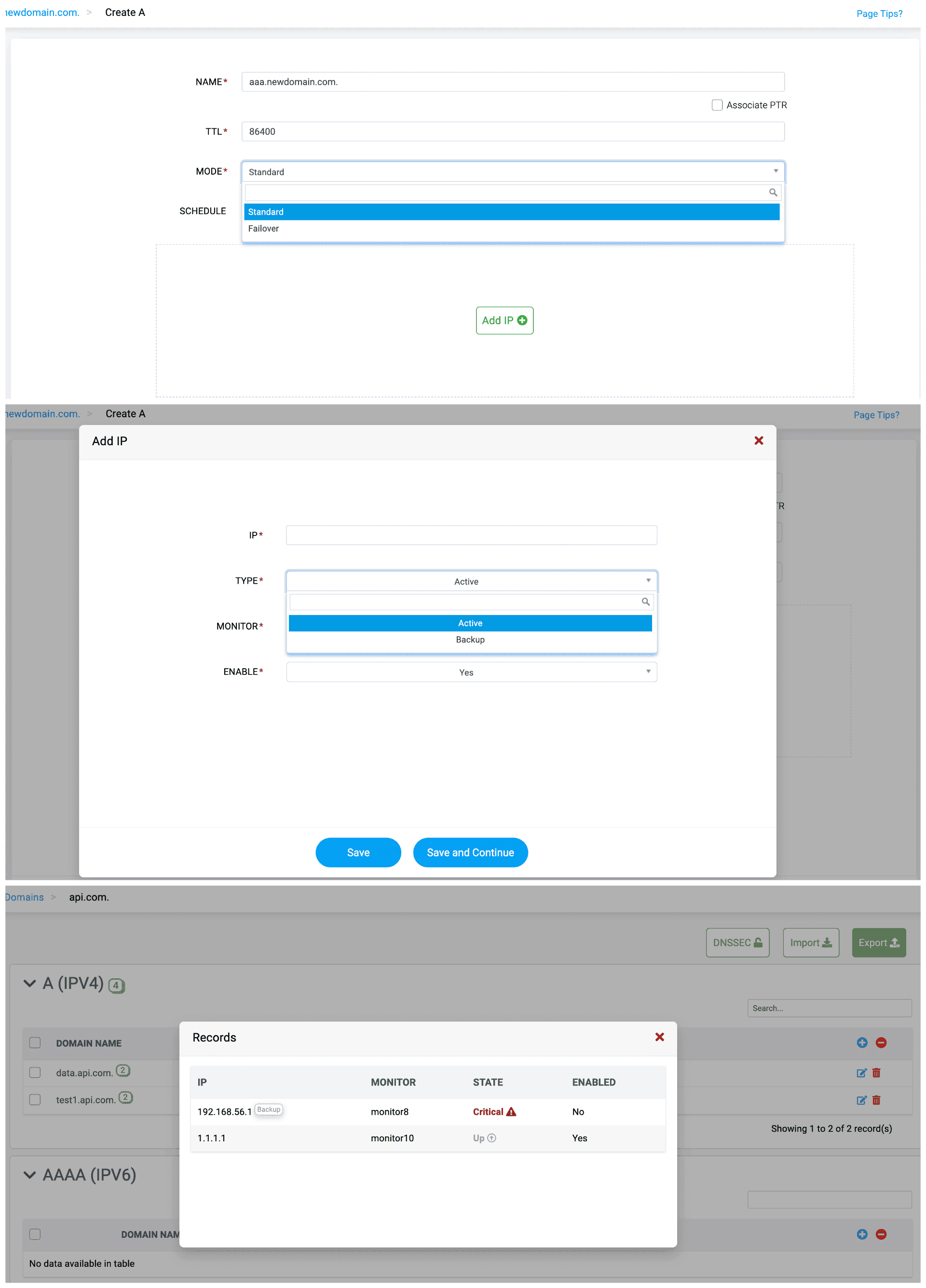
Figure 2.1: Attach active/backup hosts for each DNS response IP and see which endpoints are Up or Critical, so the resolver only serves healthy targets.
When a DNS record answers, users assume the service behind it is alive. With DDI Central 5.6, that assumption becomes measurable—and enforceable. Every probe, response, and failure is tracked in real time, and when an endpoint slips, DNS automatically pivots to the next healthy target. You’re not just resolving names anymore; you’re actively proving that only live, responsive endpoints are served.
One monitor cockpit for every probe
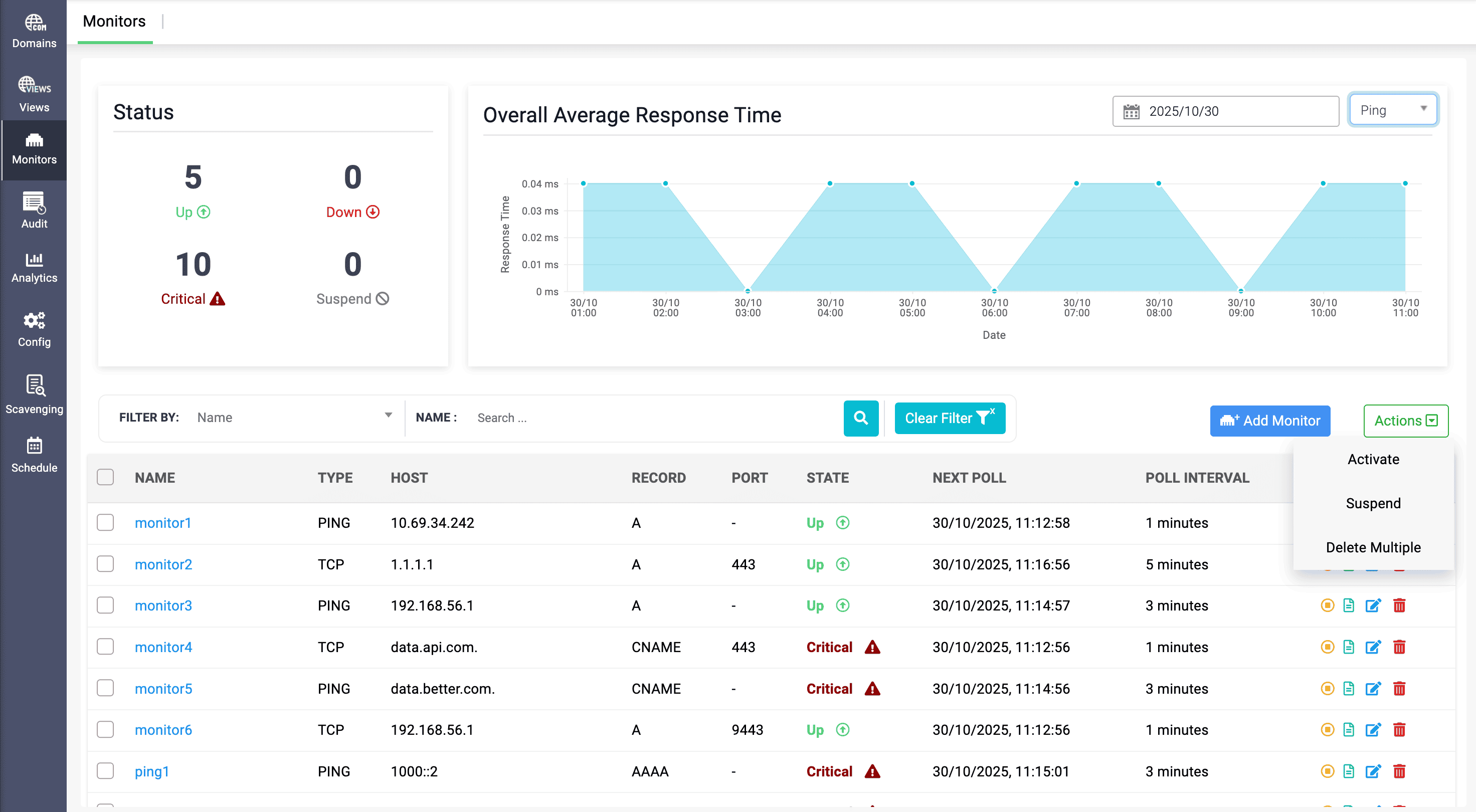
Figure 2.2: All monitors, one health console—see status, response time, and control actions for every Ping/TCP check in a single view.
Instead of scattering health checks across scripts and tools, DDI Central brings all Ping and TCP monitors into a single console. You receive a real-time view of uptime and response across distributed endpoints, with response times, success/failure ratios, and availability plotted as clear timelines. Each monitor carries its full context—host, port, type, associated DNS records, and polling interval—so when something goes awry, admins instantly know what is failing, where, and how often, and can triage from the same screen without jumping between pages.
Turn DNS into a health-aware traffic gatekeeper
Monitors are not passive—they directly inform how DNS answers. You define how endpoints are probed, how frequently they’re checked, and how many failures it takes to call a host Down. Driven only by real, sustained issues instead of jitter, those state-change alerts double as forensic markers for post-mortems, showing exactly when health shifted.
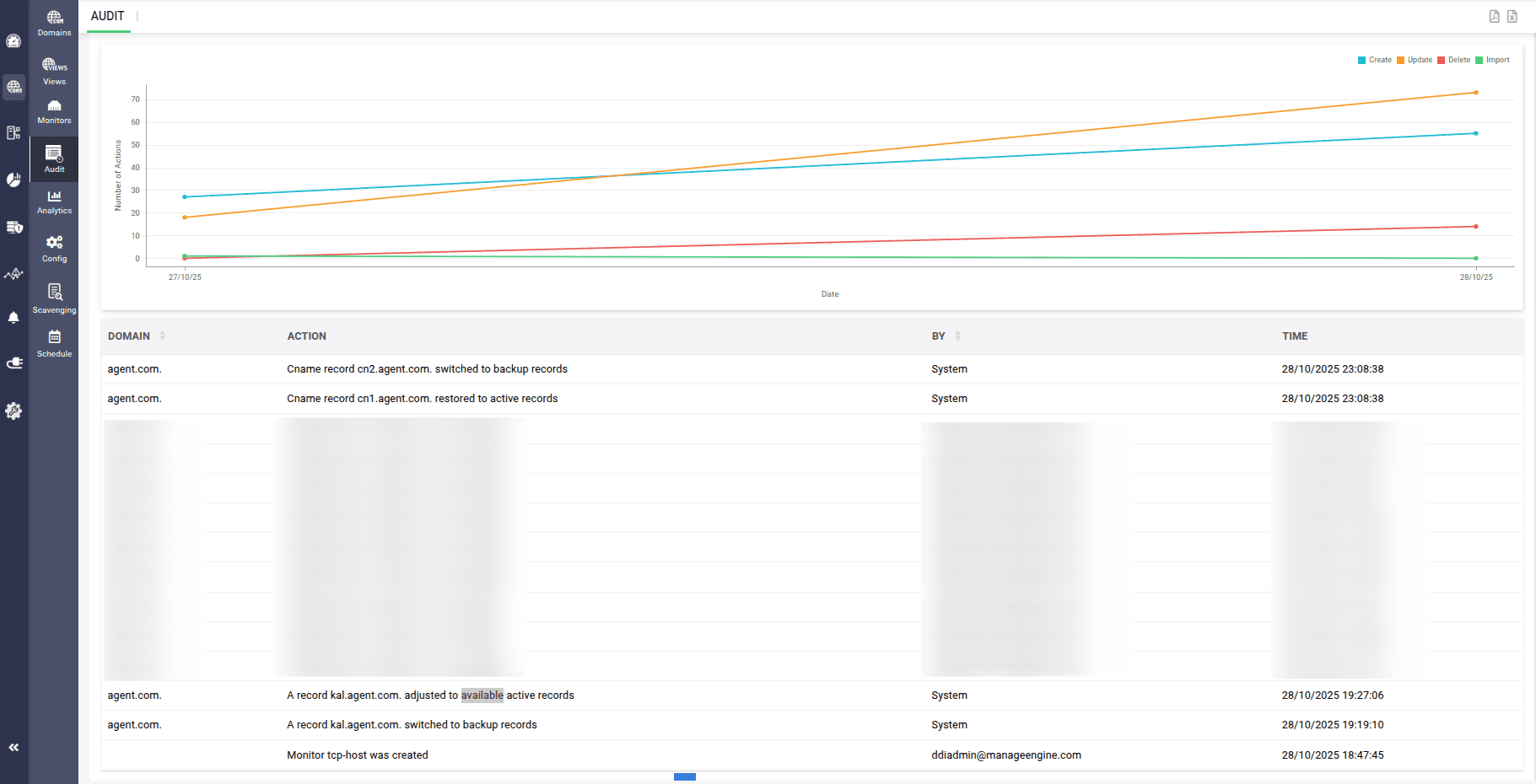
Figure 2.3: Every failover captured—CNAME and A records switching between active and backup endpoints are fully logged for DNS audit and compliance.
Behind the scenes, monitors attached to IPs ensure DNS only returns healthy endpoints and automatically fails over to backups when a primary goes critical. During maintenance, staged rollouts, or migrations, you can selectively enable or disable IPs so only chosen endpoints receive traffic—giving you DNS-level control over what resolves, and what stays dark, without sacrificing safety or uptime.
3. Cisco DHCP management: Enterprise control without the CLI
With DDI Central 5.6, Cisco DHCP finally moves out of scattered router CLIs and into a single, policy-driven console. For IOS-XE and IOS-XR, you can centralize every scope, standardize every change, and see DHCP behavior in sync with DNS and IPAM services with the same clarity you expect from your core DDI services.
Move Cisco DHCP out of the CLI
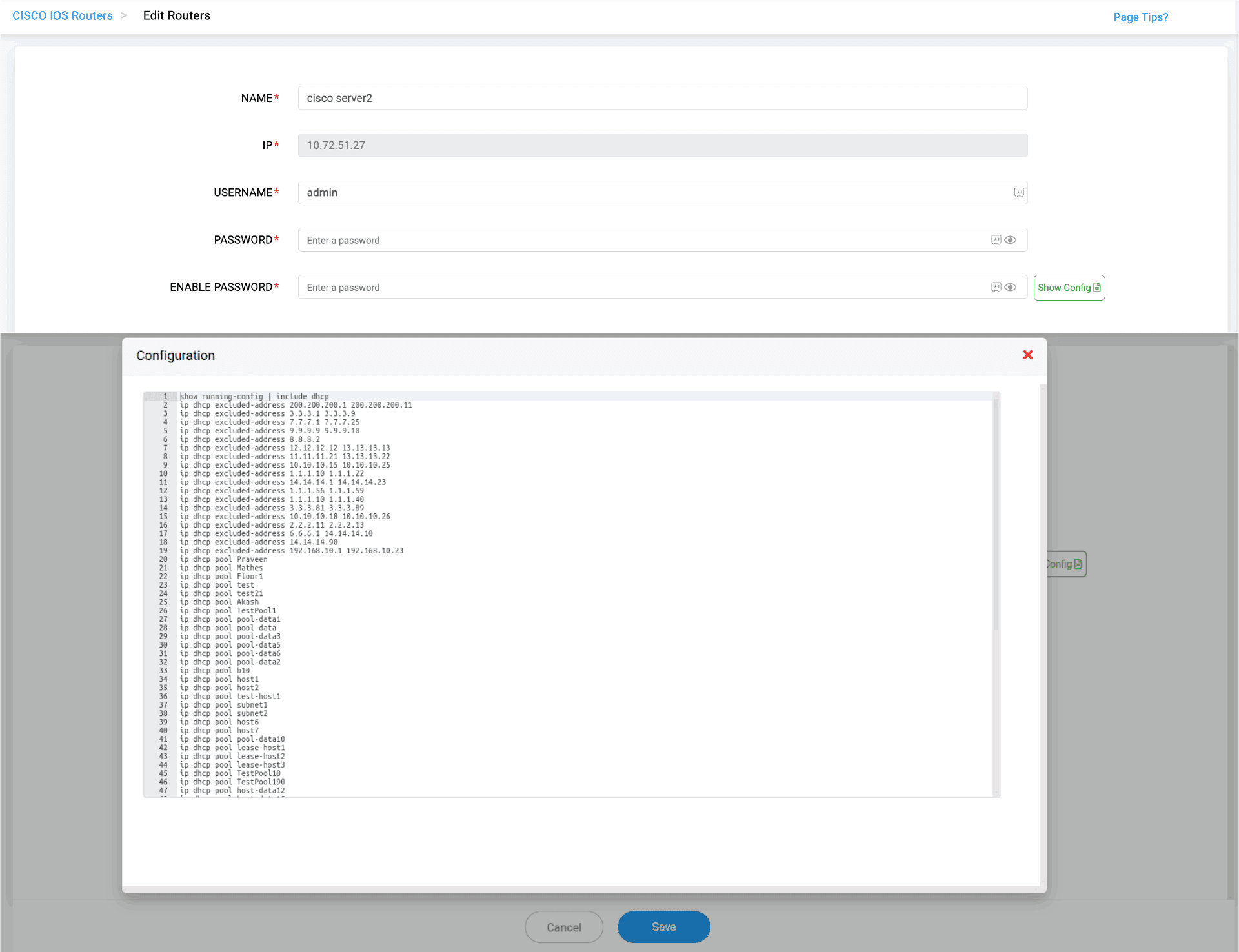
Figure 3.1: Audit the router without the CLI—pull a live Cisco DHCP running-config snapshot directly into DDI Central.
With DDI Central 5.6, Cisco DHCP finally moves out of scattered router CLIs and into a single, policy-driven console. From IOS-XE to IOS-XR, you centralize scopes, standardize changes, and see Cisco lease behavior with the same clarity you expect from your core DDI stack.
See every lease and config from one pane
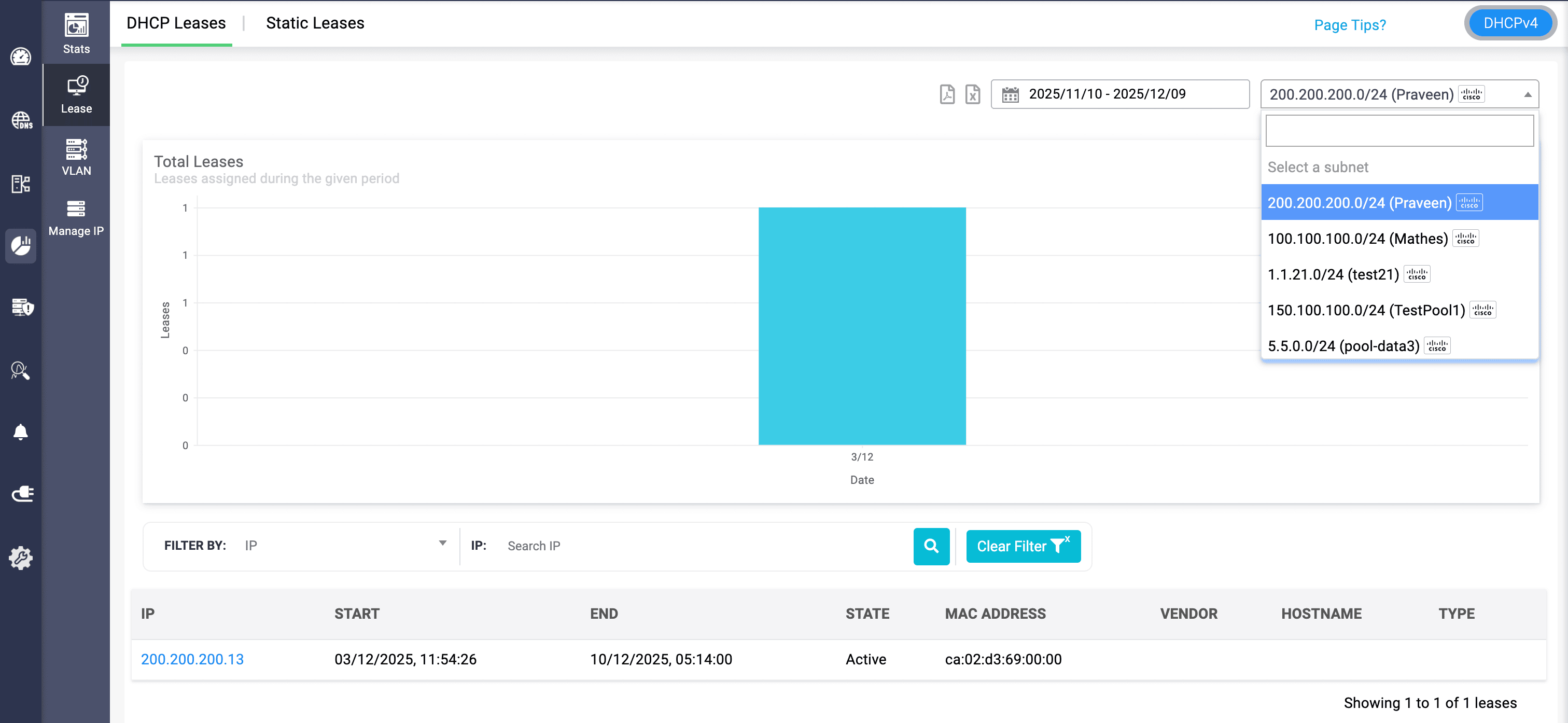
Figure 3.2: Drill into Cisco lease activity per subnet—see when an IP was leased, for how long, and to which MAC address.
Store Cisco device credentials once and securely reuse them to pull live configuration snapshots on demand. Exclusions, pools, bindings, and reservations from multiple routers appear in a single view, so admins can validate DHCP rules and confirm that router configs actually match intent—without touching the CLI. Long-forgotten pools and stale exclusions are surfaced for safe clean-up, while built-in DHCP audit logs aggregate activity across routers for RCA, compliance, and incident reviews.
Design-aligned pools for IPv4 and IPv6
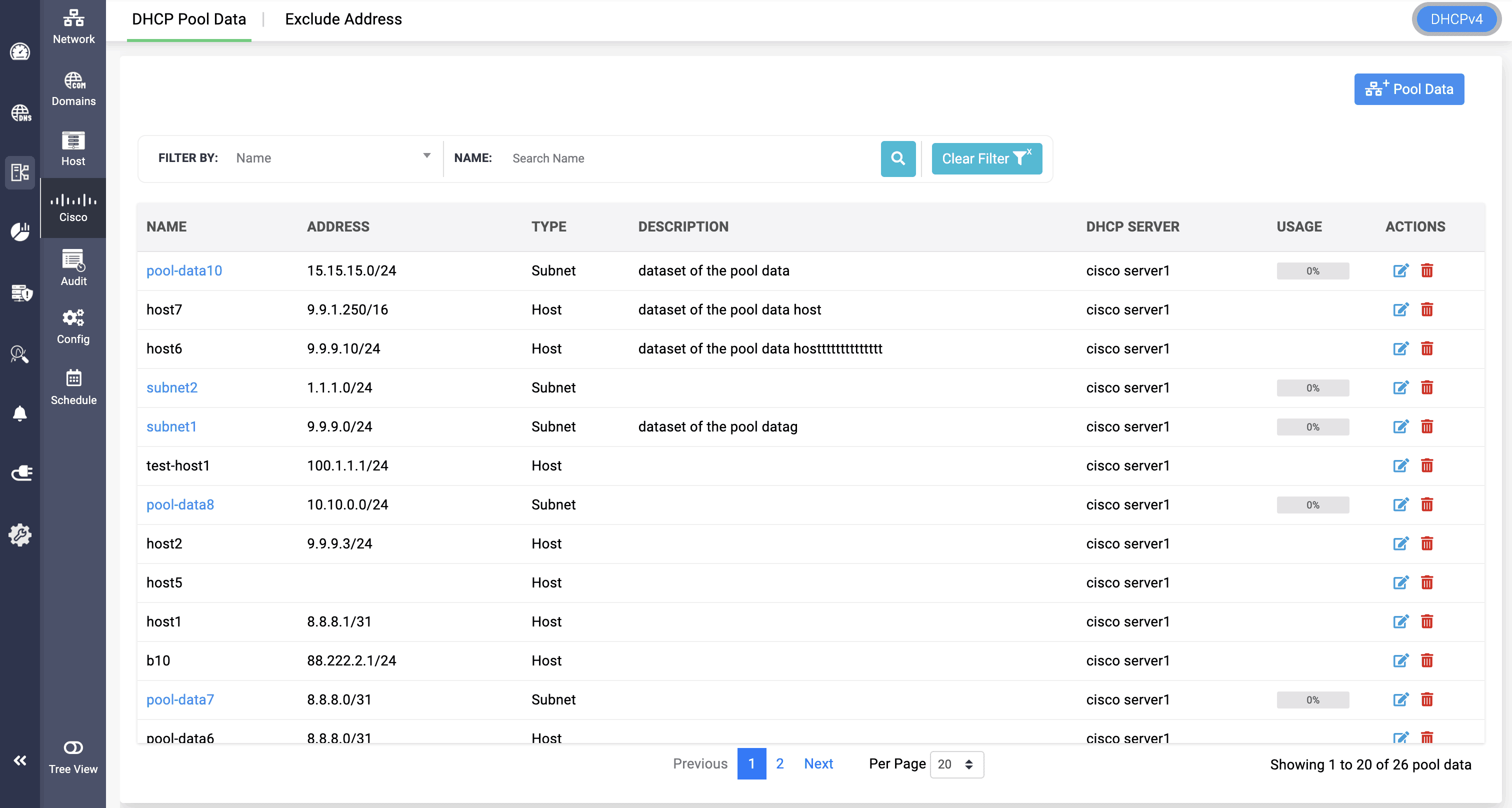
Figure 3.3: Catalog every Cisco DHCP pool—subnets and hosts, their usage, and the serving router all listed in one console.
On the pool side, DDI Central 5.6 empowers you to design DHCP behavior centrally and push it consistently across IOS-XE/XR. You define subnet ranges, VLANs, pool usage limits, allocation rules, and global exclusions so critical infrastructure and static ranges are never handed out by mistake. Custom DHCP options handle DNS servers, boot files, and vendor parameters, and the same model extends cleanly to DHCPv6—covering dual-stack rollouts and modern endpoint onboarding.
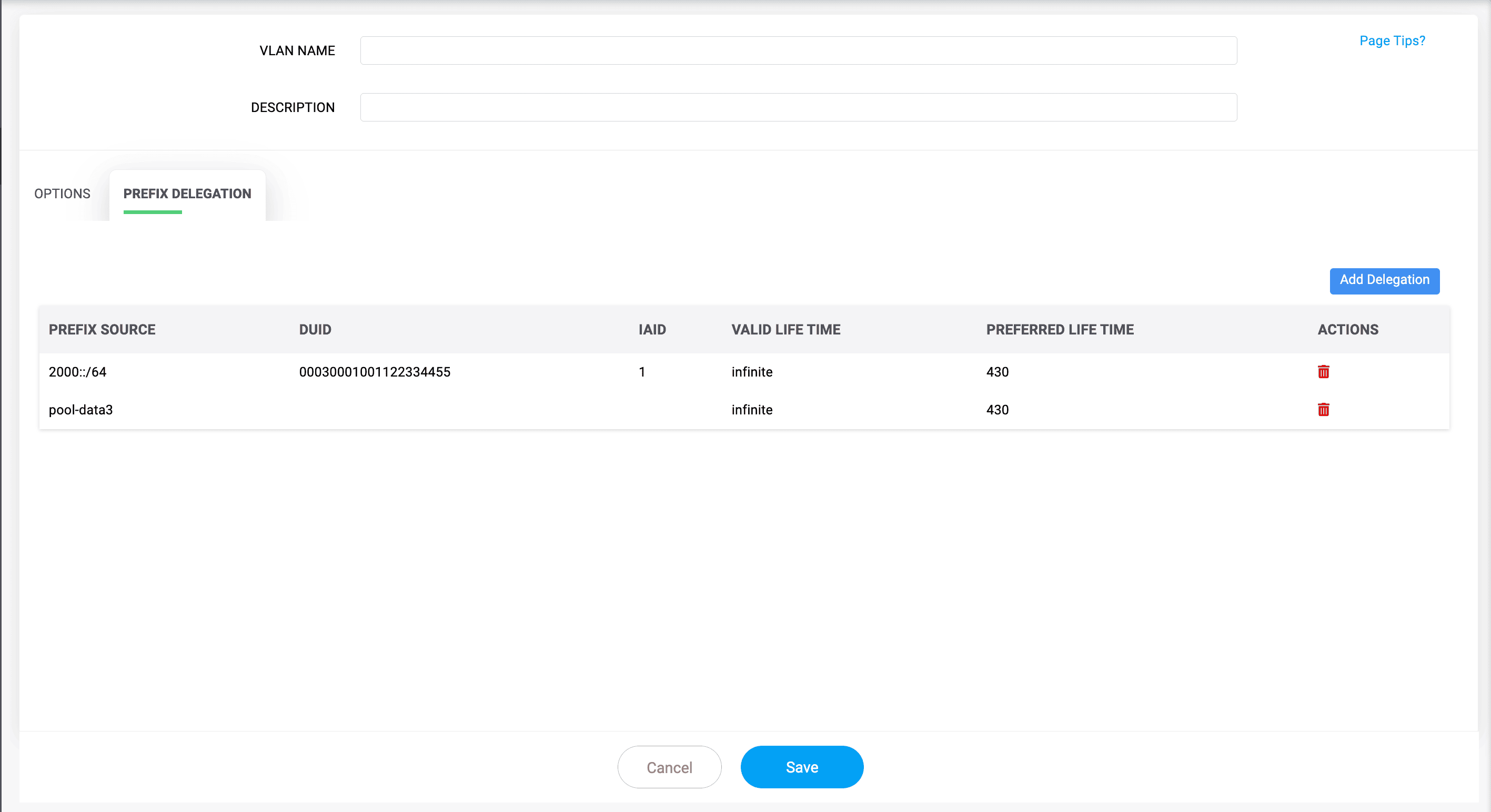
Figure 3.4: Centralize IPv6 prefix delegation—define DUIDs, IAIDs, custom options, and lifetimes for Cisco DHCPv6 prefixes in one pane.
Prefix delegation is configured with the right DUIDs, IAIDs, lifetimes, and source prefixes, giving downstream networks stable, predictable IPv6 space and turning Cisco DHCP into a unified, observable, compliance-ready control plane.
Prove compliance with built-in DHCP audit logs
All DHCP activity from your Cisco routers is also aggregated into built-in DHCP audit logs inside DDI Central. That means no more SSH sessions, manual log scraping, or device-by-device checks during a crisis. Historical logs are retained for RCA, compliance, and reporting, so when someone asks what happened, when, and which router handled it, the answer is already documented.
Let pools power DNS records and IP utilization
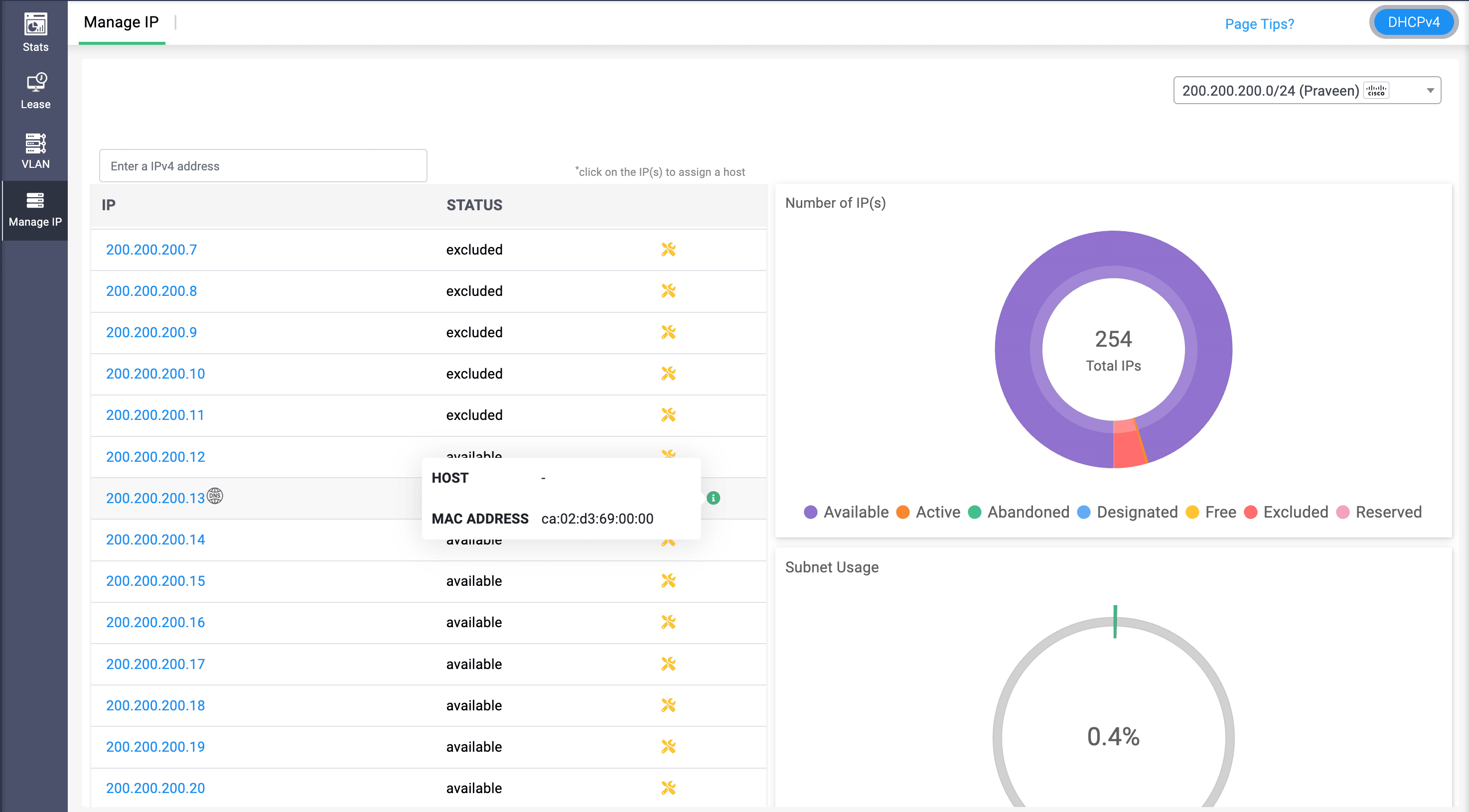
Figure 3.5: Track Cisco scope utilization at a glance—IP status, MAC identity, and subnet utilization from a single Manage IP view.
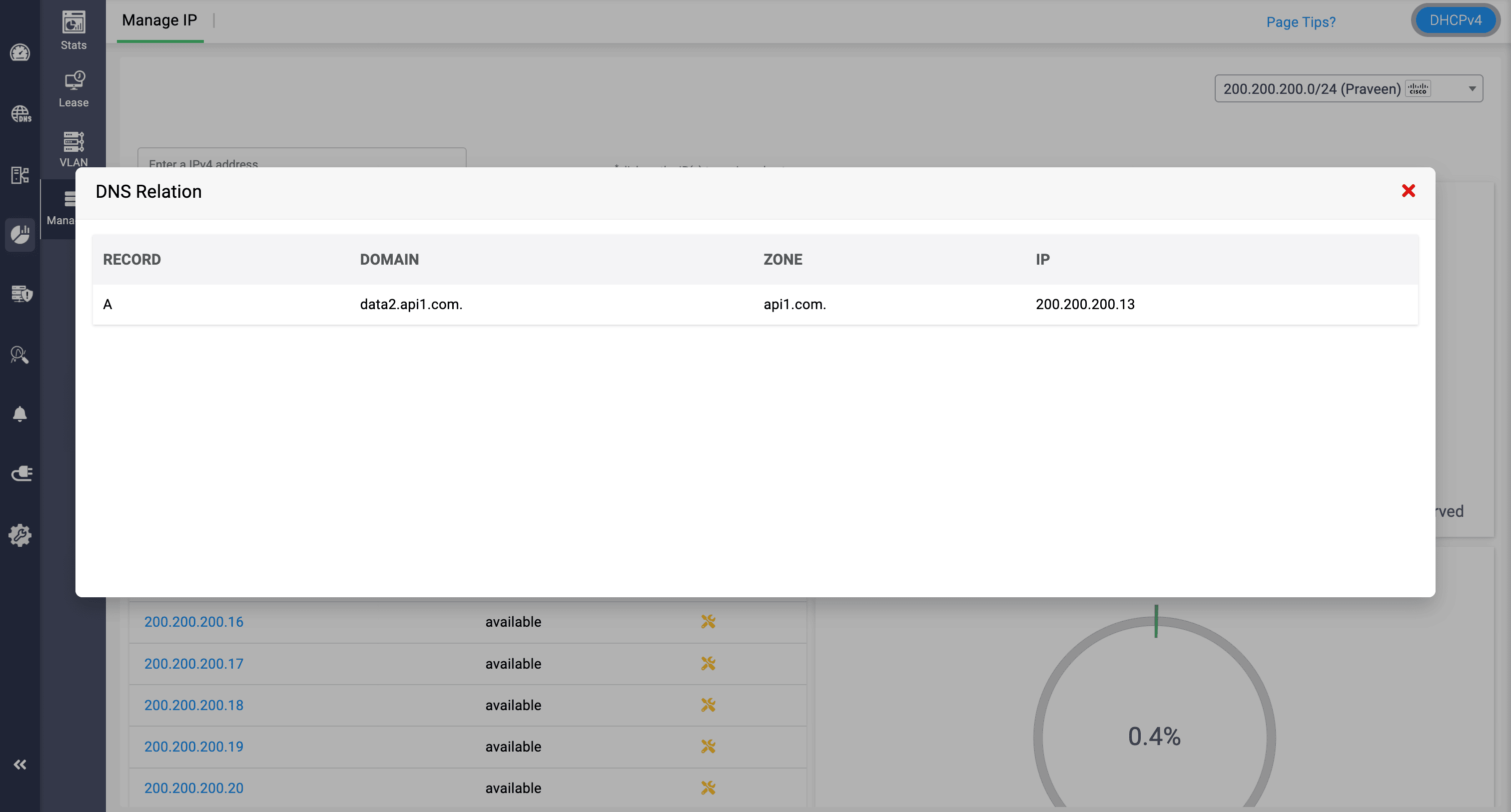
Figure 3.6: See which DNS records depend on each Cisco DHCP IP—instantly map an address to its A record, domain, and zone.
Associate Cisco pools directly with DNS records. When you create or update records, IP addresses can be auto-assigned from designated pools, keeping DNS, DHCP, and IPAM perfectly in sync. At the same time, IP utilization across Cisco scopes is visualized in IPAM, so you see free versus used space, hot pools, and growth trends at a glance—turning Cisco DHCP from router-by-router plumbing into a visible, governed address fabric.
4. DNS query and DHCP lease forecasting: Capacity that thinks ahead
Spikes in traffic, slow-burning growth, and silent configuration issues all show up first in your DNS and DHCP patterns. With DDI Central 5.6, forecasting turns those patterns into a forward-looking instrument panel. Instead of waiting for resolvers to strain or scopes to creep toward exhaustion, you see where demand is headed—numerically, visually, and in time to act.
DNS query forecasting: Tune infrastructure before traffic hits
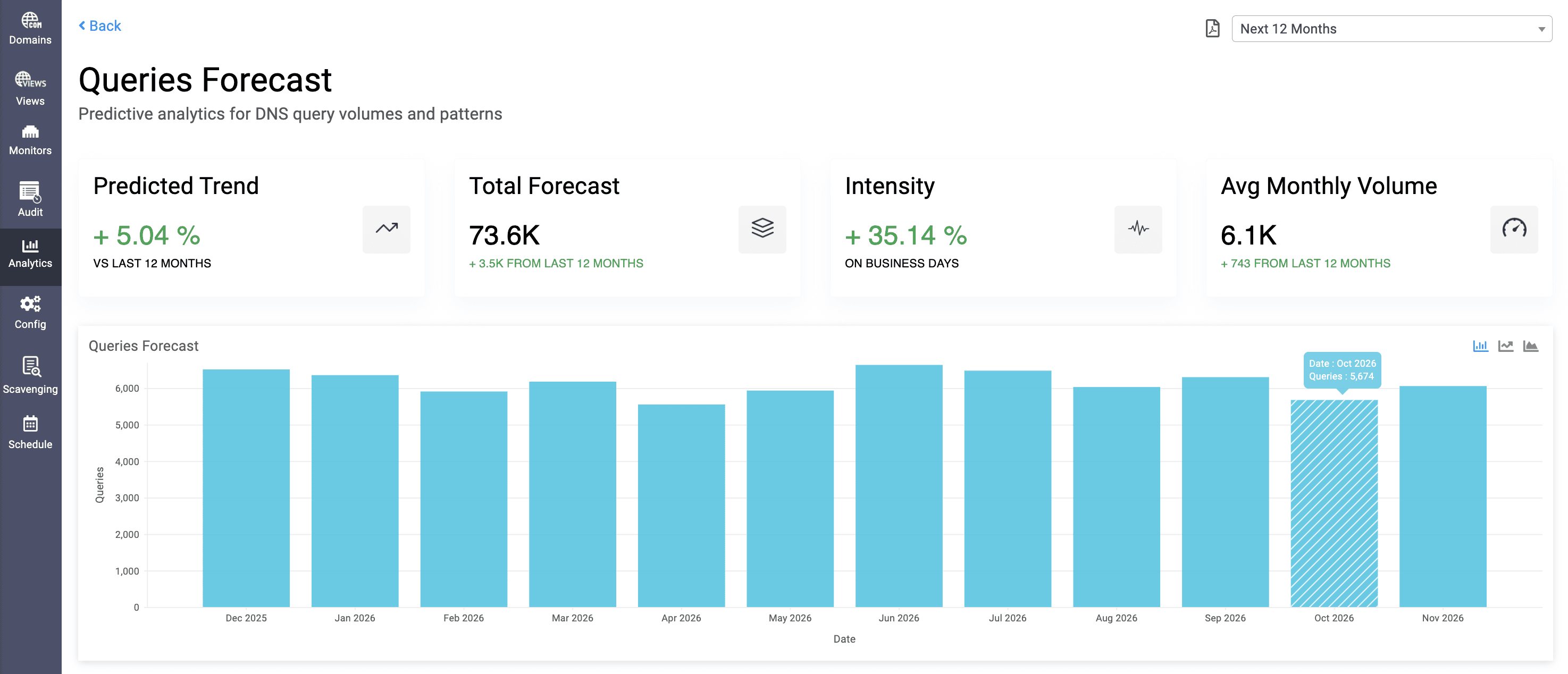
Figure 4.1: Review previous DNS traffic data and patterns to determine into capacity foresights with query trend, intensity, and volume forecasts.
See tomorrow’s query load, today
DNS query forecasting in DDI Central 5.6 gives you an early read on how demand will evolve, so scaling is proactive, not reactive. For any selected window, it projects whether queries will rise or dip against historical baselines—turning raw history into concrete capacity numbers you can actually plan around. You don’t just see totals; by contrasting business versus non-business hours, you see when demand really hits, including off-hour surges and quiet windows that typical dashboards blur out.
Watch patterns long before they become problems
Time-series forecasts surface peaks, troughs, and recurring cycles on a clear timeline, helping you schedule maintenance during genuine low-traffic periods and scale resolvers ahead of predicted spikes. When you need precision, Forecast Now in the Analytics module generates predictive views for individual hosted domains—authoritative zones, response policy zones, and reverse zones—so you can right-size capacity at the zone level, not just at the server or cluster level.
Turn forecasts into decisions, not just charts
When those insights need to leave the console, DNS (and DHCP) forecasts can be exported as polished PDFs—ready for audits, SLA reviews, capacity planning sessions, or executive briefings. Forecasting stops being “a nice graph” and becomes a repeatable input into how you design and grow your infrastructure.
DHCP lease forecasting: Never be surprised by an empty pool
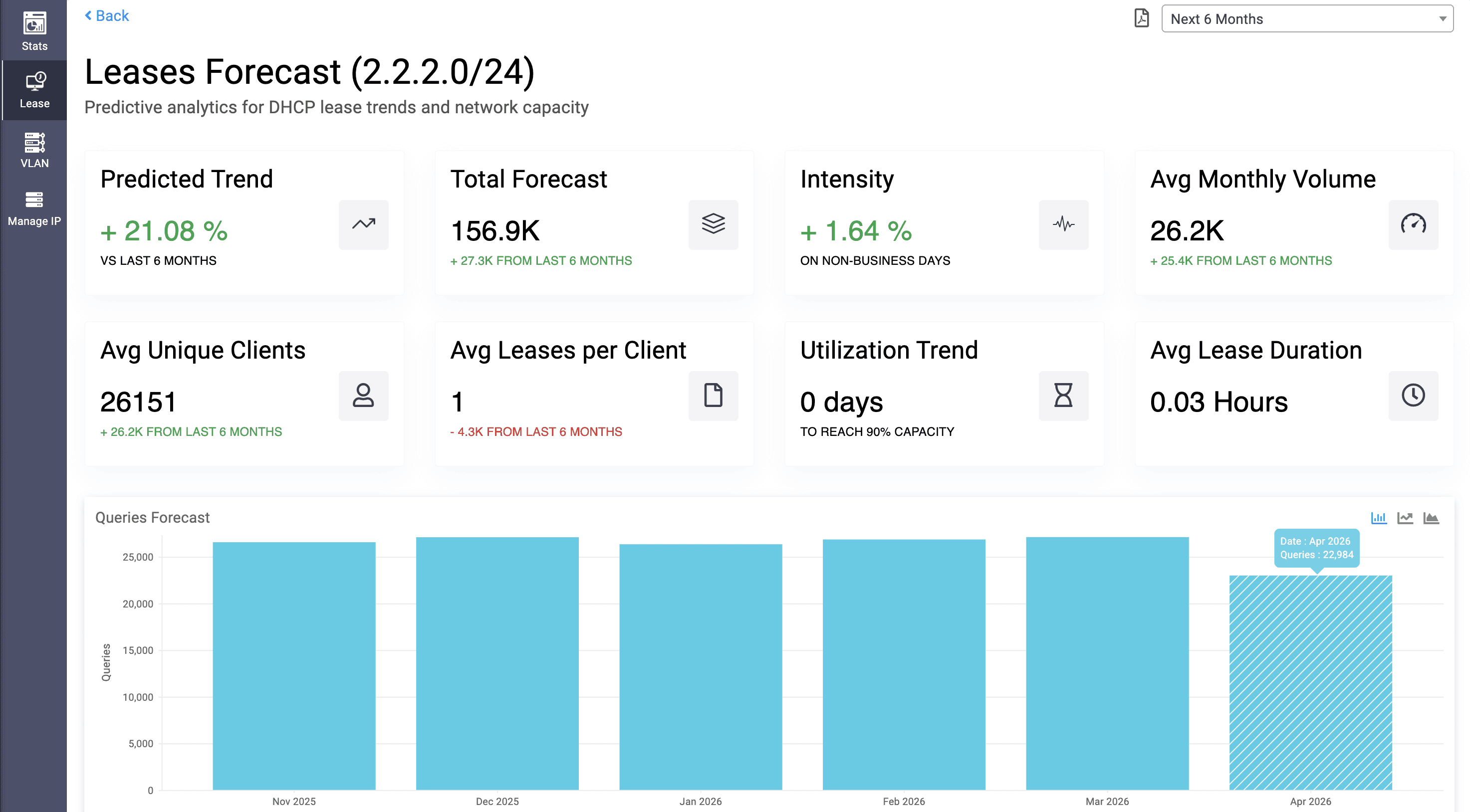
Figure 4.2: Stay ahead of exhaustion—track lease forecasts, client intensity, and days to 90% capacity for every DHCP scope.
See how fast your address space is filling
On the DHCP side, forecasting shows how quickly your pools are being consumed—and how that’s likely to change. DDI Central 5.6 analyzes historical lease patterns to project future volumes over chosen timeframes, so you know in hard numbers what tomorrow’s load looks like. Trend views reveal whether demand is climbing or flattening, and comparisons between business-hours and off-hours activity expose hidden peaks—overnight jobs, regional bursts, or after-hours access—that quietly push scopes toward saturation.
Find hidden churn before it hurts capacity
DHCP forecasting also surfaces how healthy your address usage really is. Metrics like average leases per month, average distinct clients, and average leases per client help you separate normal growth from misconfiguration-driven churn. A projected days to 90% utilization counter tells you how long you have before a pool enters the danger zone, while average lease duration gives you a tuning knob to balance stability with flexibility in your renewal policies.
Plan growth with evidence, not intuition
All of this is visualized as a timeline of predicted lease activity, making cycles, seasonal spikes, and slow climbs easy to spot at a glance. Just like with DNS, you can export forecast summaries for capacity planning and long-term scalability discussions—so expanding address space, redesigning scopes, or justifying budget becomes a data-backed decision, not a gut call.
Together, DNS query and DHCP lease forecasting transform DDI Central 5.6 into more than a monitoring platform—it becomes an early warning and planning system for the health of your entire IP infrastructure.
5. DNS zone versioning: Rewind safely, recover precisely
Outages caused by a single bad DNS change are some of the most painful—and most avoidable—incidents in any network. With DDI Central 5.6, DNS zone versioning turns your zones into fully tracked, easily reversible configuration assets. Your DNS history is no longer a mystery buried in manual backups; it’s a navigable timeline that only DDI Central admins can inspect, compare, and roll back with confidence.
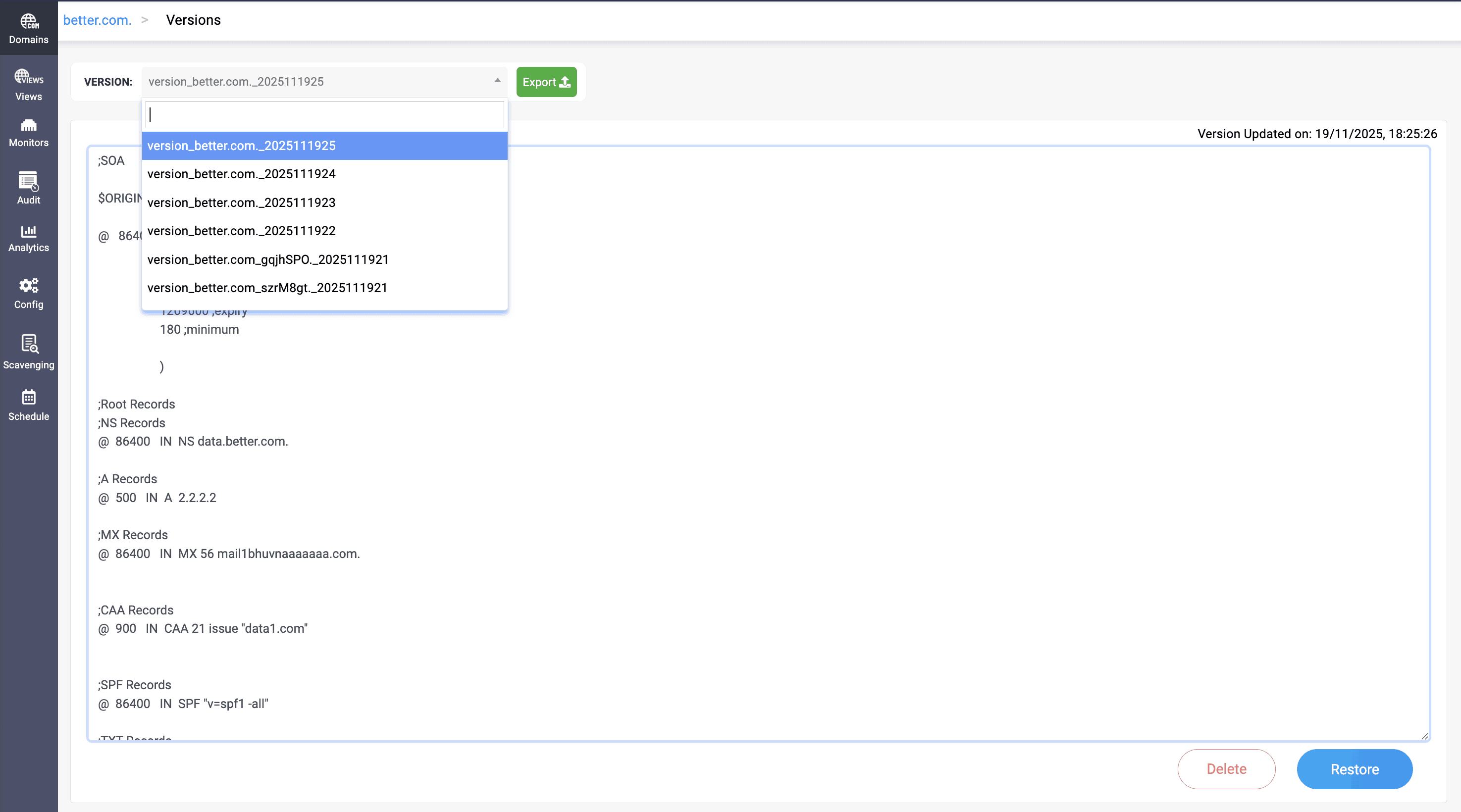
Figure 5.1: Every DNS change captured—pick a version, review the zone file, then restore or export in one click.
Turn every zone into a navigable history
Single bad DNS changes shouldn’t bring down entire services. With DDI Central 5.6, DNS zone versioning turns each zone into a fully tracked, easily reversible configuration asset. You can see up to the last 30 versions of any zone—timestamped and contextualized—and compare then versus now to pinpoint exactly which records were added, deleted, or modified before things broke.
Know what’s live, what’s dormant, at a glance
Versioning also makes monitored zones easier to reason about. Records tied to monitors in down, suspended, or critical states appear as commented entries, so it’s instantly clear which endpoints are effectively dark versus serving traffic. Smaller zones can be previewed inline; larger ones can be exported for deeper offline analysis or peer review, without leaving DDI Central.
Rollback mistakes in a single click—with a paper trail
When something does go wrong, recovery isn’t a manual restore ritual. You can promote any previous version to the active zone with one click—ideal for undoing faulty updates, failed roll-outs, or misapplied policies.
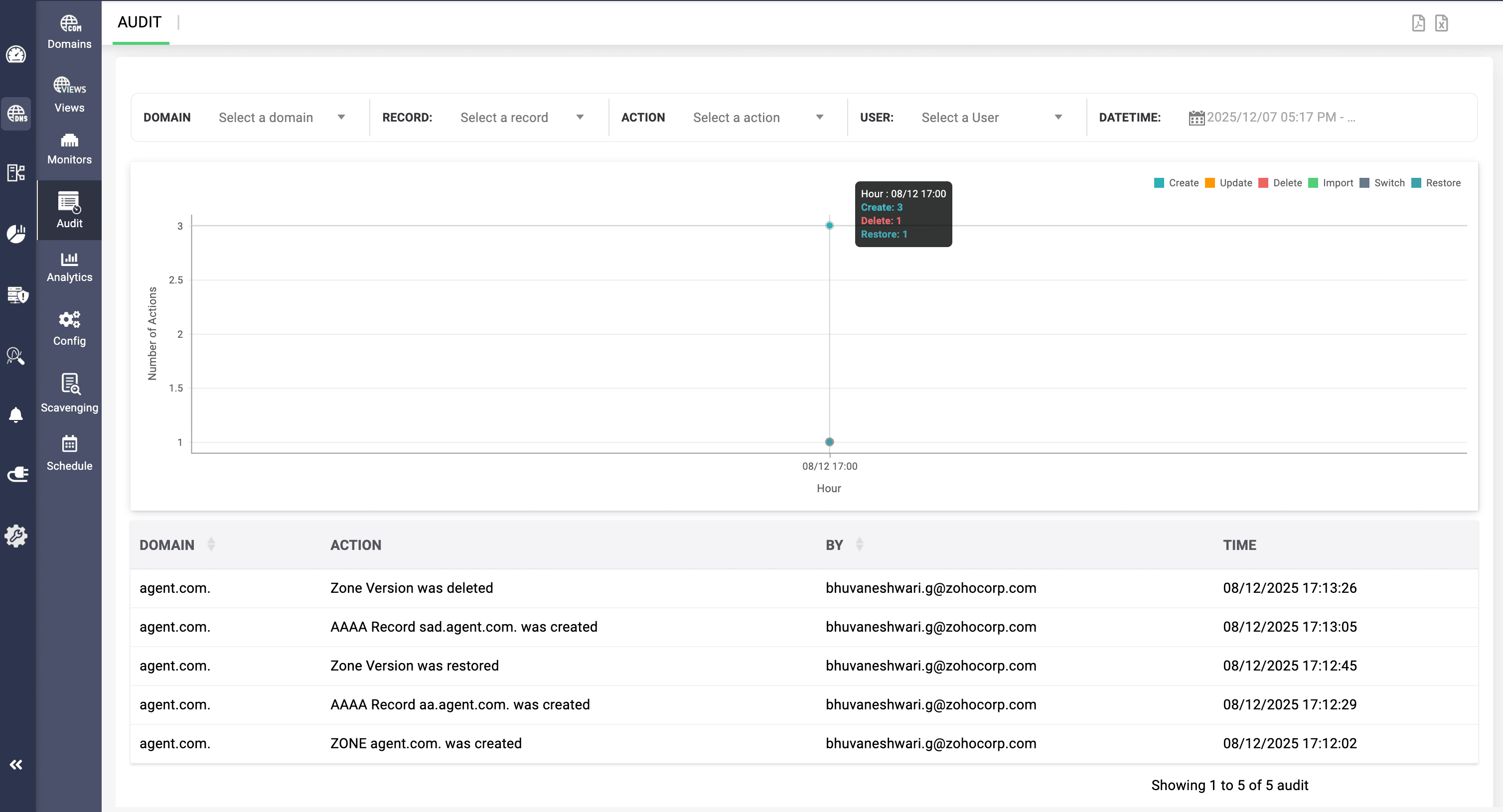
Figure 5.2: Change management at a glance—track DNS actions by domain, user, and timestamp from a single audit console.
Every restore operation, and every version deletion, is captured in DNS audit logs, so you always know who rolled back what, and when. Versions can also be exported as backups or imported into other environments to support synchronized DNS recovery, testing, or cross-site replication, while older, redundant versions can be pruned to keep history lean and meaningful.
Protect production with controlled restores
Crucially, DDI Central 5.6 safeguards what’s live. When you restore an older zone version, any records under monitoring stay locked to their current values, so rollbacks can’t overwrite the records your health checks are actively using. Role-based access controls ensure that admins alone can view, compare, restore, export, and delete versions—with every action fully audit-tracked to align with your change-management and security policies. On the other hand, guest users are limited to read-only access to archived versions.
Ready to evolve your DDI stack?
DDI Central 5.6 invites you to run your existing DNS, DHCP, and IPAM with a different level of intelligence. The same signals you’ve always had—queries, leases, logs, router configs—are now stitched together into anomalies, forecasts, and health-aware controls you can actually act on. That’s the real shift: your DDI stops being a background utility and starts behaving like an active participant in security, capacity planning, and uptime.
The new version 5.6 gives you levers you didn’t have before: quarantine that doesn’t wait for you, forecasting that doesn’t guess, monitoring that doesn’t assume, and DNS change control that doesn’t rely on hope. The question isn’t just what’s new—it’s how quickly you want this level of awareness in your stack.
Upgrade to 5.6 today— or start your 30-day free trialto see how smart, secure, and self-aware DDI can be.