

- Home
- Scalability
- Understanding scalability in Log360
Scalability in Log360
Enabling growth, performance, and continuity across enterprise environments
On this page:
- Introduction
- Managing security at scale
- The principles of Log360's scalable architecture
- Scalability Architecture
- Log360's architectural components
- The data flow pipeline
- The Architecture in Practice: Common Scenarios
Introduction
This foundational guide details the scalable architecture of ManageEngine Log360. It provides a comprehensive overview of the components, architecture, and data processing pipeline that enable Log360 to deliver performance, security, and resilience at scale.
What this document covers:
- Scalability challenges enterprises face: An overview of the hurdles in managing security data at scale.
- Principles of a scalable architecture: A breakdown of the core principles that enable scalability, security, and high availability.
- Log360's architectural components: A deep dive into the log processor cluster, and role-based specialization.
- The data flow pipeline: An overview on how logs are ingested, processed, and stored, illustrated with a deployment scenario.
Managing security at scale
Enterprises today face critical operational hurdles that stem not just from the sheer volume of logs, but also from increasing infrastructure complexity, geographically distributed environments, and the need for resilient, always-on security operations.
These challenges include:
- Exponential data growth: Log sources have expanded from on-premises servers to include cloud infrastructure, SaaS applications , and remote endpoints, leading to unpredictable and massive data streams that can overwhelm single-server solutions.
- Performance degradation: As log volume increases, a single-server centralized platform often suffers from critical performance bottlenecks in parsing, correlation, and searching. This can lead to missed threat detections and delayed incident response.
- Complex, distributed environments: Managing log collection from multiple branch offices, public cloud VPCs, and a remote workforce creates significant security and operational overhead. Centralizing this data securely without exposing the core network is a major hurdle.
- Lack of service continuity: A failure in a single-server system results in a complete loss of security visibility, leaving the organization blind to threats.
To address these challenges, Log360 is built on a multi-tier and scalable architecture that separates SIEM functions such as log collection, processing, search, and correlation into independent yet connected layers. This design enables each function to scale, adapt, and be managed independently.
The principles of Log360's scalable architecture
Log360's ability to perform at enterprise scale is based on a set of core architectural principles working together. These principles define how Log360 delivers performance, security, and reliability.
They include:
- Horizontal scalability
- Workload distribution
- Multi-tier architecture
- Reliability through log queuing system
- Availability
- Security
The following table maps these core principles to the specific Log360 components that implement them.
| Principle | How it's Implemented in Log360 |
|---|---|
| Horizontal scalability | Log360's total processing capacity can be linearly increased by adding more server nodes to handle growing log volumes. |
| Workload distribution | Workload is distributed by forwarding incoming logs to multiple processing nodes, preventing overload on any single server. |
| Multi-tier architecture | Role-based specialization - This approach decouples SIEM functions such as log processing, indexing, searching, and correlation, and distributes them across multiple server nodes. By isolating resource-intensive tasks, it optimizes performance and ensures they do not affect other operations. |
| Reliability | Log queuing system - Log360 uses distributed streaming mechanism to temporarily store incoming logs in categorized log storage queues. This allows logs to be collected at high speed and processed asynchronously. The buffering mechanism ensures reliable delivery and smooth handling of logs, even during periods of high volume . |
| Availability | Log360's scalable architecture features multiple layers of failover, from the web server to individual processing roles, ensuring service continuity and preventing data loss during component failures |
| Security | Access Gateway Cluster - A critical security layer for distributed infrastructures, it is deployed in a DMZ to centralize log collection while protecting the internal network. Acting as a reverse proxy, it conceals internal servers, securely forwards external requests, and ensures that core systems are never directly exposed. |
Scalability Architecture
In this section, we’ll explore the high-level architecture that enables Log360 to handle large volumes of log data across diverse environments with scalability and resilience. It is designed to collect, process, and analyze logs efficiently.
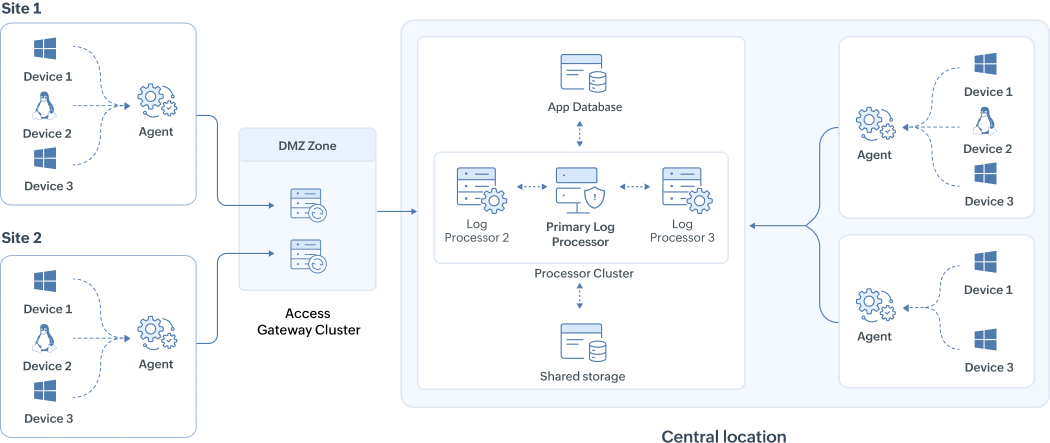
The above architecture illustration shows a scalable deployment for an enterprise with two remote sites and a central processing location. Logs from the remote sites are securely collected through an Access Gateway Cluster and then forwarded to a cluster of log processors for centralized analysis and storage. Here's the break down of the components:
- Remote sites - Agents installed at remote sites parse, filter, compress, and securely forward logs over HTTPS to the headquarters (HQ) processors.
- Access Gateway Cluster - Deployed in the DMZ, it acts as a reverse proxy that securely routes incoming logs from remote agents to the internal processors without exposing them directly to external networks.
- Central location log processors - The log processors in the central location handle all major SIEM functions, including log ingestion, enrichment with threat intelligence, queuing, indexing, search, correlation, alerting, and log forwarding. The roles can be distributed for redundancy and load balancing.
- Primary Processor - The processor cluster has a single processor that is designated as the primary node, responsible for all management functions such as configuring other processors, and managing device settings.
- JGroups communication - Processors communicate with each other over specific ports for inter-node coordination and failover support, ensuring high availability.
- Storage:
- Elasticsearch (hot storage): Stores indexed logs for fast searches.
- Archive storage (cold storage): Retains logs based on retention policies.
- PostgreSQL metadata: Maintains configuration data such as device settings, alert rules, and user preferences.
- Shared file system: Supports inter-processor coordination, Elasticsearch archives, and policy synchronization.
Data flow explained:
The Remote agents at Site 1 and Site 2 upload logs to the central log processor cluster > Access Gateway Cluster routes them to the processors > Processors collect, enrich, temporarily store logs in queue, correlate, and trigger alerts. Parallelly, logs are indexed in Elasticsearch for fast search, and archived in shared storage per retention policy.
With this high-level overview in place, the next step is to explore each component in detail. Let's break down the individual components in the next chapter to understand how they work together to ensure scalable and reliable log management and security analytics.
Log360's architectural components
This section provides a deep dive into the core components of Log360's scalable architecture. We will explore what each component is, how it functions, and how it directly contributes to scalability.
1. The log processor cluster
The log processor cluster helps achieve the multi-tier architecture by assigning capabilities to each log processor for balancing workload. This replaces the traditional single-server approach with a distributed framework where multiple processors share the workload.
- A Node is a single server that has Log360 installed. We refer to this as the log processor. A cluster is a group of these individual nodes that are networked together and managed as a single, powerful system.
- The log processors are always deployed at a single central location. In distributed setups, remote sites only have agents that collect and forward logs to the central processors for analysis and storage.
- The same version of Log360 has to be installed in every processor. The first installation will function as the Primary Processor. Any cluster operations, such as adding, editing, and deleting processors, can be performed only through the Primary Processor. Users can login to any processor to view the centralized dashboard, and the monitor cluster health.
How the log processor cluster enables workload distribution and horizontal scalability
Log ingestion - To ensure an evenly distributed workload across all processors, agents upload logs to available processors. This prevents any single node from becoming overloaded and improves overall system stability. As you add more nodes to the cluster, they are added to the agents' configuration, allowing the system to scale its ingestion capacity horizontally.
Functioning of the cluster for role-based specialization
Different security functions have different resource requirements. For example, log ingestion is typically CPU-intensive, while searching and correlation are highly memory-intensive. In a large environment, having one processor perform all these tasks can lead to performance contention, where a resource-heavy search query slows down critical log ingestion.
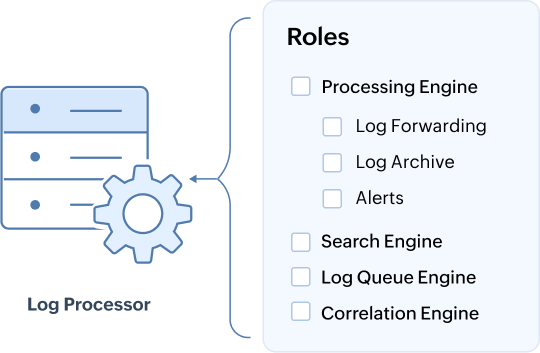
Role-based specialization: The multi-tier role-based specialization addresses performance bottlenecks by allowing specific roles to be assigned to each log processor. This is a proven pattern in high-performance data platforms as it ensures resource isolation by preventing one function from degrading another, which results in a more stable and predictable system.
It also supports scalability by letting you expand only the part of the system under strain. For instance, if searches slow down, you can simply add more nodes dedicated to the Search Engine role without impacting ingestion nodes. Here are the roles supported by Log360 in a scalable deployment:
Default roles:
- Processing Engine: Enriches parsed logs and by default handles log forwarding, alerts, and archiving.
- Log Queue Engine: Manages event flow between components and prevents data loss.
- Correlation Engine: Evaluates events against security rules.
- Search Engine: Indexes data, stores it in Elasticsearch, and handles user queries.
Optional specialized roles/custom roles: These functions can be decoupled from the Processing Engine and run on dedicated nodes for greater flexibility and performance:
- Alerts: Generates notifications from general alerts and correlation alerts.
- Log Forwarding: Sends logs to external tools or destinations for analysis or storage.
- Log Archive: Stores logs based on retention policies.
Once configured as standalone custom roles, these functions are no longer handled by the Processing Engine.
For guidance on scaling nodes and assigning roles efficiently based on your enterprise infrastructure, please refer to the capacity planning manual.
2. Queue Engine
The queuing layer of Log360 acts as the central pipeline for data movement between different components. It ensures that huge amounts of log data are handled efficiently, without losing any information, even when systems go down or workloads increase. The queuing system helps different systems in Log360 send and receive messages (log data) reliably and at very high speeds.
Key Concepts in the Queuing Layer
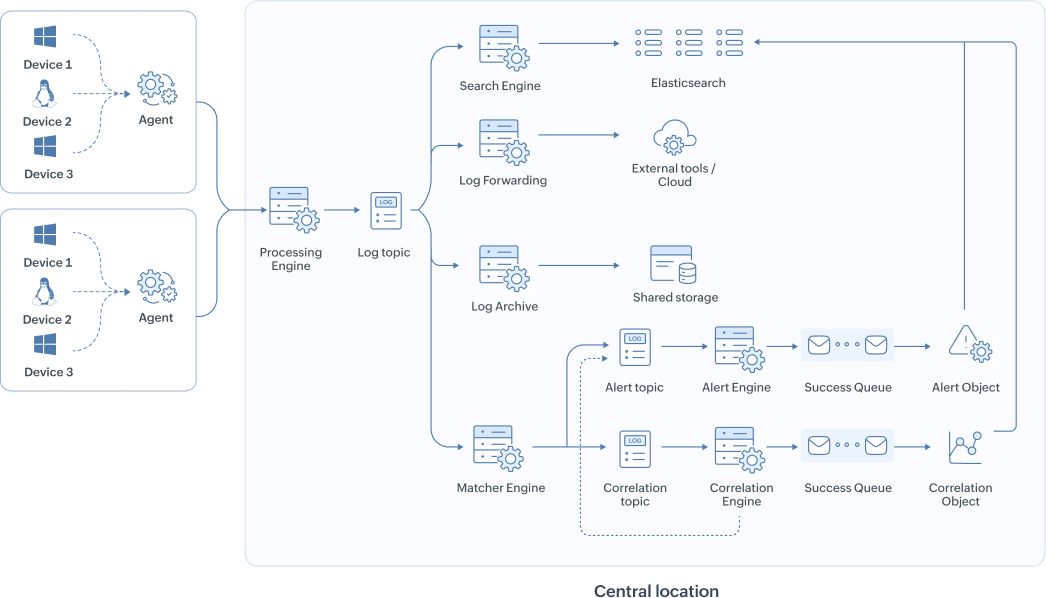
- Topics
A topic is like a folder where related messages (data) are grouped. Example: A topic may hold raw logs, another may hold processed logs, another may hold alert data.
Topics in Log360 include:
- Data enrichment topic
- Correlation topic
- Alert topic
- Log forwarder topic
- Activity topic
- Incident topic
- Partitioning
A partition splits a topic into smaller chunks to allow multiple functions to work on the same topic simultaneously, increasing speed and scalability.Think of it as splitting a big queue into multiple smaller queues so processing can happen faster.
- Replication
Every partition is copied to multiple processors. So if one processor fails, the copy from another processor can take over.This guarantees high availability and fault tolerance.
- Broker
A broker is a single node in the cluster.It stores data and handles requests to send or receive messages. In Log360, the queue cluster consists of multiple brokers in each processor working together. Each broker does not store all topics. Instead, topics and their partitions are spread intelligently across brokers for better performance and load balancing.
- Producer
A producer is any component that sends data into the queue. Example: In Log360, the processor engine acts as a producer by sending logs into the above mentioned queue topics.
- Consumer
A consumer is any component that reads data from the queue. Example: In Log360, the correlation engine and alert engine act as consumers, reading relevant data streams to process and detect threats.
- Controller Node
In a multi-node setup, a special broker becomes the controller. It is responsible for assigning partitions to brokers and managing the health of the cluster.
- Durability and Persistence
The queue stores all messages for a set time. This allows nodes that were down to catch up later.
Conclusion: The queue cluster makes sure:
- No data is lost, even if the processor nodes temporarily fail.
- Systems are decoupled into data senders (producers) and receivers (consumers) and work independently.
- Processing is scalable - more brokers can be added when log volume increases.
- Logs from multi-tenant, hybrid, or large enterprise environments can be handled efficiently.
This makes the queue cluster the backbone of Log360’s high-speed, fault-tolerant data pipeline.
3. Search Layer
The search layer in Log360 is built on Elasticsearch and serves as the engine for storing and retrieving indexed data.
Role and functions:
- Indexing: Parsed and enriched logs are sent to Elasticsearch for indexing.
- Fast retrieval and real-time search: Elasticsearch provides rapid querying across vast datasets.
4. Storage Layer
The storage layer in Log360 is responsible for data retention and archiving across different storage types depending on usage and life cycle stage.
Types of storage:
- Hot storage
- Elasticsearch indexes serve as hot storage.
- Frequently queried data resides here for fast access till the retention period, which can be configured.
- Updated by: Search Engine, Correlation Engine, Alerting Engine
- Accessed by: Search Engine(during search queries).
- Cold (Archive Storage)
- Older logs can be moved from hot storage to shared archive storage.
- Enables compliance and long-term log retention.
- Data remains query-able, but with slower performance.
- Updated by: Log Archive/Processing Engine
- Accessed by: Search Engine
- Common Database (Relational DB: PostgreSQL/MSSQL)
- Stores system metadata, configuration data, alert configurations, enrichment metadata, etc.
- Not for log storage, but essential for internal product operations and inter-component communication.
- Updated by: All processor nodes
- Accessed by: All processor nodes
- Shared storage for communication between processors
- Facilitates data exchange and coordination between multiple processor nodes in a cluster.
- Used for transferring intermediate files, maintaining synchronization, and sharing state information.
- Critical for ensuring consistent operation in multi-node deployments.
- Updated by: All processor nodes
- Accessed by: All processor nodes
Topics feeding data into storage
Below are the key topics and how they interact with storage:
| Queue topic | Purpose | Storage interaction |
|---|---|---|
| Data enrichment | Holds enriched logs ready for correlation and indexing. | Feeds data to Elasticsearch. |
| Correlation | Holds events matched by correlation rules. | Feeds data to both Elasticsearch and the common database for alerting and reporting. |
| Alert | Contains alerts generated by the Alert Engine. | Saved to the common database for ticketing and alert dashboards. |
| Log forwarding | Contains logs ready to be forwarded externally. | Not stored internally but forwarded to external security tools or cloud storage. |
| User activity | Captures system activity, configuration changes, and audit logs. | Stored in the common database and optionally in Elasticsearch. |
| Incident | Tracks incidents. | Stored and retrieved from the common database and Elasticsearch. |
The storage layer offers:
- Data retention and recoverability.
- Smooth integration between real-time data pipelines and long-term archival.
- Support for compliance regulations by maintaining historical data.
The data flow pipeline
This section explains the step-by-step journey a log takes from its source device to being available for analysis in the Log360 dashboard, applying all the architectural components we've discussed.
Example scenario: Enterprise setup and assumptions
- Central location/ HQ
- Hosts three Log360 Log Processor nodes.
- Processor 1 is the Primary Processor.
- Each processor node has the Processing Engine, Log Queue Engine, Search Engine, and Correlation Engine enabled. Alerts, Log Forwarding, and Archiving are handled by the Processing Engine by default.
- Shared storage is configured across all three nodes (NFS mount) for communication and file handling.
- Each processor has been configured to communicate with the common database.
- Total EPS handled at HQ: 8,000 EPS.
- Remote site A
- 100 devices generating 1,000 EPS.
- A lightweight log agent is configured to parse and upload to the processor cluster.
- Remote site B
- 150 devices generating 1,500 EPS.
- Uses a similar agent setup.
Data flow pipeline overview
- Log collection at remote sites
Agents at remote sites parse log formats, compress, and upload them over HTTPS to available processor nodes in HQ.
- Processor node intake and role distribution
The receiving processor node writes the incoming logs to the queue cluster after enrichment. From there, logs are consumed by the individual modules like search, correlation, alerts, and log forwarding.
- Queuing
The topics temporarily queue the logs for further processing. This works based on the Publish, Subscription model.
- Indexing and search engine
Processed logs are indexed in Elasticsearch (shared across nodes).
Search requests are load-balanced across processor nodes, but data is accessed from the common index.
- Storage handling
- Hot data: Stays in Elasticsearch for fast search (default 30 days).
- Cold data: Archived in file format (compressed and encrypted) for audit use.
- PostgreSQL handles metadata storage, alert configs, and incident summaries.
- Dashboard and analyst access
Users can access the web console to run real-time searches, view alerts, investigate incidents, and configure correlation rules. Role-based access ensures isolation of data visibility across departments and remote branches.
Summary
With all processing centralized at HQ, remote sites remain lightweight. The queuing system ensures high throughput log ingestion, while the processor nodes distribute work and storage efficiently. Elasticsearch supports real-time search and correlation, while PostgreSQL and shared file systems ensure continuity in metadata, archive management, and reporting.
This setup handles around 10,000 EPS with high availability, supports log forwarding and indexing from remote agents, and ensures streamlined log management.
The Architecture in Practice: Common Scenarios
To see how the architecture performs in a dynamic environment, this section explores several common enterprise scenarios. These examples show how the system is designed to respond to component failures, shifting workloads, and evolving operational requirements.
Scenario 1: Processor node failure in a redundant setup
- Case: An enterprise runs two processors, both configured with identical roles (Processing Engine, Log Queue Engine, and Search Engine). One of the processors experiences a hardware failure and goes offline.
- Solution: The remaining active processor seamlessly takes over the full workload. The Access Gateway Cluster automatically stops forwarding logs to the failed node. Because queue topics and Elasticsearch data are replicated across the cluster, no logs are lost and search capabilities remain online, ensuring service continuity.
Scenario 2: Failure of a node with a unique, specialized role
- Case: To handle intensive rule processing, the Correlation Engine role is assigned to a single, dedicated processor. This processor fails.
- Solution: Real-time correlation is temporarily paused, but other nodes continue to ingest, queue, and index logs, so no data is lost. Once the failed processor is restored or the Correlation Engine role is reassigned to another active processor, it processes the backlog of events from the queue, ensuring no security threats are missed.
Scenario 3: Scaling a specific function to meet demand
- Case: Analysts report that log search queries are becoming slow during peak investigation hours, creating a bottleneck for the security team.
- Solution: The enterprise can horizontally scale by adding a new processor node and assigning it a dedicated Search Engine role. This isolates the resource-intensive search function from log ingestion and processing nodes. The existing Elasticsearch cluster automatically balances the search workload to include the new node, immediately improving query performance.
Scenario 4: Adapting to a log forwarding-only requirement
- Case: A company decides to centralize its security analytics in a different tool and now only needs Log360 to collect, parse, and forward logs from its remote sites.
- Solution: The architecture is streamlined by reconfiguring roles via the Primary Processor. Roles like Correlation, Search, and Alerts are disabled, and processors are dedicated to the Processing Engine, Log Queue Engine, and Log Forwarding roles. Unnecessary nodes can be decommissioned to reduce costs, efficiently transforming Log360 into a highly scalable log forwarding pipeline.
Scenario 5: Primary Processor failure
- Case: The Primary Processor, which handles cluster management and configuration tasks, unexpectedly goes offline.
- Solution: All security operations, such as data collection, processing, search, and alerting, continue to operate on the other processor nodes without interruption. While administrative tasks like adding a new processor are paused, security monitoring is completely unaffected.
Next steps
Now that you understand the architectural principles of Log360, the next step is to plan the specifics of your deployment.
- To determine when to scale Log360, refer to the Scaling Log360 manual.
- To prepare your environment for installation, refer to the Capacity planning guide, and Plan a Scalable Deployment guide.

