

How to detect encoded PowerShell commands with Log360
PowerShell, a versatile automation tool, is often exploited by adversaries to execute commands, evade detection, obfuscate malicious activity, and remotely download and execute code. Attackers often leverage PowerShell in phishing attacks, encoding malicious commands within attachments. Common abuse methods include using attack toolkits, encoding activities, downloading payloads, loading malicious DLLs, and facilitating process injection. PowerShell's flexibility makes it a valuable tool for both legitimate and malicious activities, posing a significant security challenge.
What are encoded PowerShell commands?
Encoded PowerShell commands are PowerShell scripts or commands that have been transformed into an encoded format. This transformation serves several purposes, such as obfuscating the command to make it difficult for unauthorized parties to understand its intent at a glance and securing the transmission of the command across networks. But this encoding of commands can also be used by threat actors to encode malicious commands that prevent admins from understanding their true intent.
Legitimate uses of encoded PowerShell commands
- Automation: Administrators often encode PowerShell commands to securely automate routine tasks, ensuring they run without manual intervention.
- Configuration management: Encoded commands are used to manage and configure systems while keeping sensitive details secure.
- Secure transmission: Encoding commands ensures they are securely transmitted across networks, preventing interception by unauthorized parties.
- Task scheduling: Scheduling tasks with encoded PowerShell commands guarantees that scripts execute as intended without exposing their contents.
Malicious uses of encoded PowerShell commands
- Obfuscation by attackers: Attackers may encode PowerShell commands to obfuscate their malicious intent and avoid detection by security tools. This makes it harder for security teams to understand the command's purpose at a glance.
- Payload delivery: Encoded PowerShell commands can be used by attackers to deliver and execute malicious payloads on targeted systems. This allows them to run their malware discreetly.
- Evasion techniques: By using encoded commands, attackers can evade security measures, making it more difficult for defenders to detect and respond to their activities.
How PowerShell commands work
The most common form of encoding used for PowerShell commands is Base64 encoding. Here's how it works:
- Writing the original command: The attacker or administrator writes a PowerShell command or script.
- Encoding it: The command or script is converted into a Base64-encoded string. This process transforms the readable text into a string of characters that looks like gibberish to the casual observer.
- Executing it: The encoded command is then executed using PowerShell with a special flag that tells PowerShell to decode and run the script. This is often done with the -EncodedCommand parameter.
How to detect encoded PowerShell commands using Log360
Since PowerShell is a versatile tool that can be manipulated by adversaries, Log360 offers several predefined correlation rules that help you track PowerShell activities. One of the latest additions in the PowerShell tracking rules is the predefined correlation rule that tracks suspiciously encoded PowerShell commands. Let's look at an example to understand this.
Example
An attacker tries to execute an encoded PowerShell command to download and run malware on a company's server:
powershell.exe -EncodedCommand aGVsbG8gd29ybGQ=
When a PowerShell command doesn't follow the execution policy and contains encoding or obfuscation, it's often a sign of malicious activity. Attackers use these techniques to hide the true intent of their commands and bypass security measures.
- Legitimate command:
powershell.exe -ExecutionPolicy RemoteSigned -File script.ps1 - Suspicious command:
powershell.exe -EncodedCommand aGVsbG8gd29ybGQ=
The suspicious command uses -EncodedCommand to hide its actions, which could indicate an attempt to execute malicious code.
How the detection of encoded PowerShell commands works in Log360
The rule checks two things:
- An execution policy check: It looks for PowerShell commands that do not follow the RemoteSigned execution policy. This policy ensures that scripts coming from remote sources (like the internet) must be digitally signed to be executed, reducing the risk of running untrusted code.
- Encoded command detection: It identifies PowerShell commands that contain specific strings like -e, -en, -enc, and -w hidden -e. These strings are commonly used to encode or obfuscate commands, making them difficult to read and understand.
What happens in Log360?
- The encoded command is detected because it uses the -EncodedCommand parameter.
- The rule checks if the command bypasses normal security policies (like RemoteSigned).
- If the command matches the rule's criteria, an alert is generated.
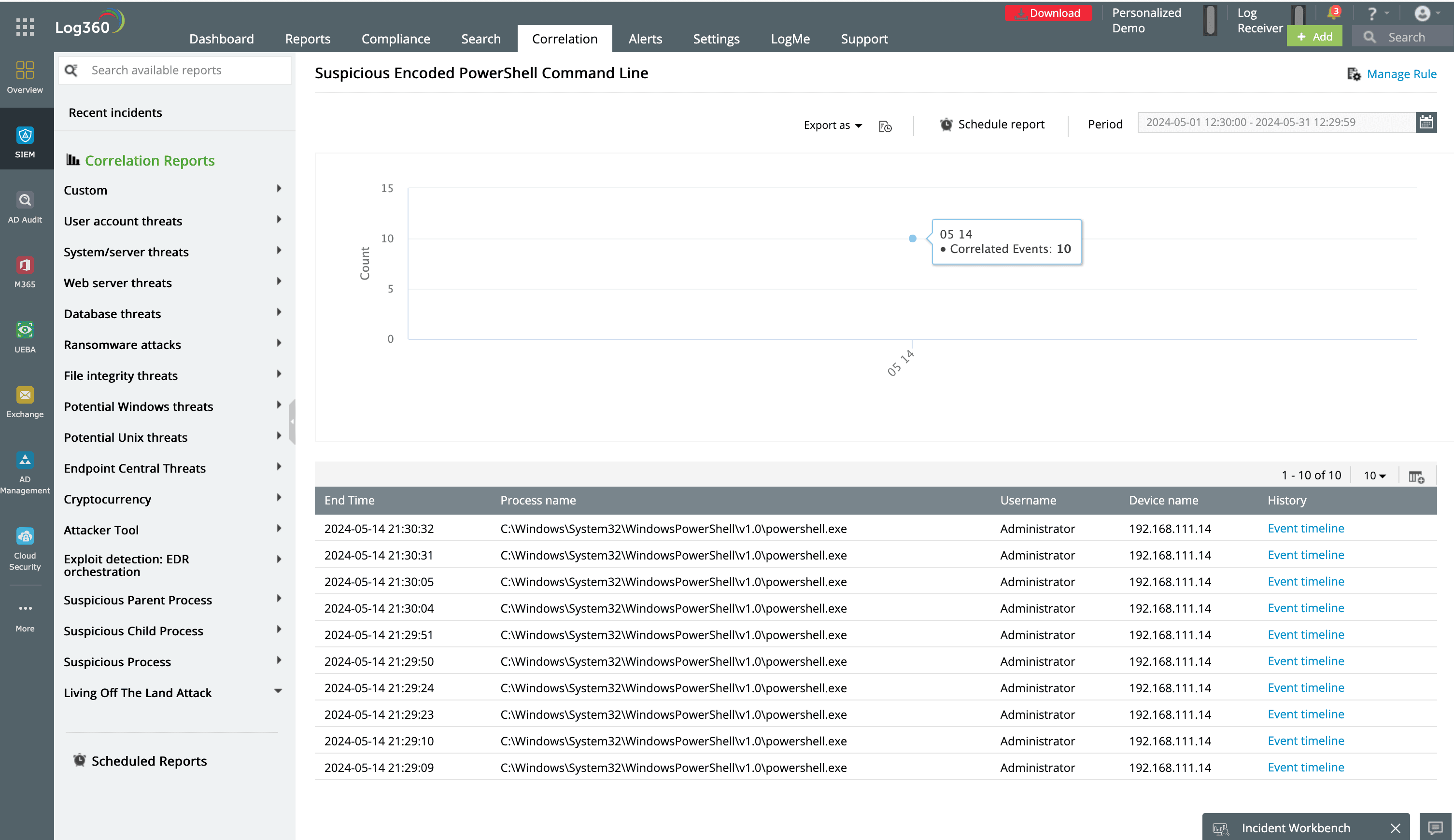
Figure 1: Predefined correlation report in Log360 showing incidents of suspicious encoded PS command lines that were executed
What to do when you detect an encoded command being executed
- Investigate the alert.
- Decode and review the PowerShell command to understand its intent.
- Examine system and security logs to trace the activity associated with the command.
- Identify the source.
- Identify which user or system executed the command.
- Review the activity of the user or system to identify any other suspicious behavior.
- Quarantine the system.
- Prevent further potentially malicious activity by disconnecting the system from the network if necessary.
- Mitigate and remediate.
- Delete any malicious files or payloads downloaded by the PowerShell command.
- Reset passwords for accounts that may have been compromised.
- Ensure all systems are up to date with the latest security patches.
- Enhance your security measures.
- Strengthen your PowerShell execution policies, such as requiring all scripts to be signed.
- Set up continuous monitoring for suspicious activities using SIEM tools.
- Educate and train.
- Educate employees about phishing attacks and the dangers of opening suspicious attachments.
- Conduct regular tests to improve user awareness and responses to phishing attempts.
- Report the incident.
- Notify your internal security team and the relevant stakeholders about the incident.
- If necessary, report the incident to external authorities or cyber incident response teams.
For a better understanding of how Log360 detects complex cyberthreats, sign up for a free demo.

