

What is SharpView.exe?
SharpView is an AD reconnaissance tool used by red teams as well as attackers to enumerate AD. It is an adaptation of PowerView, a legacy domain enumeration and post-exploitation tool. While PowerView is written using PowerShell, SharpView is written using the .NET framework and C#. It is predominantly used as an alternative to PowerView in environments where PowerShell functionality is limited or disabled. Thus, SharpView is often referred to as the .NET port of PowerView.
What makes SharpView a stealthy tool for attackers?
SharpView can operate in environments that restrict PowerShell functions. This makes it a go-to tool for attackers performing AD enumeration where PowerShell-based tools are ineffective. Furthermore, being based on the .NET framework, SharpView is less likely to be flagged by PowerShell security policies. Since SharpView is written in C#, its source code can be embedded into other C# tools and invoked by those tools. This allows it to stealthily infiltrate a victim network without being distinctly spotted. This capability gives SharpView an edge over other PowerShell tools in terms of defense evasion and persistence.
Capabilities of SharpView.exe
SharpView.exe is used for the following reasons.
- User enumeration: SharpView enumerates user accounts and filters these accounts using LDAP filters that identify enabled or disabled users.
- Group enumeration: It lists groups and their memberships. It also resolves nested groups and enumerates the members.
- Computer enumeration: SharpView retrieves computer objects, including granular details such as last logon timestamps.
- Token and SID resolution: It resolves security identifiers (SIDs) obtained during the enumeration process to specific user or group names.
- Domain trust enumeration: It queries trusted domain objects and retrieves information on the trust relationship between domains.
- ACL and permission enumeration: It enumerates ACLs and privileges for AD objects.
How SharpView works
1. Connecting with the domain controller
SharpView exists as a DLL or executable that can interact with both LDAP and Windows APIs directly.
- LDAP queries
- Windows APIs
- System.DirectoryServices is a high-level interface that includes classes such as DirectoryEntry and DirectorySearcher that make it easier to connect to AD and perform LDAP queries.
- System.DirectoryServices.Protocols is a lower-level flexible interface that helps to communicate directly with an LDAP server using the LDAP protocol.
SharpView initiates the kill chain by establishing an LDAP connection with the domain controller. It builds queries to request specific information about AD objects such as users, groups, computers, ACLs, and more.
SharpView also leverages the .NET framework's namespaces to initiate a query with the domain controller. It specifically uses the System.DirectoryServices and the System.DirectoryServices.Protocols commands, which are basically wrappers over native Windows LDAP APIs that help communicate with the domain controllers.
2. Querying the domain controller
SharpView uses the following commands and LDAP filters to query specific objects.
LDAP commands
| Command | Function |
|---|---|
| Get- | Used for enumeration |
| Invoke- | Used for execution or advanced queries |
| Find- | Used to enumerate a targeted object |
| New- | Used to add new object |
| Set- | Used to modify object properties |
| Remove- | Used to delete objects |
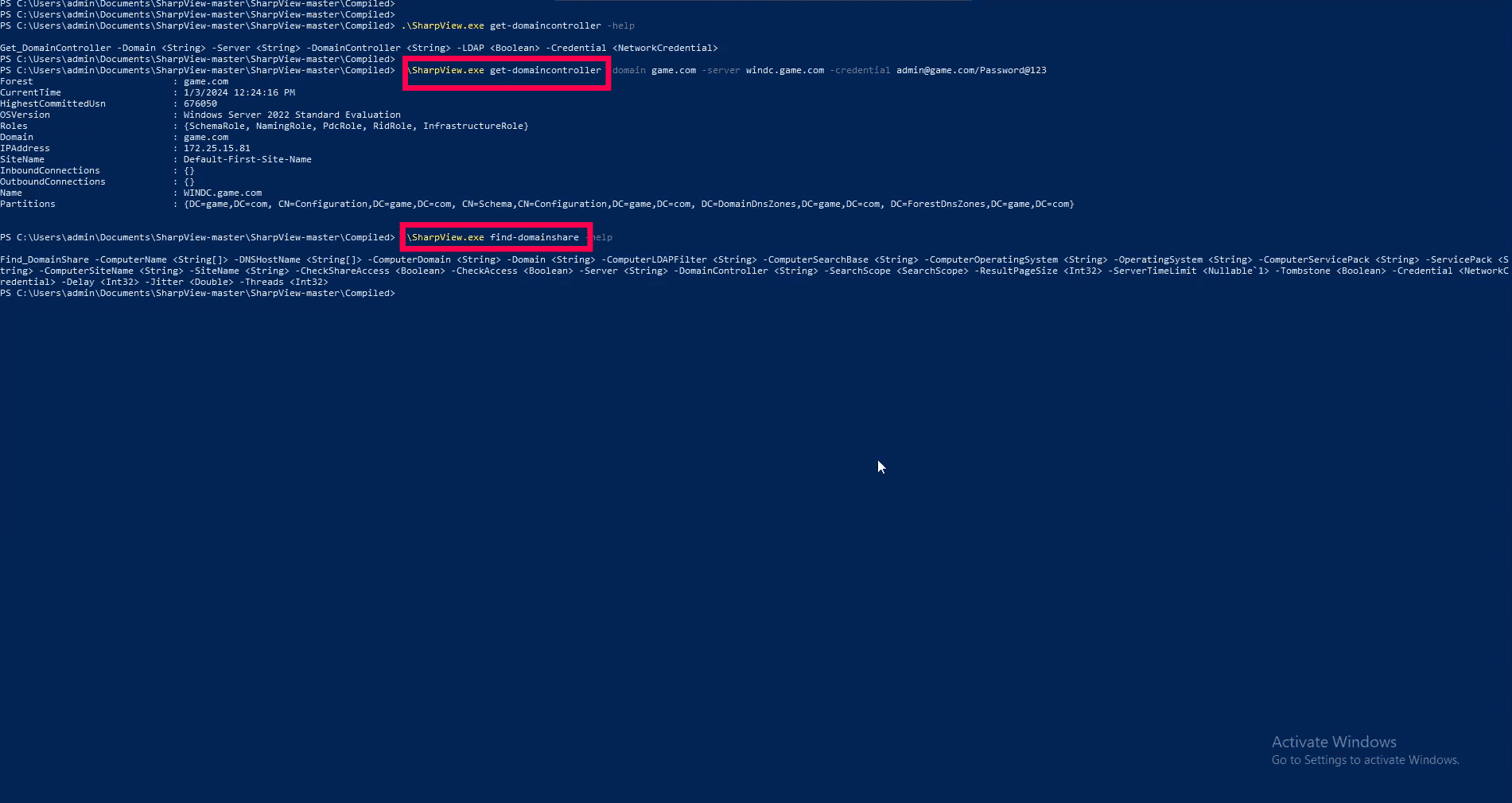
Figure 1: SharpView.exe execution using get- and find- commands for domain enumeration
LDAP filters
| Filter | Description |
|---|---|
| (&(objectCategory=person)(objectClass=user)) | Retrieves all user objects |
| (objectClass=computer) | Retrieves information on all computers |
| (objectClass=group) | Lists all groups in the domain |
| (memberOf=CN=Domain Admins,CN=Users,DC=domain,DC=com) | Lists members of the domain admin group |
| (objectClass=trustedDomain). | Enumerates domain trusts |
| (memberOf=CN=Administrators,CN=Builtin,DC=domain,DC=com) | Lists members of the local admin group |
| (&(objectCategory=person)(objectClass=user)(servicePrincipalName=*)) | Finds users with service principal names |
3. Parsing and retrieving responses
- SharpView receives responses from the domain controller as a SearchResultCollection object that contains multiple SearchResult entries.
- SharpView processes each of these entries individually and retrieves relevant attributes such as the SAMAccountName, ObjectSID, userACL, and more.
- It then converts the retrieved information to human-readable format, which is aggregated into lists or directories representing each queried object and displays it on the screen.
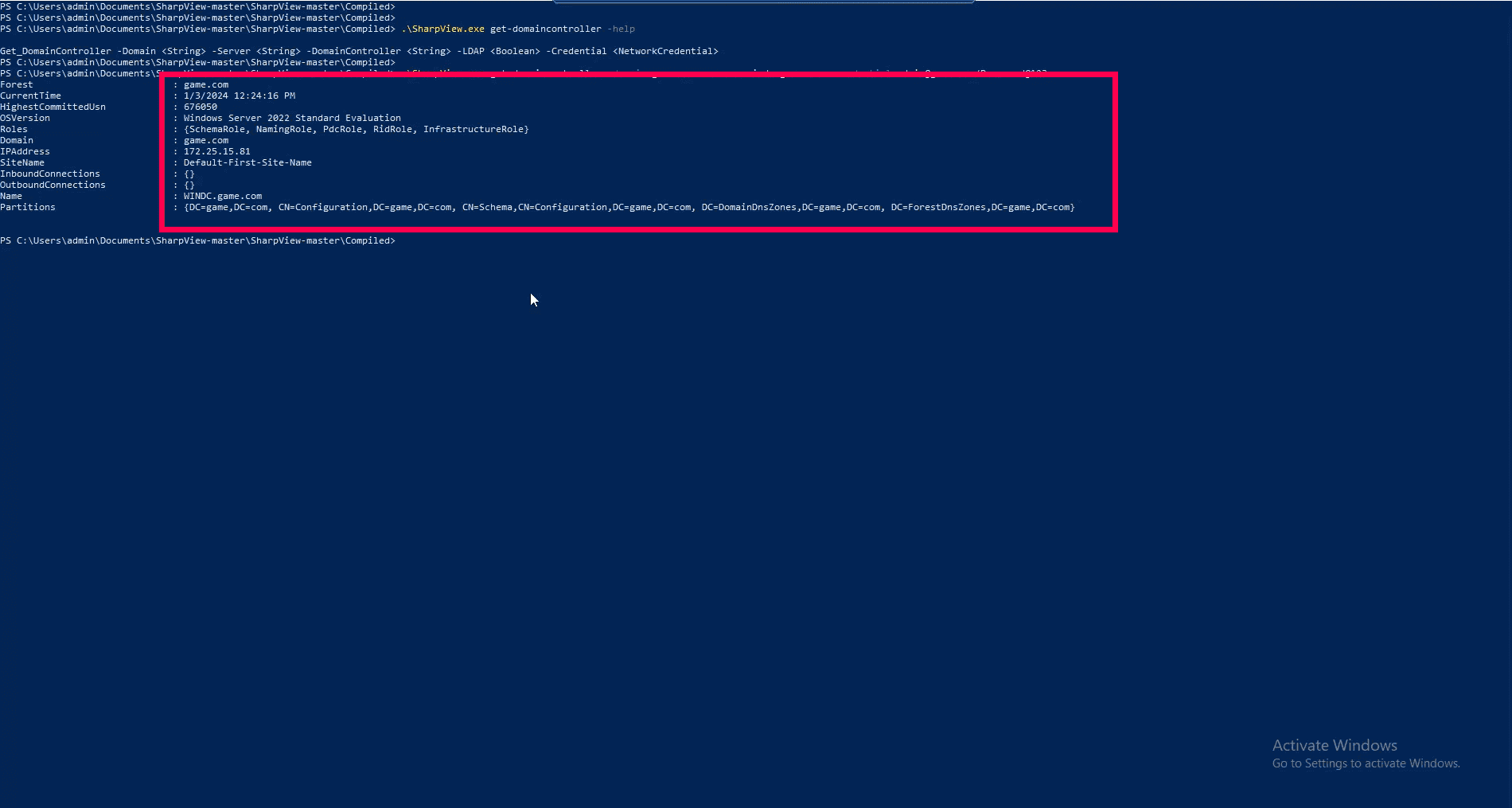
Figure 2: Domain enumeration response generated from SharpView execution
Impacts of SharpView execution
AD security compromise
Attackers exploit the LDAP protocol to breach AD security, enabling unauthorized access and domain reconnaissance.Through enumeration of domains and their configurations, attackers can easily identify security gaps and vulnerabilities. This puts not only the AD infrastructure at risk but also the users and entities within the target domain.
Data breach
AD enumeration can lead to large-scale data breaches, where user accounts, group memberships, and associated privileges are exposed. This facilitates credential abuse, privilege escalation, and lateral movement, ultimately resulting in sensitive data tampering, exfiltration, or destruction.
Compliance violation
Security breaches and data leaks undermine the integrity and credibility of the organization's domain. This triggers serious data security and privacy concerns resulting in violations of regulatory frameworks such as HIPAA, the GDPR, the PCI DSS, and others, leading to financial penalties and reputational damage.
How Log360 detects the execution of SharpView.exe
ManageEngine Log360 uses predefined correlation rules to detect the execution of attacker tools like SharpView, SharpDump, WinPeas, BadPotato, and more. The SharpView Detection rule enables the detection of AD enumeration attempts pursued using SharpView.exe.
The rule involves the following detection logic.
(("Process name" ends with "SharpView.exe") OR ("Original File Name" contains "SharpView" ))
We will also include the below command line filters to strengthen the rule and ensure precise detection.
(( COMMANDLINE CONTAINS ""find-domainprocess"" ) OR ( COMMANDLINE CONTAINS ""find-domainshare"" ) OR ( COMMANDLINE CONTAINS ""find-managedsecuritygroups"" ) OR ( COMMANDLINE CONTAINS ""get-domainmanagedsecuritygroup"" ) OR ( COMMANDLINE CONTAINS ""get-domainobject"" ) OR ( COMMANDLINE CONTAINS ""get-domainou"" ) OR ( COMMANDLINE CONTAINS ""get-domainpolicy"" ))
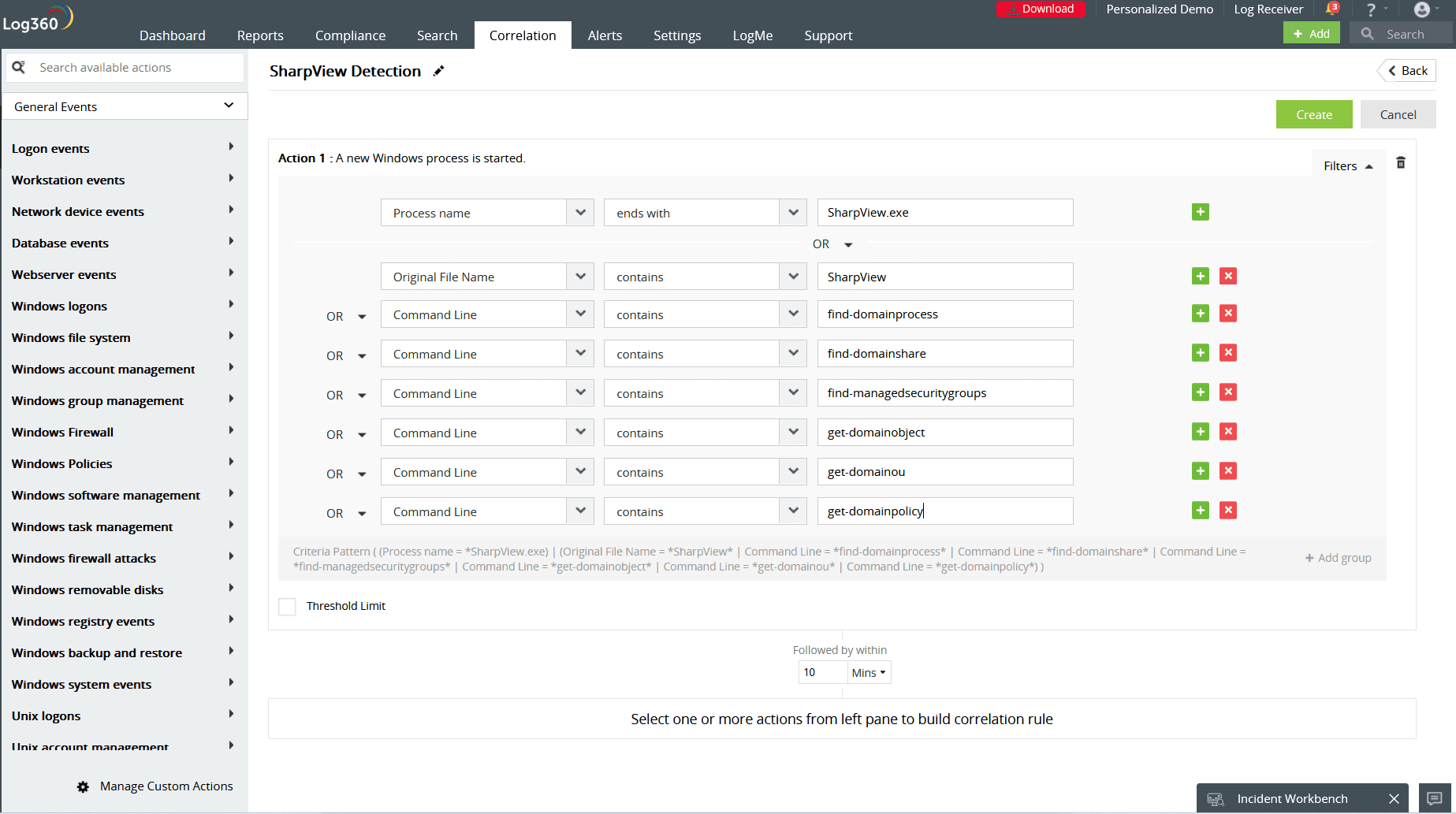
Figure 3: SharpView Detection rule in Log360execution
This rule will be triggered when a process, file, or command line associated with SharpView.exe is executed. By enabling the alert profile for this rule, you will also be notified in real-time when such executions occur. Log360 also provides a detailed report on SharpView execution trends along with details such as the user, device, and IP involved.
Learn more about how this rule works. Or, if you'd like to explore Log360's advanced correlation rules, visit our rule library.
If you'd like to see Log360 in action detecting other network attacks, sign up for a personalized demo.

