

In today’s cybersecurity landscape, every organization faces security challenges, some common across industries and others unique to their operations. Regardless of their nature, tracking security anomalies is vital for identifying and mitigating potential risks before they escalate. This page explores the top five anomalous activities that security analysts should track to strengthen their organization’s security posture.
What are security anomalies?
Security anomalies refer to unusual activities within a network or unexpected user behavior that deviates from the established norms or baselines. These anomalies can indicate potential security risks, such as unauthorized access, malware infections, data breaches, and insider threats, and even policy violations. Tracking security anomalies can help organizations improve their threat detection, response, and compliance management capabilities. An ideal security information and event management (SIEM) solution should possess built-in user and entity behavior analytics (UEBA) capabilities that can detect security anomalies and present the findings in the form of alerts and reports.
Why should security anomalies be tracked?
Tracking security anomalies is critical for several reasons:
- Early threat detection: Anomalies can signal the early stages of cyberattacks and data breaches. Tracking such anomalies can help organizations detect potential threats before they fully materialize, enabling faster intervention and reducing breach impact.
- Incident response: Identifying anomalies helps in the quick isolation and mitigation of security incidents. By doing so, organizations can limit damage, contain threats, and restore normal operations more efficiently. Moreover, by monitoring and analyzing security anomalies, analysts can gain insights into attack vectors, which can help them design their incident response playbook actions and user education programs accordingly.
- Risk management: Understanding anomalies aids in assessing potential risks and vulnerabilities within an organization's infrastructure. Organizations can prioritize their security efforts based on the risks identified through anomaly tracking.
- Compliance: Monitoring and responding to anomalies enables organizations to meet regulatory and compliance requirements for data security and help them avoid potential legal and financial penalties.
- Cyber resilience: Regularly monitoring and addressing security anomalies helps build cyber resilience. Organizations can better withstand and recover from cyber incidents, minimizing long-term damage.
It's easier to track security anomalies if the organization possesses a SIEM solution with UEBA capabilities. UEBA forms the anomaly detection engine of SIEM solutions. An UEBA-integrated SIEM solution like ManageEngine Log360 leverages machine learning algorithms to monitor and detect security anomalies, and present its findings in the form of reports for numerous security use cases, including dedicated reports for each of the top five anomalous activities that security teams should track.
What are the top 5 anomalous activities that security teams should track?
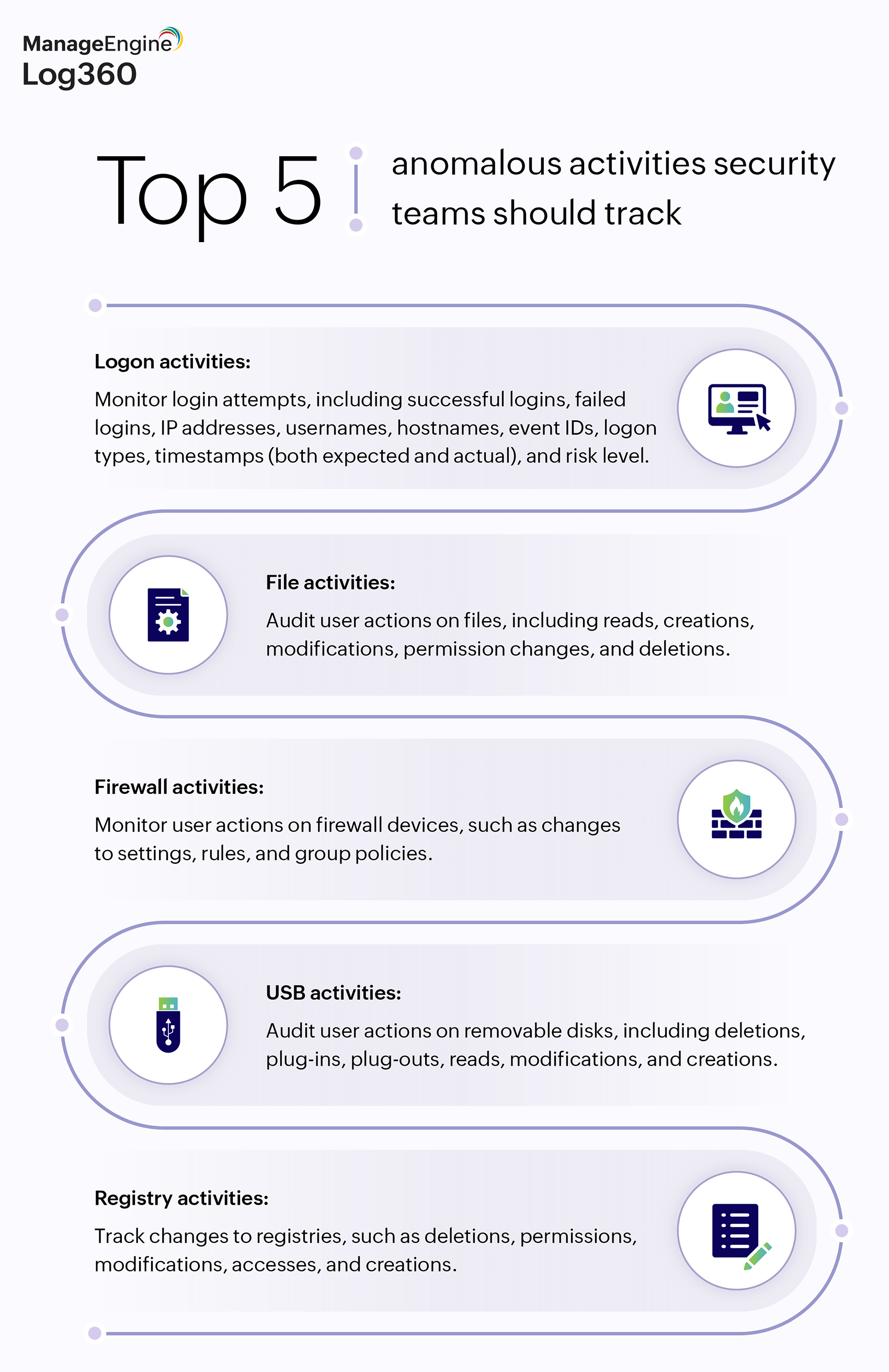
Security teams should track five main activities to gain critical insights into various aspects of their organization's security posture: Logon activities, file activities, firewall activities, USB activities, and registry activities.
To evaluate how ManageEngine Log360 can improve AWS security: Sign up for a personalized demo
Figure 1: Top 5 anomalous activities security teams should track for improved cybersecurity.
Here's why tracking each of these activities is important.
Logon activities
Provides information about who is accessing the system and when. This can help in quickly identifying unauthorized access attempts or unusual logon patterns. Multiple login failures can be a sign of brute-force or credential stuffing attacks. Tracking logon attempts from unexpected geographic locations, for instance, can indicate a case of account takeover or credential theft. Monitoring concurrent or rapid logons across different devices or locations helps in identifying potential session hijacking or credential misuse. Logon anomalies can also help identify insider threats. For example, a legitimate user logging in at an unusual time (e.g. non-business hours) for malicious purposes. Logon activities are also important for forensic investigations. For instance, in the event of a security incident, logon reports provide a timeline of user activity which can shed light on the scope and impact of the breach or attack.
File activities
Monitoring file activities helps protect sensitive, business-critical data from unauthorized access, modification, or deletion, and helps security teams ensure that critical files are not tampered with, maintaining data integrity and reducing the risk of data breaches. It also helps identify certain security threats. For example, sudden changes in file activities or access patterns can indicate malicious activities, such as ransomware attacks or insider threats. Moreover, maintaining comprehensive logs of file activity is essential for regulatory audits and forensic investigations.
Firewall activities
Firewalls are the first line of defense against network-based attacks. Monitoring firewall activities helps in detecting indications of potential intrusions, such as attempts to bypass security controls or attackers probing the network for weaknesses. Monitoring firewall traffic patterns can reveal suspicious activities, such as data exfiltration or unusual communications with known malicious IP addresses. Moreover, firewall logs provide critical insights for responding to threats—such as denial-of-service attacks or unauthorized port access attempts—and can thus help expedite threat response.
USB activities
Monitoring USB activity helps detect and prevent unauthorized data transfers, reducing the risk of data breaches. USB devices are also a common vector for introducing malware into systems. Tracking their usage can help in identifying and reducing the risk of infections spreading across the network. Detecting unauthorized file transfers via USB devices helps identify potential malicious insider activities. It can also help organizations keep track of who accessed and transferred what data, aiding in audits and investigations.
Registry activities
The registry is a critical component of system configuration and operation. Monitoring changes can help maintain system integrity and prevent unauthorized modifications and system compromises that could affect performance or security. Registry anomalies can also highlight configuration errors that could leave systems vulnerable to attacks. Changes in critical registry keys can signal the presence of rootkits, Trojans, or other advanced persistent threats. By tracking malware variants making changes to the registry, analysts can detect and respond to such infections more effectively.
By tracking each of these five reports, security analysts can identify and respond to emerging threats early, protect sensitive information, and maintain the integrity and security of their organization's IT infrastructure.
How can Log360 help organizations?
ManageEngine Log360 is a unified SIEM solution with integrated UEBA and SOAR capabilities that can help organizations track and respond to security anomalies effectively. It not only identifies time-based, count-based, and pattern-based anomalies but it also alerts you whenever a user's behavior deviates from the expected pattern, along with a suitable risk score to indicate the severity of the security event. Additionally, Log360 provides out-of-the-box reports for various activities, including the top five anomalous activities mentioned in this page.
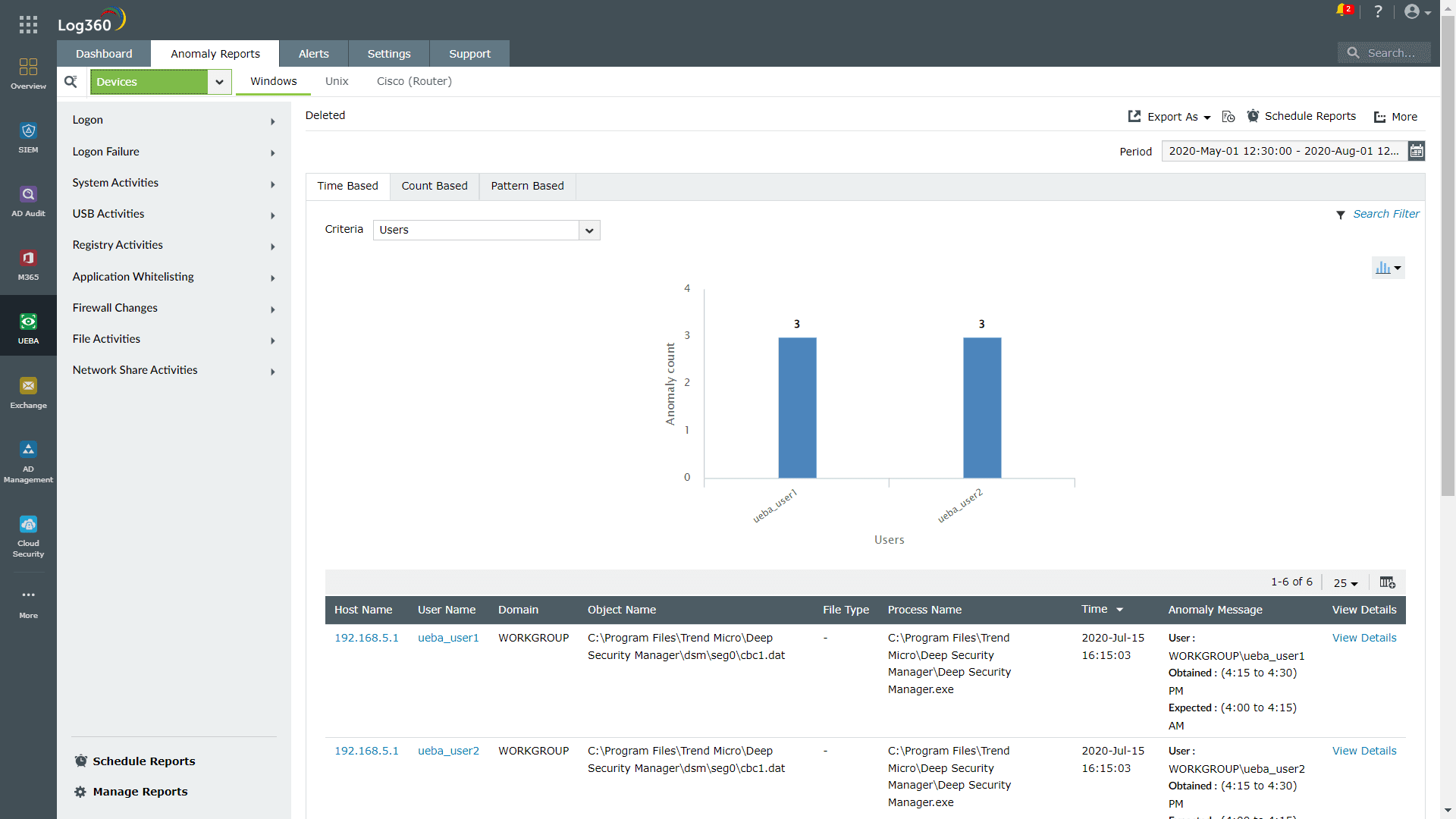
Figure 2: Anomaly reports provided by Log360.
Log360's SOAR capabilities allow organizations to associate a response workflow with an alert, enabling them to respond to security threats automatically. In this way, Log360 can help organizations reduce their MTTD and MTTR effectively. To know how else Log360 can help your organization, sign up for a personalized demo.

