

- Home
- Documentation
- What are Nginx logs?
What are Nginx logs?
On this page:
- Types of Nginx logs
- Nginx log levels
- Configuring Nginx logs
- Insights from Nginx logs
- Centralized Nginx log management with Log360
Nginx logs record all server activity, helping administrators track website traffic, monitor performance, and troubleshoot issues. These logs provide valuable insights into user requests, server responses, and potential errors, making them essential for maintaining a fast, secure, and reliable web server. Nginx generates two main types of logs: access logs, which capture details about visitor requests, and error logs, which document server issues. With customizable storage and formatting options, these logs can be analyzed using built-in tools or external log management solutions to improve visibility and ensure smooth server operation.
Types of Nginx logs
Nginx logs provide crucial insights into server activity, helping administrators monitor performance and troubleshoot issues. There are two primary types of Nginx logs: access logs and error logs, each serving a different purpose.
Nginx access logs
Nginx access logs record all incoming requests to the server, capturing details such as client IP addresses, request methods, response codes, and user agents. These logs help analyze traffic patterns, detect anomalies, and optimize performance. By default, the Nginx access log is stored in /var/log/nginx/access.log, but its location can be customized in the Nginx config location using the access_log directive.
The Nginx access log format can be adjusted with the log_format directive in the configuration file, allowing administrators to include specific details needed for analysis. For example:
         log_format custom_format '$remote_addr - $remote_user [$time_local] "$request" '

    '$status $body_bytes_sent "$http_referer" "$http_user_agent"';

    access_log /var/log/nginx/access.log custom_format;
To view Nginx logs, administrators can use command-line tools such as tail, cat, or less. For real-time monitoring, the following command allows for continuous streaming of new log entries:
tail -f /var/log/nginx/access.log
Nginx error logs
Nginx error logs capture issues encountered during request processing, including server errors, misconfigurations, and connection failures. These logs help diagnose and resolve performance and security issues. By default, the Nginx error log is stored in /var/log/nginx/error.log, but its location can be modified in the Nginx config location using the error_log directive.
Nginx logging supports different log levels, including debug, info, notice, warn, error, crit, alert, and emerg. The Nginx log level can be set in the configuration file:
error_log /var/log/nginx/error.log warn;
For debugging purposes, Nginx debug logging can be enabled to capture more detailed information about server behavior using the following command:
error_log /var/log/nginx/error.log debug;
Nginx log levels
Nginx logging allows administrators to track server activity using different log levels, which determine the type of information recorded in the Nginx error log. Configuring the right Nginx log level helps in diagnosing issues effectively.
| Log levels | Description |
|---|---|
| Debug | Provides detailed information useful for troubleshooting. Requires Nginx debug logging to be enabled in the Nginx config location. |
| Info | Logs general server operations without excessive details. |
| Notice | Records significant events that don’t require immediate attention. |
| Warn | Captures non-critical issues that might affect performance. |
| Error | Logs critical problems that could cause service disruptions. |
| Crit | Indicates severe failures requiring immediate action. |
| Alert | Used for urgent issues that need immediate resolution. |
| Emerg | Logs system-wide failures that may cause the server to stop functioning. |
Configuring Nginx logs
Nginx logging is highly customizable, allowing administrators to define the Nginx log format, log levels, and storage locations. Proper configuration ensures that Nginx logs capture relevant data for monitoring and troubleshooting.
Nginx config location
The main Nginx config location is /etc/nginx/nginx.conf, where global logging settings, including the Nginx access log and Nginx error log, can be defined. Logging can also be configured within server and location blocks for more granular control.
Nginx log format
Nginx uses the log_format directive to define how logs are structured. The Nginx default log format is typically combined, which records the client IP, request method, URL, response status, and user agent.
        log_format combined '$remote_addr - $remote_user [$time_local] '

    '"$request" $status $body_bytes_sent '

    '"$http_referer" "$http_user_agent"';
Nginx log location
The access_log directive specifies where Nginx access logs are stored. By default, logs are written to /var/log/nginx/access.log. Custom locations can be set for different virtual hosts:
access_log /var/log/nginx/domain1.access.log combined;
The error_log directive sets the Nginx error log file and its severity level. The default location is /var/log/nginx/error.log, and logging levels can be adjusted to filter messages:
error_log /var/log/nginx/error.log warn;
Insights from Nginx logs
Nginx access logs provide visibility into user activity, traffic patterns, and request details, helping administrators analyze visitor behavior, detect unusual spikes, and identify potential security threats such as brute -force attempts or bot activity. They also aid in performance monitoring by tracking slow responses and request load distribution.
Nginx error logs capture server-side issues, including misconfigurations, missing files, and permission errors. They are crucial for diagnosing application failures, identifying unauthorized access attempts, and troubleshooting SSL or back-end connectivity issues. By analyzing error logs, administrators can enhance security, optimize configurations, and ensure system stability.
Centralized Nginx log management with Log360
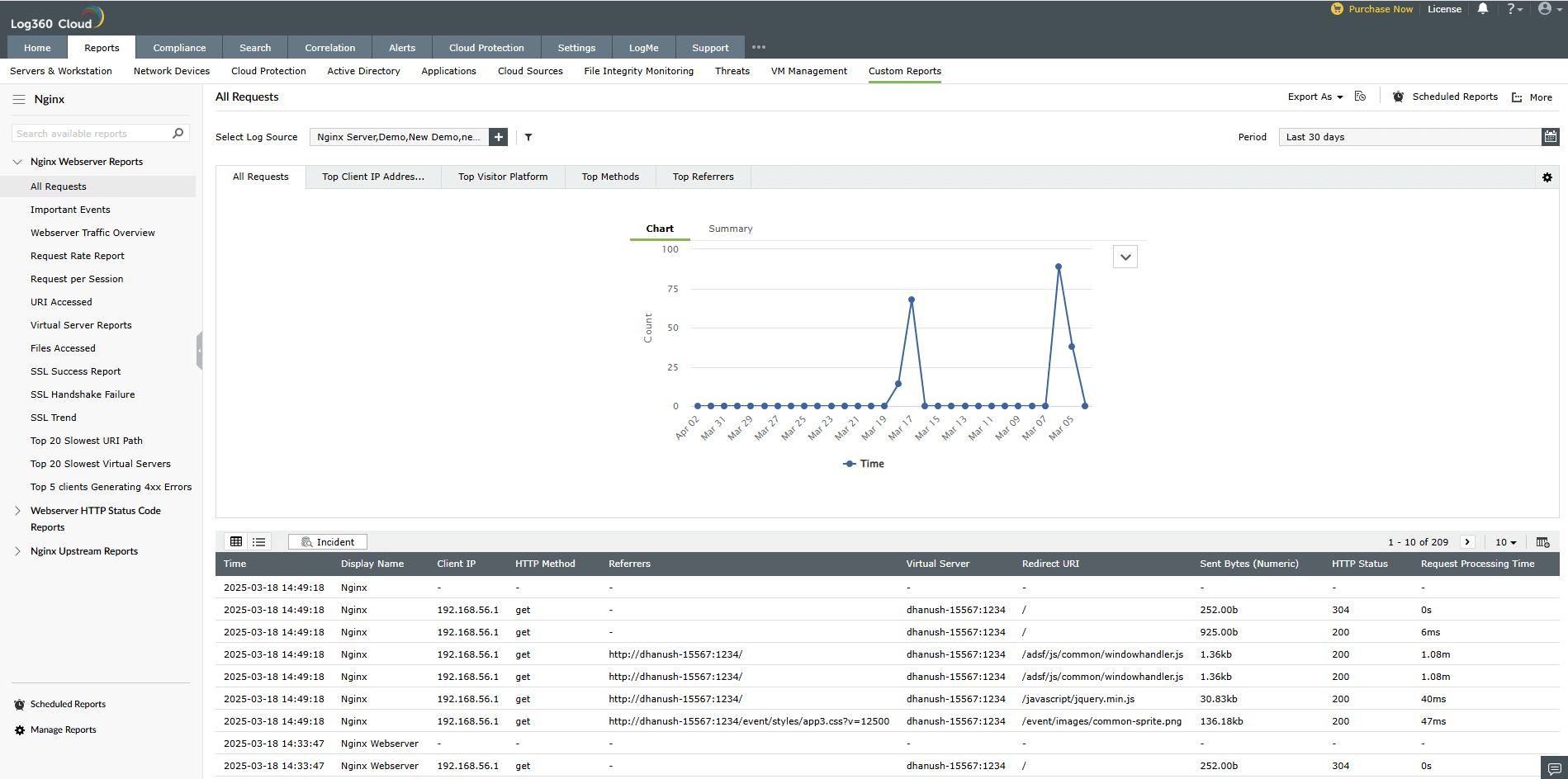
ManageEngine Log360 simplifies Nginx log management by monitoring and securing Nginx servers. It collects and analyzes access and error logs to identify security threats, optimize server performance, and ensure compliance with industry regulations.
| Feature | Use case |
|---|---|
| Log management | Collects Nginx access and error logs from configured sources at scheduled intervals for continuous monitoring. |
| Real-time monitoring | Continuously analyzes Nginx logs to detect unusual traffic patterns, failed login attempts, and server errors. |
| Correlation rules | Uses predefined correlation rules to identify security threats, including suspicious login attempts and web-based attacks. Custom rules can be configured to detect web scraping, DDoS attacks, and brute-force attempts. |
| Real-time alerts | Sends real-time alerts for unauthorized access, server misconfigurations, and traffic anomalies, allowing administrators to respond quickly. |
| Compliance reporting | Generates compliance reports with predefined templates for the PCI DSS, the GDPR, HIPAA, and other regulatory standards. Log search and audit trails help ensure compliance readiness. |
| Forensic analysis | Enables in-depth investigation with log search, event filtering, and correlation-based attack analysis. Provides event timelines to trace security incidents and identify causes. |

