


What Is OS Credential Dumping and Why It Matters
OS Credential Dumping (T1003) is one of the most dangerous techniques in the MITRE ATT&CK framework. Attackers who have gained a foothold on a system use this technique to extract authentication credentials from operating system memory, the Windows registry, or Active Directory databases. These stolen credentials let attackers escalate privileges, move laterally, and ultimately compromise the entire domain.
This technique sits at the heart of the Credential Access (TA0006) tactic and acts as a force multiplier. A single successful credential dump from LSASS memory can yield dozens of password hashes and Kerberos tickets, giving the attacker the keys to move freely across the network. The 2025 Verizon DBIR found that stolen credentials were involved in 44.7% of confirmed breaches, and credential dumping is the primary method attackers use to harvest those credentials post-compromise.
Groups like APT29 (Cozy Bear), FIN7, and Scattered Spider rely heavily on T1003 throughout their intrusions. Once inside, these groups execute Mimikatz or equivalent tools within minutes to harvest credentials before the security team can respond.
Key insight: Credential dumping is rarely the end goal. It is the gateway to lateral movement (TA0008) and privilege escalation (TA0004). Detecting it early breaks the attack chain before the attacker reaches domain controllers.
OS credential dumping at a glance: Impact, Scope, and Risk
| Attribute | Detail |
|---|---|
| MITRE ID | T1003 |
| Tactic | Credential Access (TA0006) |
| Severity | Critical |
| Affected Platforms | Windows, Active Directory |
| Common Tools | Mimikatz, Procdump, Ntdsutil, Rubeus, comsvcs.dll |
| Detection Difficulty | Moderate (known tools are easy; custom/LOLBin variants harder) |
| Log360 Coverage | 16 built-in correlation rules |
| Key Log Sources | Windows Security Events (4656, 4663, 4662, 4688), Sysmon, AD Replication Logs |
| Sub-techniques | T1003.001 (LSASS Memory), T1003.002 (SAM), T1003.003 (NTDS), T1003.004 (LSA Secrets), T1003.006 (DCSync) |
- Attackers use T1003 to extract password hashes, plaintext passwords, and Kerberos tickets from memory and storage
- APT29 and Scattered Spider use this technique in nearly every intrusion
- Log360 detects this with 16 built-in rules across Windows and Active Directory platforms
- Key indicators include LSASS access, shadow copy creation for SAM/NTDS extraction, and AD replication from non-DC sources
How OS credential dumping works: Mimikatz-to-DCSync attack walkthrough
A typical credential dumping attack unfolds in four stages across the enterprise environment.
Stage 1 - Initial foothold and privilege escalation
The attacker gains access to a workstation, typically through phishing or exploitation of a public-facing application. They escalate to local administrator privileges using a kernel exploit or misconfigured service. With local admin on a single machine, the credential dumping attack surface opens up completely.
What this looks like in logs
Creator Process: cmd.exe
New Process: C:\Users\compromised\AppData\Local\Temp\exploit.exe
Token Elevation Type: TokenElevationTypeFull (2)
Stage 2 - LSASS memory credential extraction
With local admin privileges, the attacker executes Mimikatz (or a variant like SafetyKatz or SprayKatz) to read credentials directly from the LSASS process memory. Every user who has authenticated to this machine since the last reboot has credentials cached in LSASS, including domain accounts, service accounts, and sometimes domain administrators who logged in for maintenance.
What this looks like in logs
Object Name: \Device\HarddiskVolume2\Windows\System32\lsass.exe
Process Name: C:\Windows\Temp\m.exe
Access Requested: Read
Subject Account: compromised_admin
Notice the non-standard process (m.exe, a renamed Mimikatz binary) requesting read access to lsass.exe. Legitimate processes almost never request direct read access to LSASS outside of the operating system itself.
Stage 3 - Lateral movement with stolen hashes
The attacker uses the harvested NTLM hashes in a pass-the-hash attack to authenticate to other systems without knowing the plaintext password. If the LSASS dump yielded an IT administrator's hash, the attacker can now access domain controllers, file servers, and any system the administrator could reach.
Stage 4 - DCSync and domain compromise
On a domain controller (or from any account with Replicating Directory Changes rights), the attacker executes DCSync. Mimikatz sends legitimate-looking Active Directory replication requests to extract the password hash for any domain account, including the KRBTGT service account. With the KRBTGT hash, the attacker forges Golden Tickets, granting them persistent, unrestricted access to the entire Active Directory forest.
What this looks like in logs
Object Type: domainDNS
Properties: DS-Replication-Get-Changes-All
Account Name: compromised_admin$
Source Workstation: WORKSTATION-42 (NOT a domain controller)
The critical indicator is the source. A replication request originating from a workstation rather than a domain controller is almost always a DCSync attack.
Real-world attack: Scattered spider campaign (2024-2025)
The Scattered Spider threat group (also tracked as 0ktapus and UNC3944) provides a clear example of T1003 in action. In a series of intrusions targeting financial services and technology companies throughout 2024 and early 2025, Scattered Spider combined social engineering with credential dumping to achieve full Active Directory compromise within hours.
After gaining initial access through SIM-swapping and MFA fatigue attacks, the group deployed a custom variant of Mimikatz that evaded traditional signature detection. They executed sekurlsa::logonpasswords on compromised endpoints, harvesting NTLM hashes and Kerberos tickets from LSASS memory. In multiple incidents, the group then used DCSync to extract the KRBTGT hash and forge Golden Tickets, giving them persistent access that survived password resets across the organization.
The CrowdStrike 2025 Global Threat Report noted that Scattered Spider achieved full domain compromise in under 4 hours using this exact attack chain, and the CISA issued advisories specifically warning about this group's credential harvesting techniques.
| Year | Incident | Threat Group | Technique Variant | Impact |
|---|---|---|---|---|
| 2024 | Financial services intrusion | Scattered Spider | T1003.001, T1003.006 | Full AD compromise, data exfiltration |
| 2025 | Technology company breach | APT29 | T1003.001, T1003.003 | NTDS.dit stolen, persistent access |
These incidents show why detecting credential dumping early is critical. Once the attacker reaches DCSync, the remediation effort expands from isolating a single host to resetting every password in the domain, including the KRBTGT account.
ManageEngine Log360 for Credential Dumping Detection
Detect Mimikatz, LSASS dumps, SAM extraction, and DCSync with 16 prebuilt correlation rules. Start investigating credential theft in minutes.
How to detect and investigate OS credential dumping with Log360
Log360 provides layered detection for OS Credential Dumping, combining its real-time correlation engine, UEBA behavioral analytics, and Active Directory audit integration through ADAudit Plus. The detection strategy covers three distinct attack surfaces: tool-based dumping (Mimikatz and variants), LSASS memory access patterns, and Active Directory replication abuse (DCSync).
Real-Time Detection
Detecting Mimikatz and Known Credential Dumping Tools
The most direct form of credential dumping uses known tools like Mimikatz, SprayKatz, SafetyKatz, and SafetyDump. Log360's correlation engine monitors Windows process creation logs (Event ID 4688) for the command-line patterns and process signatures associated with these tools. The Mimikatz Detection rule (Critical, Windows) triggers when process creation events match known Mimikatz binary names, command-line arguments like sekurlsa::logonpasswords or lsadump::dcsync, or file hashes associated with Mimikatz variants. Because attackers frequently rename the binary, Log360 also correlates on command-line content, not just the process name.
For obfuscated variants that avoid the standard Mimikatz signature, Log360 deploys additional rules. The SprayKatz Detection rule (Critical, Windows) and the SafetyKatz Detection rule (Critical, Windows) catch .NET-wrapped and memory-only variants that attackers use to bypass traditional antivirus. The SafetyDump Detection rule (Critical, Windows) specifically targets the SafetyDump tool, which creates a minidump of LSASS for offline credential extraction.
Detecting LSASS Memory Access and Credential Extraction
When attackers use living-off-the-land techniques (like Procdump or comsvcs.dll) to dump LSASS memory, the tool signature changes but the behavior remains the same: a non-system process requests read access to lsass.exe. Log360's LSASS Dump Keyword In CommandLine rule (Trouble, Windows) catches this by monitoring process creation events for command-line arguments that reference lsass, regardless of the tool used.
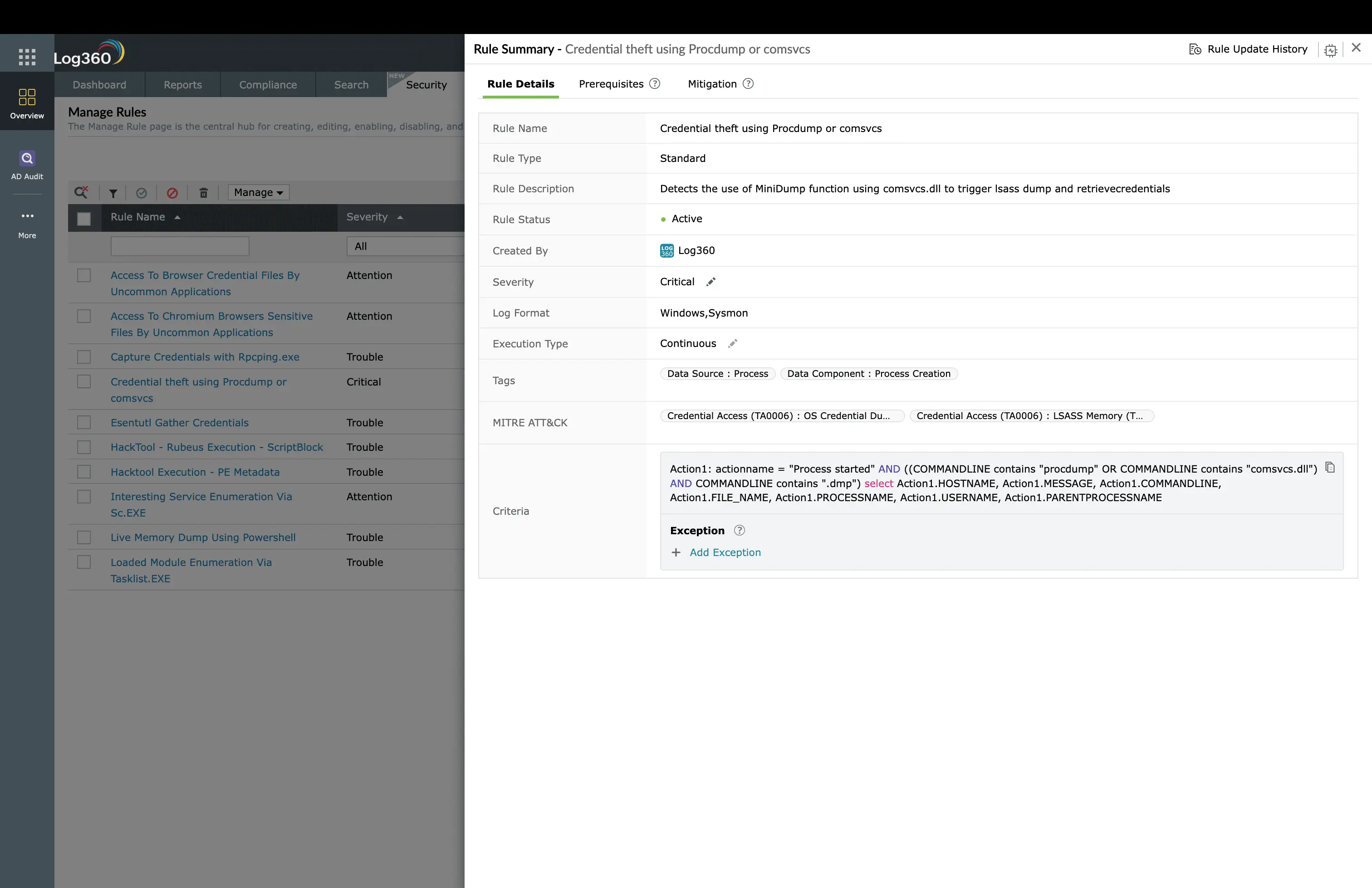
The Credential theft using Procdump or comsvcs rule (Critical, Windows) specifically targets these LOLBin-based dumping techniques. When an attacker runs procdump -ma lsass.exe or uses rundll32.exe comsvcs.dll MiniDump, this rule fires immediately, alerting the SOC team before the attacker can process the dump file.
Detecting SAM and NTDS Database Extraction
Attackers sometimes bypass LSASS entirely and target the stored credential databases. The SAM hive contains local account hashes, while NTDS.dit holds the password hashes for every account in the Active Directory domain. Log360's SAM SECURITY Hive Dump rule (Critical, Windows) detects attempts to extract the SAM and SECURITY registry hives using reg save commands.
For NTDS.dit theft, Log360 monitors two attack paths. The Shadow Copies Creation Using OS Utilities rule (Trouble, Windows) fires when attackers create Volume Shadow Copies to access locked database files. The Ntdsutil Abuse rule (Trouble, AD) detects the use of the legitimate ntdsutil.exe utility for creating NTDS.dit snapshots, and the NTDS.DIT Created rule (Attention, AD) alerts when new NTDS.dit files appear outside the standard AD database path.
Detecting DCSync Attacks
DCSync is the most dangerous credential dumping variant because it extracts every password hash in the domain remotely, without touching the domain controller's file system. Log360's Active Directory Replication from Non Machine Account rule (Critical, AD) is the primary defense. It fires when a replication request originates from an account that is not a domain controller machine account, which is the hallmark of DCSync.
The Mimikatz DC Sync rule (Trouble, AD) adds a second layer by specifically targeting the Mimikatz lsadump::dcsync command pattern. Together with the DPAPI Domain Backup Key Extraction rule (Trouble, AD), which detects attempts to extract the DPAPI backup key from Active Directory, Log360 provides comprehensive coverage of AD-level credential theft.
Behavioral Detection with UEBA
Log360's UEBA module adds a behavioral layer that catches credential dumping attempts that evade signature-based rules. UEBA builds baselines for each user account based on authentication patterns, workstation usage, and process execution. When an account suddenly begins accessing LSASS on multiple machines, requesting Kerberos tickets for service accounts it has never accessed, or logging into systems outside normal working hours, the UEBA risk score increases and triggers an anomaly alert, even if the specific tool used has no known signature.
Investigation Workflow in Log360
When a credential dumping alert fires, follow this investigation workflow.
- Open the alert detail: Review the source host, account name, process path, and command-line arguments. Check the severity level. Critical-severity rules (Mimikatz, SafetyKatz, Procdump) indicate confirmed tooling, while Trouble-severity rules may need further validation.
- Review the user/entity timeline: Pull up the flagged account's activity in Log360's incident view. Check whether this account was recently created, involved in a brute-force lockout, or logged in from an unusual source.
- Cross-reference related alerts: Check if other MITRE technique alerts fired around the same time. If you also see alerts for Kerberos ticket theft (T1558) or NTLM relay (T1557), the attacker is likely advancing through the credential access kill chain.
- Determine blast radius: Identify every account that was logged into the compromised host (cached in LSASS). These accounts must all be treated as compromised. Search for pass-the-hash logon events (Event ID 4624 Type 9) using these accounts across the environment.
- Export evidence: Save the alert chain, process execution logs, and related authentication events for incident reporting and forensics.
Coverage Gaps and Custom Rules
Log360's built-in rules cover the most common T1003 sub-techniques comprehensively. For advanced coverage, consider adding these custom correlation rules.
- LSASS Access by Non-System Process: Monitor Event ID 4663 for any process outside lsass.exe, csrss.exe, and services.exe accessing the LSASS process object. This catches novel tools that avoid known signatures.
- Credential Guard Bypass Attempt: Monitor for processes loading wdigest.dll after Credential Guard is enabled, which indicates an attacker attempting to re-enable WDigest authentication for plaintext credential capture.
How to remediate and prevent OS credential dumping
Immediate containment
- Isolate the affected host: Remove network access to prevent the attacker from using harvested credentials. Use Log360's automated response to trigger host isolation scripts.
- Force password reset for all exposed accounts: Every user account that was logged into the compromised host must have its password reset immediately. This includes service accounts.
- If DCSync was detected: Rotate the KRBTGT password twice (with at least 12 hours between rotations) to invalidate any forged Golden Tickets. This is the only way to revoke them.
- Preserve logs and evidence: Export the Log360 alert chain, process execution logs, and authentication events before any remediation changes the evidence.
Root cause remediation
- Enable Credential Guard: Deploy Windows Credential Guard on Windows 10/11 and Server 2016+ to isolate LSASS in a virtualization-based security container. This prevents direct memory access by Mimikatz.
- Enable LSA Protection (RunAsPPL): Configure LSASS to run as a Protected Process Light, blocking unsigned code from loading into LSASS memory. Set via Group Policy or registry.
- Disable WDigest authentication: Set HKLM\SYSTEM\CurrentControlSet\Control\SecurityProviders\WDigest\UseLogonCredential to 0. This prevents plaintext passwords from being stored in LSASS.
- Implement CIS Benchmark recommendations for credential protection, including disabling NTLMv1, enforcing Kerberos AES encryption, and removing unnecessary domain admin logons from workstations.
Long-term hardening
- Tiered administration model: Separate domain admin accounts from workstation admin accounts. Domain admins should only log into domain controllers, never workstations.
- Protected Users group: Add high-privilege accounts to the Protected Users security group, which disables NTLM authentication, forces Kerberos AES, and prevents credential caching.
- Implement LAPS: Use Local Administrator Password Solution to randomize local admin passwords, eliminating the risk of lateral movement via shared local admin credentials.
Log360 automated response configuration
Navigate to Log360's Alert Profiles and configure automated responses for the Critical-severity credential dumping rules:
- Disable user account: Enable for Mimikatz Detection, SprayKatz Detection, SafetyKatz Detection, and Active Directory Replication from Non Machine Account rules
- Run custom script: Trigger a PowerShell script to isolate the affected host from the network when any Critical credential dumping rule fires
- Create ServiceDesk Plus ticket. Auto-create an incident ticket with full alert details for every credential dumping alert
- Email and SMS notification: Alert the SOC team lead and the incident response manager immediately for Critical-severity rules
Need to explore ManageEngine Log360? Schedule a personalized demo
OS Credential Dumping: Frequently Asked Questions
What is OS Credential Dumping (T1003) in MITRE ATT&CK?
T1003 describes techniques adversaries use to extract credential material from operating system memory, registry, or Active Directory databases. Sub-techniques include LSASS Memory (T1003.001), SAM (T1003.002), NTDS (T1003.003), LSA Secrets (T1003.004), and DCSync (T1003.006). It is the most commonly observed credential access technique and typically follows initial compromise.
How does Log360 detect Mimikatz and credential dumping?
Log360 detects credential dumping through 16 prebuilt correlation rules covering multiple attack vectors. These rules monitor for known tool signatures (Mimikatz, SprayKatz, SafetyKatz, Procdump), LSASS memory access patterns, SAM hive extraction, NTDS.dit theft, and DCSync replication requests. Each rule triggers real-time alerts with severity classifications, feeding into Log360's incident investigation workflow.
What Windows Event IDs indicate credential dumping?
The key Event IDs are 4656 and 4663 (object access on lsass.exe), 4688 (process creation showing Mimikatz or Procdump execution), 4662 (directory service access for DCSync detection), and 4769 (Kerberos service ticket operations). Enable Advanced Audit Policy on all endpoints and domain controllers, then forward logs to Log360 for correlation.
What is the difference between LSASS dumping and DCSync?
LSASS dumping extracts credentials from the memory of a single host where users have recently authenticated. DCSync is far more dangerous: it mimics domain controller replication to request password hashes for any account in the domain, including the KRBTGT account used for Golden Ticket attacks. LSASS dumping requires local admin privileges; DCSync requires domain replication rights. Log360 detects both with dedicated rules. See the full credential access detection guide for details.
How do I prevent credential dumping attacks?
Enable Credential Guard on Windows 10/11 and Server 2016+ to protect LSASS memory. Implement LSA Protection (RunAsPPL). Disable WDigest authentication. Rotate the KRBTGT password twice to invalidate Golden Tickets. Use Protected Users security group for privileged accounts. Monitor with Log360 UEBA for behavioral anomalies indicating credential theft.
- What Is OS credential dumping?
- Impact, Scope, and Risk
- Mimikatz-to-DCSync walkthrough
- Use cases
- Detect and Investigate with Log360
- Remediation and Prevention
- Frequently Asked Questions

