


What is remote services abuse (T1021)?
MITRE ATT&CK® T1021 describes a lateral movement technique where adversaries leverage legitimate remote access services already enabled in an environment to move between systems. Unlike techniques that require uploading exploit code or installing new tools, T1021 uses protocols that IT teams depend on daily: Remote Desktop Protocol (RDP), Server Message Block (SMB) with admin shares, Windows Remote Management (WinRM), SSH, VNC, and DCOM. Because these protocols are legitimate and often necessary, blocking them entirely is not an option for most organizations.
What distinguishes attacker use of these services from legitimate administrator activity is context: who is connecting, from which source system, at what time, and to which destination. Detection relies on user and entity behavior analytics and event correlation rather than protocol-level blocking.
T1021 in the ATT&CK chain: T1021 sits under TA0008 — Lateral Movement. Attackers frequently combine it with T1550 (Use Alternate Authentication Material), using stolen NTLM hashes or Kerberos tickets to authenticate via remote services without needing plaintext credentials. Log360 maps 15 detection rules across Windows, Active Directory, AWS, and Network sources to T1021.
How attackers use remote services for lateral movement
After gaining an initial foothold and often after escalating privileges, attackers use remote services to reach additional systems and expand their access. The typical T1021 attack flow proceeds as follows:
- Credential harvest from initial host: Using tools like Mimikatz, the attacker extracts NTLM hashes, Kerberos tickets, or plaintext credentials from the initially compromised system's memory or registry hives. These credentials are the keys to remote services on other hosts in the same domain or subnet.
- Target discovery: The attacker enumerates reachable hosts and open ports using net commands, PowerShell, or scanning tools. They identify which systems have RDP (3389), SMB (445), WinRM (5985, 5986), or SSH (22) open and accessible from their current position.
- Authenticate and execute: Using harvested credentials, the attacker connects to the target system via the chosen protocol. Remote command execution follows immediately: deploying additional tools, establishing new footholds, dumping credentials from the new host, or accessing sensitive data only available on that system.
- Repeat and pivot: Each newly compromised host becomes a staging point for further lateral movement, creating a chain of compromised systems that progressively approach high-value targets such as domain controllers, backup servers, or financial systems.
Why T1021 is effective
T1021 is effective because defenders face an asymmetric challenge: the same protocols attackers abuse are required for legitimate IT operations. RDP is used for remote administration; SMB is used for file sharing; WinRM powers PowerShell remoting. Disabling these protocols is often operationally impossible, making detection-focused controls the primary defense. This is why Log360's security monitoring for T1021 focuses on behavioral anomalies rather than protocol presence.
Sub-techniques covered under T1021
T1021 has six documented sub-techniques, each covering a distinct remote access protocol. Log360 provides detection coverage across all six:
T1021.001 — Remote Desktop Protocol (RDP)
RDP is the most commonly abused remote service in lateral movement campaigns. Attackers often pair RDP access with pass-the-hash techniques to authenticate without needing plaintext passwords. A particularly dangerous variant is RDP session hijacking via tscon.exe, which allows an attacker with SYSTEM privileges to connect to another user's active RDP session without entering any credentials. Log360's RDP Session Hijacking Using tscon (Critical severity) and Outbound RDP Connections Over Non-Standard Tools (Trouble severity) rules target this behavior directly.
T1021.002 — SMB/Windows Admin Shares
Windows administrative shares (ADMIN$, C$, IPC$) are automatically created on all Windows systems and provide administrative-level access to the full file system when accessed with valid credentials. Attackers use these shares to copy payloads to remote systems and execute them via scheduled tasks or services. Log360 monitors access to these shares via the Access To ADMIN$ Network Share (AD, Attention) and Copy From Or To Admin Share Or Sysvol Folder (Windows, Trouble) rules. In Active Directory environments, unexpected SYSVOL access from non-administrative hosts is particularly significant.
T1021.003 — DCOM
Distributed Component Object Model (DCOM) enables remote execution through Windows COM infrastructure, using protocols that are both legitimate and difficult to filter at the firewall level. DCOM-based lateral movement tools like SharpMove exploit DCOM application classes to execute commands remotely. Log360's HackTool - SharpMove Tool Execution rule (Windows, Trouble) detects this technique based on command-line and process signatures associated with known DCOM lateral movement tools. Coupling with PowerShell execution monitoring provides additional coverage for DCOM-based payloads.
T1021.004 — SSH
In Linux environments and increasingly in Windows environments with OpenSSH enabled, SSH is a primary lateral movement vector. AWS EC2 environments present a particular challenge: attackers who compromise an IAM principal with EC2 Instance Connect permissions can upload temporary SSH public keys and authenticate within a 60-second window. Log360's AWS EC2 Instance Connect SSH Public Key Uploaded (AWS, Trouble) rule targets this cloud-specific T1021.004 pattern, providing coverage for hybrid and cloud-native environments.
T1021.005 — VNC
Virtual Network Computing (VNC) provides graphical remote desktop access. Attackers install VNC software on compromised systems to establish persistent, graphical remote access at high bandwidth. Unlike RDP, VNC often operates on non-standard ports and may not go through standard authentication infrastructure, making it harder to audit. Log360's Suspicious UltraVNC Execution (Windows, Trouble) rule detects VNC tool execution patterns associated with attacker deployment rather than legitimate administrative use.
T1021.006 — WinRM
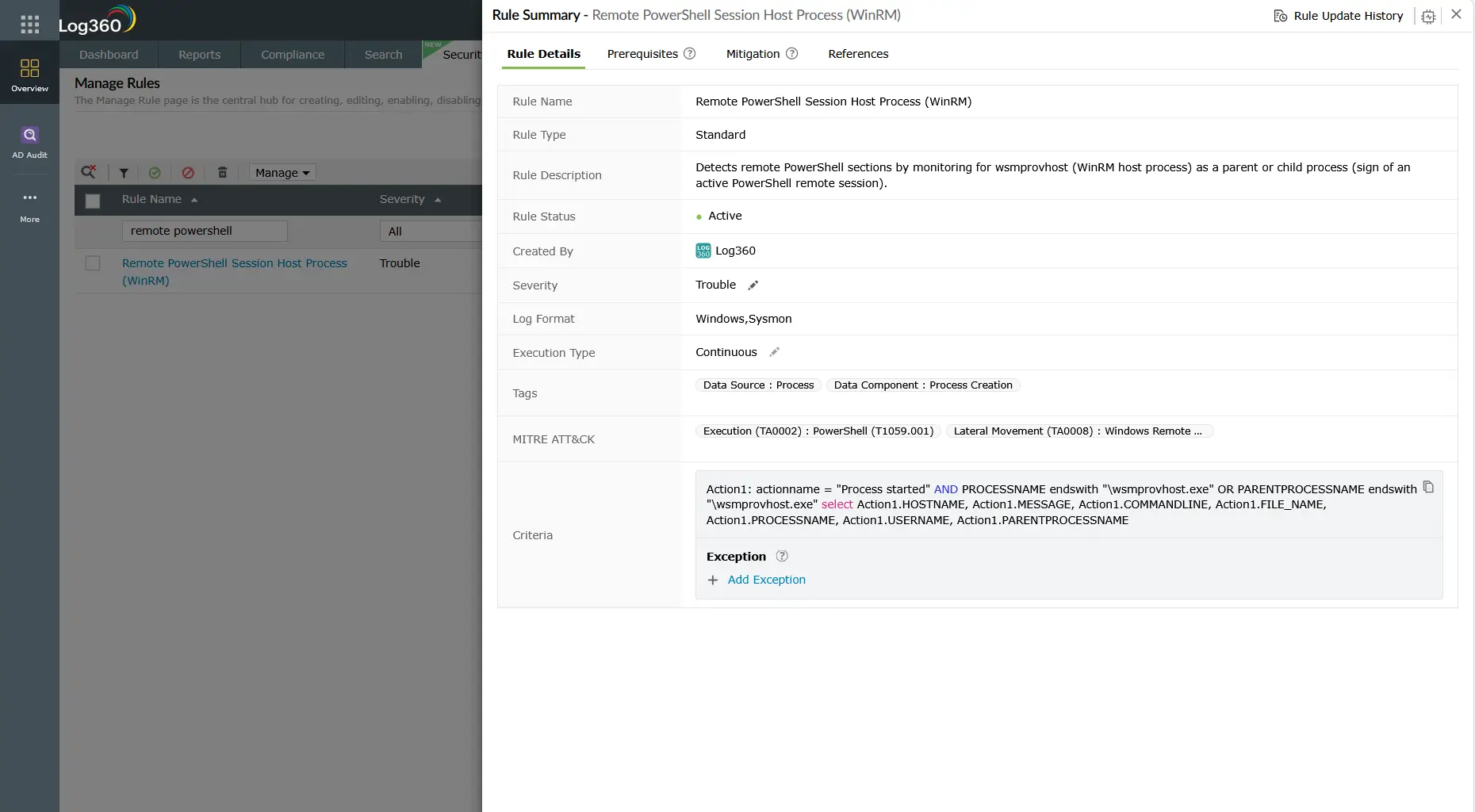
Windows Remote Management enables remote PowerShell sessions and command execution across Windows endpoints. Attackers use WinRM for both interactive remote sessions and scripted mass command execution. The Evil-WinRM tool is a popular attacker-side WinRM client designed specifically for penetration testing and post-exploitation lateral movement. Log360's HackTool - WinRM Access Via Evil-WinRM (Windows, Trouble) and Execute Invoke-command on Remote Host (Windows, Trouble) rules detect both tool-specific and behavioral WinRM abuse patterns.
Detection indicators for T1021
Effective T1021 detection requires correlating authentication events, network connection patterns, and process execution from multiple log sources. No single indicator is sufficient.
Authentication anomaly indicators
Lateral movement via remote services always produces authentication events. The key is distinguishing attacker authentication from legitimate administrator activity:
- Event ID 4624 — Logon Type 3 (Network) or Type 10 (Remote Interactive): Remote logon events at unusual hours, from unexpected source workstations (not designated jump servers), or to hosts the account has never previously accessed.
- Event ID 4648 — Logon with Explicit Credentials: A process using credentials other than the currently logged-in user. Common in pass-the-hash scenarios where the attacker supplies harvested credentials explicitly to authenticate to a remote service.
- Event ID 4776 — NTLM Authentication: NTLM authentication requests, particularly from workstations attempting to authenticate to servers they do not normally access. Volume spikes in NTLM from a single source within a short window indicate scanning or automated lateral movement.
Admin share and pipe indicators
- Event ID 5140 — Network Share Access: Access to administrative shares (ADMIN$, C$, IPC$) from systems that are not designated management hosts is a strong lateral movement indicator.
- Named Pipe Activity: PsExec and RemCom communicate through specific named pipes (PSEXESVC, RemCom_stdin). Log360's PUA - CSExec/RemCom Default Named Pipe rule detects the pipe creation pattern that accompanies remote tool execution.
Remote execution tool signatures
Attackers frequently use known lateral movement tools with distinct execution signatures. Log360 maintains rules for the most commonly observed tools:
- PsExec: Creates PSEXESVC service on target host (Event ID 7045), uses \\TARGET\ADMIN$ share for binary transfer, produces specific process tree.
- Evil-WinRM: WinRM connections from non-standard WinRM clients, PowerShell remoting to hosts not normally accessed by the source account.
- SharpMove: DCOM-based tool with specific command-line patterns and process creation signatures detected by Log360's HackTool rules.
Log360 detection rules for T1021
Log360 ships 15 pre-built correlation rules targeting T1021 Remote Services across all six sub-techniques. The table below covers the highest-signal rules:
Note: The Pass the Hash Activity 2 rule covers the authentication method commonly used to access remote services without plaintext credentials. For comprehensive pass-the-hash coverage, review the dedicated T1550 detection guide alongside this page. Log360's 79 total TA0008 rules span Windows, AD, AWS, M365, and network telemetry sources.
Investigation steps
When Log360 fires a T1021-related alert, the investigation goal is to determine the lateral movement path, identify all affected hosts, and assess whether the attacker has reached their target or established persistence on intermediate hosts.
- Identify the source account and host: Which account triggered the alert? Is this a named user account, service account, or machine account? Which source workstation or server generated the remote connection? Document both immediately, as containment actions will depend on this information.
- Map the lateral movement path: In Log360, use the investigation dashboard to correlate logon events (4624 Type 3/10) with the source and destination hosts within the same time window. Trace the chain: what did the attacker access on the destination host? Did they authenticate further to additional hosts from there?
- Check for pass-the-hash indicators: Review Event ID 4624 on the destination hosts. Logon Type 9 (NewCredentials) combined with the NTLM authentication package indicates credential-based lateral movement. Correlate with T1550 detection indicators to determine if hash-based authentication was used.
- Assess actions taken on destination hosts: What did the attacker do after connecting? Look for file writes, service creation (Event ID 7045), scheduled task creation (Event IDs 4698-4702), and subsequent outbound connections. This determines the blast radius and whether the destination host is itself now compromised.
- Timeline analysis: Build a chronological timeline of all remote connection events across the affected hosts. This is critical for determining dwell time, the full scope of access, and which data or systems may have been reached. Log360's log forensics capabilities accelerate this timeline reconstruction significantly.
- Identify staging infrastructure: Look for any files copied to or from administrative shares. Files placed in
C$\Windows\System32,ADMIN$, or temp directories on target hosts are landing zones for attacker tools and payloads.
Response playbook
- Contain the source host immediately: Isolate the originating workstation or server from the network. If the alert came from a compromised service account rather than a workstation, disable the account in Active Directory to stop ongoing lateral movement.
- Reset credentials for all affected accounts: Any account used in T1021 lateral movement must be considered compromised. Force password resets. If NTLM hashes were used, password reset alone is sufficient to invalidate the hash. In Kerberos pass-the-ticket scenarios, invalidate the relevant TGTs/TGSs through a domain controller restart or account disable/re-enable cycle.
- Audit all destination hosts: Each system the attacker connected to should be treated as potentially compromised. Conduct forensic analysis: look for new accounts, new services, scheduled tasks, and registry modifications made during the attacker's access window. The incident management process should track each host as a separate investigation thread.
- Restrict lateral movement protocols: Implement network segmentation to limit which systems can initiate RDP, SMB, or WinRM connections to others. Jump servers should be the only systems permitted to initiate remote desktop sessions across security zones. Use host-based firewall rules to enforce this.
- Harden remote access configuration: Disable NTLMv1 domain-wide, enforce NTLMv2 minimum, enable SMB signing to prevent SMB relay attacks, and restrict WinRM access via Group Policy to designated management hosts only.
- Conduct threat hunting for persistence: After T1021-based lateral movement, attackers frequently establish persistence on each compromised host. Review for new local admin accounts, new startup entries, and scheduled tasks across all systems in the lateral movement path. Refer to the MITRE persistence detection guide for techniques to hunt.
ManageEngine Log360 for T1021 detection
Log360 provides 15 pre-built correlation rules covering all T1021 sub-techniques across Windows, Active Directory, AWS, and network infrastructure. The integrated UEBA module builds behavioral baselines for remote access patterns, surfacing anomalous connections that rule-based detection alone cannot catch. When T1021 activity is detected, Log360's investigation dashboard maps the full lateral movement chain, showing every hop from the initial compromise to the furthest reach of the attacker.
Explore related lateral movement detection guides
Return to the comprehensive TA0008 overview covering all lateral movement techniques, detection strategies across Windows environments, AD, cloud, and network layers, and the full Log360 detection rule reference for this tactic.
Learn how attackers use NTLM hashes and stolen Kerberos tickets to authenticate to remote services without plaintext passwords, and how Log360 detects NTLMv1 downgrade attacks and anomalous credential usage patterns.
Understand how privilege escalation precedes lateral movement in the attack chain, and how detecting T1078 Valid Account abuse early stops attackers from acquiring the elevated credentials they need for T1021 remote service access.
Need to explore ManageEngine Log360? Schedule a personalized demo
Frequently asked questions
What is T1021 Remote Services in MITRE ATT&CK?
T1021 is a MITRE ATT&CK technique under the TA0008 Lateral Movement tactic where adversaries use legitimate remote access protocols to move between systems in a network. Sub-techniques cover RDP (T1021.001), SMB/Admin Shares (T1021.002), DCOM (T1021.003), SSH (T1021.004), VNC (T1021.005), and WinRM (T1021.006). Detection requires behavioral analysis rather than protocol blocking, since these services are required for normal IT operations.
How do attackers use RDP for lateral movement?
Attackers use RDP by authenticating with stolen credentials or NTLM hashes obtained from a previously compromised host. The most advanced RDP lateral movement technique is session hijacking via tscon.exe, which connects to an existing active session without requiring any credentials. Log360's RDP Session Hijacking Using tscon rule detects this pattern at Critical severity. For the authentication method attackers use to enable RDP without plaintext passwords, see the T1550 detection guide.
What Windows Event IDs detect lateral movement via remote services?
The most important Event IDs for T1021 detection are: 4624 (successful logon, Types 3 and 10), 4648 (explicit credential logon), 4776 (NTLM authentication), 5140 and 5145 (share access), and 7045 (service installation, common after PsExec use). Log360 ingests all of these and correlates source-destination pairs across hosts, mapping the full lateral movement path in a single investigation view.
How does Log360 detect PsExec and similar remote execution tools?
Log360 detects PsExec through the Psexec Execution rule, which identifies the PSEXESVC service creation on target hosts and specific named pipe patterns. Similar pre-built rules cover RemCom (via named pipe detection), SharpMove (DCOM-based tool signature), and Evil-WinRM (WinRM client pattern). These rules fire regardless of whether legitimate credentials or harvested hashes were used. See the full T1021 rule table for all 15 detection rules mapped to this technique.
What is the difference between T1021 and T1550 in lateral movement?
T1021 covers the remote service protocols used to connect to and execute on target systems (RDP, SMB, WinRM, SSH). T1550 covers the authentication technique used to access those services without plaintext passwords, such as pass-the-hash or pass-the-ticket. In most real-world lateral movement incidents, the two techniques are used together: T1550 provides the authentication token, and T1021 provides the transport. Both are covered under the TA0008 Lateral Movement detection guide.
- What is remote services abuse (T1021)?
- How attackers use remote services for lateral movement
- Sub-techniques covered under T1021
- Detection indicators for T1021
- Log360 detection rules for T1021
- Investigation steps
- Response playbook
- Explore related lateral movement detection guides
- Frequently asked questions

