


What is use of alternate authentication material (T1550)?
MITRE ATT&CK® T1550 (Use Alternate Authentication Material) describes a set of lateral movement techniques where adversaries bypass the need for a plaintext password by reusing authentication artifacts captured from compromised systems. Instead of cracking passwords or performing brute force, attackers extract the underlying credential material (NTLM hashes, Kerberos tickets, or cloud access tokens) and present that material directly to authentication protocols that accept it without requiring the original password.
This technique is particularly dangerous because it sidesteps the most common defensive response to credential compromise: password reset. If an attacker holds a valid NTLM hash, they can continue authenticating as the account owner until the password is changed AND the source host is isolated to prevent re-capture. Traditional password strength policies and expiration cycles provide no protection whatsoever against hash-based authentication.
T1550 in the ATT&CK chain: T1550 sits under TA0008 Lateral Movement and is almost always paired with T1021 (Remote Services): the attacker uses T1550 to obtain an authentication token and T1021 to deploy that token against remote services (RDP, SMB, WinRM). The hash or ticket that fuels T1550 was almost always acquired through a prior Credential Access technique, typically OS credential dumping against LSASS memory or Active Directory's NTDS.DIT file.
How pass-the-hash works
Windows NTLM authentication was designed to allow a client to prove knowledge of a password without transmitting the password in plaintext across the network. To do this, the protocol only ever requires the hash of the password. The client proves it knows the hash by responding to a server challenge using a cryptographic calculation involving the hash. Critically, the server verifies this response by performing the same calculation using the hash it stored—it never requires the plaintext password to complete verification.
Pass-the-hash exploits exactly this design. An attacker who obtains the NTLM hash of a privileged account (by dumping LSASS, reading the SAM hive, or performing a DCSync attack against Active Directory) can inject that hash directly into the authentication flow using tools like Mimikatz, Impacket's smbclient, or Invoke-TheHash. From the Windows authentication system's perspective, the attacker is indistinguishable from the legitimate account holder: the correct hash was presented, the cryptographic challenge was answered correctly, and access is granted.
Why password complexity does not stop pass-the-hash
A 32-character random password produces an NTLM hash that is just as usable in a pass-the-hash attack as the hash of a four-character password. Authentication complexity requirements, expiration policies, and password managers offer zero protection against this technique. The only effective controls are architectural: prevent hash extraction in the first place (Credential Guard), limit the blast radius of a captured hash (LAPS, tiered administration, network segmentation), and detect hash-based authentication anomalies immediately (UEBA and correlation rules).
Sub-techniques covered
T1550.002 — Pass the Hash
Pass-the-hash is the most widely observed sub-technique, targeting Windows NTLM authentication. Attackers extract the NT hash from LSASS memory, the Windows SAM registry hive, or the domain controller's NTDS.DIT file, then inject it directly into the authentication layer of their attack tool. The tool presents the hash to SMB, RDP, WinRM, or other NTLM-compatible services and authenticates as the account owner.
Windows event logs record a distinctive signature: a successful network logon (Event ID 4624) with Logon Type 9 (NewCredentials) and NTLM as the authentication package, originating from a process that has no corresponding interactive session. This combination is almost never produced legitimately and serves as the primary detection signal for T1550.002.
T1550.003 — Pass the Ticket
Pass-the-ticket targets Kerberos authentication by stealing and reusing TGT (Ticket-Granting Ticket) or TGS (Ticket-Granting Service) tickets from memory on compromised systems. Unlike pass-the-hash, which works against NTLM-capable services, pass-the-ticket can be used against Kerberos-protected resources including domain-joined services, SharePoint, and applications integrated with AD authentication.
Log360 does not currently ship a pre-built rule specifically for pass-the-ticket detection. Organizations concerned about Kerberos ticket abuse should consider configuring a custom correlation rule that fires when a TGS request (Event ID 4769) comes from a host whose TGT was not issued on that host (cross-referencing Event ID 4768 ticket issuance). For Golden Ticket scenarios (forged TGTs with arbitrary lifetimes), monitoring for Event ID 4769 requests missing a corresponding 4768 issuance event is the primary detection path.
Coverage note: Log360's three pre-built T1550 rules cover T1550.002 (Pass the Hash) on Windows and Active Directory. T1550.003 (Pass the Ticket), T1550.001 (Application Access Token), and T1550.004 (Web Session Cookie) require custom correlation rules or rely on behavioral anomaly detection through the UEBA module. Organizations with significant Kerberos abuse risk should implement dedicated T1550.003 custom rules referencing Event IDs 4768 and 4769 with TGT lifetime monitoring.
Attack scenario: Domain pivot via pass-the-hash
Understanding T1550 in the context of a realistic attack chain helps security teams understand what to look for in their logs and why the detection indicators matter. The following scenario reconstructs a typical lateral movement chain using pass-the-hash:
- Initial foothold on a finance workstation (WS-FINANCE-04): A finance analyst opens a malicious macro-enabled document received via a targeted email. The macro executes a PowerShell download cradle, deploying a Cobalt Strike beacon. The attacker now has an interactive session on WS-FINANCE-04 running as the analyst's domain account.
- Privilege escalation on the workstation: The attacker identifies an unpatched local privilege escalation vulnerability and elevates to SYSTEM on WS-FINANCE-04. With SYSTEM access, they run
sekurlsa::logonpasswordsin Mimikatz, extracting NTLM hashes for all accounts with active sessions on the host—including the IT administrator who remotely managed the machine last week. The IT admin's NTLM hash is now in the attacker's possession. - Pass-the-hash to a file server (FILESVR01): Using Impacket's smbclient with the captured IT admin hash, the attacker authenticates to FILESVR01's ADMIN$ share without entering any password. Log360's Pass the Hash Activity 2 rule fires on the domain controller: it sees a network logon (Event ID 4624, Type 9) for the IT admin account originating from WS-FINANCE-04 via NTLM—a host where the IT admin has no active session. The UEBA module simultaneously flags a risk deviation: the IT admin account has never previously authenticated to FILESVR01 from a finance workstation.
- Data staging on FILESVR01: The attacker browses the file server and identifies a directory containing HR compensation data and M&A documents. They compress and encrypt the data for later exfiltration, creating a staging archive in
C$\Windows\Temp. - Hash reuse against additional systems: The attacker uses the same IT admin hash to authenticate to three more servers via WinRM, deploying a lightweight persistent beacon on each. They are building redundant access points before the anticipated detection response.
In this scenario, the attack from Step 3 onward would have been detected in Log360 in near-real time. The Pass the Hash Activity 2 rule would fire within seconds of the Type 9 logon appearing on the domain controller's event log, giving the SOC team the opportunity to contain both the source workstation and the IT admin account before the attacker reaches additional targets.
Real-world example: Operation Wocao
Operation Wocao, documented by Fox-IT in December 2019, provides one of the most detailed public accounts of sustained pass-the-hash lateral movement in an enterprise environment. The threat actor operated silently in networks across 10 countries for over a year, using pass-the-hash as a primary lateral movement technique alongside living-off-the-land execution methods.
The attackers consistently used Mimikatz-compatible tooling to extract NTLM hashes from compromised hosts, then used those hashes to authenticate via SMB and WinRM to additional internal systems. Detection was complicated because the attackers operated largely within business hours, targeting IT and development workstations where administrator credentials were frequently cached. Their NTLM-based authentication looked identical to legitimate IT administration sessions from the network layer.
More recently, the Microsoft Threat Intelligence team's tracking of Midnight Blizzard (APT29) documented pass-the-hash use during post-compromise lateral movement phases in 2024 Microsoft 365 and on-premises AD environment attacks. The technique persists as a preferred tool precisely because it is invisible to network-layer inspection and requires SIEM-level behavioral correlation to detect reliably.
Why T1550 persists despite being well-known
Pass-the-hash was first documented in 1997 and has been a known attack technique for nearly three decades. Yet it remains one of the most commonly observed lateral movement methods in enterprise incident response engagements. The reason is structural: disabling NTLM entirely breaks too many legacy applications and authentication workflows in most enterprise environments, and deploying Credential Guard requires TPM 2.0 hardware across the entire endpoint fleet. Until organizations complete those architectural improvements, pass-the-hash remains an persistently viable technique, and event correlation remains the primary detection control.
Detect and investigate T1550 with Log360
Log360 approaches T1550 detection through two complementary mechanisms: rule-based correlation that catches the specific NTLM anomalies associated with hash-based authentication, and UEBA behavioral analysis that identifies account activity deviating from established baselines even when the authentication technically succeeds.
Detecting pass-the-hash activity
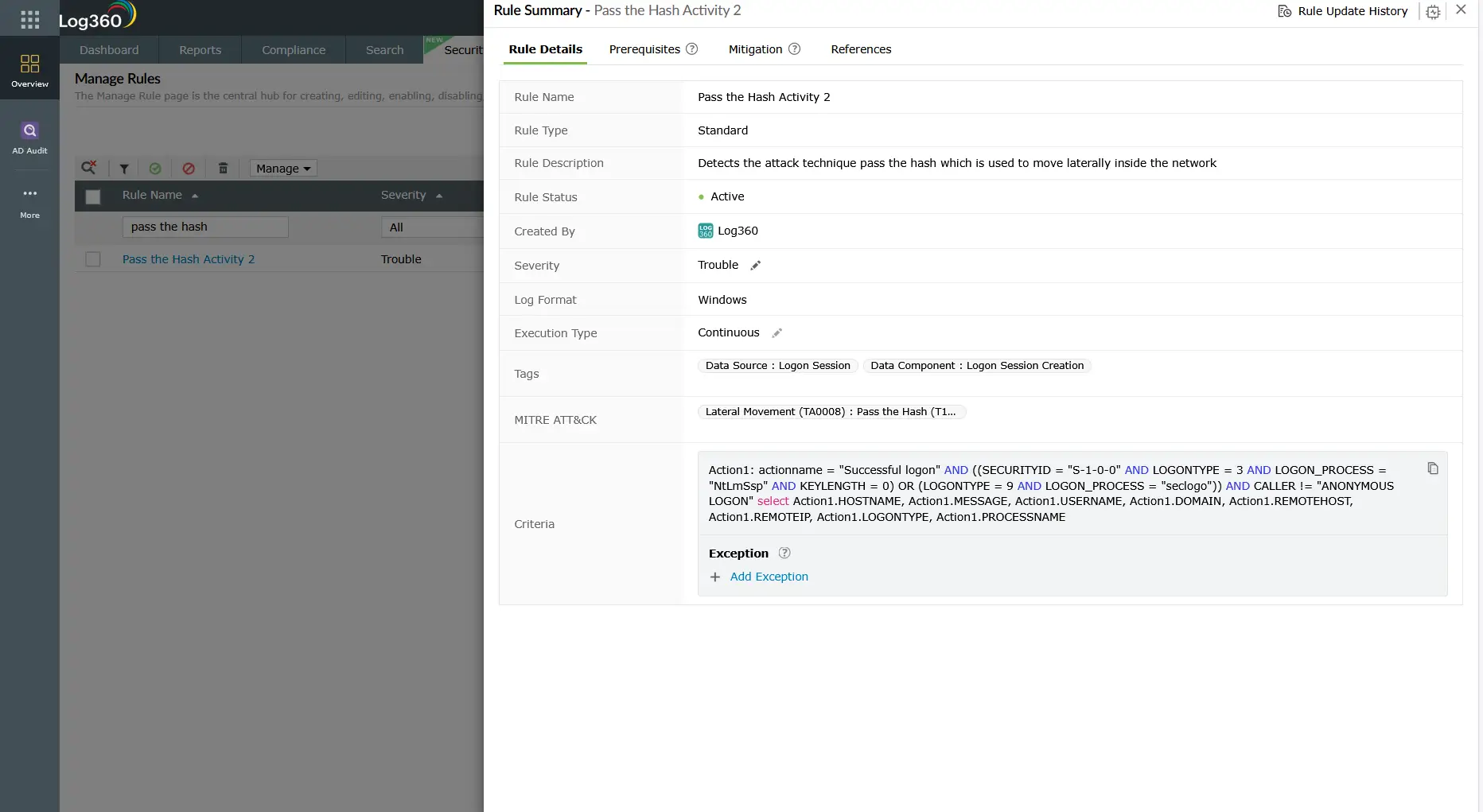
The primary detection for T1550.002 in Log360 is the Pass the Hash Activity 2 correlation rule (Active Directory, Trouble severity). This rule fires when Log360 observes the combination of NTLM authentication with Logon Type 9 (NewCredentials) in Event ID 4624—the audit trail pattern that Windows produces when a process injects external credentials rather than using the interactive session's token. Because this combination almost never appears in legitimate environments, it has a very low false positive rate when domain-joined systems are running on supported Windows versions.
The complementary Outgoing Logon with New Credentials rule (Windows, Attention) catches the source side of this event: when a process on a workstation initiates outbound authentication using credentials other than the currently logged-in user, this Attention-severity alert fires. By itself it is lower-fidelity than the AD-side Pass the Hash Activity 2 rule, but when both rules fire for the same account within the same time window, the correlation confidence is very high.
Detecting NTLMv1 downgrade attacks
Before performing pass-the-hash, some attackers or their tooling forces a network-wide NTLMv1 downgrade. NTLMv1 hashes are significantly easier to crack offline using rainbow tables, making them a stepping stone from hash capture to plaintext password recovery. Log360's NTLMv1 Logon Between Client and Server rule (Windows, Trouble) fires whenever NTLMv1 is negotiated in an NTLM authentication exchange. In any environment running Windows Server 2008 R2 or later with NTLMv2 enforced by Group Policy, this rule should never fire under normal conditions. A single NTLMv1 event warrants immediate investigation.
Logon Type: 9
Account Name: CORP\it_admin
Source: WS-FINANCE-04
Authentication Package: NTLM
SubjectUserName: ANONYMOUS LOGON
Logon Process: seclogo
Workstation: WS-FINANCE-04
Timestamp: 2026-03-14T02:31:09Z
This anonymized log sample shows the exact Event ID 4624 pattern that the Pass the Hash Activity 2 rule targets: Logon Type 9, NTLM authentication, ANONYMOUS LOGON as the subject (meaning no interactive session on the source), and a source workstation (WS-FINANCE-04) that has no reason to initiate a separate authentication event for the domain IT admin account at 2:31 AM.
Behavioral detection through UEBA
Rule-based detection catches known patterns. Log360's UEBA module provides a second detection layer based on learned behavioral baselines. For T1550, UEBA contributes by flagging when a service account or user account authenticates to a system it has never previously accessed, or when authentication volume from a specific account spikes anomalously within a short window. An attacker using a captured IT admin hash to authenticate against 15 servers in 10 minutes will appear clearly anomalous against a baseline that shows the legitimate IT admin typically accesses 2-3 servers per day during business hours.
UEBA risk scores are additive: if a service account triggers Pass the Hash Activity 2 (correlation rule), appears as an anomalous new resource accessor (UEBA behavioral rule), and initiates admin share access at an unusual hour (another correlation rule), Log360 elevates the combined risk score and surfaces the account prominently in the high-risk account dashboard—reducing the analyst's triage burden significantly.
Investigation workflow
- Confirm and document the source host: The source host identified in the pass-the-hash alert is the machine where the attacker captured the hash. This host must be isolated as the immediate containment priority. Document its hostname, IP address, and the account(s) whose hashes appear to have been used.
- Identify the hash capture event: Search Log360 for credential dumping indicators on the source host in the 60 minutes before the T1550 alert. Look for LSASS access patterns, Mimikatz signatures, SAM registry hive access (Event IDs 4656/4663 on the SAM hive), or the privilege escalation events that preceded SYSTEM access. Understanding how the hash was obtained determines which other accounts may also be compromised.
- Scope the affected accounts: Every account whose credentials were cached on the source host at the time of the dump is potentially compromised. For workstations, this typically includes the current interactive user and any administrators who have recently connected remotely. Use Log360's logon history search to identify all accounts that authenticated to the source host in the previous 7 days.
- Trace lateral movement destinations: Use Log360 to search for Event ID 4624 (Types 3 and 9) and Event ID 4648 for each affected account across all monitored hosts within the time window following the hash capture. Map every destination the attacker reached using the captured hash. Cross-reference with T1021 remote service events to identify which protocols were used.
- Check destination hosts for persistence: On each host the attacker authenticated to, search for new local accounts (Event ID 4720), new services (Event ID 7045), scheduled task creation (Event IDs 4698-4702), and remote registry modifications. Refer to the persistence detection guide for the complete list of indicators to check.
- Verify domain controller integrity: If the attacker used pass-the-hash to access a domain controller, assess whether any AD changes were made: new accounts, group membership changes, trust modifications, or replication-related events that could indicate a DCSync or DSRM account manipulation. Use Log360's log forensics module to reconstruct the full timeline of events on each affected domain controller.
Automated response
When a Pass the Hash Activity 2 alert fires in Log360, the platform can trigger the following automated response actions, configured through the Alert and Response workflow:
- Immediate account disable in Active Directory: Log360 can call the AD management API to disable the affected account within seconds of alert creation, stopping ongoing hash-based authentication attempts before the analyst has opened the alert.
- Host isolation via Endpoint Central: For organizations with ManageEngine Endpoint Central deployed, Log360 can trigger a host isolation action on the identified source workstation, cutting off its network connectivity to stop further hash extraction or lateral movement tools.
- Ticket creation in ServiceDesk Plus or Jira: Log360 automatically creates a high-priority incident ticket with the full alert context (account name, source host, destination, logon type, timestamp, correlated events) attached, ensuring the investigation workflow starts immediately.
Response playbook
Immediate containment (first 30 minutes)
- Isolate the source host identified in the T1550 alert from the network segment. If host isolation is not possible, disable it via a network access control enforcement rule.
- Disable the affected account(s) in Active Directory to invalidate any ongoing hash-based sessions. Note that for domain admin accounts, disabling and re-enabling (rather than just password reset) is required to invalidate Kerberos tokens.
- Force password reset for all accounts whose hashes may have been present on the source host at the time of compromise.
Remediation and hardening
- Deploy Windows Defender Credential Guard: Credential Guard uses hardware-based isolation (VBS/Hyper-V) to protect LSASS credential material from extraction by tools running in the OS user space. This is the single most effective control against pass-the-hash and prevents Mimikatz from dumping NTLM hashes from protected systems. Requires TPM 2.0 and Hyper-V-compatible hardware.
- Disable NTLMv1 domain-wide: Set the Network Security: LAN Manager authentication level Group Policy setting to "Send NTLMv2 response only. Refuse LM & NTLM" across all domain members. This prevents NTLMv1 downgrade attacks and reduces the crackability of captured hashes.
- Deploy LAPS (Local Administrator Password Solution): LAPS randomizes the local administrator account password on every workstation, eliminating the lateral movement path that uses a single shared local admin password to authenticate across all workstations via pass-the-hash.
- Implement tiered administration model: Prevent domain admin accounts from logging into workstations (where they would be cached in LSASS and available for hash capture). Use privileged access workstations (PAWs) for all tier-0 (domain admin) operations.
- Enable SMB signing: SMB signing prevents NTLM relay attacks (where a captured hash challenge response is relayed in real-time to authenticate against a third system). While this does not stop pure pass-the-hash, it removes the relay variant of the technique that is even harder to detect.
- Restrict NTLM to designated systems: Use Group Policy to restrict NTLM authentication to a specific list of trusted servers where it is operationally required. Block NTLM on all other systems, forcing Kerberos for authentication. This dramatically reduces the attack surface for pass-the-hash even before Credential Guard is fully deployed.
ManageEngine Log360 for T1550 detection
Log360 provides pre-built correlation rules for pass-the-hash detection across Windows and Active Directory environments, along with UEBA behavioral baselines that catch low-and-slow hash abuse that rule thresholds cannot detect. When T1550 activity is detected, Log360's investigation dashboard correlates the hash-based authentication events with credential dumping indicators and remote service access events to give analysts a complete picture of the lateral movement path taken using the captured credentials.
Related content
Return to the comprehensive TA0008 overview covering all lateral movement techniques, the threat landscape, threat hunting playbooks, response workflows, and the full Log360 detection rule reference for this tactic.
Pass-the-hash requires a prior hash capture on the source host. The T1021 Remote Services guide covers the remote protocols (RDP, SMB, WinRM) that attackers use to deploy the captured hash across the network, and how Log360 detects both the protocol abuse and the authentication anomalies together.
Valid account abuse under TA0004 often provides the initial privileged credential that enables lateral movement. See how detecting T1078 Valid Accounts early in the kill chain limits the attack surface available for T1550 pass-the-hash campaigns.
Need to explore ManageEngine Log360? Schedule a personalized demo
Frequently asked questions
What is pass-the-hash in cybersecurity?
Pass-the-hash is a lateral movement technique (MITRE ATT&CK T1550.002) where an attacker uses a captured NTLM password hash to authenticate to remote Windows systems without knowing the plaintext password. The Windows NTLM authentication protocol accepts the hash directly as proof of identity, so an attacker who extracts a hash from LSASS memory or the SAM database can authenticate as that account across the network until the account password is changed and the source host is isolated.
How do attackers obtain NTLM hashes for pass-the-hash attacks?
Attackers obtain NTLM hashes through credential dumping (MITRE ATT&CK T1003). Common methods include dumping LSASS process memory using Mimikatz (which Log360 detects via the Mimikatz Detection rule), extracting the SAM registry hive, performing DCSync replication against a domain controller, or reading the NTDS.DIT database file from a compromised DC. Once the hash is obtained, it can be used immediately in pass-the-hash attacks without cracking or decryption. Deploying Windows Defender Credential Guard prevents LSASS memory from being accessible to these tools.
What Windows Event IDs detect pass-the-hash attacks?
The primary detection Event ID is 4624 (successful logon) with Logon Type 9 (NewCredentials) combined with NTLM as the authentication package—this combination is the unmistakable Windows audit signature of hash-based authentication. Event ID 4776 (NTLM credential validation) without a corresponding interactive session on the source host is a secondary indicator. Log360 monitors both through the Pass the Hash Activity 2 and Outgoing Logon with New Credentials rules. For a broader view of authentication-based incident detection, these events should be correlated with T1021 remote service access events.
Does resetting a compromised account password stop a pass-the-hash attack?
Resetting the password invalidates the NTLM hash, because the hash is derived from the password value. However, password reset alone is insufficient if the attacker retains access to the compromised source host, because they can re-run their credential dumping tool to immediately capture the new hash. The correct containment sequence is: isolate the source host first to break the attacker's access, then reset the password to invalidate the existing hash. For long-term protection, deploying Windows Defender Credential Guard prevents privileged credential extraction from LSASS on protected endpoints.
What is the difference between pass-the-hash and pass-the-ticket?
Pass-the-hash (T1550.002) reuses an NTLM hash to authenticate through Windows NTLM authentication protocols. Pass-the-ticket (T1550.003) reuses a stolen Kerberos TGT or TGS to authenticate through Kerberos without needing the password or hash. Both are sub-techniques under T1550 and TA0008 Lateral Movement. Log360 ships pre-built rules for pass-the-hash detection; pass-the-ticket detection requires custom correlation rules monitoring Event IDs 4768 and 4769 for ticket issuance anomalies. In practice, both techniques are frequently combined with T1021 Remote Services to access target systems.
- What is use of alternate authentication material (T1550)?
- How pass-the-hash works
- Sub-techniques covered
- Attack scenario: Domain pivot via pass-the-hash
- Real-world example: Operation Wocao
- Detect and investigate T1550 with Log360
- Automated response
- Response playbook
- Related content
- Frequently asked questions

