


What is privilege escalation (TA0004)?
Privilege escalation is the process by which an attacker gains access to resources or capabilities beyond what their current account is authorized to use. In the MITRE ATT&CK framework, it maps to tactic TA0004 and represents the critical bridge between initial foothold and full domain compromise.
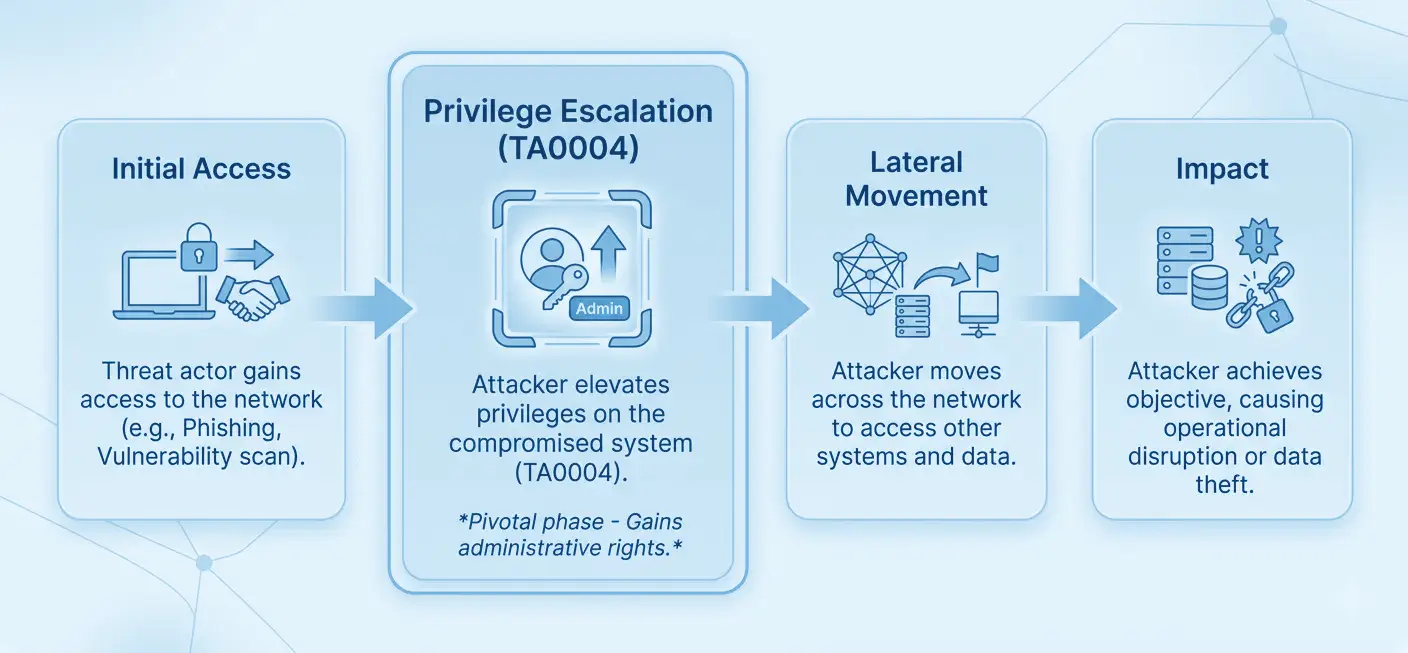
After gaining initial access (whether through phishing, exploiting a public-facing application, or stealing credentials), attackers rarely land with the privileges they need to achieve their objectives. They must escalate: from a standard user to local administrator, from local admin to domain admin, from a cloud user to a privileged IAM role. Privilege escalation is that escalation path.
MITRE ATT&CK TA0004 — Privilege Escalation: Log360 maps 243+ detection rules to this tactic across Windows, Active Directory, AWS, and Microsoft 365 environments. It covers techniques including exploitation for privilege escalation (T1068), valid account abuse (T1078), scheduled task manipulation (T1053), and system process creation (T1543).
Why privilege escalation matters in 2026
Modern attackers, including advanced persistent threat groups, treat privilege escalation not as a single event but as a sustained campaign. They may spend days or weeks probing for escalation paths before acting. According to the 2025 Verizon Data Breach Investigations Report, the use of stolen credentials and privilege abuse was a leading factor in over 40% of confirmed breaches. Routine IT security audits of privileged accounts and group memberships are a prerequisite for building effective detection baselines.
Privilege escalation attacks matter for three reasons:
- Amplified blast radius: A compromised admin account gives attackers access to backup systems, identity infrastructure, and security controls, making containment exponentially harder.
- Defense evasion enablement: With elevated privileges, attackers can disable endpoint detection tools, clear event logs, and modify audit policies, erasing their tracks.
- Ransomware prerequisite: Virtually every ransomware attack requires privilege escalation before deployment. Attackers need SYSTEM or domain admin rights to encrypt network shares and disable AV across the environment. Effective threat detection at the privilege escalation stage prevents ransomware from reaching its full potential blast radius.
Privilege escalation in the attack chain
Privilege escalation does not occur in isolation. Attackers chain it with initial access techniques, then use elevated privileges for lateral movement, credential dumping, and ultimately impact (data destruction, ransomware, exfiltration). Detecting privilege escalation early, before lateral movement begins, is the highest-leverage intervention point in the cyber kill chain. Organizations following a zero trust maturity model can materially reduce escalation risk by enforcing least-privilege access at every layer.
How privilege escalation works
Attackers use multiple overlapping methods to escalate privileges. Understanding the mechanics of each technique is essential for tuning effective detection rules. The four primary approaches covered in this guide are:
1. Exploiting software vulnerabilities (T1068)
Attackers exploit unpatched vulnerabilities in the operating system, drivers, or installed software to execute code in a higher-privileged context. PrintNightmare (CVE-2021-34527) and HiveNightmare (CVE-2021-36934) are well-known examples that granted SYSTEM access to standard users on Windows. Detection relies on behavioral indicators: suspicious parent-child process chains and unexpected kernel driver installations, rather than CVE signatures alone. See the T1068 detection guide for full coverage.
2. Abusing valid accounts (T1078)
Attackers who have obtained service account credentials, domain admin hashes, or cloud IAM access keys can directly use those credentials to act with elevated privileges. There is no "exploit"; the attacker simply authenticates as a privileged user. This makes detection harder and requires behavioral baselines:
- Is this account logging in from an unusual location?
- At an unusual hour?
- Accessing resources it has never touched?
Log360's user behavior analytics capabilities build these baselines automatically. Risk-based alerting then prioritizes the highest-fidelity anomalies for analyst review. Full coverage in the T1078 detection guide.
3. Scheduled task/job abuse (T1053)
Windows Scheduled Tasks can be created or modified to run under SYSTEM privileges. Attackers create tasks that execute malicious payloads, often encoded PowerShell, in a high-privilege context. The task creation itself may appear legitimate unless you inspect the action command, the user account configured, and the task's scheduled trigger. Creation events at off-hours, tasks pointing to temp folders, or GPO-deployed tasks are strong indicators.
4. Creating or modifying system processes (T1543)
Windows services run as SYSTEM by default. Attackers create new services pointing to malicious binaries, or tamper with existing service binaries (DLL hijacking, binary replacement) to execute code at SYSTEM level on the next service start or system reboot. Kernel driver installation via SC.EXE with unsigned or suspicious drivers is a particularly high-fidelity indicator.
5. Access token manipulation (T1134)
Windows access tokens define a process's privileges and group memberships. Attackers with even low-privilege access can steal or duplicate tokens from running processes to impersonate SYSTEM or any logged-in user without knowing their password. Detection focuses on Event ID 4672 (privilege assignment anomalies), Event ID 4688 (process running under a different account than its parent), Event ID 4765 (SID-history modification), and Sysmon ProcessAccess events targeting SYSTEM-level processes. See the T1134 detection guide for full coverage.
Abuse elevation control mechanisms (T1548)
UAC and Linux sudo are designed to gate privilege escalation behind explicit consent. Attackers bypass rather than exploit these controls. On Windows, trusted binaries that silently self-elevate (fodhelper, eventvwr) can be redirected via COM object or registry key hijacking to run attacker-controlled code at high integrity, no consent prompt required. On Linux, misconfigured sudo rules (NOPASSWD entries, wildcard paths) and world-writable setuid binaries allow escalation without credentials. Detection focuses on high-integrity processes spawning without a consent.exe event, registry changes under HKCU\Software\Classes targeting auto-elevating COM objects, and unexpected commands in sudo execution logs. See the T1548 detection guide for full coverage.
Key techniques under TA0004
The table below summarizes the four privilege escalation techniques covered in this cluster, their detection difficulty, and Log360's detection coverage:
| Technique | Description | Platforms | Detection difficulty | Log360 coverage |
|---|---|---|---|---|
| T1068 — Exploitation for Privilege Escalation | Exploits OS/software vulnerabilities to gain SYSTEM or root privileges | Windows, Linux | High: minimal log footprint for some exploits | Behavioral indicators: suspicious process lineage, kernel driver installs |
| T1078 — Valid Accounts | Uses stolen or legitimate high-privilege credentials to act as a privileged user | Windows, AD, AWS, M365 | High: no exploit indicators, requires behavioral baselines | 10+ rules: PIM changes, group elevation, anomalous auth patterns |
| T1053 — Scheduled Task/Job | Creates or modifies scheduled tasks to execute payloads under SYSTEM privileges | Windows, AD | Medium: task creation logged, but payloads may be encoded | 10+ rules: SYSTEM-privilege task creation, encoded payloads, off-hours creation |
| T1543 — Create/Modify System Process | Creates new Windows services or modifies existing ones to run malicious code as SYSTEM | Windows | Medium: service events logged, but unsigned drivers may bypass detection | 6+ rules: new service creation, kernel driver install, service path tampering |
| T1134 — Access Token Manipulation | Steals or duplicates Windows access tokens from running processes to impersonate SYSTEM or privileged users without credentials; includes Potato attacks, SID-history injection, and parent PID spoofing | Windows, Active Directory | High: operates in memory via legitimate APIs; Sysmon required for API-level visibility | 12+ rules: Potato attack tooling, suspicious parent-child chains, SID-history modification, privilege assignment anomalies |
| T1548 — Abuse Elevation Control Mechanism | Bypasses UAC on Windows or exploits misconfigured sudo/setuid on Linux to escalate privileges without a consent prompt or credentials; common vectors include COM hijacking via auto-elevating binaries and NOPASSWD sudo misconfigurations | Windows, Linux, macOS | Medium: no exploit required; abuses legitimate OS mechanisms; requires behavioral detection over signatures | 8+ rules: fodhelper, eventvwr, and sdclt UAC bypass patterns, registry changes targeting auto-elevating COM objects, high-integrity process spawning without consent.exe |
Detection strategies for privilege escalation
Effective privilege escalation detection requires a layered strategy within your SIEM that combines event correlation, behavioral baselines, and active directory monitoring. No single log source is sufficient. Teams can extend detection depth through log collection across endpoints, domain controllers, and cloud services to ensure complete coverage.
Layer 1: Windows event log correlation
Windows Security Event Logs contain the primary evidence trail for privilege escalation attempts. Key events to monitor include:
- Event ID 4673: A privileged service was called. It fires when a process requests a privileged right. High-volume baseline noise, but spikes from unusual processes are significant.
- Event ID 4688: A new process was created. Combined with token elevation type (TokenElevationTypeFull = 2), it reveals full-token processes indicating admin-level execution.
- Event ID 4697: A service was installed in the system. Critical for detecting T1543 service-based persistence and escalation.
- Event IDs 4698–4702: Scheduled task lifecycle events: created, deleted, enabled, disabled, updated. All are relevant for T1053 detection.
- Event IDs 4728, 4732, 4756: Security group membership changes. Adding accounts to local or domain admin groups is a direct privilege escalation indicator.
- Event ID 7045 (System log): New service installed, the system-level counterpart to 4697, often caught before security log events.
Layer 2: Active Directory change monitoring
In domain environments, privilege escalation frequently involves Active Directory manipulation: modifying group membership, changing ACLs to grant additional rights, or abusing the DSRM account. Log360's AD monitoring module tracks all group membership changes, GPO modifications, and trust relationship creation in real time.
Layer 3: Cloud IAM monitoring
In AWS and Microsoft 365, privilege escalation takes the form of IAM role assumption, PIM role activation, and API key abuse. Log360 ingests Amazon VPC security logs and M365 Unified Audit Logs to detect when roles are elevated beyond their normal scope, such as a developer role assuming an admin policy, or a PIM role being permanently activated rather than time-limited. Cloud threat detection across these platforms complements on-premises Windows monitoring to close hybrid environment coverage gaps.
Layer 4: Behavioral baselines (UEBA)
Many of the most dangerous privilege escalation scenarios involve no malware and no CVE exploitation—just legitimate credentials used in unusual ways. Log360's UEBA engine builds behavioral baselines for each user and entity, flagging deviations such as a service account suddenly performing interactive logons, or an account logging in at 2 AM from a new geographic location. The user identity mapping capability ensures that the same person across multiple accounts is treated as a unified entity—critical for detecting credential-based escalation chains.
Log360 detection rules for TA0004
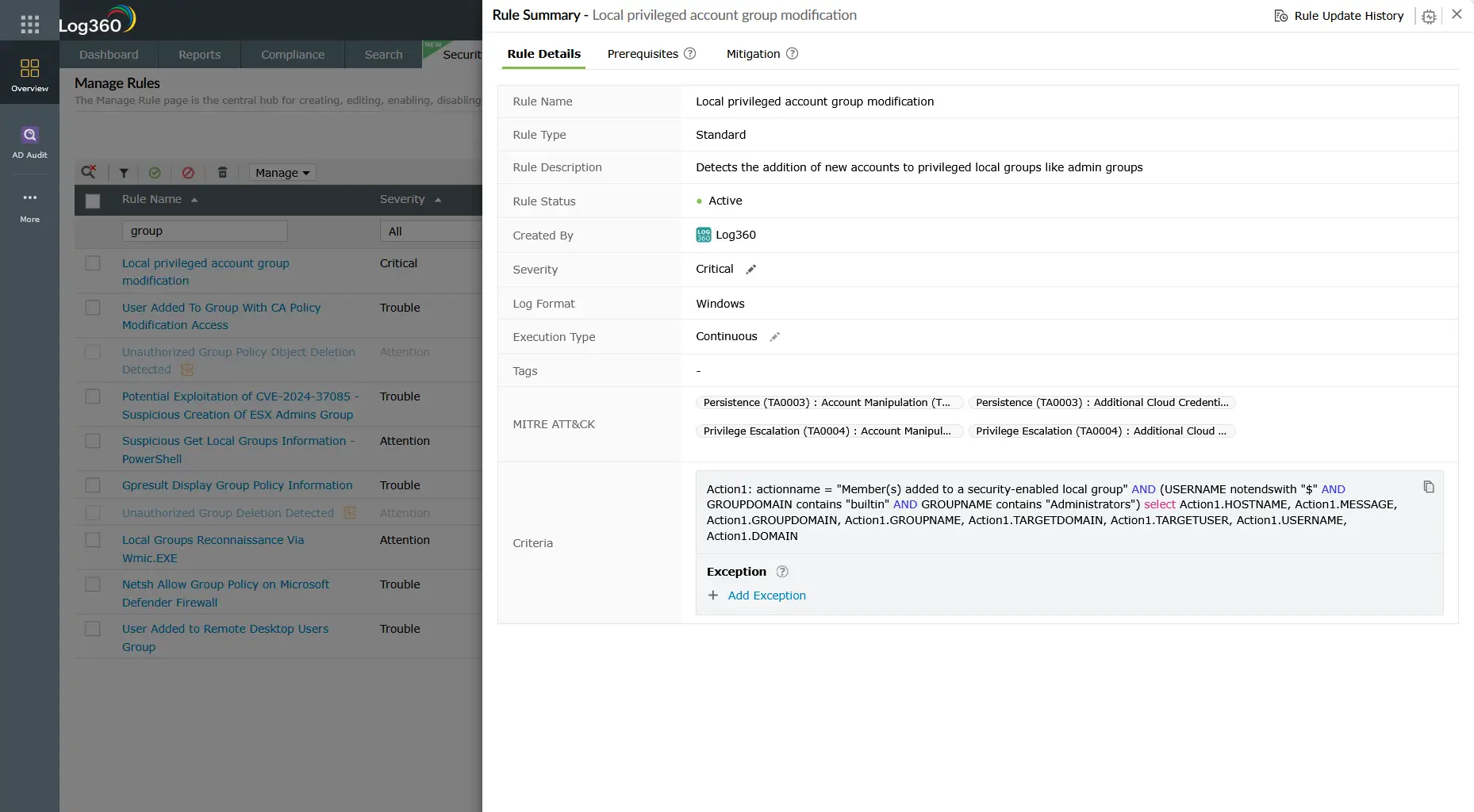
Log360 ships with pre-built correlation rules covering all major TA0004 sub-techniques. The table below lists the highest-signal rules, sorted by severity:
| Rule name | Technique | Platform | Severity |
|---|---|---|---|
| Local privileged account group modification | T1078 / T1098 | Windows | Critical |
| Suspicious parent spawning wininit/services/csrss | T1543 / T1068 | Windows | Critical |
| Suspicious Scheduled Tasks created during non-working hours | T1053 | Windows | Critical |
| User Added to Local Administrators Group | T1078 / T1098 | Windows | Trouble |
| User Added To Highly Privileged Group | T1078 / T1098 | Windows | Trouble |
| Schtasks Creation Or Modification With SYSTEM Privileges | T1053 | Windows | Trouble |
| New Kernel Driver Via SC.EXE | T1543 / T1068 | Windows | Trouble |
| Suspicious Service Path Modification | T1543 | Windows | Trouble |
| Scheduled Task Executing Encoded Payload from Registry | T1053 | Windows | Trouble |
| PIM Role Configuration Changed | T1078 | M365 | Attention |
| Enabled User Right in AD to Control User Objects | T1078 / T1098 | Active Directory | Trouble |
| Persistence and Execution at Scale via GPO Scheduled Task | T1053 | Active Directory | Trouble |
Note: This table shows a subset of Log360's TA0004 detection rules. Log360 ships 243+ rules mapped to the Privilege Escalation tactic across Windows, Active Directory, AWS, and Microsoft 365 platforms. Rules are continuously updated as new techniques are observed.
Investigation and response
When a privilege escalation alert fires, the investigation goal is to determine: who did it, from where, when, how, and whether the escalation succeeded. A rapid and structured threat investigation with SOAR playbook automation limits attacker dwell time before they reach lateral movement.
Investigation checklist
- Identify the account: What account performed the escalation action? Is it a service account, shared account, or named user? Check when the account was last used legitimately.
- Establish the timeline: When did the alert fire relative to other suspicious events? Look for preceding logon events, privilege-use events (4673), and any new process creation chains.
- Determine success or failure: Did the escalation succeed? Check for subsequent high-privilege actions (admin share access, shadow copy deletion, AV service stops).
- Trace the origin: What workstation or IP sourced the activity? Is this a known managed asset? Cross-reference with your asset inventory.
- Check for persistence: After privilege escalation, attackers typically establish persistence. Look for new scheduled tasks, new services, registry run key changes, and new local admin accounts created within the same timeframe.
- Assess lateral movement risk: With elevated privileges, the attacker can move laterally. Check logon events from the escalated account to other systems in the same timeframe.
Response actions
- Immediate containment: Disable the compromised account or isolate the affected host from the network while investigation continues.
- Revert unauthorized changes: Remove any unauthorized group memberships, delete malicious scheduled tasks or services, and restore modified service binaries.
- Force credential rotation: Reset passwords for all accounts that may have been exposed or used in the escalation chain. For domain admin compromise, this includes the krbtgt account.
- Patch the root cause: If a CVE was exploited (T1068), prioritize emergency patching or implement compensating controls (AppLocker, WDAC, controlled folder access).
- Threat hunt for lateral movement: Assume that if escalation occurred, lateral movement may have already begun. Conduct a proactive threat hunting exercise across the environment. Enriching your investigation with cyber threat intelligence can accelerate attribution and scope assessment.
ManageEngine Log360 for privilege escalation detection
Log360's full suite of TA0004 correlation rules, real-time Active Directory monitoring, and UEBA behavioral baselines give SOC teams the detection depth to catch privilege escalation before attackers reach their objectives. Pre-built investigation dashboards surface the full evidence trail, from the initial anomaly through to lateral movement indicators.
Explore the TA0004 technique detection guides
Learn how attackers exploit unpatched OS and software vulnerabilities to gain SYSTEM-level privileges, and how Log360 detects suspicious process lineage and kernel driver installations that signal T1068 exploitation attempts.
Discover how threat actors abuse stolen service account credentials, cloud IAM roles, and privileged AD accounts to act with elevated permissions, and how Log360's behavioral baselines and PIM monitoring catch this without requiring malware indicators.
See how attackers create new Windows services or tamper with existing service binaries to execute code as SYSTEM, including kernel driver abuse, and how Log360's service monitoring rules detect these T1543 patterns in real time.
Need to explore ManageEngine Log360? Schedule a personalized demo
Frequently asked questions
What is privilege escalation in cybersecurity?
Privilege escalation is the act of gaining access rights beyond what were originally granted—typically moving from standard user to administrator, or from local admin to domain admin. In the MITRE ATT&CK framework it is classified as tactic TA0004 and encompasses 13 techniques. It is a prerequisite for most advanced persistent threat campaigns because threat actors rarely gain initial access with the privileges they need to cause significant damage.
What are the most common privilege escalation techniques?
The most frequently observed MITRE ATT&CK privilege escalation techniques are T1068 (Exploitation for Privilege Escalation) using unpatched CVEs, T1078 (Valid Accounts) via stolen credentials, T1053 (Scheduled Task/Job) configured to run as SYSTEM, and T1543 (Create or Modify System Process) via malicious Windows services. Account manipulation (T1098) and access token manipulation (T1134) are also frequently seen in conjunction with these primary techniques.
How does Log360 detect privilege escalation attacks?
Log360 deploys 243+ pre-built correlation rules mapped to TA0004 Privilege Escalation. These rules monitor Windows Security Event Logs for suspicious process creation and group membership changes, Active Directory for unauthorized privilege grants, cloud IAM logs for PIM role activations and role assumption anomalies, and system logs for new services and scheduled task creation. UEBA baselines detect behavioral privilege abuse where no CVE is involved.
What Windows Event IDs are most important for privilege escalation detection?
The highest-signal Windows Event IDs for privilege escalation detection are: 4688 (process creation with elevation token type), 4697/7045 (service installation), 4698–4702 (scheduled task lifecycle), 4673 (privileged service request), and 4728/4732/4756 (security group membership changes). Log360 ingests and correlates all of these in real time, requiring no manual tuning for the pre-built TA0004 rule set.
What is the difference between horizontal and vertical privilege escalation?
Vertical privilege escalation means gaining higher privilege levels—a standard user becoming a local admin or a local admin obtaining domain admin rights. Horizontal privilege escalation means accessing another account at the same privilege level to reach different data or systems. Both are covered under MITRE ATT&CK TA0004, and Log360's detection rules address both patterns across Windows, Active Directory, and cloud environments.
- What is privilege escalation?
- Why privilege escalation matters in 2026
- How privilege escalation works
- Key techniques under TA0004
- Detection strategies for privilege escalation
- Log360 detection rules for TA0004
- Investigation and response
- Explore the TA0004 technique detection guides
- Frequently asked questions

