


What is valid accounts abuse (T1078)?
MITRE ATT&CK® T1078 covers the use of legitimate credentials to perform actions within an environment. As a privilege escalation technique, it specifically describes scenarios where an attacker who has already gained initial access with limited privileges uses additionally obtained credentials for higher-privilege accounts to elevate their access within the environment.
The critical distinction: T1078 privilege escalation requires no vulnerability, no exploit, and no malware. The attacker simply is the privileged account, or gains the privileges legitimately through identity infrastructure abuse. This makes it extraordinarily difficult to detect without behavioral baselines and comprehensive user behavior analytics covering every identity activity across the environment.
T10788 is a cross-tactic technique: In TA0001 Initial Access, attackers use valid credentials to gain their first foothold. In TA0004 Privilege Escalation, those credentials are for accounts with higher privilege than the attacker's current session. Log360 addresses both contexts with distinct detection rule sets.
How attackers escalate privileges via valid accounts
Valid account abuse for privilege escalation takes several distinct forms, each with a different log footprint and different detection approach:
Active Directory group membership manipulation
After gaining initial access, an attacker with write permissions to an AD group obtained through misconfigured ACLs, delegation abuse, or compromised accounts can add themselves or a backdoor account to a privileged group such as Domain Admins, Enterprise Admins, or Local Administrators. The account immediately inherits all rights associated with the group. Event IDs 4728, 4732, and 4756 capture these changes, but only if AD auditing is configured at the appropriate granularity. Preventing credential stuffing and lateral movement requires catching these group changes in real time before the attacker acts on elevated access.
PIM role activation abuse (Microsoft 365)
Azure AD Privileged Identity Management (PIM) allows eligible accounts to activate high-privilege roles (Global Administrator, Privileged Role Administrator) on demand, without permanently holding those roles. An attacker who compromises an account with PIM eligibility can activate the role, perform privileged actions in M365 or Azure, and deactivate the role creating a narrow window of elevated privilege that may be missed if alert thresholds are set too high. Log360 detects all PIM role configuration changes
Cloud IAM role assumption (AWS)
In AWS, attackers who obtain access keys for an IAM user with sts:AssumeRole permissions can assume a higher-privilege IAM role, temporarily acquiring that role's permissions. Combined with the IAM user's own permissions, this can achieve near-administrative access. AWS CloudTrail captures role assumption events, and Log360's AWS integration surfaces anomalous assumption patterns.
Service account credential abuse
Service accounts often have elevated privileges (read/write to file systems, execute-as rights, database access) that are broader than required. If attackers compromise a service account through kerberoasting, credential dumping, or weak password exploitation they may immediately have privileges beyond what a standard user account provides. Log360 detects unusual interactive logons from service accounts, which are a strong indicator of this abuse pattern. Tools like Mimikatz are commonly used to extract service account credentials from memory, making LSASS process monitoring a key detection layer.
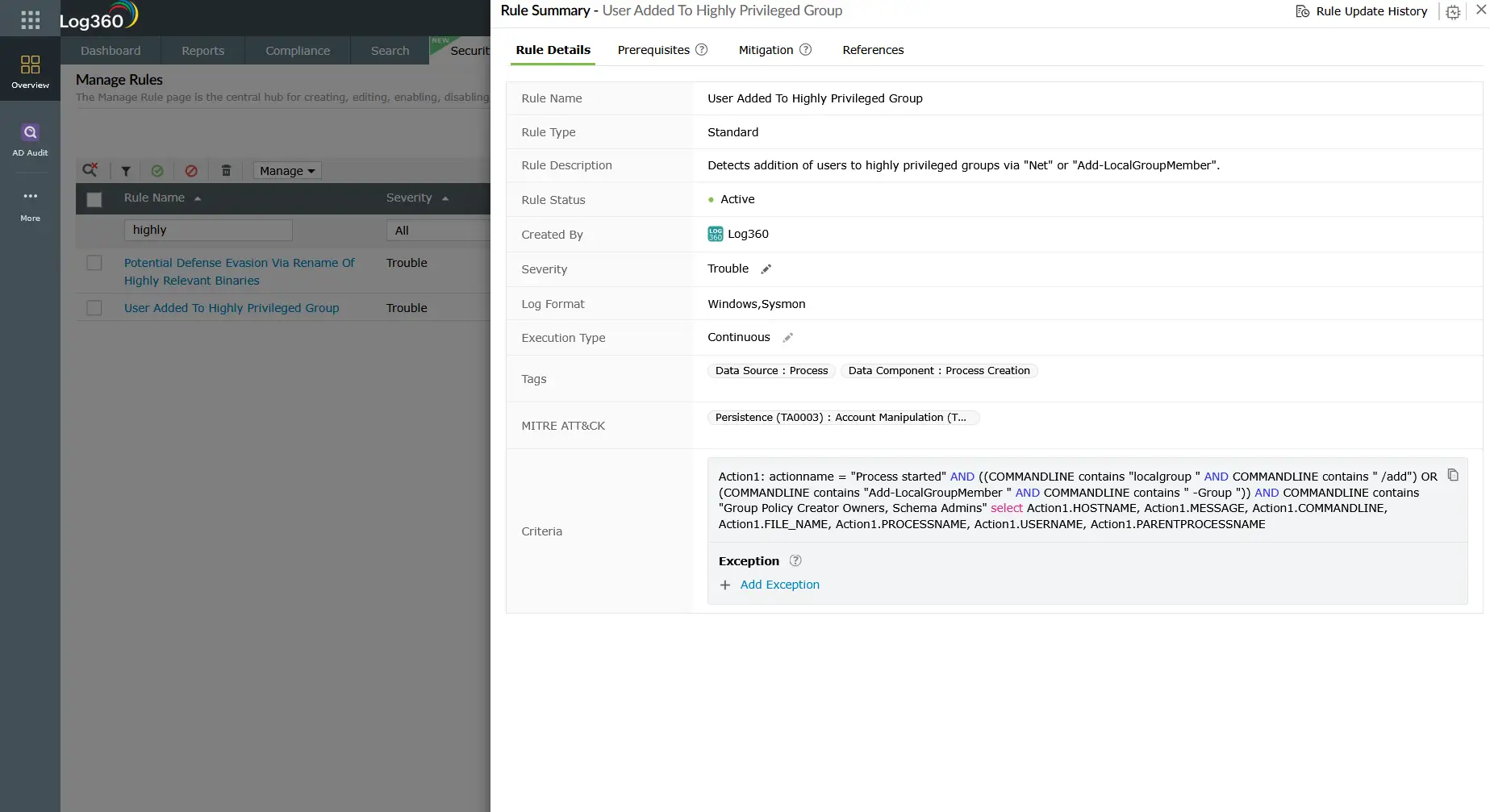
Privilege escalation scenarios using T1078
Scenario 1: Compromised helpdesk account
An attacker phishes a helpdesk employee whose account has "User Account Management" rights in AD. The attacker resets the password for a dormant Domain Admin account, authenticates as that Domain Admin, and adds a new account to the Domain Admins group before the helpdesk password is rotated. Log360 detects: password reset on privileged account + new privileged group member from unusual source.
Scenario 2: PIM role activation by compromised M365 account
An attacker compromises a Microsoft 365 user account eligible for a Global Administrator PIM role. They activate the role, configure a new application with delegated admin permissions, then deactivate the PIM role. Log360 detects: PIM Role Configuration Changed
Scenario 3: AWS role assumption chain
An attacker gains access to AWS IAM user credentials with sts:AssumeRole on an admin-level role. They assume the role, modify IAM policies to add themselves to a permanent admin group, then access S3 data. Log360 detects: AWS Suspicious SAML Activity and Key Pair Import Activity correlated with subsequent high-privilege API calls.
Scenario 4: Service account interactive logon
An attacker dumps credentials from an endpoint using Mimikatz, obtains a service account password, and uses it to interactively log on to a server the service account accesses. The service account has local admin rights on that server. Log360 detects: interactive logon (Event ID 4624 Type 2/10) for a service account that normally only uses Type 3 (network) logons.
Detection indicators for T1078
Because T1078 uses legitimate authentication mechanisms, detection depends on identifying what is unusual rather than what is malicious by signature. The primary detection vectors are:
- Privileged group membership changes: Any account added to Domain Admins, Enterprise Admins, Local Administrators, or other sensitive groups should trigger immediate investigation. Legitimate changes should be traceable to an approved change request.
- Privileged account authentication from unusual contexts: Admin accounts logging in from workstations they have never accessed, from unexpected geographic locations, or outside normal business hours are strong T1078 behavioral indicators.
- PIM role activations without expected context: PIM activations from accounts lacking a concurrent change management ticket, or activations for roles the account has only used infrequently, warrant investigation.
- Service account interactive logons: Service accounts performing interactive (Type 2) logons instead of their expected network or service logon types indicate credential theft and lateral use.
- Multiple group elevation actions in quick succession: An account adding itself or another account to multiple privileged groups within minutes is a strong indicator of automated privilege escalation scripts.
Log360 detection rules for T1078
| Rule name | Platform | Severity | What it detects |
|---|---|---|---|
| Local privileged account group modification | Windows | Critical | Any modification to a local privileged group (Administrators, Remote Desktop Users, etc.) direct T1078 privilege escalation indicator. See T1078 at MITRE ATT&CK |
| User Added to Local Administrators Group | Windows | Trouble | Account added to the Local Administrators group immediate elevation of local privileges |
| User Added To Highly Privileged Group | Windows | Trouble | Account added to Domain Admins, Enterprise Admins, Schema Admins, or other high-value AD groups |
| Enabled User Right in AD to Control User Objects | Active Directory | Trouble | ACL change granting a non-admin account rights to manage user objects creates a backdoor escalation path |
| PIM Role Configuration Changed | M365 | Attention | Any modification to PIM role settings covers activation, eligibility changes, and approval workflow bypasses |
| Temporary Access Pass Added To An Account | M365 | Critical | Temporary Access Pass added can be used to bypass MFA and access privileged accounts |
| Application ID URI Modified | M365 | Critical | App registration URI modification often used in post-PIM-escalation to establish persistent admin access via app permissions |
| AWS Suspicious SAML Activity | AWS | Trouble | Anomalous SAML authentication to AWS used in federation abuse for cloud privilege escalation |
| Login to Disabled Account | M365 | Trouble | Authentication attempt using a disabled account may indicate credential stuffing targeting dormant privileged accounts |
| Active Directory User Backdoors | Active Directory | Trouble | Suspicious ACL changes that create hidden escalation paths shadow admin creation technique. See T1098 Account Manipulation at MITRE ATT&CK |
Investigation steps
- Identify who made the change: For group membership alerts, check Event ID 4728/4732/4756 for the actor account (the account that performed the modification), not just the target account. Verify whether the actor account is authorized to make group changes.
- Correlate with change management records: Was there an approved ticket authorizing this privilege change at this time? Unauthorized changes or changes outside the approved window are high-confidence malicious indicators.
- Check the source workstation: Is the change originating from a privileged administration workstation (PAW) or from a standard desktop? Admin group changes from standard desktops are a strong indicator of compromise.
- Review the actor account's recent activity: In Log360's user activity dashboard, examine the actor account's logon history for the past 24-72 hours. Look for logons from new IPs or unusual locations preceding the group change this may indicate the actor account itself was compromised.
- Check for persistence mechanisms in parallel: T1078 escalation is often used in conjunction with persistence techniques. In the same timeframe, look for new scheduled tasks (T1053), new services (T1543), or new user accounts being created.
- For cloud (M365/AWS) alerts: Review the full API call sequence in Log360's cloud activity logs. What actions did the elevated account take after the PIM activation or role assumption? Was data accessed, exported, or new credentials provisioned?
Response playbook
- Revert unauthorized privilege changes: Immediately remove any unauthorized group memberships. If an account was added to Domain Admins, remove it and review whether it was used to make any further changes while elevated.
- Disable or isolate the actor account: The account that performed the unauthorized privilege change is likely compromised. Disable it pending investigation and force a password reset with MFA re-enrollment once cleared.
- Review all actions taken with the elevated privileges: If the escalation succeeded, the attacker had elevated privileges for a period. Audit all actions taken by the elevated account in that window files accessed, processes launched, outbound connections made.
- Rotate credentials for affected accounts: Both the elevated account and the actor account should have passwords rotated. For domain admin compromise, follow the AD compromise recovery procedure including krbtgt account rotation.
- Audit delegated permissions and ACLs: T1078 often exploits overly permissive ACL delegation. After containment, audit AD for accounts with unexpected permissions to modify group memberships, reset passwords, or modify user attributes. Use user identity mapping to ensure all service accounts and privileged accounts are inventoried with their effective permissions clearly documented.
- Review PIM eligibility assignments (M365): Tighten PIM eligibility lists, implement approval workflows for high-privilege roles, and enforce activation time limits to reduce the blast radius of future T1078 exploitation. Integrate Log360's risk posture management to continuously assess identity risk and surface accounts that have accumulated excessive privileges over time.
ManageEngine Log360 for T1078 privilege escalation detection
Log360's real-time Active Directory monitoring, M365 Unified Audit Log integration, and UEBA behavioral baselines provide comprehensive coverage for T1078-based privilege escalation. Pre-built rules for privileged group changes, PIM manipulation, and service account anomalies eliminate the need for manual rule writing while Log360's correlation engine surfaces the full attack context in seconds.
Explore related privilege escalation detection guides
Return to the complete TA0004 overview covering all privilege escalation techniques, cross-platform detection strategies, the full detection rule reference, and investigation checklists for prioritizing alerts.
Learn how adversaries exploit kernel vulnerabilities and bring-your-own-vulnerable-driver attacks to gain SYSTEM-level access the exploit-based counterpart to credential-based T1078 escalation.
Frequently asked questions
How do attackers use valid accounts for privilege escalation?
Attackers use T1078 for privilege escalation by obtaining credentials for accounts with higher privileges than their current session via credential dumping, Kerberoasting, phishing, or AD delegation abuse and then authenticating as those accounts. No vulnerability exploitation is required. Detection relies on behavioral anomalies: unusual logon contexts, unauthorized AD group changes, PIM role activations, and service account misuse. See the full TA0004 detection guide for context.
What is PIM role abuse in privilege escalation?
Azure AD Privileged Identity Management (PIM) allows just-in-time role activation for eligible accounts. Attackers who compromise an account with PIM eligibility for a high-privilege role (such as Global Admin) can activate that role, perform privileged actions, then deactivate it creating a narrow window of escalated access. Log360's T1078 detection rules include PIM Role Configuration Changed alerts to catch these transient escalation events in real time.
How does Log360 detect credential-based privilege escalation?
Log360 detects T1078 privilege escalation through multiple mechanisms: real-time AD group membership change alerts (Events 4728, 4732, 4756) with critical severity for high-value groups, M365 PIM role change detection, UEBA behavioral baselines flagging accounts acting outside their normal patterns, and cloud IAM anomaly detection for AWS SAML and role assumption events. See the TA0004 overview for the complete Log360 rule set.
What is the difference between T1078 in Initial Access vs Privilege Escalation?
T1078 in TA0001 Initial Access involves using valid credentials to gain the initial foothold the attacker was previously external. In TA0004 Privilege Escalation, T1078 involves using additionally obtained high-privilege credentials to expand privileges within an environment where the attacker already has a foothold. The detection signals differ: Initial Access focuses on authentication gate anomalies (MFA bypass, impossible travel), while Privilege Escalation focuses on AD group changes, PIM activations, and privileged account behavioral deviation.
How can organizations prevent valid account privilege escalation?
Prevention requires a layered approach: enforce least-privilege by auditing and removing unnecessary group memberships and delegated permissions; implement Privileged Access Workstations (PAWs) that restrict privileged account use to dedicated hardened systems; require just-in-time access for all privileged operations through PIM or PAM solutions (ManageEngine PAM360 integrates natively with Log360); enforce MFA for all privilege escalation paths; and run regular AD tiering assessments to identify shadow admin paths. Log360's T1078 detection rules provide the monitoring layer that validates whether preventive controls are holding.
- What is T1078 — Valid accounts for privilege escalation?
- How attackers escalate privileges via valid accounts
- Privilege escalation scenarios using T1078
- Detection indicators for T1078
- Log360 detection rules for T1078
- Investigation steps
- Response playbook
- Explore related privilege escalation detection guides
- Frequently asked questions

