


What is abuse elevation control mechanism (T1548)?
MITRE ATT&CK® Abuse Elevation Control Mechanism (T1548) describes a set of privilege escalation techniques where adversaries exploit or circumvent operating system elevation controls, rather than exploiting a software vulnerability, to gain higher-privilege access. Unlike Exploitation for Privilege Escalation (T1068), which requires a vulnerable target, T1548 abuses the elevation mechanism itself.
On Windows, the primary sub-technique is Bypass User Account Control (T1548.002), where attackers exploit the UAC auto-elevation behavior in trusted system processes to silently escalate from medium-integrity (standard user) to high-integrity (administrator) context. In cloud environments, Temporary Elevated Cloud Access (T1548.005) abuses IAM role assumption mechanisms to obtain administrator-level API access.
T1548 in the ATT&CK chain: T1548 is classified under TA0004 — Privilege Escalation. It typically follows initial access and frequently precedes lateral movement. After bypassing UAC, attackers install malicious services (see T1543), dump credentials, or use alternate authentication material (T1550) to move laterally.
T1548 Sub-Techniques
T1548 encompasses six sub-techniques across Windows, Linux, macOS, and cloud platforms. Log360 detection coverage is strongest for Windows (T1548.002) and cloud (T1548.005):
| Sub-Technique | Platform | Description | Log360 Coverage |
|---|---|---|---|
| Bypass UAC (T1548.002) | Windows | Abuses auto-elevated processes (fodhelper.exe, eventvwr.exe, sdclt.exe) or COM object hijacking to silently escalate privileges | Pre-built process monitoring rules; Sysmon registry event detection |
| Setuid and Setgid (T1548.001) | Linux, macOS | Abuses setuid/setgid bit on executables to run programs with the file owner's (typically root) privileges | Custom rule recommended — Linux syslog monitoring for setuid execution patterns |
| Sudo and Sudo Caching (T1548.003) | Linux, macOS | Exploits sudo misconfigurations (NOPASSWD entries, timestamp caching) to execute commands as root | Custom rule recommended — Linux auth.log monitoring for unexpected sudo usage |
| Temporary Elevated Cloud Access (T1548.005) | AWS, Azure, GCP | Abuses STS AssumeRole, Azure JIT access, or GCP service account impersonation to obtain temporary admin-level cloud access | Pre-built AWS CloudTrail and Azure Activity Log rules for unauthorized IAM role changes |
How Attackers Use T1548
T1548 attacks vary by sub-technique, but follow a consistent pattern of abusing a legitimate elevation control rather than exploiting a software bug:
- Identify the bypass vector: The attacker enumerates available auto-elevating processes (Windows), sudo misconfigurations (Linux), or IAM role policies with assumable permissions (cloud). Tools like SharpHound, WinPEAS, LinPEAS, and Pacu (AWS) automate this reconnaissance phase.
- Stage the bypass payload: For UAC bypass (T1548.002), the attacker writes a malicious registry key, such as modifying HKCU\Software\Classes\ms-settings\shell\open\command, that will be executed when an auto-elevating process like fodhelper.exe launches. The registry write happens under the user's own hive (no admin required), while the execution inherits the elevated token.
- Trigger the elevation: The attacker executes the auto-elevating process. Windows silently elevates it, and the malicious registry payload executes in a high-integrity context, without any UAC prompt appearing to the user.
- Establish high-privilege persistence: With a high-integrity token, the attacker installs a malicious service, disables security tools, or extracts credentials from LSASS. The UAC bypass is a stepping stone, not the end goal. Common next steps include creating or modifying system processes (T1543) and using the resulting access for lateral movement (TA0008).
Abuse Elevation Control (T1548) — Real-World Attack Examples
- Fodhelper.exe UAC bypass: One of the most widely observed UAC bypass techniques. Attackers write a malicious command to HKCU\Software\Classes\ms-settings\shell\open\command, then execute fodhelper.exe, an auto-elevated Windows Settings utility. The registry value executes at high integrity, granting the attacker an elevated shell.
- Eventvwr.exe hijack: A legacy UAC bypass exploiting the Event Viewer's auto-elevation. Attackers modify HKCU\Software\Classes\mscfile\shell\open\command before launching eventvwr.exe, which reads this key and executes its value at high integrity.
- Sdclt.exe bypass: Abuses the System Restore utility's auto-elevation. Used by SilentCleanup scheduled task or directly by attackers via HKCU\Software\Microsoft\Windows\CurrentVersion\App Paths\control.exe registry hijack.
- AWS role chaining (T1548.005): An attacker with limited IAM access uses sts:AssumeRole on a role with broader permissions — essentially privilege escalating within the AWS console without touching EC2 instances or virtual machines.
Detection Indicators for T1548
Detection for T1548 requires monitoring both registry activity (for UAC bypass) and process integrity levels (for the resulting elevated execution). Because no vulnerability is exploited, signature-based detection is ineffective and behavioral analysis is the only reliable approach.
Pre-bypass Indicators
- Registry key writes to auto-elevation paths: Modifications to HKCU\Software\Classes sub-keys, particularly ms-settings, mscfile, or Folder\shell\open\command, from a medium-integrity process are a strong pre-execution indicator of T1548.002. Sysmon Event ID 13 (RegistryEvent: value set) captures these with full key and value data.
- Privilege enumeration tools: Commands like whoami /groups, whoami /priv, or tool executions (WinPEAS, SharpHound, UACME) in the minutes preceding the UAC bypass indicate active pre-exploitation enumeration.
Execution Indicators (UAC Bypass — T1548.002)
The most reliable T1548.002 indicator is an auto-elevating Windows process spawning an unexpected child process. Log360 monitors process creation events (Event ID 4688 and Sysmon Event ID 1) to detect this pattern:
- fodhelper.exe, eventvwr.exe, or sdclt.exe spawning cmd.exe, PowerShell, or unusual executables: These processes should never spawn interactive command interpreters during normal operation. Any such parent-child relationship is suspicious.
- High-integrity process without consent.exe in the execution chain: Legitimate UAC elevation always invokes consent.exe (UAC dialog host). A high-integrity process with a medium-integrity parent and no consent.exe in the chain indicates UAC was bypassed.
- Process token elevation type — full (3) without prompt: Event ID 4688 records TokenElevationType. A value of %%1937 (type 3: full elevation) for a process whose parent shows %%1938 (type 2: limited) without an intervening consent.exe is a high-fidelity UAC bypass indicator.
Cloud Indicators (T1548.005)
- Unexpected STS AssumeRole calls: AWS CloudTrail records every AssumeRole API call. Calls from principals that don't normally assume the target role, or role assumptions to administrator-equivalent policies from low-privilege accounts, are key T1548.005 indicators.
- Azure PIM role activation from unusual locations: Azure Privileged Identity Management (PIM) role activations from unfamiliar geographies, IP addresses, or at unusual hours indicate potential T1548.005 abuse.
Log360 Detection Rules for T1548
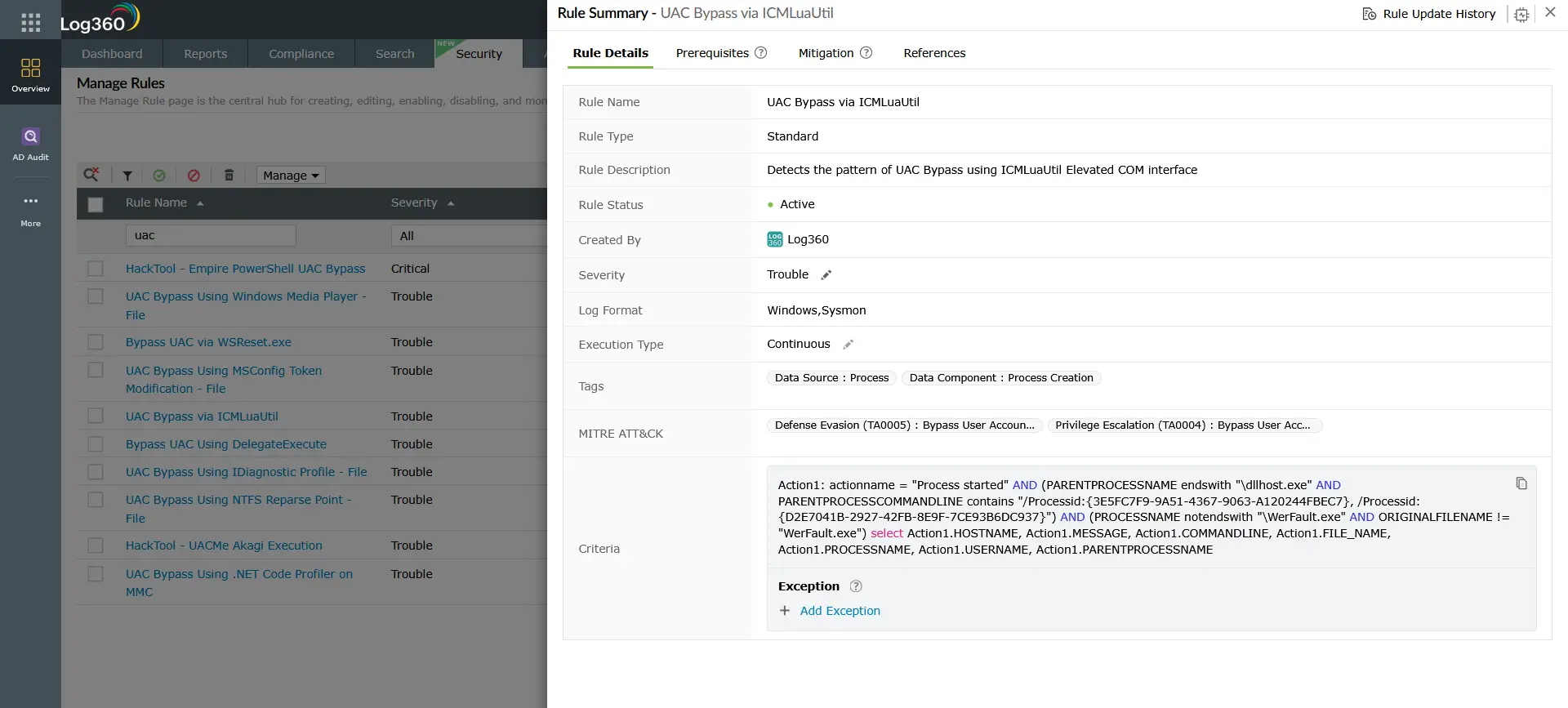
ManageEngine Log360 covers T1548 through pre-built behavioral rules for Windows UAC bypass patterns, registry manipulation, cloud IAM abuse, and Linux privilege escalation. The following rules are mapped to T1548 in Log360's threat detection engine:
| Rule Name | Platform | Severity | What It Detects |
|---|---|---|---|
| Bypass UAC via Fodhelper.exe | Windows, Sysmon | Trouble | Identifies use of Fodhelper.exe to bypass User Account Control — adversaries abuse this auto-elevated Windows Settings utility to execute privileged processes (T1548.002) |
| Shell Open Registry Keys Manipulation | Windows, Sysmon | Trouble | Detects manipulation of shell open registry keys (exefile and ms-settings paths) used for UAC bypass via fodhelper.exe, computerdefaults.exe, and slui.exe registry hijacks (T1548.002) |
| UAC Bypass via Event Viewer | Windows | Trouble | Detects UAC bypass using Windows Event Viewer (eventvwr.exe) via registry hijack of the mscfile handler — a widely-used and well-documented T1548.002 bypass method |
| Sdclt Child Processes | Windows, Sysmon | Trouble | Detects sdclt.exe spawning new child processes — a general detection for sdclt-based UAC bypass where the System Restore utility auto-elevates to run a malicious command (T1548.002) |
| Bypass UAC Using SilentCleanup Task | Windows | Trouble | Detects modification of the windir environment variable to a non-default value — attackers abuse this to trigger UAC bypass via the auto-elevated SilentCleanup scheduled task running cleanmgr.exe (T1548.002) |
| UAC Bypass via ICMLuaUtil | Windows, Sysmon | Trouble | Detects UAC bypass using the ICMLuaUtil Elevated COM interface — an abuse of a Windows COM object that auto-elevates, allowing arbitrary command execution at high integrity (T1548.002) |
| Bypass UAC via WSReset.exe | Windows, Sysmon | Trouble | Detects use of WSReset.exe to bypass User Account Control — the Windows Store reset utility auto-elevates and reads a command from a low-privilege registry key, executing it at high integrity (T1548.002) |
| UAC Disabled | Windows | Trouble | Detects when an attacker disables User Account Control by setting the EnableLUA registry value to 0 — eliminates the primary Windows elevation control mechanism entirely |
| HackTool - UACMe Akagi Execution | Windows, Sysmon | Trouble | Detects execution of UACMe (Akagi.exe), a comprehensive UAC bypass testing tool used in real attacks to automate exploitation of over 60 documented UAC bypass methods (T1548.002) |
| PrintSpoofer Detection | Windows, Sysmon | Trouble | Detects PrintSpoofer, a local privilege escalation utility that exploits the Windows Print Spooler to obtain SYSTEM-level access on Windows 10 and Server 2016/2019 (T1548) |
| AWS STS Role Assumption by Service | AWS CloudTrail | Trouble | Detects when an AWS service assumes a role via STS to obtain temporary credentials — adversaries use unauthorized role assumption for cloud privilege escalation and lateral movement (T1548.005) |
| AWS Suspicious SAML Activity | AWS CloudTrail | Trouble | Identifies suspicious SAML-based role assumption in AWS indicating potential backdoor access via federated identity abuse — maps directly to T1548.005 (Temporary Elevated Cloud Access) |
| Repeated failed SUDO commands | Unix | Trouble | Detects multiple failed sudo execution attempts from the same user — indicates unauthorized privilege escalation attempts or active brute-forcing of sudo access (T1548.003) |
Custom rule recommendation for Linux — Setuid and Setgid (T1548.001) / Sudo and Sudo Caching (T1548.003): For environments running Linux workloads, a custom Log360 correlation rule targeting Linux auth.log or syslog for sudo commands from non-standard users, setuid binary execution outside of /bin and /usr/bin, and sudo from unexpected parent processes provides coverage for Setuid and Setgid (T1548.001) and Sudo and Sudo Caching (T1548.003) that the pre-built rules do not cover.
Investigation Steps
When Log360 fires a T1548-related alert, follow this investigation sequence to confirm the bypass, identify the payload, and determine the full blast radius:
- Examine the auto-elevated process and its child: In the Log360 process investigation view, identify the auto-elevating parent (fodhelper.exe, eventvwr.exe, sdclt.exe) and the child process it spawned. Note the child process name, command-line arguments, and working directory which reveals the attacker's payload or secondary tool.
- Review registry modifications preceding the alert: Search Sysmon Event ID 13 logs for HKCU\Software\Classes writes in the 5-minute window before the alert timestamp. The registry value written will contain the malicious command or payload path. This is the staging step, identifying it reveals the attack payload even if the subsequent process was obfuscated.
- Determine what the elevated process executed: Trace all child processes of the high-integrity session. Common next steps after UAC bypass include: credential dumping (LSASS access), service installation (Event ID 7045), PowerShell with encoded commands, or download of additional payloads. Each of these generates its own alert in Log360.
- Check for persistence mechanisms installed post-bypass: Review Event ID 7045 (new service) and 4698 (scheduled task created) in the 10-minute window after the UAC bypass. Attackers typically establish persistence within minutes of achieving high-integrity access.
- Assess lateral movement risk: With a high-integrity token, attackers can dump credentials (LSASS) and use them for pass-the-hash (T1550) or remote services abuse (T1021). Check for outbound SMB, RDP, or WinRM connections from the affected host in the post-bypass window.
- For cloud alerts: Review the full IAM role assumption chain in CloudTrail. Identify who initiated the AssumeRole call, from which principal, to which target role, and what API calls were made with the assumed credentials. Check for data access events (S3 GetObject, Secrets Manager GetSecretValue) that indicate the elevated access was used for exfiltration.
Response Playbook
- Isolate the affected host: Remove the system from the network to prevent lateral movement from the high-integrity session. UAC bypass gives attackers the equivalent of local admin and so credential dumping and lateral movement can happen within seconds.
- Remove the malicious registry key: Delete the UAC bypass registry entry (e.g., HKCU\Software\Classes\ms-settings\shell\open\command) and any associated keys under HKCU\Software\Classes. This removes the bypass mechanism and prevents re-exploitation if the host is reconnected.
- Terminate malicious processes and remove persistence: Stop any processes launched via the bypass. Remove malicious services (Event ID 7045), scheduled tasks (Event ID 4698), or startup entries created in the post-bypass window.
- Reset credentials on the affected host: With high-integrity access, LSASS credential extraction is trivial. Rotate local administrator passwords (LAPS), service account passwords, and any credentials for accounts that logged onto the host interactively.
- Enable UAC to the highest setting: Ensure UAC is configured to "Always notify" (the maximum setting). Many UAC bypass techniques work only when UAC is set to "Notify only when apps try to make changes", the default. The highest setting forces a prompt even for Windows binaries.
- For cloud incidents: Revoke the temporary credentials obtained via the abused role assumption. Review and tighten the IAM trust policy on the assumed role. Enable AWS STS session policies with condition keys limiting the source IP range. Review any resource access made with the elevated credentials for data exfiltration indicators.
- Threat hunt for lateral movement: Search Log360 for RDP (Event ID 4624, logon type 10), SMB admin share access, and WinRM sessions originating from the affected host after the bypass timestamp. Use Log360 UEBA to identify any accounts showing anomalous behavior following the incident.
ManageEngine Log360 for T1548 Detection
ManageEngine Log360 detects T1548 Abuse Elevation Control Mechanism through behavioral correlation rules across Windows, Sysmon, and cloud platforms. The integrated investigation dashboard correlates registry modification events with subsequent process creation, surfacing the complete UAC bypass chain in a single alert, cutting investigation time from hours to minutes. For cloud environments, Log360 natively ingests AWS CloudTrail and Azure Activity Logs, detecting IAM role abuse patterns that indicate T1548.005 exploitation.
Need to explore ManageEngine Log360? Schedule a personalized demo
Frequently Asked Questions
What is Abuse Elevation Control Mechanism (T1548)?
T1548 is a MITRE ATT&CK technique where adversaries abuse OS elevation controls, such as Windows UAC, Linux sudo, or cloud IAM temporary roles, to gain higher privilege levels without exploiting a software vulnerability. The most prevalent sub-technique on Windows is Bypass User Account Control (T1548.002), which abuses auto-elevating system processes to silently escalate from a standard user context to administrator. Learn more about how T1548 fits into the broader TA0004 Privilege Escalation tactic.
How does UAC bypass work and how can it be detected?
UAC bypass (T1548.002) exploits the fact that certain Windows processes auto-elevate without prompting the user, because Windows trusts them implicitly. Attackers hijack the registry keys these processes reference on startup. Detection focuses on Sysmon Event ID 13 (registry write to HKCU\Software\Classes auto-elevation paths) combined with Event ID 1 or 4688 (auto-elevated process spawning an unexpected child). ManageEngine Log360 correlates these events into a single high-confidence T1548 alert.
Does Log360 detect UAC bypass in cloud environments?
Yes, Log360 detects Temporary Elevated Cloud Access (T1548.005) in AWS, Azure, and GCP by ingesting CloudTrail, Azure Activity Log, and GCP Cloud Audit Logs. Pre-built rules flag unauthorized IAM role assumption calls, suspicious SAML activity, and Azure PIM role configuration changes that indicate cloud-based elevation control abuse. For on-premises Windows environments, Log360 covers T1548.002 UAC bypass through process and registry monitoring rules.
What is the difference between T1548 and T1068?
T1548 abuses legitimate OS elevation mechanisms — no vulnerability required. T1068 exploits a software vulnerability (kernel, driver, or service) to gain privileges. T1548 is generally more reliable across patched systems because it abuses design choices rather than bugs. T1068 requires a specific vulnerable target. Both sit within TA0004 Privilege Escalation, and both are covered by ManageEngine Log360 detection rules. See the T1068 detection guide for a detailed comparison.
What compensating controls reduce T1548 risk?
For Windows: set UAC to "Always notify" (maximum setting), restrict write access to HKCU\Software\Classes for standard users where possible, and implement Windows Defender Application Control (WDAC) to allowlist auto-elevating processes. For cloud: implement least-privilege IAM policies, require MFA for role assumption, enable AWS STS session policies with source IP condition keys, and use Azure PIM with approval workflows for privileged roles. These controls supplement T1548 detection with preventive hardening.
- What is abuse elevation control mechanism (T1548)?
- T1548 sub-techniques
- How attackers use T1548
- Detection indicators for T1548
- Log360 detection rules for T1548
- Investigation steps
- Response playbook
- Frequently asked questions

