


What is T1068 — Exploitation for privilege escalation?
MITRE ATT&CK® T1068 describes a technique where adversaries exploit software vulnerabilities in the operating system kernel, a device driver, a running service, or installed software to gain privileges higher than their current account holds. The goal is SYSTEM-level access on Windows or root on Linux, unlocking capabilities unavailable to standard users: installing kernel drivers, reading protected memory, disabling security controls.
Unlike credential-based escalation, T1068 requires a vulnerable target. The attacker must identify a locally exploitable CVE applicable to the victim's OS version and patch level, then deliver and execute an exploit either manually or as a stage in post-exploitation tooling such as Metasploit or custom shellcode. Pre-built detection rules mapped to T1068 behavioral indicators are the most resilient way to catch exploitation attempts regardless of the specific CVE involved.
T1068 in the ATT&CK chain: T1068 is classified under TA0004 Privilege Escalation. It is frequently used after initial access via T1190 (Exploit Public-Facing Application) or phishing, when the initial landing is a low-privilege user context. Successful T1068 exploitation typically precedes T1543 (service persistence) or credential dumping.
How attackers use T1068
The T1068 attack flow follows a consistent pattern, regardless of the specific exploit used. MITRE ATT&CK framework documentation for this technique provides additional sub-technique context and real-world procedure examples from tracked threat actor groups:
- Enumerate patch level and OS version: The attacker runs
systeminfo, checksWMIC qfefor installed hotfixes, or uses post-exploitation tools like WinPEAS/LinPEAS to identify missing patches and potentially exploitable misconfigurations. - Select an applicable exploit: The attacker matches discovered vulnerabilities against their exploit toolkit. Exploit-DB, GitHub, or private exploit brokers are common sources for local privilege escalation exploits.
- Execute the exploit: The exploit is delivered as a binary, script, or reflective DLL. Execution typically spawns a new process often
cmd.exeorpowershell.exeinheriting SYSTEM token privileges. - Establish SYSTEM-level persistence: With SYSTEM access, the attacker installs a malicious service, modifies a kernel driver, or adds themselves to the local administrators group to maintain the elevated access.
Notable T1068 exploits
Real incidents demonstrate the breadth of T1068 exploitation vectors:
- PrintNightmare (CVE-2021-34527): Windows Print Spooler vulnerability allowing SYSTEM execution via a malicious printer driver.
- HiveNightmare / SeriousSAM (CVE-2021-36934): Excessive ACLs on Windows 10 shadow copies allowing standard users to read SAM, SECURITY, and SYSTEM hives enabling offline credential extraction.
- Windows Error Reporting (CVE-2022-37969): A Win32k privilege escalation vulnerability exploited in targeted attacks to gain kernel-level access.
- Driver-based escalation: Bring Your Own Vulnerable Driver (BYOVD) attacks, where attackers load a legitimately signed but vulnerable driver to execute unsigned code in kernel space.
Detection indicators for T1068
T1068 is among the harder techniques to detect because kernel exploitation often leaves minimal log footprint. Detection is most effective when focused on behavioral indicators before and after exploitation rather than exploit signatures. A modern SOC toolset combining SIEM correlation with endpoint telemetry provides the best coverage for T1068 detection across the exploitation lifecycle.
Pre-exploitation indicators
- Privilege Enumeration: Commands like
whoami /priv,systeminfo, orWMIC qfe listexecuted from unusual parent processes (e.g., spawned by a web application) indicate active privilege reconnaissance. - WinPEAS / LinPEAS execution: These enumeration tools have known signatures and behavioral patterns (e.g., looping through registry hives, checking service permissions, accessing shadow copies).
Exploitation indicators (process lineage)
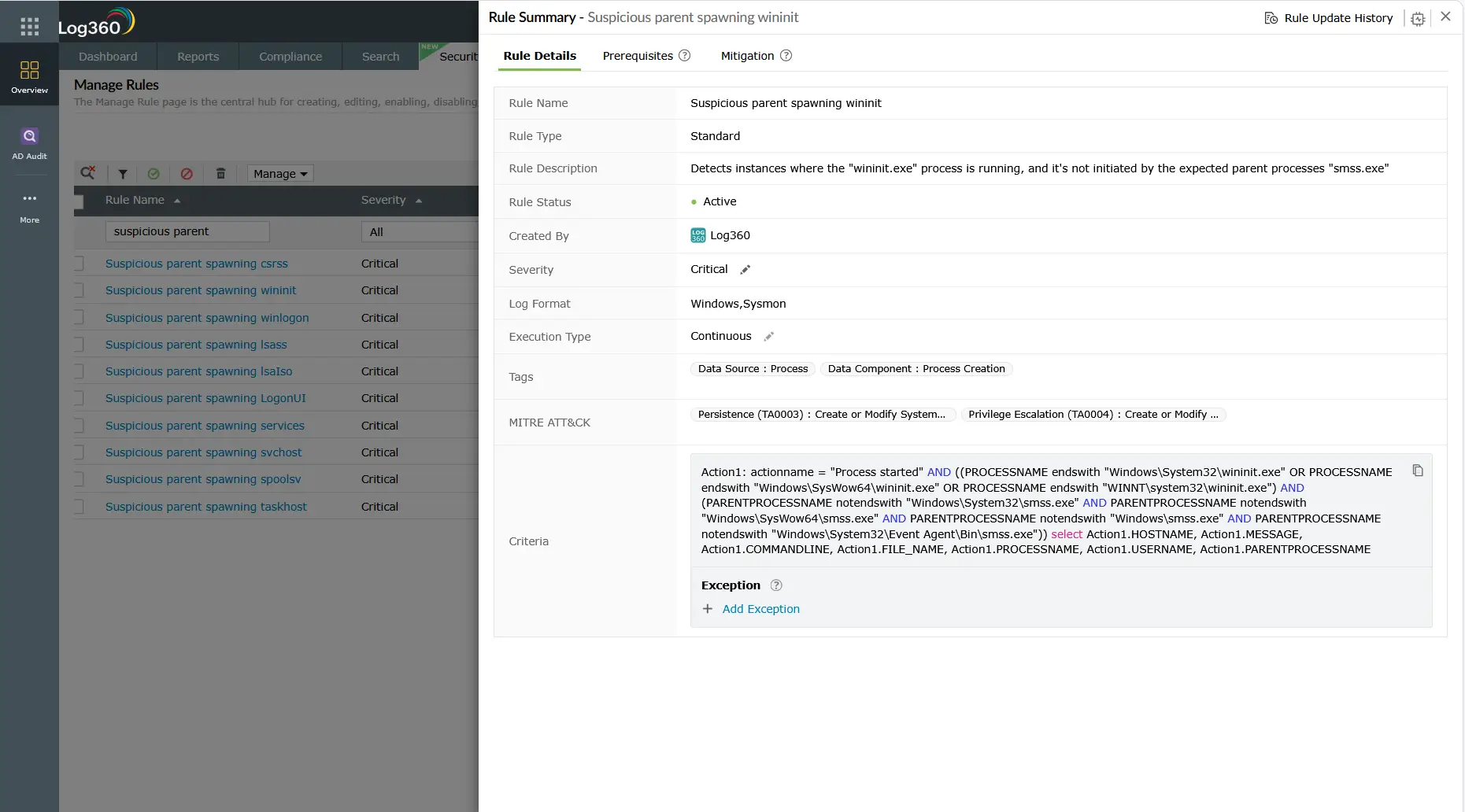
The most reliable T1068 indicator is an anomalous parent-child process relationship specifically, a critical system process (wininit.exe, services.exe, csrss.exe) spawned by an unexpected parent, or a high-privilege process (running as SYSTEM) with a non-privileged parent. Log360's pre-built rule Suspicious parent spawning wininit/services/csrss (Critical severity) targets exactly this pattern.
Post-exploitation indicators
- Kernel driver installation: T1068 exploits, particularly BYOVD attacks, install vulnerable or malicious kernel drivers. Event ID 7045 (new service installed) and Sysmon Event ID 6 (driver load) with an unsigned or low-reputation driver are high-fidelity indicators. Correlate with log analysis of the process chain immediately preceding the driver load for complete attack chain reconstruction.
- New service creation with SYSTEM token: After exploitation, attackers often immediately create a new service (Event ID 4697) to establish SYSTEM-level persistence.
- Token privilege expansion: Process creation (Event ID 4688) with
TokenElevationTypeFullfor a process whose parent was running at standard user level indicates successful privilege token manipulation.
Log360 detection rules for T1068
Log360 ships with pre-built correlation rules that address the behavioral indicators of T1068 exploitation. Because T1068 does not have CVE-specific rule coverage (signatures would be brittle and easily bypassed), Log360's approach focuses on process behavior, driver activity, and service creation patterns:
| Rule name | Platform | Severity | What it detects |
|---|---|---|---|
| Suspicious parent spawning wininit/services/csrss | Windows | Critical | Critical system processes spawned by unexpected parent strong indicator of exploit-driven process manipulation |
| New Kernel Driver Via SC.EXE | Windows | Trouble | Kernel driver installation using SC.EXE used in BYOVD attacks and post-exploitation driver persistence. See T1068 at MITRE ATT&CK |
| New Service Creation Using Sc.EXE | Windows | Attention | New service created via SC.EXE frequently used immediately after T1068 exploitation to persist SYSTEM-level access |
| Suspicious New Service Creation | Windows | Trouble | Service creation with unusual binary paths (temp folders, user profiles, or encoded names) indicating malicious payload delivery |
| Potential Persistence Attempt Via Existing Service Tampering | Windows | Trouble | Modification of an existing service's binary path binary replacement technique used after T1068 exploit to maintain SYSTEM access |
Custom rule recommendation: For environments with Sysmon deployed, a custom Log360 correlation rule targeting Sysmon Event ID 6 (Driver Loaded) where Signed = false or Signature = "" provides high-fidelity BYOVD detection not available from Windows Event Logs alone.
Investigation steps
When Log360 fires a T1068-related alert, follow this investigation sequence to confirm the exploit, scope the damage, and identify the root cause:
- Examine the full process chain: In Log360's Process Lineage view, trace the alert's source process back to its ancestor chain. Identify where the privilege elevation occurred which process transitioned from low to high privilege without a legitimate elevation request (UAC).
- Check the kernel driver: If a kernel driver installation is involved (Event ID 7045 or Sysmon ID 6), extract the driver binary path. Verify whether the driver is signed, check the publisher, and cross-reference against known malicious driver hashes. Unsigned drivers in
Temp,AppData, or unusual paths are immediate red flags. - Correlate with network logs: Was the exploit delivered remotely? Check for network connections immediately preceding the process chain anomaly. A connection from an unexpected external IP to an internal service, followed by an exploit chain, points to remote T1068 exploitation.
- Assess privilege scope after escalation: What actions did the SYSTEM-level process perform? Check for subsequent file writes, registry modifications, credential access attempts, or lateral movement (remote logons to other systems). This determines the full blast radius.
- Identify the exploited vulnerability: Check the Windows version and installed patches (Event ID 4688 metadata, or raw
systeminfooutput from the affected host). Correlate the behavior with known CVEs for that OS version and patch level to identify the specific vulnerability exploited.
Response playbook
- Isolate the host immediately: Remove the affected system from the network via EDR quarantine or VLAN reassignment to prevent lateral movement from the SYSTEM-level session.
- Stop and remove malicious drivers/services: Disable and unload any suspicious kernel drivers. Remove malicious services created post-exploitation. Do not simply stop the service fully remove it and delete the binary.
- Preserve forensic evidence: Before reimaging, capture a full memory dump (SYSTEM-level access enables comprehensive memory acquisition), export relevant event logs, and hash all suspicious files. This evidence is essential for CVE attribution and insurance claims.
- Apply the relevant security patch: Identify the exploited CVE and apply the Microsoft Security Update or vendor patch. If the patch is not immediately available (zero-day), implement compensating controls: Windows Defender Application Control (WDAC) blocking unsigned drivers, or AppLocker restricting execution from temp folders.
- Reset credentials on the affected host: Any credentials cached on a SYSTEM-compromised host should be treated as exposed. Rotate local admin passwords (LAPS), service account passwords, and any interactive credentials used on the system.
- Threat hunt for lateral movement: With SYSTEM access, attackers can dump credentials and move laterally. Run a threat hunt for logons from the affected host to other systems in the same timeframe as the T1068 exploitation window. Use threat intelligence enrichment to identify if the observed TTPs match a tracked adversary group.
ManageEngine Log360 for T1068 detection
Log360's behavioral correlation rules detect T1068 exploitation through process lineage anomalies and kernel driver activity catching exploit attempts even when no CVE signature is available. The integrated investigation dashboard surfaces the complete process chain, correlated network events, and service creation timeline in a single view, cutting investigation time from hours to minutes.
Explore related privilege escalation detection guides
Return to the comprehensive TA0004 overview covering all privilege escalation techniques, detection strategies across Windows, AD, AWS, and M365, and the full Log360 detection rule reference for this tactic.
Learn how attackers create new Windows services or tamper with existing service binaries to execute code as SYSTEM a technique closely related to T1068 post-exploitation persistence, detected by Log360's service monitoring rules.
Understand how adversaries use stolen or legitimate high-privilege credentials to act as admin without exploiting any vulnerability the most common escalation technique in real-world incidents and detectable through Log360's behavioral baselines.
Frequently asked questions
What is T1068 Exploitation for Privilege Escalation?
T1068 is a MITRE ATT&CK technique where an attacker exploits a software vulnerability in the OS kernel, a device driver, or a locally running service to gain higher-level privileges than their current account holds. It requires a vulnerable target and a working exploit for the specific patch level, making it more technically demanding than credential-based escalation. Learn more about how T1068 fits into the broader TA0004 Privilege Escalation tactic.
How do you detect kernel-level privilege escalation exploits?
Detection focuses on behavioral indicators: anomalous parent-child process relationships (critical system processes with unexpected parents), unsigned kernel driver loads (Sysmon Event ID 6 with Signed = false), new services created immediately after suspicious process spawning (Event ID 7045), and token elevation type analysis in Event ID 4688. Log360's pre-built rules target these T1068 behavioral patterns without relying on brittle exploit signatures.
What Windows Event IDs detect T1068 privilege escalation?
The most relevant Event IDs for T1068 detection in Log360 are: 4688 (process creation with token elevation type), 4697 (service installation in Security log), 7045 (new service in System log often captured before 4697), Sysmon 1 (process create with full command line), and Sysmon 6 (kernel driver load). Supplementing Windows Security Audit with Sysmon dramatically increases T1068 detection fidelity.
Is T1068 harder to detect than other privilege escalation techniques?
Yes T1068 exploitation often occurs in kernel space where standard Windows audit logging is minimal. Signature-based detection fails quickly as exploit code is modified. The most resilient approach is behavioral: Log360's correlation rules flag anomalous process lineage and driver activity regardless of the specific exploit used. For a comparison with easier-to-detect escalation methods, see the TA0004 detection guide which covers detection difficulty ratings for all techniques.
What compensating controls reduce T1068 risk when patching is not immediately possible?
When immediate patching is not feasible, organizations should implement: Windows Defender Application Control (WDAC) or AppLocker to block execution from temp/user directories, Hypervisor-Protected Code Integrity (HVCI) to prevent unsigned kernel drivers, restricting SC.EXE execution to authorized administrators, and enabling Credential Guard to protect credentials even if SYSTEM is achieved. These controls supplement T1068 detection with preventive hardening that remains effective even against zero-day exploits.
- What is T1068 — Exploitation for privilege escalation?
- How attackers use T1068
- Detection indicators for T1068
- Log360 detection rules for T1068
- Investigation steps
- Response playbook
- Explore related privilege escalation detection guides
- Frequently asked questions

