

In Windows systems, process spawning is a technique where an existing process creates a new process to perform specific tasks.
A single parent process may spawn several child processes for one or more of the following reasons:
- Execute multiple tasks: Spawning allows the parent process to execute multiple tasks simultaneously. While the parent process can focus on major system functions, the child process can carry out minor tasks like system upgrades and maintenance.
- Manage resources: Child processes have their own memory space and resources. So, by spawning multiple child processes, the parent can carry out resource-intensive operations seamlessly.
- Maintain system continuity: Highly resource-intensive tasks may destroy a process and crash the system. Therefore, by delegating such tasks to a child process, the parent can ensure system continuity, even if the child process crashes.
Though spawning is a normal system event, it can become suspicious when a parent process spawns an inappropriate child process or when a legitimate child process is spawned by an unrelated parent process. Attackers often exploit this technique to manipulate a system, inject malicious code, and execute malware scripts. One such process frequently exploited by attackers is taskhost.exe.
What is taskhost.exe?
taskhost.exe, also known as Host Process for Windows Tasks, is a Windows process that hosts the execution of Dynamic Link Library (DLL) files when required by other applications. A DLL file contains a set of code that can be used by multiple programs simultaneously. Unlike EXE files, which can be directly executed by the Windows OS, DLL files need to be called by another application or process to run.
taskhost.exe serves as the process that loads and allows DLL files to execute when called by an application. Since it can be called by multiple applications at the same time, multiple instances of taskhost.exe may run simultaneously. It operates in the background without user interaction and is located in the following Windows folders:
- Windows\System32\taskhost.exe
- Windows\SysWow64\taskhost.exe
- WINNT\system32\taskhost.exe
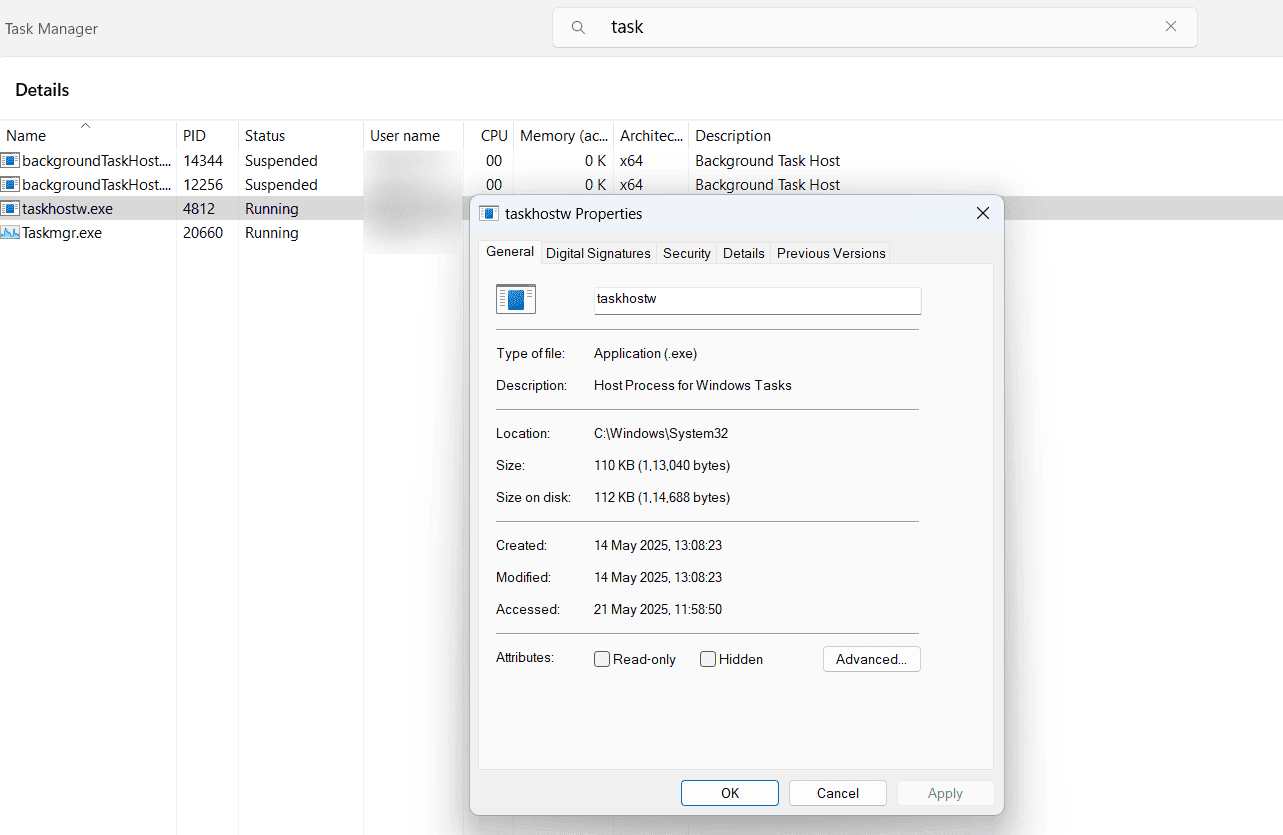
Figure 1: taskhost.exe process in Windows.
In Fig. 1, you can see multiple taskhost.exe processes running simultaneously in a Windows system. When you right-click any of the taskhost.exe processes and select its properties, you can find details such as the type of file that has called the process, the location from where taskhost.exe was executed, the size of the process, and more. From the above image, you can see that the taskhost.exe process was executed from the C:\Windows\System32 folder.
Parent and child processes associated with taskhost.exe
Parent processes that spawn taskhost.exe as their child process are:
- services.exe
- svchost.exe
services.exe is a Windows process that manages system services and svchost.exe is the process that hosts those services on Windows systems. taskhost.exe is spawned by either of these processes to execute specific application tasks.
Child processes that are spawned by taskhost.exe are:
- werfault.exe
- wermgr.exe
- WerFaultSecure.exe
The above child processes of taskhost.exe are associated with the Windows Error Reporting system and are responsible for handling and reporting application crashes and system errors.
Apart from these processes, any other process involving taskhost.exe as its parent or child may indicate suspicious process spawning activity on the system.
Why do attackers abuse taskhost.exe?
taskhost.exe is leveraged by attackers to spawn malicious child processes for the following reasons:
- Allowlisted Windows process: taskhost.exe is a legitimate Windows process and is executed from system32 and SysWow64 folders that are not susceptible to the scrutiny of security tools.
- Multiple running instances: Multiple applications may call the taskhost.exe process to run DLL files. This creates multiple instances of taskhost.exe that run simultaneously. Thus, monitoring and tracking each process hosted on each instance of taskhost.exe becomes difficult.
- Association with scheduled tasks: Attackers exploit taskhost.exe because it hosts scheduled tasks involving DLL files. This ensures that malware scripts are executed every time the scheduled task runs, making it harder to detect the malicious process.
How is taskhost.exe exploited?
Here are the different techniques used by attackers to exploit taskhost.exe:
- Code injection: Attackers use code injection techniques to inject malicious code into DLL files. So whenever taskhost.exe loads the malicious DLL file, a malicious child process gets executed. Since the parent process (taskhost.exe) appears to be executing legitimate tasks, the suspicious child process remains undetected.
- Exploiting scheduled tasks: By injecting malicious code into scheduled tasks, attackers ensure that the malware is executed whenever the scheduled task runs. This helps attackers maintain persistence within the network, escalate privileges, and move laterally within the system.
- Leveraging multiple instances: Attackers can exploit multiple instances of taskhost.exe to run malicious processes that mimic the legitimate functionality of taskhost.exe in the system background. This can be leveraged to exploit vulnerabilities in the Windows system to create stealthy back doors for attackers.
How Log360 detects taskhost.exe spawning suspicious child processes
ManageEngine Log360 uses predefined correlation rules to detect suspicious child processes. One such rule, taskhost spawning suspicious child, enables the detection of malicious processes masquerading as harmless child process. The rule involves the following criteria for detection.
Criteria:
(("Parent process name" ends with "Windows\System32\taskhost.exe" OR "Windows\SysWow64\taskhost.exe" OR "WINNT\system32\taskhost.exe") AND ("Process name" not ends with "werfault.exe" AND "wermgr.exe" AND "WerFaultSecure.exe"))
This rule is triggered when the parent process taskhost.exe is found to spawn a child process that does not include werfault.exe, wermgr.exe and WerFaultSecure.exe.
To learn more about how this rule works, visit this page.

