

If your organization is like most, you’re probably pulling threat intelligence feeds from at least 24 different sources—maybe even more. A threat intelligence feed is a continuous stream of real-time data on emerging cyberthreats, including globally blocklisted malicious IPs, URLs, domains, and malware signatures. These feeds are essential for detecting and mitigating threats, but the real challenge lies in making the right use of them. How do you turn insights into action—whether for threat detection, cyberthreat analysis, or incident response? In this guide, we’ll break down key threat intelligence use cases and practical ways to leverage them for a stronger security posture.
What is the use of threat intelligence feeds?
Threat intelligence feeds enrich network log data with updated information from global repositories of malicious IPs, URLs, and domains so security teams can detect, analyze, and mitigate external cyberthreats in real time.
Cyberthreat intelligence feeds contain the following information about domains, URLs, or IP addresses:
- The risk or reputation score of the IP: A score that denotes how risky the particular URL or IP is.
- Threat category: The type of threat the URL or IP is associated with, such as phishing, malware, or botnets.
- WhoIs information: Contains information on the the domain registrant, associated IPs, and geolocation (e.g., state, country, and latitude and longitude).
- Related indicators: Contains details of files, related IPs or URLs hosted on the site, and autonomous system number.
- Security vendor analysis: The count of how many security vendors have tagged the URL or IP as malicious. The higher the number, the more risky.
This is just some basic information obtained from cyberthreat intelligence feeds. The breadth and depth of information can vary from vendor to vendor.
How to choose the best threat intelligence feeds
Go for a multi-vendor approach. Different threat feeds specialize in specific threat types, such as phishing, malware signatures, or spam. Some vendors offer IoCs on threats while others offer in-depth information on techniques, tactics, and procedures. There are also industry-specific threat intelligence feeds, such as FS-ISAC for financial services and H-ISAC for healthcare. Use a combination of open-source and paid threat intelligence sources to optimize cost and value.
SIEM tools that support STIX/TAXII-based threat feeds can streamline the process of obtaining and ingesting cyberthreat intel from multiple sources.
Threat intelligence for attack detection
Any interaction between your network devices and risky websites should be detected and flagged in real time. This can be customized through SIEM solutions to categorize the alert severity based on the reputation score. This will solve alert overload by helping security teams focus on the most critical threats. Here are a few threat intelligence use cases for attack detection:
- Risky phishing links that employees might click from emails
- Unknown or suspicious IPs sending requests to your web servers
- Outgoing traffic to C2 sites or botnet traffic
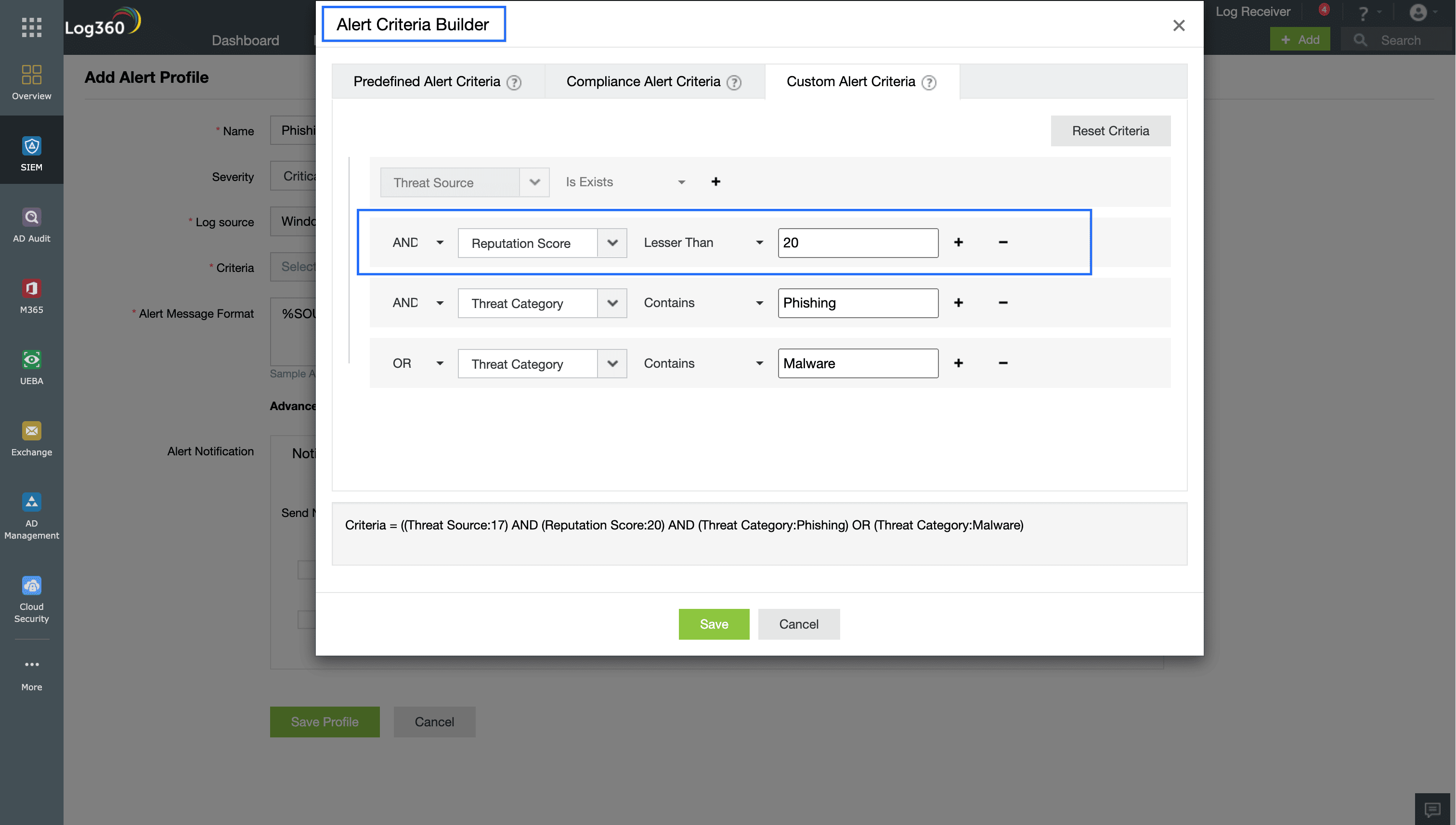
Figure 1: A phishing attack detection alert rule that uses threat intelligence feeds to flag phishing or malware threats.
Cyberthreat analysis using threat intelligence feeds
Cyberthreat analysis involves leveraging threat intel feeds to investigate risky IPs or URLs tied to the detected attacks. SecOps teams need to gather contextual information on the the source and destination, check the geolocation and WhoIs information, and analyze the related indicators—like the the threat's history, associated files and hosted URLs.
This analysis serves as important evidence in an ongoing investigation. Analysts can correlate this data with existing data to determine if the threat is part of a larger campaign or a known attack pattern. This helps security analysts plan the next course of action, whether it's to block the threat, reset affected systems, or escalate the incident for further analysis.
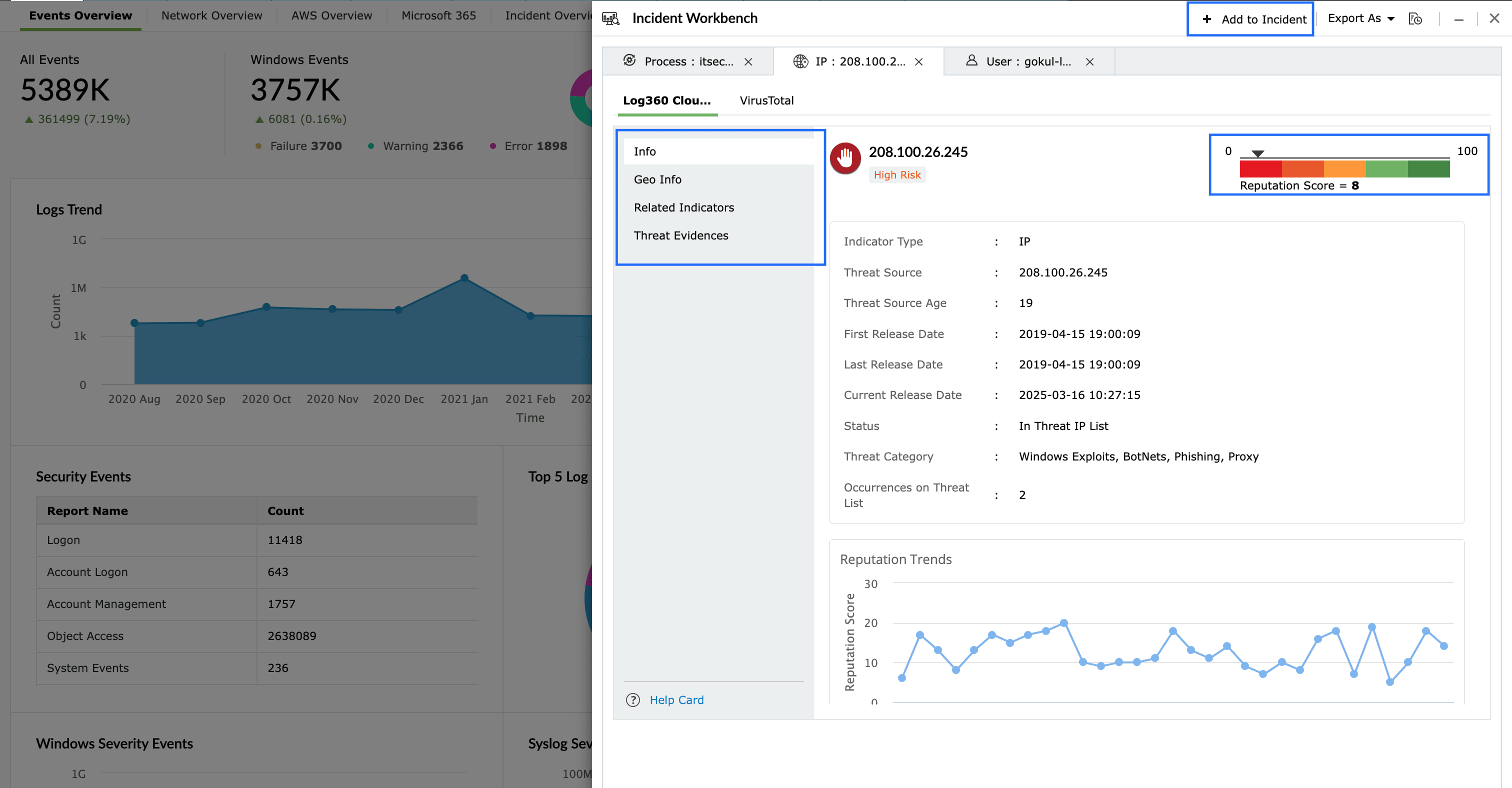
Figure 2: Threat intelligence feeds provide reputation score, geolocation information, and related indicators for cyberthreat analysis.
Incident response with threat intelligence
By integrating threat intelligence feeds with SIEM and SOAR capabilities, SecOps teams can enhance their detection and response. Response to security incidents must be automated, with workflows triggered as soon as a threat is detected. Threat intelligence feeds can enhance incident response by corroborating information from SIEM alerts and enabling appropriate actions.
Here's an example of how SecOps teams can automate incident response with threat intelligence:
- Detection: A security event is detected (e.g., suspicious outbound traffic) via alerting or a correlation rule.
- Playbook: The workflow queries external threat intelligence feeds (e.g., VirusTotal, AlienVault OTX, or PhishTank) to determine whether the associated IP address, URL, or domain is malicious.
- Response:
If the indicator is malicious, the system can initiate automated containment actions:
- Blocking the IP on firewalls
- Isolating affected endpoints
- Alerting security teams for further investigation
If it’s benign, the user can be notified and the incident can be closed.
Figure 3 shows the configuration for an IP verification SOAR workflow step that queries external threat intelligence feeds in real time to check whether the parameter (outgoing IP address) exists in the vendor's database. Based on the response, one of two actions is taken, as shown in Figure 4.
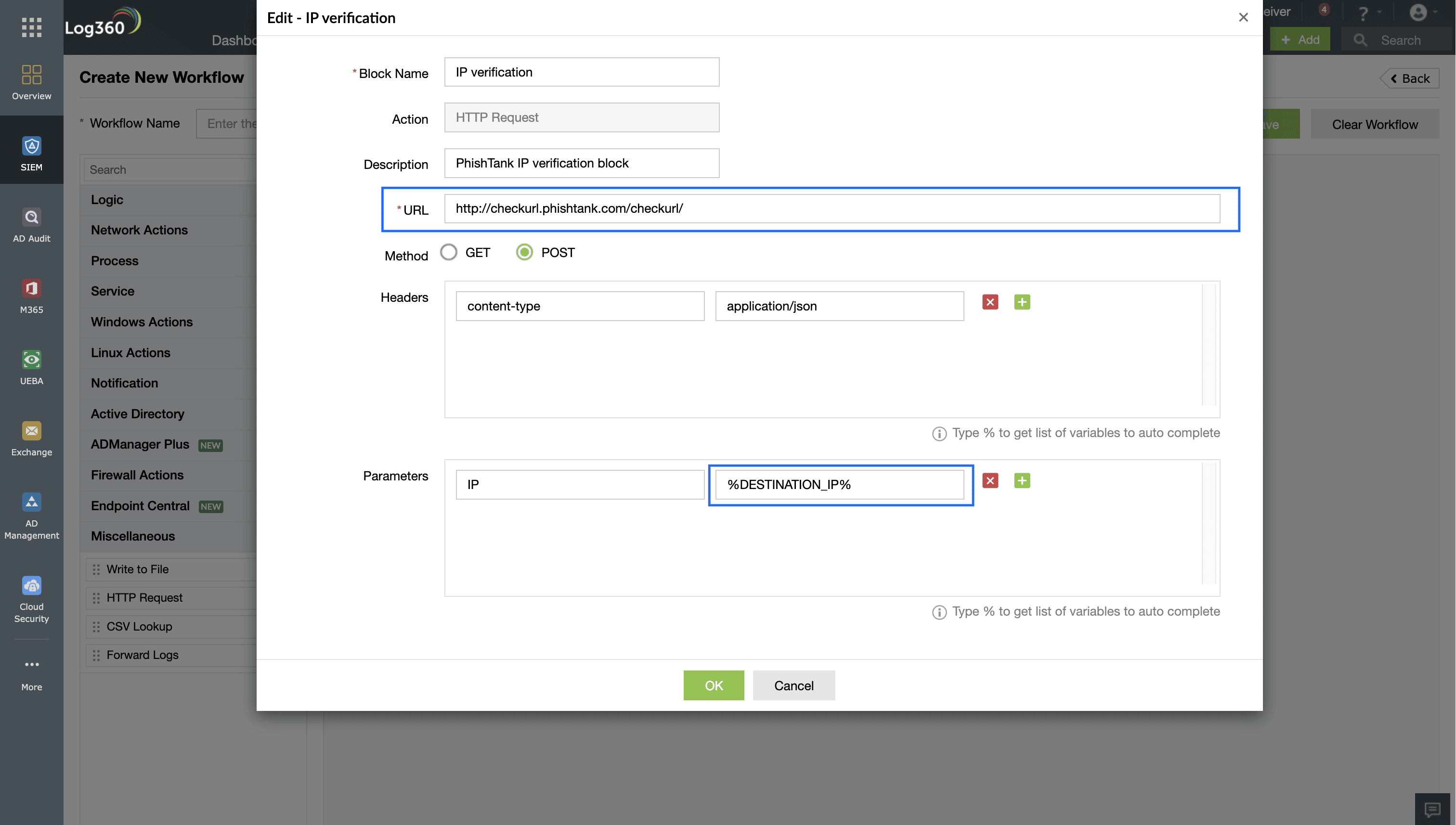
Figure 3: A incident response workflow block that verifies IPs or URLs with threat intelligence feeds.
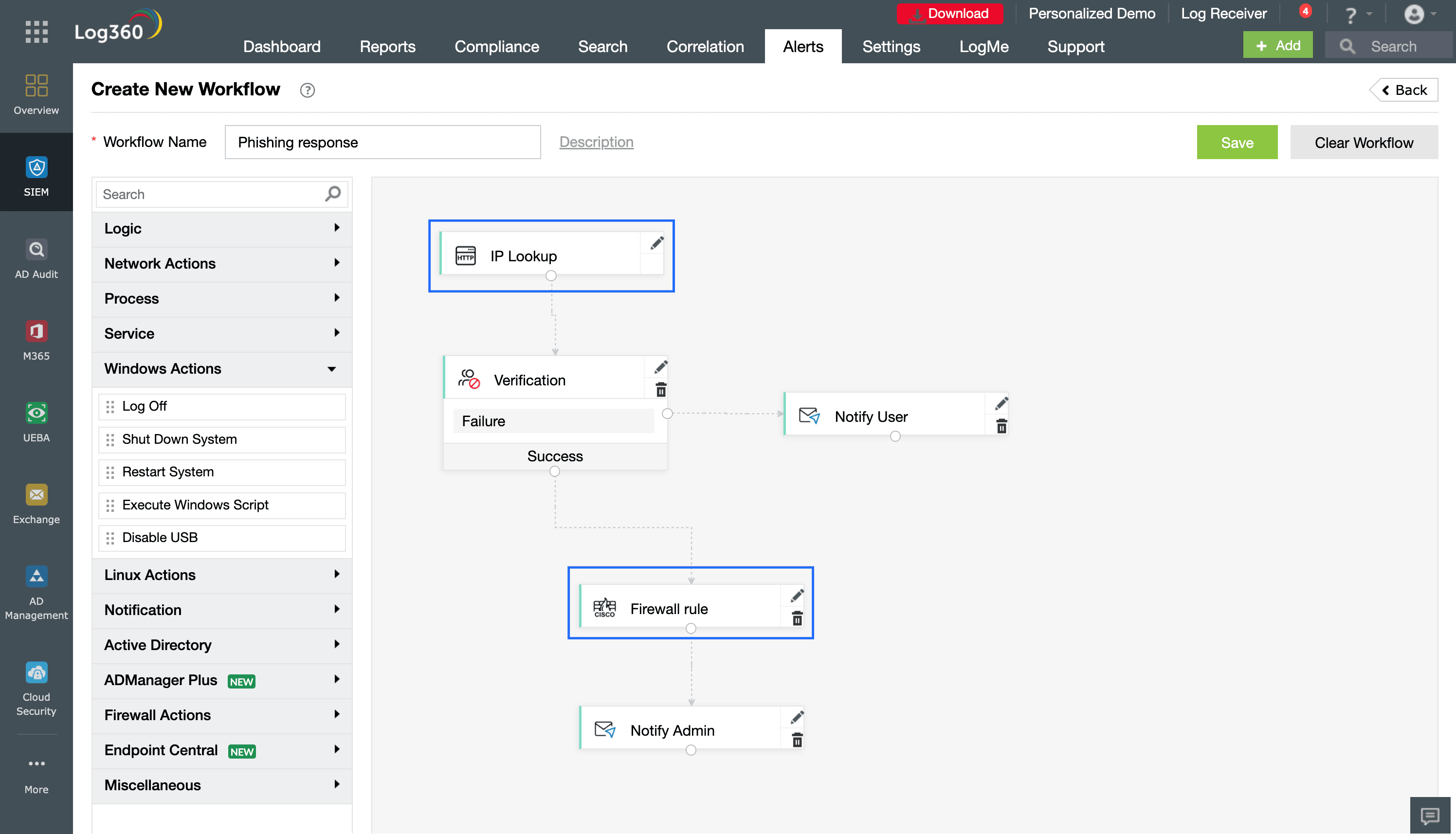
Figure 4: An automated decision workflow using SOAR that takes mitigation actions based on the threat intelligence response for a queried IP address.
Want to try it for yourself? Create alerting rules, investigate threat sources, and build incident response workflows using threat intelligence feeds. Download a free, 30-day, fully functional trial of ManageEngine Log360 and explore its capabilities at your own pace.

