

What is Kubernetes?
Kubernetes is an open source platform that helps organizations manage containerized applications with ease. With several containers operating with different settings, containerized applications may change dynamically and can become complex. In the face of dynamically changing workloads, administrators must maintain seamless orchestration, monitoring, and security while providing scalability, dependability, and resource efficiency. Kubernetes offers just that.
Kubernetes was developed in 2014 by Google, inspired by Borg, one of their internal cluster management programs. Supporting a broad spectrum of use cases—from small applications to large, complex enterprise workloads—Kubernetes integrates seamlessly with other cloud-native technologies like Helm, Prometheus, and Istio. Organizations can enhance scalability, improve system reliability, optimize cost efficiency, and accelerate software delivery by adopting Kubernetes. These benefits make Kubernetes a key enabler of modern DevOps practices and microservices architectures.
In this article, you'll explore the origins of Kubernetes, its architecture, how it works, common use cases, and best practices for monitoring your clusters.
Kubernetes over the years
Today, the Cloud Native Computing Foundation manages Kubernetes. However, Google is still one of its main contributors, alongside other tech giants like Microsoft, which contributed code, and Intel, which contributed the device plugins framework. Below is a brief timeline of Kubernetes' growth:
- June 2014: The first commit to Kubernetes was pushed to GitHub, containing 250 files and 47,501 lines of code.
- July 2015: The first stable version of the platform Kubernetes 1.0 was released.
- March 2017: Kubernetes 1.6 was released, with improvements to scalability, security, and stability.
- June 2024: Kubernetes celebrates its 10th anniversary.
Kubernetes architecture: Core components explained
The different components of Kubernetes are:
- Cluster: A collection of computers running containerized apps with Kubernetes. Multiple nodes makeup a cluster.
- Nodes: Are virtual or physical machines deployed by Kubernetes, i.e., one machine in your cluster. There are two types of nodes: A master node and a worker node within a cluster.
- Pods: Pods are the smallest deployable unit present within a Kubernetes cluster. Each node contains a pod that contains one or more containers. They provide the storage, network, and specifications to run containers.
- API server: Exposes Kubernetes API and communicates with other clusters, and also serves as the front end for Kubernetes control panel.
- Scheduler: Schedules and assigns pods to nodes as per demand.
- Controller manager: Ensures that the cluster matches the required state by managing nodes, pods, and other resources.
- Etcd: In three words, an etcd is cluster's storage system. It comprises all the data within the cluster, configuration, and state information.
- Kubelet: Communicates with the master node, gets the list of scheduled containers, and ensures these containers are working systematically.
- Kubeproxy: Ensures pods can communicate with each other within and outside the cluster and forwards traffic to the right IP and port.
- Container runtime: Responsible for running containers (Docker is a popular container runtime).
- Ingress Controller: Manages and directs external traffic into the cluster and ensures that load is balanced across all pods.
- CoreDNS: A DNS Server present within a worker node used for service discovery whenever pods need to connect with each other.
Note: Containers are small units of software that contain codes and other dependencies, such as memory databases and configuration files, so that the application can run smoothly.
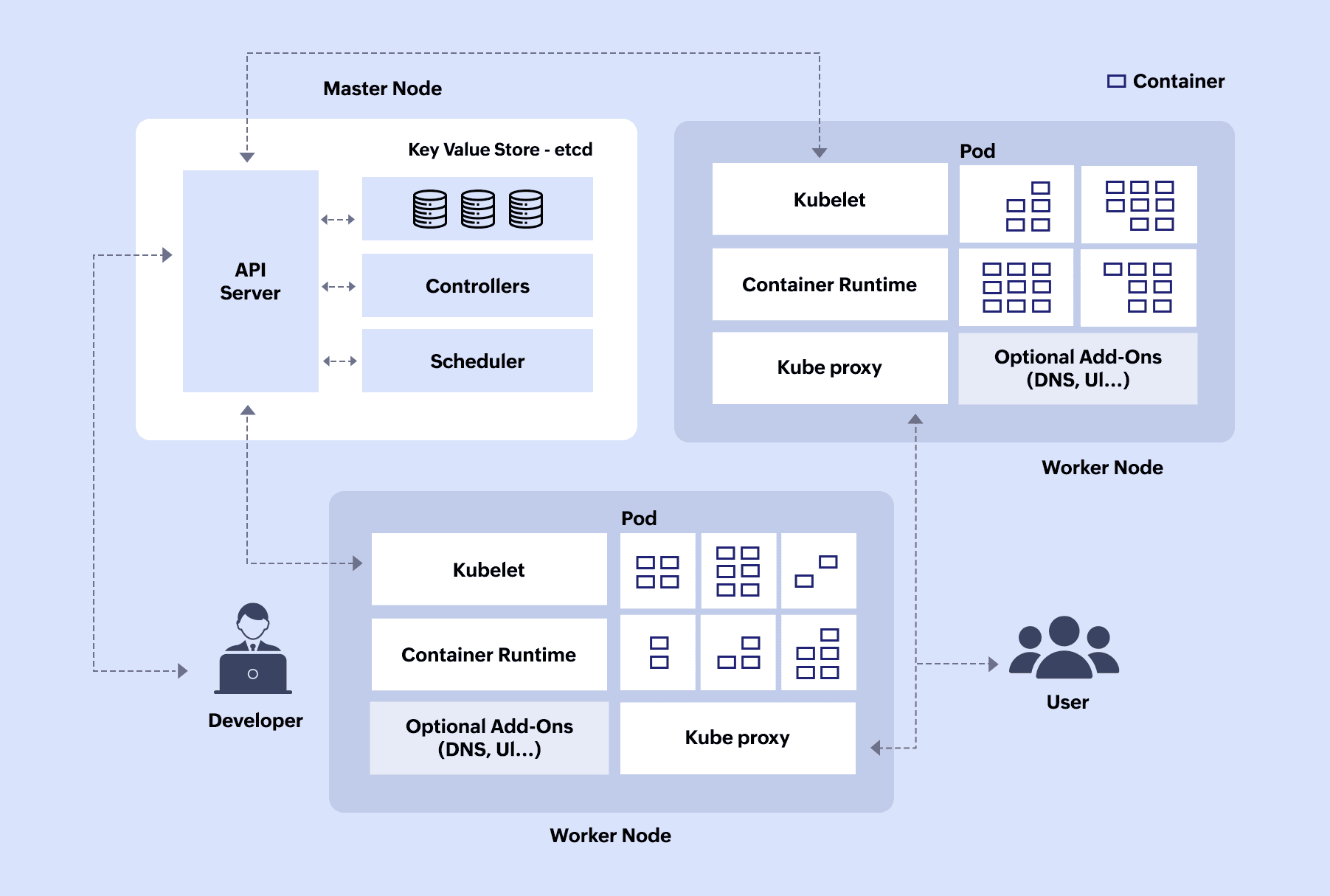
Figure 1: Architecture of a Kubernetes cluster
How Kubernetes works
To illustrate the inner workings of Kubernetes, let’s consider Instagram, a widely used social media application where users can share photos and videos. As of February 2024, Instagram boasts 2.4 billion users, representing approximately one-fourth of the global monthly internet user base. Given this extensive user base, Meta (the company that owns Instagram) utilizes Kubernetes to ensure the scalability and reliability of its application.
In this architecture, various components of the Instagram application are distributed across different pods within the worker nodes. For example, there may be a front-end pod, an API pod, and a database pod.
Here is how the process unfolds in Kubernetes from the moment the app is opened to the response being sent back to the user:
- A user opens the Instagram app.
- The Ingress Controller receives the request and directs it to the appropriate pod, which is the front-end pod in this case.
- The front-end pod sends a request to the API server using appropriate DNS name.
- During periods of high user activity:
- Kubernetes API server automatically scales up the number of front-end pods.
- Kubernetes scheduler selects the most suitable worker node for deployment based on resource availability.
- The Controller Manager ensures that the desired number of replicas for each service is maintained.
- During periods of high user activity:
- The CoreDNS running in the worker node translates the API service’s DNS name into the IP address of the API pod so the front-end pod knows where to send its request.
- The front-end pod then communicates with the API pod via Kubeproxy, which routes the request to the specific service pod based on load balancing.
- The API service pod then processes the request and queries the database pod.
- API service pod responds back to the Kubeproxy.
- Kubeproxy forwards this response to the front-end pod.
- The front-end pod formats the data into a user-friendly interface and presents it to the user.
In the event of a failure of one or more worker nodes, Kubelet promptly notifies the API server in the control plane (master node), which initiates the process of replacing the affected pods to maintain service availability.
Kubernetes use cases
- Simplifying deployment and management of applications: Kubernetes simplifies deployment and management by automating key tasks such as scaling, load balancing, and self-healing.
- Transportation of applications without being locked out: Kubernetes ensures that developers can easily transport their applications for on-premises to the cloud without the fear of vendor-lockins by containerizing applications along with their dependencies.
- Scalability based on demand: Using Horizontal Pod Autoscalers , Kubernetes monitors metrics like CPU usage and request rates, and adjusts the number of active pods, ensuring proper and optimal utilization of resources.
- Rapid innovation simultaneously for teams: By deploying multiple independent services and creating microservices architecture, teams can work together and deploy updates without disturbing the whole application.
- Enables deployment in hybrid and multi-cloud environments: By providing a consistent platform across on-premises and cloud environments, organizations can deploy applications flexibly, optimizing resource usage and cost management.
Kubernetes monitoring
Kubernetes monitoring analyzes the health, performance, and reliability of containerized applications in clusters to provide real-time insights. Kubernetes is susceptible to attacks due to its complexity and distributed nature. Common attack vectors include unauthorized access to the API, misconfigured permissions, and vulnerabilities in container images or infrastructure. To mitigate these risks, strong security practices like role-based access control (RBAC), regular vulnerability scanning, and network segmentation are essential.
You can read more about Gartner's approach to Kubernetes environment monitoring in this paper titled, How to monitor containers and Kubernetes workloads. Effective monitoring helps identify bottlenecks, troubleshoot issues, and optimize resource allocation, ensuring smooth and efficient applications. Proactive monitoring alerts teams to potential problems, enabling faster response times and reduced downtime. You can learn more about the basics of Kubernetes monitoring and logging here .
Frequently asked questions
- What is Helm in Kubernetes?
-
Helm is a package manager that simplifies even the most complex applications on Kubernetes, making it easier to manage and deploy applications. It uses charts, which are preconfigured packages, to bundle all the necessary resources together. This way, deployment and upgrades become easier as users can install or update an entire application with a single command rather than configuring each component individually.
- What is Rancher in Kubernetes?
-
Rancher is an open-source platform that makes it easier to deploy and manage Kubernetes clusters. If Kubernetes is an orchestra conductor, managing multiple musicians (Docker), Rancher is the concert hall manager managing multiple orchestras (Kubernetes cluster). Rancher provides a single interface where users can view and control all their clusters in one place. This means you can create, deploy, and monitor clusters across different environments—whether they are on-premises, in the cloud, or hybrid setups—without having to switch between different tools or interfaces.
- Kubernetes vs Docker
-
Docker streamlines software development by enabling developers to package applications into small containers, while Kubernetes automates deployment, scaling, and operation of these containers. Learn more .
- Kubernetes vs OpenShift
-
They are both orchestration platforms created by Google and Red Hat, respectively. Kubernetes is an open-source platform, while OpenShift is built on top of Kubernetes and extends its functionality with added features.
- Kubernetes vs Docker Swarm
-
While both are container orchestration platforms, Docker Swarm is more suitable for organizations seeking simplicity while Kubernetes is better suited for organizations needing advanced capabilities.

