

- Free Edition
- Quick Links
- Active Directory Auditing
- Active Directory auditor
- Active Directory monitoring
- Account lockout analyzer
- Login monitoring software
- Active Directory change notifier
- User logon audit reports
- AD logon logoff tracker
- User logon failure auditing
- Login history tracking tool
- AD change auditor
- Insider threat detection software
- Permissions change auditing
- Entra ID reporting
- Privileged user monitoring
- User behavior analytics tool
- Active Directory security monitoring
- Group Policy auditing tool
- GPO change auditor
- Entra ID auditing
- Audit user account management
- OU change auditor
- Audit group membership changes
- Active Directory auditing and reporting tool
- GPO reporting tool
- Remote desktop monitoring software
- PowerShell logging and auditing
- Azure password protection auditing
- Azure sign-in risk detection
- File Server Auditing
- Windows Server Auditing
- Employee Tracking
- Workstations Auditing
- Compliance Auditing
- Other features
- SIEM Integration
- Windows DNS - Schema Auditing
- Windows security event log monitoring
- SIEM audit solution
- Schedule Active Directory change reports
- Reports from Archived Data
- Aggregated summary reports
- AD new/old attribute changes
- Audit trail
- Audit Active Directory LAPS
- Scheduled Reports & Alerts
- Account lockout examiner
- Industry
- Documents
- Success Stories
- Related Products
- Log360 (On-Premise | Cloud) Comprehensive SIEM and UEBA
- ADManager Plus Active Directory Management & Reporting
- ADAudit Plus Real-time Active Directory Auditing and UBA
- ADSelfService Plus Identity security with MFA, SSO, and SSPR
- DataSecurity Plus File server auditing & data discovery
- Exchange Reporter Plus Exchange Server Auditing & Reporting
- M365 Manager Plus Microsoft 365 Management & Reporting Tool
- RecoveryManager Plus Enterprise backup and recovery tool
- SharePoint Manager Plus SharePoint Reporting and Auditing
- AD360 Integrated Identity & Access Management
- AD Free Tools Active Directory FREE Tools
Using ADAudit Plus, security and IT teams can:
Track all file access events
Record every read, write, delete, move, rename, and copy-paste operation on your file servers, with the user identity, source machine, and timestamp for each event.
Audit folder permission changes
Capture every change to folder permissions and SACLs—including old and new ACL values—so you know exactly who changed access rights and what the new rights are.
Detect unusual file activity
Baseline each user's normal file activity volume and timing. This allows you to be aware of spikes in file modifications or deletions, which can indicate ransomware or data destruction.
Meet compliance requirements
Run pre-configured report sets for HIPAA, PCI-DSS, GDPR, SOX, FISMA, GLBA, and ISO 27001 to answer auditor requests in minutes without manual log extraction.
What events ADAudit Plus tracks on your file server
ADAudit Plus provides dedicated reports for file and folder events across your environment. These reports are organized by event type and by server, so you can investigate an action wherever it happened across your environment. You can track:
File reads and access attempts
- Successful file accesses as well as failed read, write, and delete attempts
File modifications, deletions, and moves
- All write and overwrite events
- Files deleted, with who deleted them and when
- Copy-paste and move operations with source and destination paths
- Rename events with original and new file names
Folder permission and ownership changes
- DACL modifications with old and new ACL values
- SACL changes, so you know if auditing was disabled on a specific path
- Folder ownership changes with actor identity and new owner
USB and removable storage
- File reads, writes, and copy events on USB drives and removable devices
- Removable device plug-in events, so you can see when external storage is connected to a machine
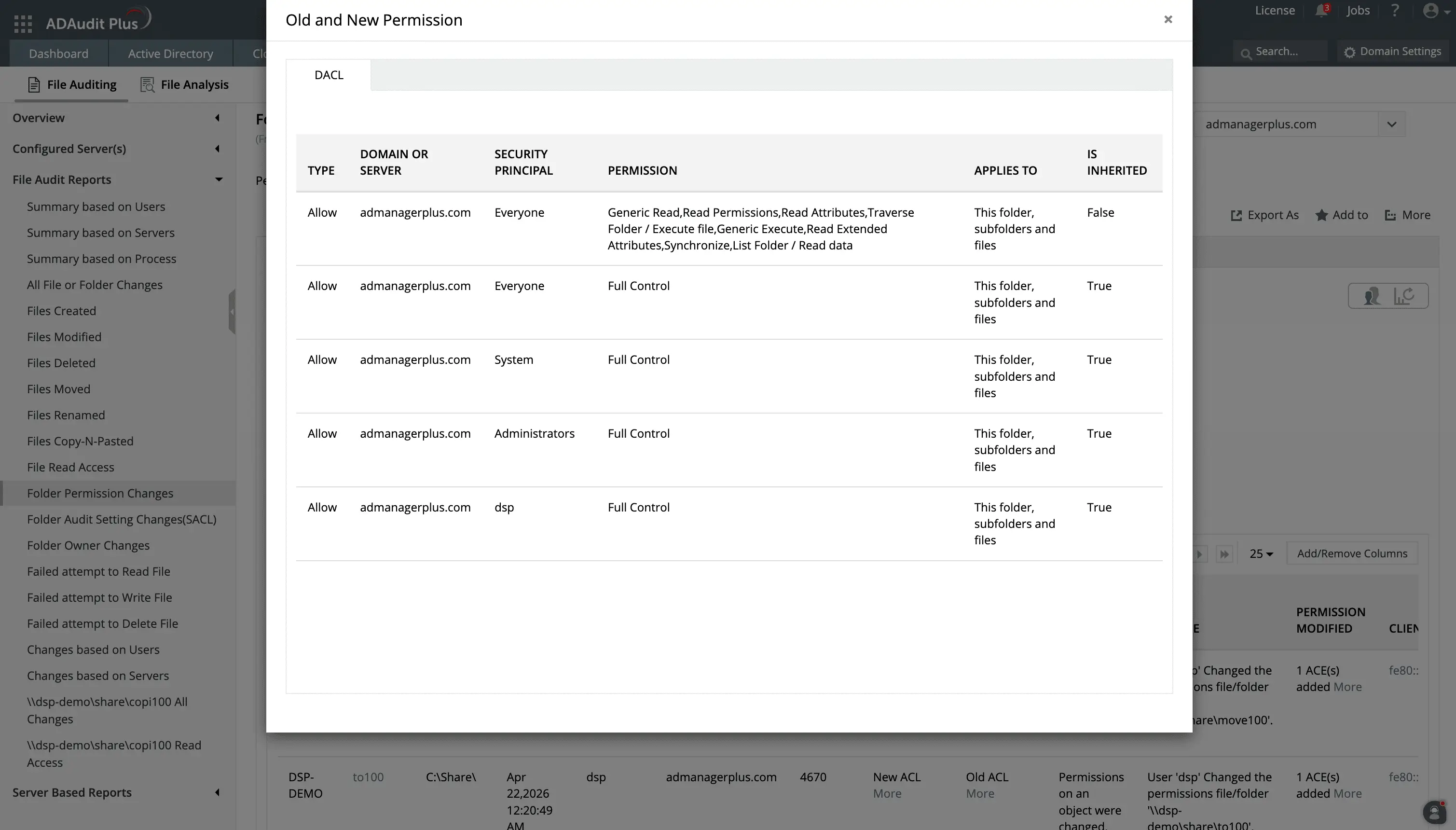
Monitor successful and failed attempts to access files and folders.
Track permission changes along with the values before and after the change is made.
File audit reports
ADAudit Plus can provide reports on a specific critical server, or generate a report on a particular action wherever it was performed in your environment. This allows you to:
Investigate by file event type
- Pull up every deletion, modification, or permission change in a single view, or filtered by user, time window, or file path
- View copy-paste events that most native tools do not capture together, giving you visibility into a common data exfiltration vector
- Identify who is attempting to delete or modify files en masse
Investigate by user or process
- Get a complete activity log for a specific user across all monitored servers, without writing a single query
- View file operations performed by every process, making it easy to spot a process generating abnormal modification volumes
Schedule and export
- Schedule any report for automatic delivery by email
- Export in CSV, PDF, HTML, CSVDE, or XLSX format
- Custom report profiles let you save a combination of specific users, file paths, time windows, and operation types as a view you can return to at any time
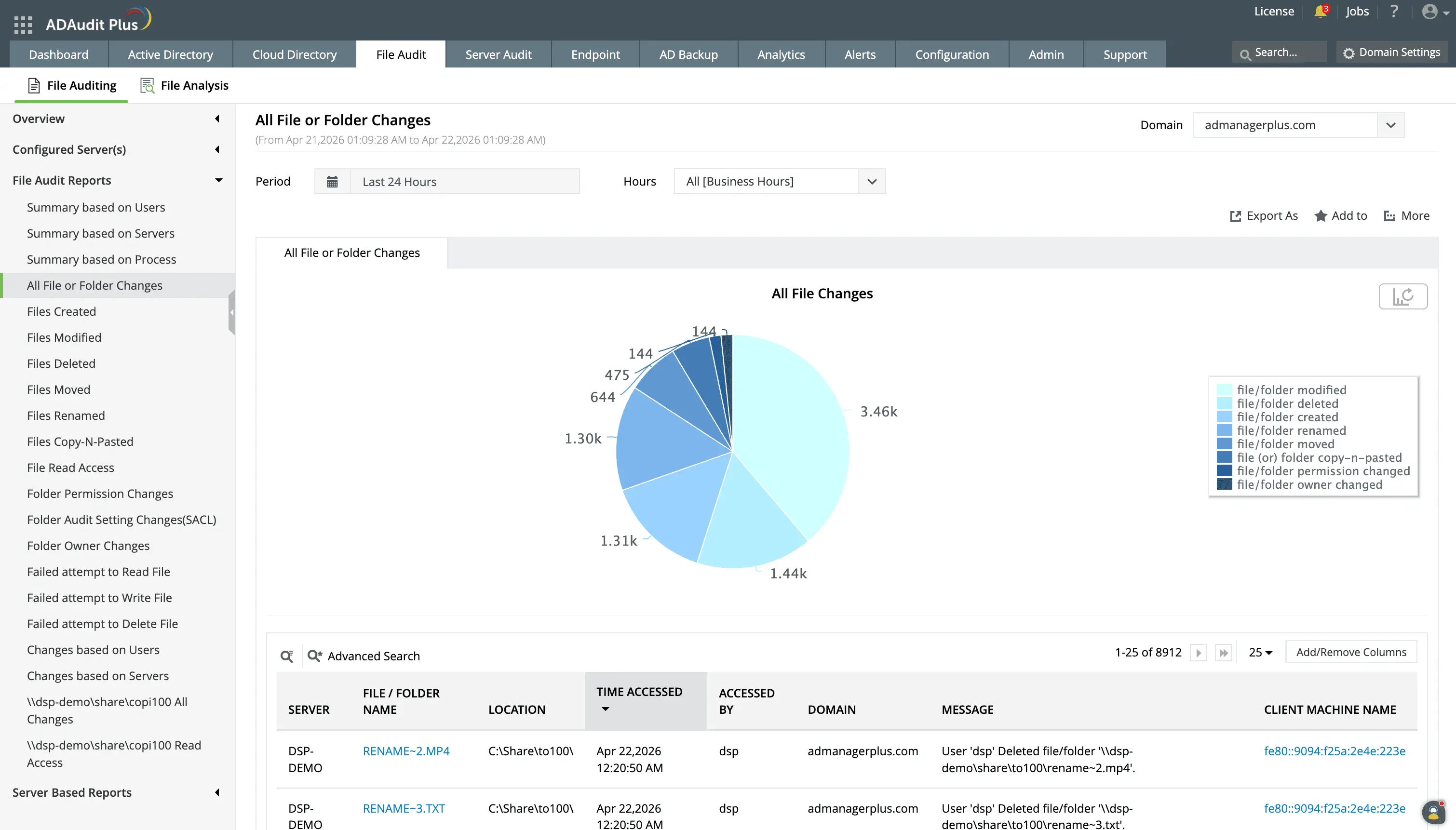
Get detailed reports and analytics on file changes in your environment and know who made what change, in which file, and when.
Use Schedule and Export options to periodically monitor users and servers and submit change reports for compliance audits.
Get real-time alerts on critical file activity
ADAudit Plus has several default alert profiles covering the file events most likely to signal a breach or compliance violation. Here is what you can do with them.
Stop ransomware before it spreads
- Ransomware activity detection is driven by UBA baselines, not static thresholds, so ADAudit Plus catches unusual activity even from accounts that legitimately handle large numbers of files
- When file modification volumes spike above a learned baseline, ADAudit Plus triggers an alert and can run scripts to stop the infection from reaching the next server
Protect critical data in real time
- You can configure alert profiles to be triggered when a user accesses a critical share, so you can investigate quickly
- Folder permission change alerts fire instantly when access rights on monitored shares are modified, giving you time to reverse an unauthorized change before it is exploited
- A deletion alert on a critical folder means you know about data removal the moment it happens, not after a user reports files are missing
Respond faster with automated workflows
- ADAudit Plus can follow up on alerts by automatically creating a ticket in ServiceNow, Jira, Freshservice, ManageEngine ServiceDesk Plus, Zendesk, or Kayako, so the right team is already working the incident before anyone has to manually log it
- For GDPR environments, this matters significantly since you have 72 hours to report a breach. With the automated alert-to-ticket workflow, your clock starts with evidence already captured and a response already initiated
- Forward any alert event to your SIEM via log streaming for centralized correlation with other security data
Build your own alert conditions
- Create custom alert profiles with specific thresholds, user scopes, file paths, and response actions
- Alerts deliver notifications by email and SMS the moment the triggering condition is met
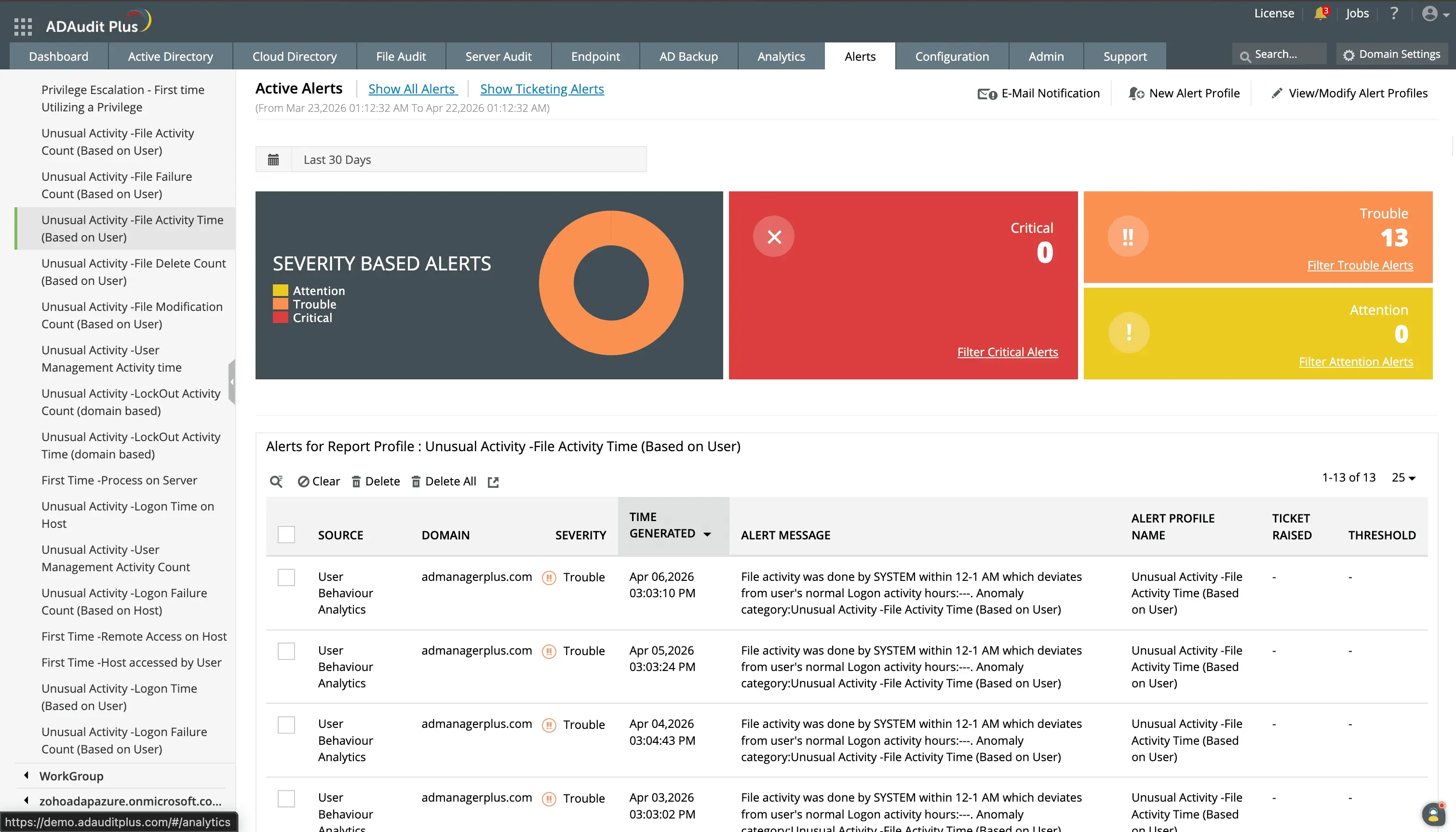
Detect unusual activity by time and volume using the UBA capability.
Set up workflows with your existing ticketing system to ensure that every alert is responded to quickly by your technicians.
Monitor alerts based on their severity and customize them based on your organization's needs.
Detect insider activity in file servers with user behavior analytics
ADAudit Plus applies user behavior analytics to your file audit data to baseline each user's normal activity volume and timing. When a user accesses data they never have before, transfers an unusual volume of files, or works at an unusual hour, you get an alert. This allows you to detect insider threats and other malicious activity.
Extend file auditing beyond Windows file servers
Most organizations store data across hybrid platforms. ADAudit Plus covers these from a single console. You do not need a separate tool for each storage platform, and you get complete audit information regardless of which platform the event originated from.
Supported platforms
- Windows File Server
- Windows File Cluster
- NetApp Server (7-Mode and C-Mode)
- EMC Isilon
- EMC Server
- Hitachi NAS
- Huawei OceanStor
- Synology NAS
- Amazon FSx
- Azure File Share
- QNAP NAS
- Nutanix Files
- CTERA Edge Filers
- Qumulo NAS
Meet compliance requirements with file audit reports
ADAudit Plus includes pre-configured report sets for seven regulatory frameworks, so no manual log extraction is needed.
Compliance frameworks covered
HIPAA, PCI-DSS, GDPR, SOX, FISMA, GLBA, ISO 27001
On top of these, you can use custom report profiles to combine specific users, audit actions, file paths, and time windows into saved views. When a compliance-relevant alert fires, ADAudit Plus can auto-create a ticket in your ITSM tool, giving you documented evidence of detection and response alongside the audit trail.
4 compelling reasons to choose ADAudit Plus
Widely recognized
ADAudit Plus has been recognized as a Gartner Peer Insights Customers' Choice for Security Incident & Event Management (SIEM) for four consecutive years.
Easy deployment
Go from downloading ADAudit Plus to receiving predefined reports and alerts in under 30 minutes, without any professional help.
Competitive pricing
ADAudit Plus is licensed per-server, unlike other IT auditors which are licensed per-user. With per-server licensing, even with a growing number of users each year, you can continue to ingest log data without additional costs.
Unified visibility
ADAudit Plus consolidates auditing, security, and compliance across Active Directory, Entra ID, Windows servers, workstations, and file servers into a single pane of glass, eliminating the need to juggle multiple tools.
Frequently asked questions about file server auditing
File server auditing is the continuous monitoring and recording of every operation that affects files, folders, and permissions on your file servers. A complete audit trail captures who performed each action, what changed, when it happened, and from which machine. Without it, you cannot reliably detect unauthorized access, investigate a security incident, or demonstrate to an auditor that access controls are working.
Security
- Ransomware announces itself through a sudden spike in file modifications or renames. Without real-time file activity monitoring, the first sign you have is the encrypted file extensions.
- Insider threats often start quietly: a user reading files outside their normal scope, copying data to a new location, or accessing a server they have never touched before. Auditing gives you the visibility to catch this early.
Compliance
- Regulations require organizations to monitor access to systems containing protected health information, cardholder data, and other personal information.
- Some also require you to detect and report breaches within specified timelines and demonstrate control over access to personal data. Having a file server reporting tool can help you with this.
Windows provides file event logging through the Security event log and Event Viewer, but both have significant gaps for continuous file server auditing.
Event Viewer
- Records events locally on each server with no central view across multiple file servers
- Fixed-size log files overwrite older records when full, so forensic data can disappear before anyone reviews it
- No alerting when a critical change occurs
- Event IDs 4656, 4660, 4663, and 4670 generate high volumes on busy servers, making manual analysis impractical
PowerShell
- Can retrieve current permission states but cannot show who changed them or what the old value was
- Reconstructing a change history requires custom scripts, scheduled execution, and searchable output storage
- No anomaly detection or behavioral baseline
Native Windows file auditing requires enabling the Audit object access policy via Group Policy, configuring SACL entries on each folder you want to monitor, and then manually collecting and filtering events from the Security event log on each file server. This approach does not scale: log files overwrite older events when full, there is no central view across multiple servers, and there is no alerting. ADAudit Plus automates the entire process, collecting events from all your file servers into a central repository and presenting them in reports with real-time alerts for critical events.
File auditing tracks who accessed or changed files and folders in real time, recording the user identity, timestamp, and type of operation for each event. FIM focuses on whether the content or attributes of specific critical files have changed, typically comparing the current state against a known good baseline. ADAudit Plus provides both: the file auditing capability covers access and change tracking across your file servers, while the FIM capability covers continuous integrity verification for sensitive file paths that you define.