Direct Inward Dialing: +1 408 916 9892
Open Server Manager on your Windows server.
Under the Manage tab,click on Group Policy Management to open the Group Policy Management Console.
Navigate to Forest >Domain >Your Domain >Domain Controllers.
You can choose to either edit an existing group policy object or create a new one.
In the Group Policy Editor, navigate to Computer Configuration >Windows Settings >Security Settings >Advanced Audit Policy Configuration.
Expand the node and navigate to Audit Policy >Object Access and then configure Audit Application Generated. Enable it for both 'Success' and 'Failure'.
To open ADFS Management snap-in, navigate to Programs >Administrative Tools > ADFS Management
Click on Actions and then select Edit Federation Service Properties.
In the dialog box that opens, click on the Events tab. Enable it for Success and Failure.
ADAudit Plus generates comprehensive reports by collecting and processing information from various sources in Active Directory. The ADFS reports in ADAudit Plus give information on logon failures, logon successes and Extranet lockouts.
To troubleshoot ADFS account lockouts, open ADAudit Plus console and navigate to Reports >ADFS Auditing >Logon Failure Account lockouts happen after repeated logon failures. So this report would be the key to identifying the reason for the account lockout. Here is a sample report:

Open Server Manager on your Windows server.
Under the Manage tab,click on Group Policy Management to open the Group Policy Management Console.
Navigate to Forest >Domain >Your Domain >Domain Controllers.
You can choose to either edit an existing group policy object or create a new one.
In the Group Policy Editor, navigate to Computer Configuration >Windows Settings >Security Settings >Advanced Audit Policy Configuration.
Expand the node and navigate to Audit Policy >Object Access and then configure Audit Application Generated. Enable it for both 'Success' and 'Failure'.
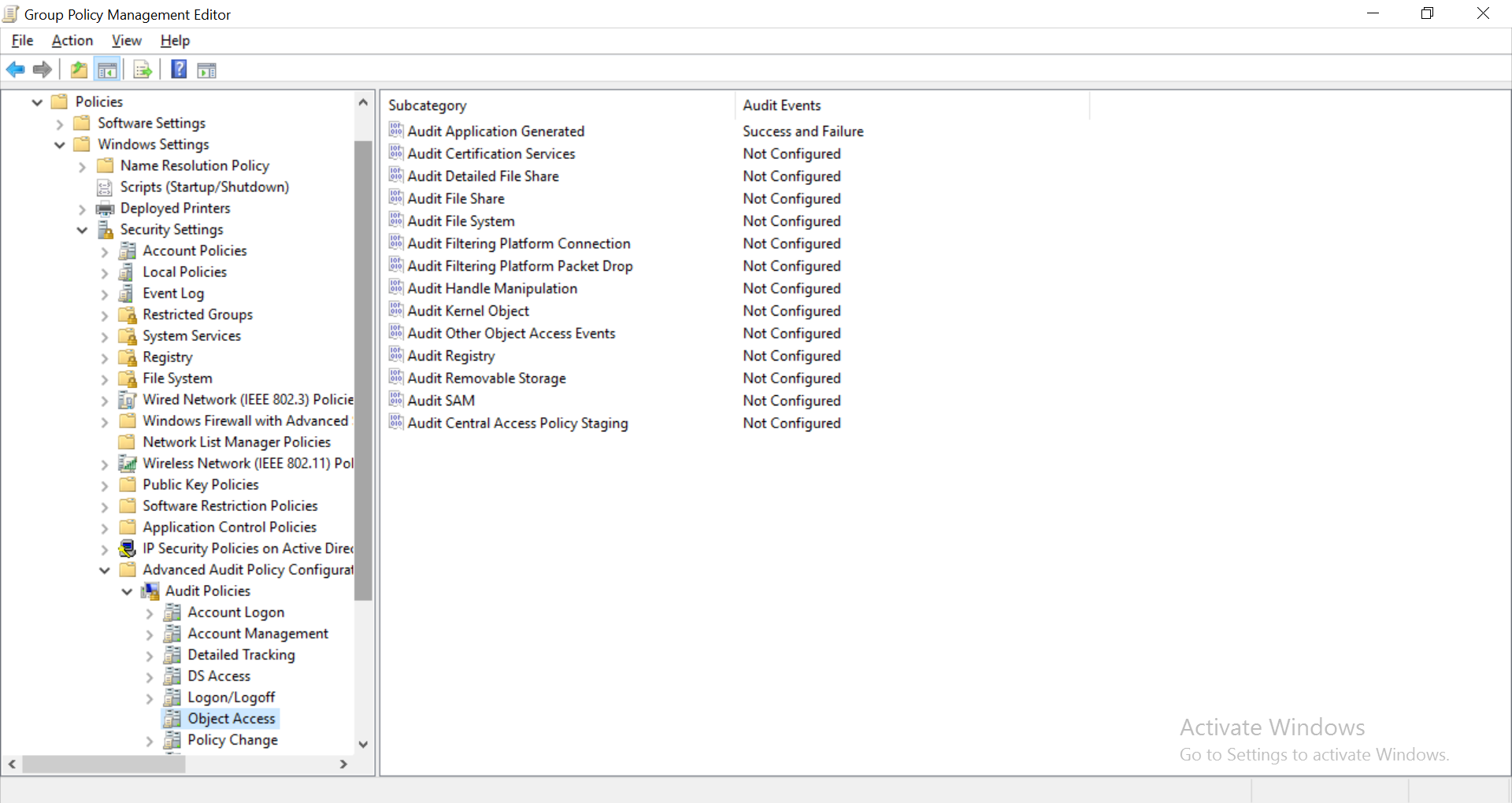
[Highlight policies, windows settings, security settings, Advanced audit policy, audit policy, object access and audit application generated]
To open ADFS Management snap-in, navigate to Programs >Administrative Tools > ADFS Management
Click on Actions and then select Edit Federation Service Properties.
In the dialog box that opens, click on the Events tab. Enable it for Success and Failure.
Windows Event Viewer records all the events connected to the objects in Active Directory for which auditing has been enabled. The events are recorded with unique event IDs. For AD FS, there are two kinds of logs that need to be inspected - the Admin log and the Trace log.
To view the admin log, open Event Viewer and navigate to Applications and Services logs > ADFS > Admin. To view the trace log events, open Event Viewer and navigate to Windows logs > Security to find all the security events listed in the center pane. Look for events ID 4625 (account failed to logon), 1203 (Fresh credential validation error) to find the reason for account lockouts.
Native auditing becoming a little too much?
Simplify Active Directory auditing and reporting with ADAudit Plus.
Get Your Free Trial Fully functional 30-day trial










