Home
How to generate a search report?
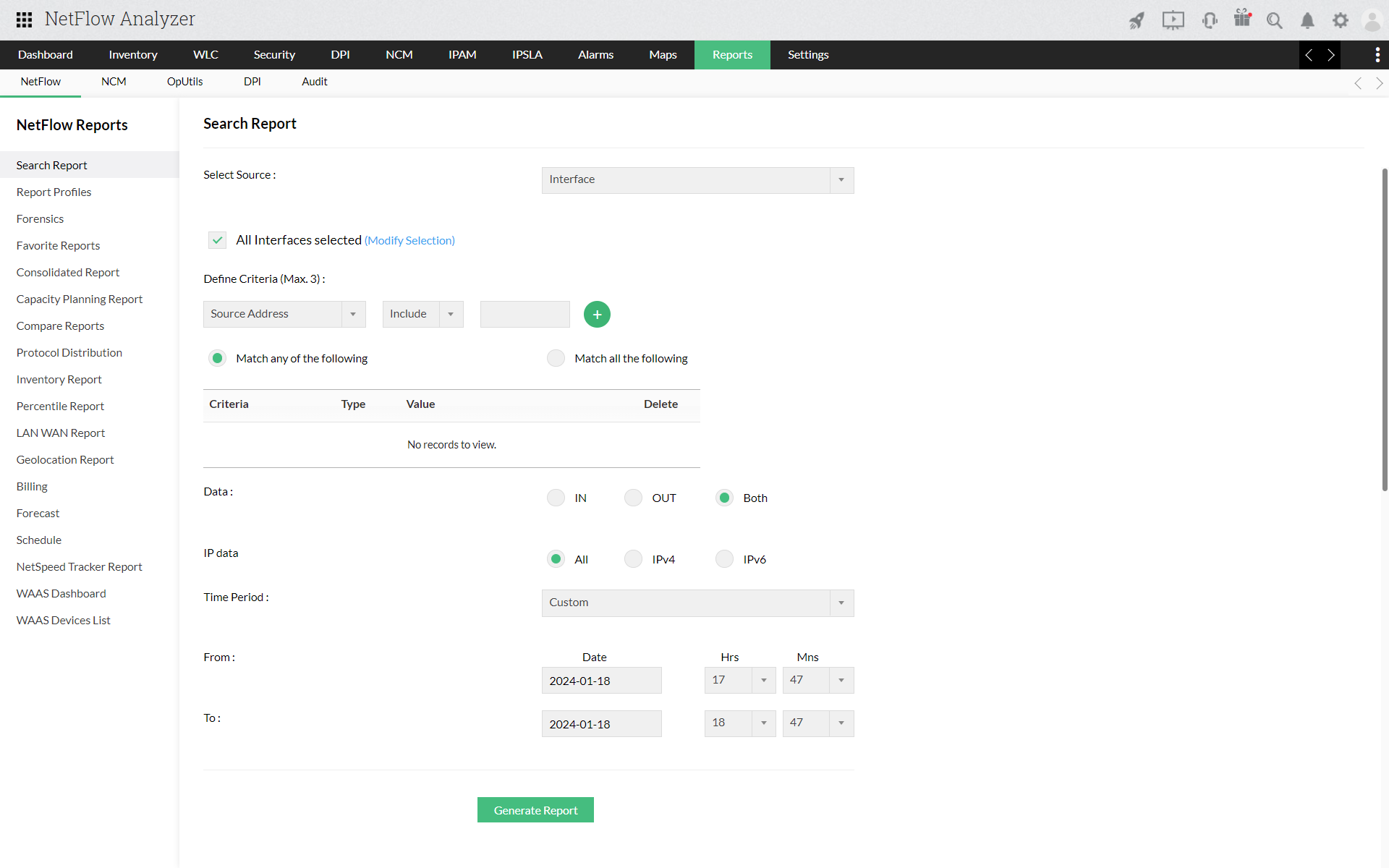
Navigate to Reports > Search Report.
Select the Source - Interfaces, WLC Device, IP Groups or Interface Groups.
Define criteria, Date and time period.
Click on "Generate Report".
Benefits
Related Products
»
Bandwidth Monitor
»
Bandwidth Reporting
»
Cisco NetFlow
»
NetFlow Monitoring
»
Network Traffic Analyzer
»
Site to Site Traffic Monitoring
»
Application Performance Optimization
»
Network Security
»
NetFlow Reporting
»
Automating Network Reports
»
Customizable Dashboard
»
Network Traffic Monitor
»
Faster Network Troubleshooting
»
Protocol and Application Monitoring
»
NetFlow Analyzer Reports
»
Department-wise Bandwidth Monitoring
»
Billing ⁄ Measure Bandwidth Usage
»
Cisco CBQoS Monitoring
»
Network Monitoring
»
Application Performance Monitoring
»
Bandwidth Monitoring & Traffic Analysis
»
Network Configuration Management
»
Switch Port & IP Address Management
»
Firewall Management