Remote Collector for enhanced traffic visibility
Monitor server traffic, decode application behavior, and track internet performance — all from a single agent.
When something goes wrong on your network, the last thing you want is a monitoring blind spot. But that is exactly what happens when devices do not export flow data, when flow records cannot tell you whether a slowdown is the network's fault or the application's, or when internet quality at a branch office quietly degrades without anyone noticing until users start complaining. Most monitoring tools were not built for these situations. They work well where flow data exists and fall short everywhere else.
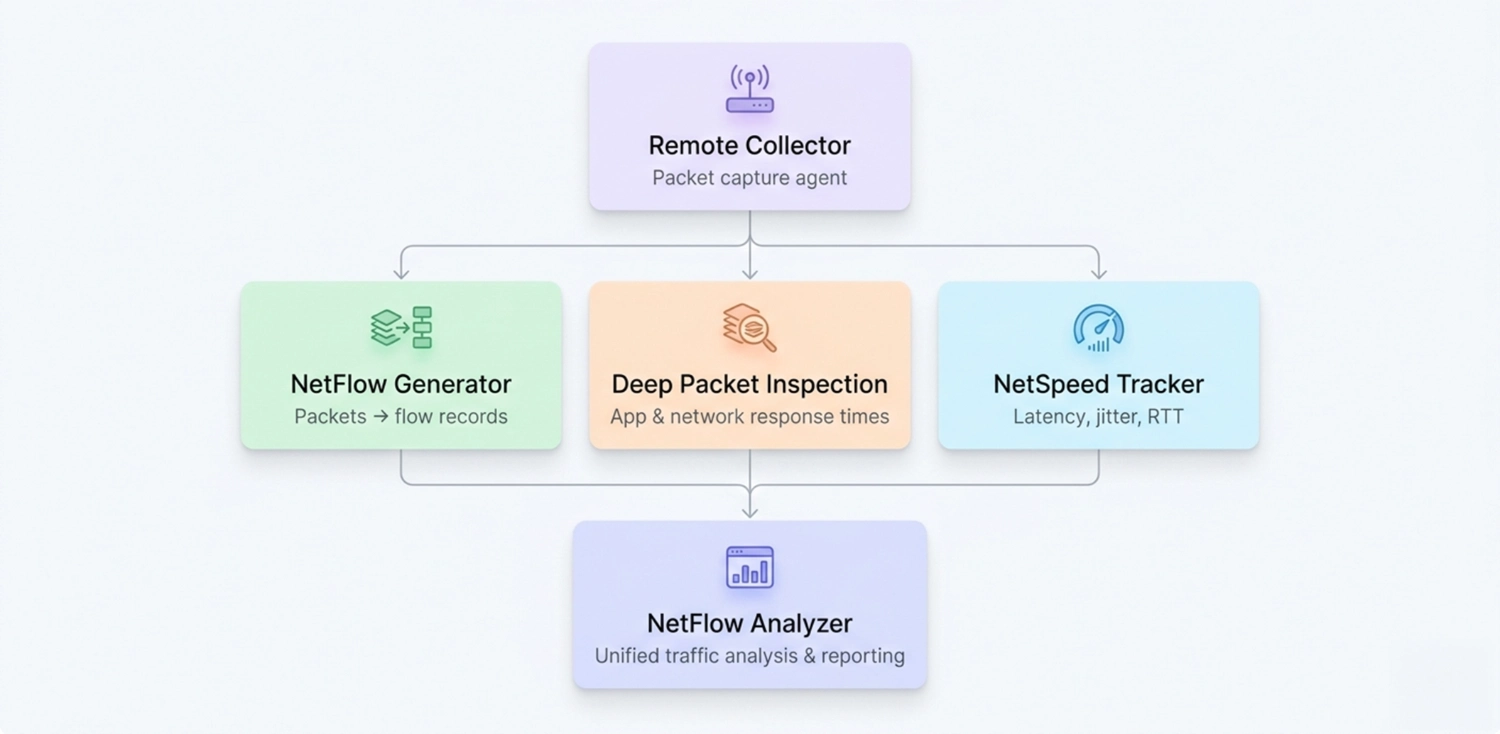
The Remote Collector fills that gap. It is an agent for ManageEngine NetFlow Analyzer that captures packets directly from the network interface, so you get traffic visibility where traditional flow monitoring cannot reach. Configure it as a NetFlow Generator, a Deep Packet Inspection engine, a NetSpeed Tracker, or all three at once depending on what your network needs.
What is the Remote Collector?
The Remote Collector is an agent for ManageEngine NetFlow Analyzer. It captures raw packets at the network interface card (NIC) of the machine it is installed on and transforms that data into traffic intelligence that NetFlow Analyzer can collect, store, and analyze.
It can be configured in three modes: as a NetFlow Generator , as a Deep Packet Inspection engine, or as a NetSpeed Tracker . Each mode can be enabled independently or in combination, based on what your monitoring environment requires.
What can you do with the Remote Collector?
| Capability | What it enables |
|---|---|
| NetFlow Generator (NFG) | Monitor traffic on servers and devices that do not natively export flow data |
| Deep Packet Inspection (DPI) | Measure application and network response times at the packet level |
| NetSpeed Tracker | Track upload speed, download speed, latency, and jitter at the internet edge |
A closer look at each capability
Each capability the Remote Collector offers is built to solve a specific monitoring challenge. The sections below break down how NetFlow Generator, Deep Packet Inspection, and NetSpeed Tracker work individually, when to use each one, and what you gain from them.
1. NetFlow Generator
NetFlow Generator captures raw packets hitting the NIC of the agent and converts them into NetFlow records. NetFlow Analyzer then processes these records the same way it processes flow data from any other source. This allows you to monitor server traffic and network traffic on devices that do not support flow export, without replacing or reconfiguring that hardware.
How it works
The agent listens at the network interface and translates packet data into NetFlow records in real time. In NetFlow Analyzer, you can view server traffic broken down by source, destination, application, and conversation. You can also monitor WAN traffic metrics .
When to use it
When a router or switch does not natively support flow export, port mirroring or network tapping can be configured to redirect traffic to a server where NFG is installed. NFG listens to the mirrored network packets and exports them as flows to NetFlow Analyzer, giving you full visibility into traffic that would otherwise go unmonitored. You can see bandwidth consumption by application, active conversations, and whether the server is hitting its capacity limits. From there, you can determine whether the problem sits on the server side or the network side, and act accordingly.
Key benefits
- Detect unusual server behavior early with threshold-based alerts on traffic patterns.
- Get visibility into application traffic, conversations, and bandwidth utilization on devices that do not export flow data.
- Generate reports on bandwidth usage to understand traffic trends and plan capacity.
2. Deep Packet Inspection (DPI)
When configured as a DPI engine, the Remote Collector captures mirrored packets and analyzes them to surface application response time, network response time, and traffic volume. This data is sent to NetFlow Analyzer, where it can be viewed across URLs, applications, and conversations.
How it works
The agent's Ethernet card sniffs traffic and produces average response time and volume data every minute. The data captured varies by protocol:
- For TCP, the agent captures application response time, network response time, and volume across URLs, applications, and conversations.
- For UDP, the agent captures average traffic volume for applications, source IPs, and destination IPs .
- For DNS, the agent captures real-time DNS query and response data, by analyzing packet-level data.
- For DHCP, the agent captures real-time DHCP transaction data, including client counts, failure rates, average response times and more.
You can install up to ten Remote Collector instances configured as DPI engines under a single NetFlow Analyzer installation.
When to use it
A web application is loading slowly. Bandwidth utilization looks normal and there is no visible congestion on the network. Flow data does not point to any obvious cause.
With DPI running, you can see both application response time and network response time side by side. If network response time is stable but application response time is elevated, the problem is not bandwidth-related. It is inside the application. That single distinction saves your team from spending time investigating the wrong layer .
Key benefits
- Determine whether a performance issue is caused by bandwidth constraints or the application itself, reducing mean time to know (MTTK).
- Monitor application response time across URLs, applications, and conversations.
- Track network response time to identify latency and bandwidth bottleneck patterns.
3. NetSpeed Tracker
NetSpeed Tracker is an agent-based capability that monitors the health and performance of your internet connection. It tracks upload speed, download speed, data volume, latency, and jitter, giving IT teams a continuous read on whether connectivity at any given location is performing as expected.
How it works
The agent runs at the edge of your network and collects internet performance metrics at regular intervals. These metrics flow into NetFlow Analyzer, where they can be trended, compared against thresholds, and used to generate alerts when performance drops below acceptable levels.
When to use it
A branch office reports intermittent slowness accessing cloud services. The complaints are inconsistent and nothing in your traffic data points to a clear cause. NetSpeed Tracker gives you a continuous record of that branch's internet connection performance. Latency spikes, jitter patterns, and speed fluctuations become visible over time. You can identify whether the issue is recurring, when it typically occurs, and whether it is severe enough to raise with your internet service provider.
Key benefits
- Continuously track upload speed, download speed, latency, and jitter at the network edge.
- Build a historical record of internet connection performance to distinguish recurring issues from isolated events.
- Give your team the data needed to validate internet connection quality and address gaps in connectivity.
Remote Collector and NetFlow Analyzer
NetFlow Analyzer collects, stores, and analyzes flow data to show traffic patterns across every device and interface in your network. It supports drill-down into Layer 4 and Layer 7 application traffic and allows you to apply QoS policies to prioritize traffic.
The Remote Collector extends that visibility into areas that standard network traffic monitoring cannot reach: servers without flow export, environments where packet-level analysis is needed, and internet edge locations where connection quality needs to be actively measured.
Together, they give your team a complete picture of what is moving across your network, how applications are performing, and whether your internet connectivity is holding up where it matters.
Ready to close the visibility gaps in your network?
Download NetFlow Analyzer nowGet a demo from our expertsFAQs
What is the Remote Collector in ManageEngine NetFlow Analyzer?
+
What is the difference between NFG and DPI in the Remote Collector?
+
What does the NetSpeed Tracker measure?
+
How many DPI engines can be configured in one NetFlow Analyzer installation?
+