This document provides a detailed overview of the OAuth and OpenID Connect (OIDC) API endpoints available in ADSelfService Plus. OAuth is an authorization protocol that enables authenticated resource access between servers and applications without sharing login credentials. OIDC is an identity layer built on top of the OAuth framework.
The primary endpoints covered in this documentation include:
You can refer to this document for more information on OAuth and OIDC.
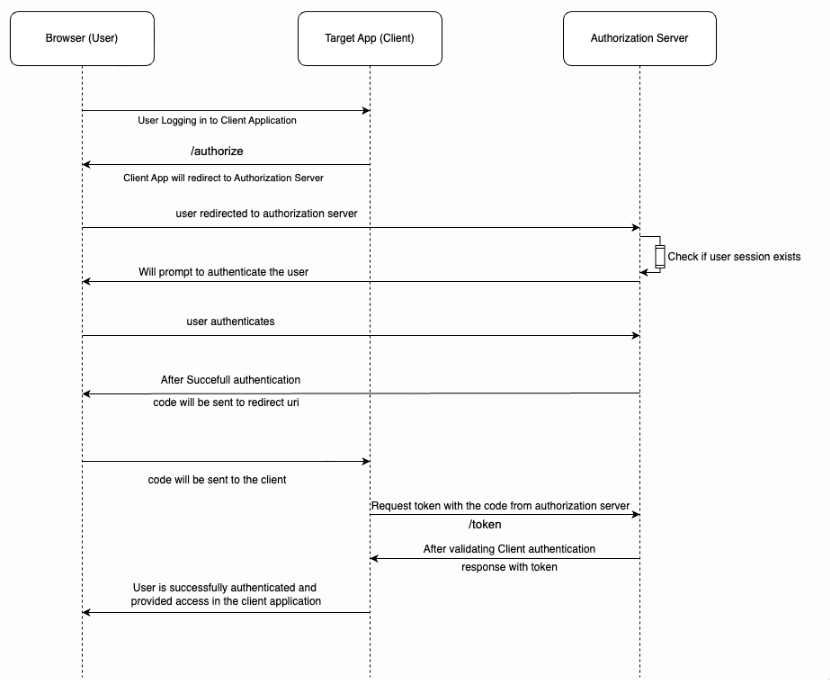
Description: This endpoint initiates the authentication flow, allowing the client application to request user authentication and obtain an authorization code for session establishment. The user is redirected to the identity provider's (IdP) login page to authenticate. Upon successful authentication, the server responds with an authorization code that can later be exchanged for an ID token and access token.
URL: https://<ADSSP_SERVER_URL:PORT>/sso/oauth/e20.....5f7/authorize
Method: GET
Parameters:
Sample request:
GET /authorize?client_id=<CLIENT_ID>&redirect_uri=<REDIRECT_URI>&response_type=code&response_mode=form_post&scope=openid profile email
Sample response:
Upon successful authentication: Redirects to the redirect_uri with the authorization code (e.g., code=<AUTHORIZATION_CODE>).
Description: This endpoint is where the application exchanges the authorization code (obtained from the authorization endpoint) for an access token.
URL: https://<ADSSP_SERVER_URL:PORT>/sso/oauth/e20.....5f7/token
Method: POST
Headers:
Body parameters:
Sample request:
POST /token
Content-Type: application/x-www-form-urlencoded
client_id=<CLIENT_ID>&client_secret=<CLIENT_SECRET>&code=<AUTHORIZATION_CODE>&grant_type=authorization_code
Sample response:
{ "access_token": "<ACCESS_TOKEN>", "token_type": "Bearer", "expires_in": 3600, "refresh_token": "<REFRESH_TOKEN>", "id_token": "<ID_TOKEN>" }
Client authentication modes in OAuth offer various mechanisms for client applications to securely authenticate with the authorization server when exchanging authorization grants for tokens. The following are the OAuth client authentication modes that ADSelfService Plus supports:
Description: This authentication mode uses HTTP Basic Authentication to transmit the client_id and client_secret in the authorization header as a Base64-encoded string.
Headers:
Body parameters: grant_type, code, redirect_uri
Example request:
POST /token
Content-Type: application/x-www-form-urlencoded
Authorization: Basic Q0xJRU5UX0lEOkNMSUVOVF9TRUNSRVQ=
grant_type=authorization_code&code=<AUTHORIZATION_CODE>&redirect_uri=<REDIRECT_URI>
Description: This authentication mode includes both client_id and client_secret in the body of the POST request.
Body parameters: client_id, client_secret, grant_type, code, redirect_uri
Example request:
POST /token
Content-Type: application/x-www-form-urlencoded
client_id=<CLIENT_ID>&client_secret=<CLIENT_SECRET>&grant_type=authorization_code&code=<AUTHORIZATION_CODE>&redirect_uri=<REDIRECT_URI>
Description: This authentication mode uses a JWT signed with the client_secret in the body of the POST request.
Body parameters: client_assertion, client_assertion_type, grant_type, code, redirect_uri
Example request:
POST /token
Content-Type: application/x-www-form-urlencoded
client_assertion=<SIGNED_JWT>&client_assertion_type=urn:ietf:params:oauth:client-assertion-type:jwt-bearer&grant_type=authorization_code&code=<AUTHORIZATION_CODE>&redirect_uri=<REDIRECT_URI>
Steps to create a signed JWT:
Example JWT header:
Example JWT payload:
Description : This endpoint provides profile details of the authenticated user, such as username, email, and other identity information. It requires an access token obtained from the token endpoint (refer to s.no.2) and returns information based on the granted scopes.
URL : https://<ADSSP_SERVER_URL:PORT>/sso/oauth/e20.....5f7/userinfo
Method: POST
Headers :
Sample response:
Description: This endpoint, which requires no authentication, publishes the public keys used by the OAuth server to sign tokens. Applications can use these keys to verify the authenticity and integrity of tokens, ensuring they haven't been tampered with and originate from a trusted source.
URL: https://<ADSSP_SERVER_URL:PORT>/sso/oauth/e20.....5f7/keys
Method: GET
Sample response:
Description: This endpoint allows the application to revoke a specific token, whether it is an access token or a refresh token. It requires client authentication using any of the authentication methods listed under the token endpoint (s.no.2) to verify the client's identity when requesting token revocation.
URL: https://<ADSSP_SERVER_URL:PORT>/sso/oauth/e20.....5f7/revoke
Method: POST
Headers:
Body parameters:
Sample request:
POST /revoke
Content-Type: application/x-www-form-urlencoded
token=<ACCESS_TOKEN>&token_type_hint=access_token
Sample response:
On Success: Returns HTTP 200.
Description: This OIDC endpoint provides metadata about the IdP, enabling clients to discover and interact with it. It is obtained when the application is configured in ADSelfService Plus and requires no authentication.
URL: https://<ADSSP_SERVER_URL:PORT>/sso/oauth/e20.....5f7/.well-known/openid-configuration
Method: GET
Key response parameters:
The response from this endpoint typically includes the following parameters in a JSON format: