SAML is a type of SSO standard. It defines a set of protocols that allows users to use a single set of credentials to access a host of applications, like Microsoft 365, Salesforce, and Google Workspace, to name a few.
SAML helps organizations simplify access to enterprise applications.
A SAML provider is any server that supports authentication and authorization of a user during a SAML request. SAML comprises of two providers:
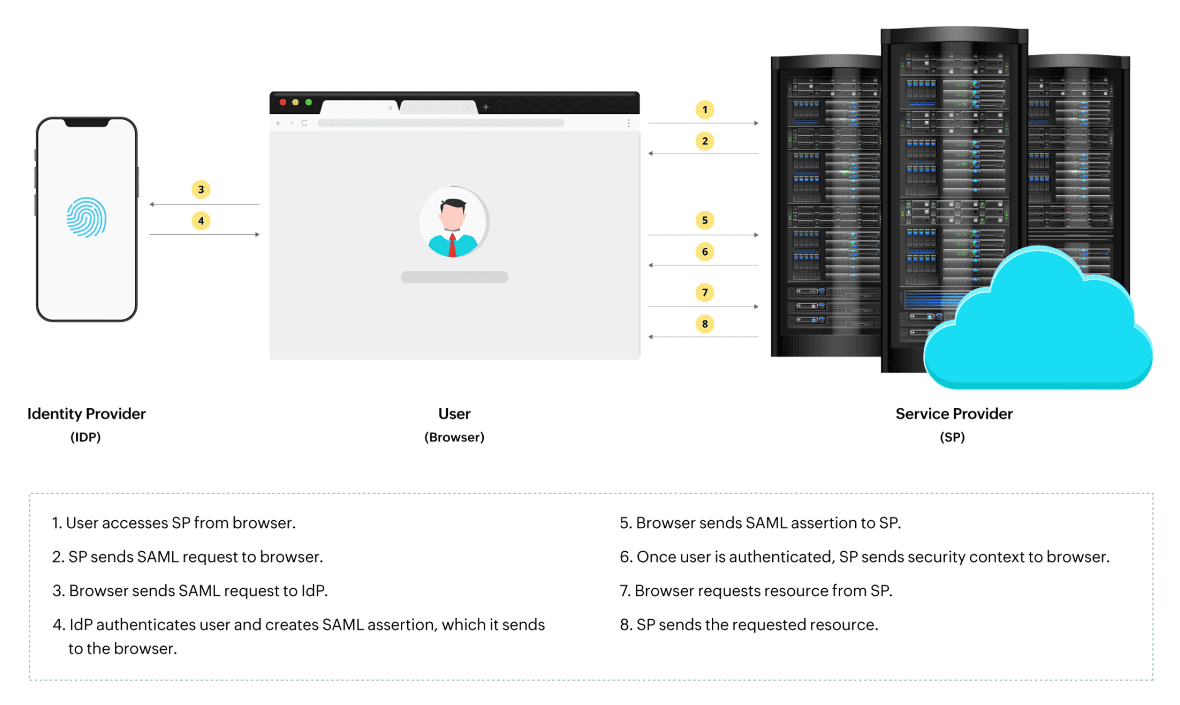
The IdP authenticates a user by verifying their passwords, biometrics, or security tokens. Once authenticated, the IdP issues tokens or assertions to the service provider. The SP uses this to provide access to different applications. Think of an IdP as a keymaker who creates a master key to access the many rooms in your house. Think of SPs as different rooms that you require access to. By using a single master key (IdP), you get to access all the different rooms (SPs) in your house.
SAML provides a secure way to authenticate user identities between the SPs and IdPs while allowing them to exist as separate entities. SAML transactions, or the standardized communications between the SP and the IdP, happen in extensible markup language (XML).
To understand the interaction between SAML IdP and SP, you must understand the difference between SAML authentication and SAML authorization.
| SAML authentication | SAML authorization |
|---|---|
| The process of verifying user identity via their entered credentials. | Telling the SP what level of access to grant to the authenticated user. |
A SAML assertion is a package of messages that notifies the SP that a user is signed in. It contains all the information necessary for the SP to confirm that users are who they claim to be. This includes information on the source of the assertion, at what time it was issued, and what conditions made the assertion valid. The IdP generates information as to when a particular user was authenticated, and by what means the user was authenticated. The assertion also contains the list of attributes associated with a particular user, which is referred to as claims, and the authorization decision, that is, whether the user was granted or denied access to a particular source.
Let's consider a real-world example. Imagine you work for an organization that requires access to multiple applications. Previously, you'd need to remember different usernames and passwords for each app, leading to password fatigue, wasted time, and repetitive effort. By implementing SAML, you can seamlessly login to the IdP once and access all applications without needing to login again. SAML offers two methods to initiate SSO.
Seamless access: Users can login once into the IdP and access all the different applications without reentering passwords. This saves time and improves efficiency.
Centralized authentication: By centralizing the login from an IdP, organizations can implement stronger security measures like MFA and password policies.
Scalability: SAML can integrate and handle a large number of applications and services.
Enhanced security: SAML reduces the risk of password related attacks by minimizing the use of passwords to a great extent.
ManageEngine ADSelfService Plus, an integrated Active Directory self-service password management and SSO solution , acts as the IdP for enterprise applications. It uses the highly secure and industry standard SAML 2.0 to provide SSO for cloud applications like Salesforce, Microsoft 365, and Google Workspace, among others.
ADSelfService Plus lets you configure SAML for a wide range of applications straight out of the box. You can also add custom applications that support SAML by entering the app details, selecting the supported SSO flow, uploading metadata, and configuring the encryption. Refer to the configuration help document for detailed steps.
Aside from SAML-based enterprise SSO, ADSelfService Plus also provides:
With up to 20 different authenticators available, IT administrators have a wide variety of options to choose from to verify the users' identities before they log into enterprise applications through SSO.
Self-service password reset and account unlock
Users are empowered to reset their own passwords and unlock their accounts without having to approach the help desk.
Enables IT admins to enforce restrictions on the type of passwords that users can create. Restrictions can be placed on characters, repetition, pattern, and length.
SAML-based single sign-on (SSO) is a security standard that allows users to log in to multiple applications with a single set of credentials. It uses the SAML protocol to securely exchange authentication and authorization information between an identity provider (IdP) and a service provider (SP).
SAML is used for authentication and authorization, securely exchanging information between an identity provider (IdP) and a service provider (SP). OAuth is used for authorization, granting third-party applications limited access to user resources without sharing explicit credentials. Choosing between SAML and OAuth comes down to you specific requirements. If you're looking for enterprise-level SSO to access multiple web applications, go with SAML. To integrate with third-party applications without exposing your credentials, go with OAuth.
SAML is used for authentication and authorization, securely transferring user identity between identity provider (IdP) and service provider (SP). OpenID Connect (OIDC) builds on OAuth 2.0, focusing on authentication and providing user information in JSON Web Tokens (JWTs). While SAML is more complex and secure, OIDC is simpler and more suited for modern web applications.