
How to reset Mac password from the login screen with ADSelfService Plus
Overview
When domain users forget their Mac login password, they are locked out of both their macOS device and their Active Directory account, which disrupts productivity. While Apple offers options such as the Reset Password assistant, Recovery Key, Apple ID, or another admin account, these methods depend on conditions like FileVault being enabled or the user having access to a Recovery Key. These dependencies often push users to contact the help desk.
ADSelfService Plus removes these hurdles by allowing users to reset Mac passwords (including on MacBook Pro) directly from the login screen after verifying their identity. It supports macOS versions Sierra, High Sierra, Mojave, and Catalina.
With ManageEngine ADSelfService Plus, users can perform self-service password reset from:
- The login screens of Windows, Linux, or macOS machines.
- Any web browser via the ADSelfService Plus portal.
- Mobile devices through the ADSelfService Plus iOS/Android app or mobile site.
- Remote or private networks, with support for cached credential updates.
Prerequisites
- The ADSelfService Plus login agent must be installed on macOS machines. Admins can deploy it via:
- The ADSelfService Plus admin console
- Manual installation
- Users must be enrolled in ADSelfService Plus. Enrollment is a one-time process where users enter their mobile number and email address, set answers to security questions, and provide other details in ADSelfService Plus in order to register for self-service password management. Learn how to enroll users.
Steps to reset your Mac password with ADSelfService Plus
- ADSelfService Plus places a Reset Password/Account Unlock link on the Mac login screen.
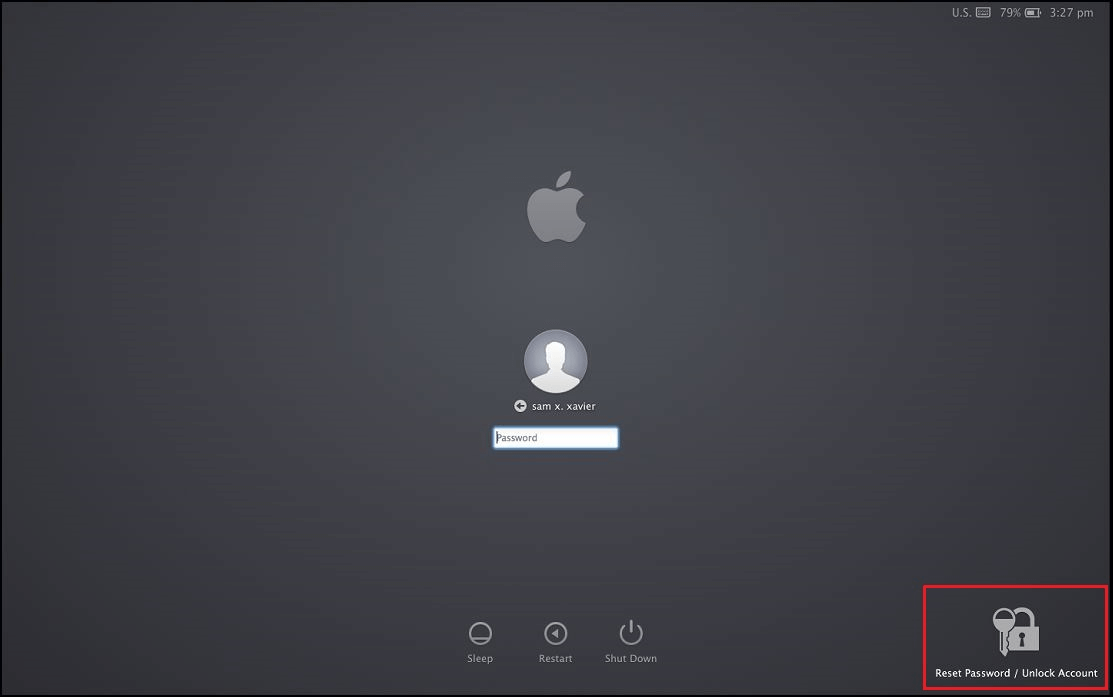
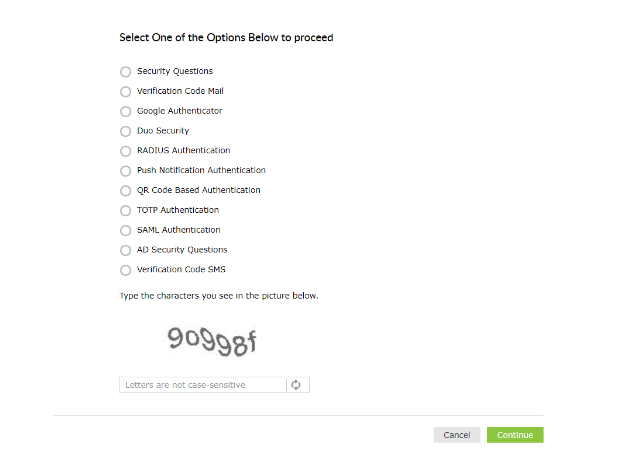
- User identity verification: Clicking this link will open the password reset portal. Users are required to prove their identity through any of the enforced authentication methods, like SMS-based one-time passwords (OTPs), email-based OTPs, Google Authenticator, DUO Security, and RSA SecurID.
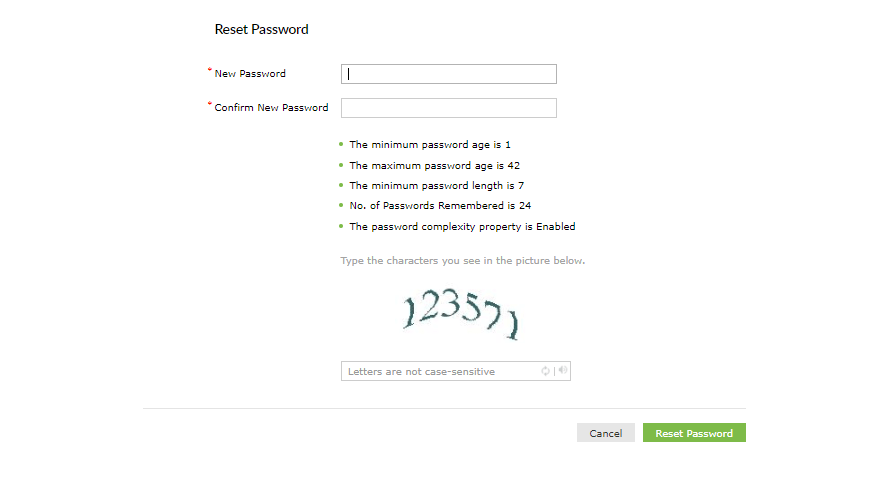
- Once a user's identity is successfully verified, they will be allowed to reset their macOS Active Directory password.
Validation and confirmation
- After completing the steps, log in with your new password to confirm it works.
Tips
- Enable multi-factor authentication (MFA) for macOS, Windows, and Linux logins to add an extra security layer beyond passwords.
- Use the Password Policy Enforcer in ADSelfService Plus to ensure users set strong, compliant passwords that meet organizational standards.
- Leverage real-time password synchronization to update credentials across enterprise applications instantly whenever a password is reset.
Related topics and articles
Self-service macOS password management
Login agent installation guide
Self-service Password Reset from macOS login screen for local/remote users.
Get Your Free Trial Fully functional 30-day trial







