 Free Edition
In this article:
This article explains how to export Exchange Online mailboxes to PST format using RecoveryManager Plus, helping organizations manage email data more effectively and maintain compliance through efficient archiving. Exporting to PST also aids in optimizing storage and reclaiming unused licenses. The guide walks users through each step of the export process and highlights the benefits of using RecoveryManager Plus for this task.
Exporting Exchange Online mailbox data to PST format is important for a number of reasons. Some of the most common reasons include:
The following steps illustrate how you export entire mailboxes or specific mailbox items in your Exchange Online environment to PST format.
To export a mailbox from your on-premises Exchange,
 in the Select Mailboxes field. You can select all the mailboxes by selecting the check-box adjacent to the Display Name text. To search for individual mailboxes, use the search icon
  . After you’ve selected all the mailboxes you wish to export to PST, click OK.
Note: You can also import a CSV file with the list of mailboxes to be exported by clicking the import icon  . In the pop-up that appears, click Browse and select the CSV file which contains the mailboxes to be exported.
Note: The individual PST files might slightly exceed or fall short by a maximum of 10% of the specified file size.
Choose the mailboxes to include in the export job
Set the size limit at which the PST file should be split into multiple parts.
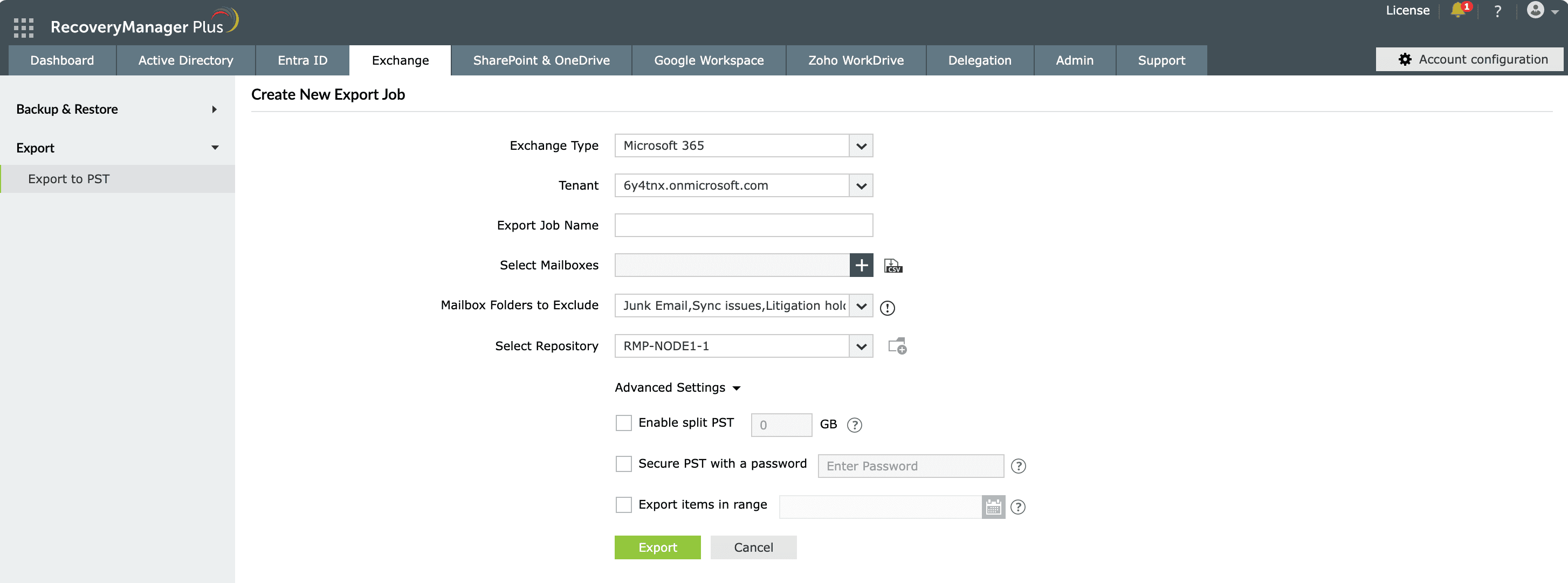
Figure 1: Exporting Exchange Online mailboxes to PST using RecoveryManager Plus.
Choose the mailboxes to include in the export job
Set the size limit at which the PST file should be split into multiple parts.
Once you have exported a mailbox to PST, the screen will display the following information.
Last updated on: 23-05-2025
Fill this form, and we'll contact you rightaway.
Our technical support team will get in touch with you at the earliest."

