

Edit Active Directory user attributes using ADManager Plus
Last updated on:In this article
Editing Active Directory user attributes in the native Active Directory Users and Computers (ADUC) console can be a crucial task for the IT administrators. ADManager Plus offers a user-friendly interface that simplifies the management and editing of user attributes from a single console, removing the need for complex scripts. With its powerful features, this tool saves time and mitigates the risk of manual errors.
Modify Active Directory user attribute
The Modify Single User management action helps administrators locate and edit any single user account attribute.
- Log in to ADManager Plus.
- Click the Management tab.
- Navigate to User Management > User Modification > Modify Single User.
- Select the domain where the user account's attribute that needs to be edited is located.
- Locate the desired user account by using the search option.
- Once the required user is located, click the Modify User button located in the Action column of the user account.
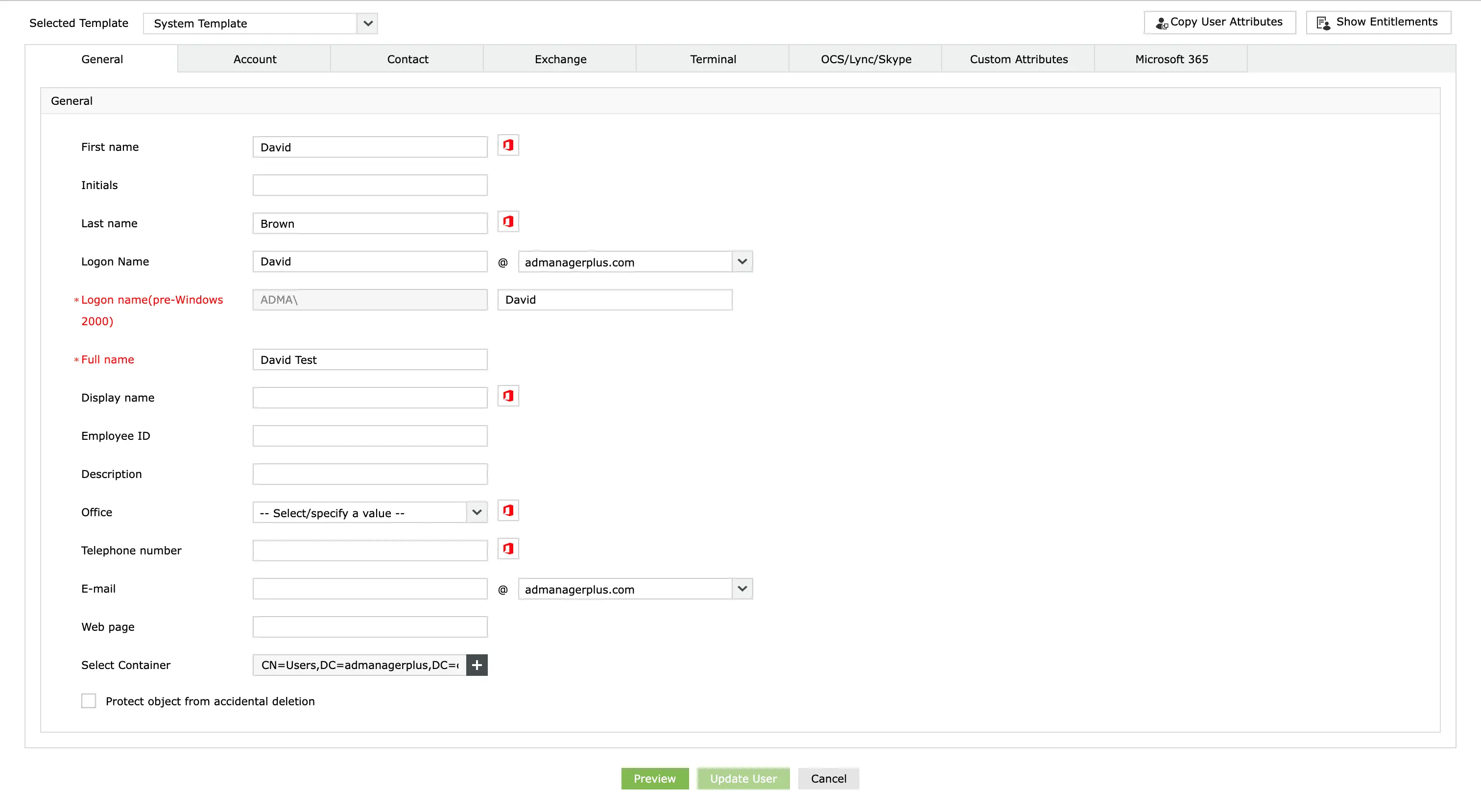
- In the Modify User Properties window, choose the required User Modification Template from the drop-down menu.
- Modify the attribute you want to edit by switching between the available tabs.
- If you wish to use the values of specific attributes of an existing user account, you can use the Copy User Attributes option.
- Click Preview to display all the fields that will be modified, along with their existing and new values.
- After making all the required changes, click Update User to save the changes to the user account.
Key use cases of editing user attributes
Use Case 1: Department and role updatesWhen employees move into a new department or role, administrators are responsible for updating user attributes such as job title, department, and location while also ensuring that access rights are appropriately given. This process prevents users from retaining unnecessary access to data, thus enhancing security.
Use Case 2: Streamlining offboardingDuring the offboarding process, administrators must modify user attributes and promptly revoke access rights. This reduces the risk of unauthorized access and helps maintain a secure environment by ensuring that former users have no remaining permissions after departure.
Benefits of using ADManager Plus
User-friendly interface
Create, modify, and manage AD objects easily from an intuitive interface.
Seamless bulk user management
Effortlessly manage and edit multiple user accounts simultaneously, saving time and streamlining administrative tasks.
Comprehensive reporting
Gain access to over 200 prepackaged reports for in-depth insights into AD objects.
Streamlined access certification campaign
Run automated campaigns to review and validate user access privileges, ensuring that only authorized individuals have access to network resources.
 Free Edition












