

FIPS compliance in ManageEngine ADManager Plus
Last updated on:In this article
Federal Information Processing Standards (FIPS) compliance is a set of standards developed by the United States government to ensure the security of sensitive and non-sensitive government data in computer systems and networks. These standards are mandatory for all US federal agencies and contractors handling sensitive information. The aim is to ensure that secure cryptographic methods and key management systems (KMS) are used to protect sensitive data.
The National Institute of Standards and Technology outlines specific encryption and key generation techniques required for FIPS compliance. Modules that comply with FIPS 140-2 are recognized and widely used by federal agencies in the U.S. and Canada to safeguard sensitive information.
Starting from build 8020, ADManager Plus can now operate in FIPS-compliant mode, aligning with the security standards set by the US government. Enabling FIPS mode in ADManager Plus ensures that it adheres to FIPS 140-2 standards and operates using only FIPS-approved algorithms.
- Prerequisites for FIPS compliance
- How do you configure FIPS in ADManager Plus?
- What will change after FIPS mode has been enabled?
Prerequisites for FIPS compliance
To achieve FIPS compliance for your environment, the following criteria must be met:
Database version compatibility
Ensure that your MS SQL server is configured with SQL authentication, because MS SQL with Windows authentication is not supported in FIPS mode. Only MS SQL versions 2016 and above are compatible with FIPS standards.
Password-protected backup ZIP files and reports export
Passwords for exported reports and backup ZIP files must meet FIPS requirements by having a minimum of 15 characters, ensuring they meet the security standards necessary for FIPS mode.
Secure SMS gateway configuration
If you are using a custom SMS provider to send notifications, ensure that the gateway is configured to use HTTPS, as this is mandatory for FIPS compliance.
Email server security
Ensure that the mail server configured in ADManager Plus is compatible with TLSv1.2, as only these versions will be supported in FIPS mode.
Secure LDAP connection
LDAP SSL must be enabled both in the product and on the configured domain controllers (DCs) to maintain FIPS compliance. When FIPS mode is enabled, new DCs will automatically connect using LDAP over SSL (LDAPS).
FIPS-compliant authentication and privacy
All authentication and privacy methods in a FIPS-compliant environment must adhere to FIPS 140-2 standards, including the use of Kerberos authentication for AD to ensure complete compliance.
How do you configure FIPS in ADManager Plus?
Enabling FIPS mode in ADManager Plus ensures that all cryptographic operations use secure, FIPS-approved algorithms that meet the strict security standards outlined in FIPS.
To activate FIPS mode, follow these steps:
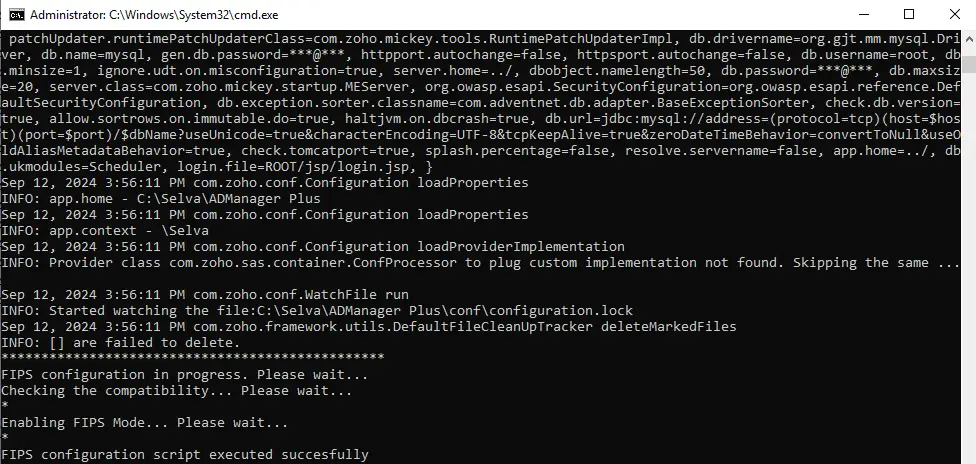
- Open Command Prompt in administrative mode, navigate to <admanagerplushome>/bin directory and then run configureFIPSMode.bat file.
- After successful execution of the batch, the trace FIPS configuration script executed successfully will be displayed.
Important:
- Ensure that ADManager Plus' service is completely stopped before enabling FIPS mode.
- FIPS mode cannot be disabled once it has been enabled.
- It's recommended that you restrict NTLM authentication on DCs to prevent fallback to NTLM if the key distribution center (KDC) service becomes unavailable.
What will change after FIPS mode has been enabled?
Enabling FIPS mode in ADManager Plus introduces several key changes that strengthen security and ensure alignment with FIPS guidelines.
Device communication
- FIPS-unsupported weak ciphers used by the product for client communication are disabled, and only FIPS-compliant protocols are utilized.
- REST API communication follows FIPS compliance when enabled.
- Communication to email server will also adhere to FIPS compliance.
- All AD communications will use Kerberos authentication.
Changes in certificates
- In FIPS mode, PFX file format and PKCS12 certificate type are restricted. Instead, the BCFKS keystore type is utilized.
- Preconfigured SSL certificates will be converted to BCFKS format upon enabling FIPS mode. The SSL certificate in BCFKS format with ".keystore" extension can be imported via the GUI to enable SSL.
Internal communication
- The failover migration process and data transmission between the primary and secondary server will be encrypted following FIPS compliance guidelines.
- Passwords and saved data will be automatically converted to FIPS-compliant formats.
- Elasticsearch communication will happen in FIPS-compliant protocols.
Limitation
- MS SQL with Windows authentication is not supported in FIPS mode.
- MS SQL versions 2014 and below are not supported in FIPS mode due to the use of non-FIPS compliant algorithms in those versions.
- NTLM-based SSO is not supported and should be disabled in FIPS mode.
Database encryption
Data in the database is encrypted and decrypted according to the algorithm specified in our configuration. By default, we use AES-256 for database encryption.
Algorithms used in ADManager Plus
| Algorithm | Details | Usage | FIPS approved |
|---|---|---|---|
| AES-256 |
Key length: 256 Iteration: 65556 Mode: CBC Padding: PKCS5 Padding SecretKeyAlgorithm: PBKDF2WithHmacSHA1 |
Used as the default algorithm for cryptographic handling in ADManager Plus. | Yes |
| Using 7z binaries AES-256 and AES-128 | Used for encrypting the database backup and exported reports. | Yes | |
|
Type: AES Key length: 256 Mode used: CBC AES/CBC/PKCS5Padding |
Used for encryption or decryption of key store and proxy password. | Yes | |
| SHA-256 | SHA-256 hash | Used to mask sensitive data in the logs and generate checksums for user defined file types to detect modifications. | Yes |
| SHA-512 | Type: SHA-512 hashing | Used for generating checksums for patch files and detecting modifications in other files. | Yes |
| Bcrypt |
Type: Bcrypt Iteration count: 12(default) |
Used for hashing the user password
Note:
SHA-256 will be used in FIPS mode. |
No (PBKDF2WithHmacSHA512 will be used when FIPS mode is enabled) |
| ZIPCrypto | ZIPCrypto for archive | Used to encrypt and export data into a zip file in the ADManager Plus client | No (AES-256 will be used when FIPS mode is enabled) |
FIPS supported ciphers
Here is the list of cryptographic ciphers supported and used when FIPS compliance is enabled in ADManager Plus.
- TLS_DHE_DSS_WITH_AES_128_CBC_SHA256
- TLS_DHE_DSS_WITH_AES_128_GCM_SHA256
- TLS_DHE_DSS_WITH_AES_256_CBC_SHA
- TLS_ECDHE_ECDSA_WITH_AES_128_CBC_SHA
- TLS_ECDHE_ECDSA_WITH_AES_128_CBC_SHA256
- TLS_ECDHE_ECDSA_WITH_AES_128_GCM_SHA256
- TLS_ECDHE_ECDSA_WITH_AES_256_CBC_SHA
- TLS_ECDHE_ECDSA_WITH_AES_256_CBC_SHA384
- TLS_ECDHE_ECDSA_WITH_AES_256_GCM_SHA384
- TLS_ECDHE_RSA_WITH_AES_128_CBC_SHA
- TLS_ECDHE_RSA_WITH_AES_128_CBC_SHA256
- TLS_ECDHE_RSA_WITH_AES_128_GCM_SHA256
- TLS_ECDHE_RSA_WITH_AES_256_CBC_SHA
- TLS_ECDHE_RSA_WITH_AES_256_GCM_SHA384
- TLS_RSA_WITH_AES_128_CBC_SHA
- TLS_RSA_WITH_AES_256_CBC_SHA
- TLS_DHE_RSA_WITH_AES_256_CBC_SHA
- TLS_DHE_RSA_WITH_AES_128_CBC_SHA
- TLS_DHE_RSA_WITH_AES_128_GCM_SHA256
- TLS_ECDHE_RSA_WITH_AES_256_CBC_SHA384
- TLS_DHE_RSA_WITH_AES_128_CBC_SHA256
- TLS_DHE_RSA_WITH_AES_256_CBC_SHA256
- SSL_RSA_WITH_3DES_EDE_CBC_SHA
Conclusion
Enabling FIPS mode in ADManager Plus enhances security, ensuring compliance with industry standards and protecting against vulnerabilities associated with weaker cryptographic protocols. It provides a secure framework to safeguard data communication and integrations within the system, adhering to strict FIPS guidelines.
 Free Edition












