

How to create GPOs using ADManager Plus
Last updated on:Group Policy Objects (GPOs) are collections of rules or policies that control the working environment of user accounts and computer accounts in a Windows environment. They are essential tools that help IT administrators enforce policies and maintain security and compliance in an enterprise environment.
While GPOs are typically created using the Group Policy Management Console, its complex interface can be quite challenging for technicians with limited expertise. ADManager Plus, an IGA tool for enterprises, simplifies the creation, linking, and management of GPOs with its user-friendly, intuitive UI, addressing the challenges associated with native tools.
Steps to create GPOs using ADManager Plus
- Log in to ADManager Plus and navigate to the Management tab.
- On the left pane, click GPO Management.
- Under GPO Management, click Manage GPOs.
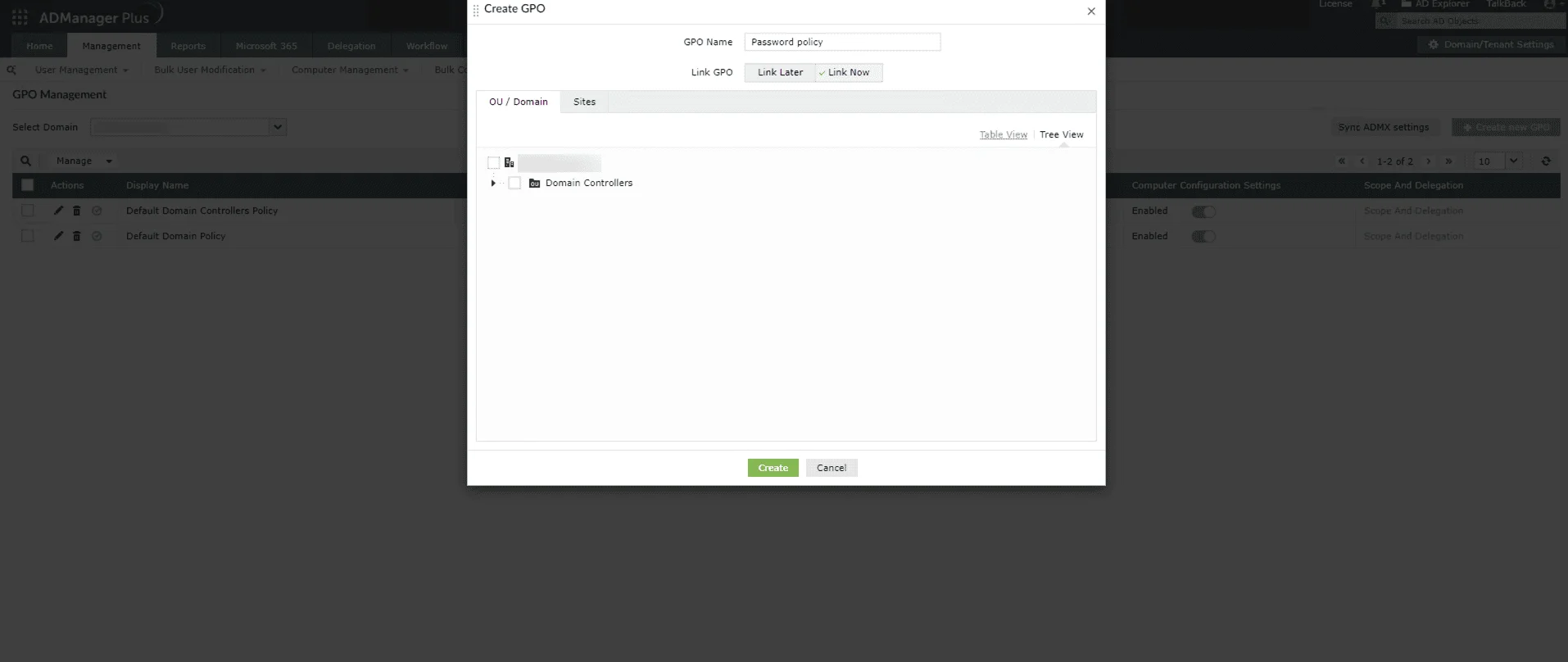
- Click + Create new GPO.
- Enter a suitable name for the GPO in the GPO Name field.
- In the Link GPO field:
- Click Link Later if you only want to create the GPO and link it at a later time.
- Click Link Now to instantly link the GPO, then select the desired OUs, domains, and sites.
- Click Create to create the GPO.
Once a GPO is created, keep an eye on it with ADManager Plus' comprehensive GPO reports on GPO settings, GPO scopes, and more.
 Free Edition












