ManageEngine® Applications Manager helps enterprises ensure their critical business applications have high uptime. The Business Services Management capability adds a business context to monitoring IT resources and helps the IT Team to proactively monitor the servers, applications, network services and ensure IT Operations have visibility on how IT resources impact business applications. By better visibility, IT Managers can ensure adequate resources are provisioned for IT Services that impact the business and ensure IT meets the goals of the business.
Traditional Systems and Network Management tools use a siloed approach to monitoring. This makes the workflow for the Operations Team more complex and does not help the IT Team to troubleshoot performance issues quickly. However ManageEngine Applications Manager gives an integrated view across technology silos.
Complex infrastructure need powerful tools to simplify monitoring. Today's Web Applications are N-Tiered and depend on various resources like file servers, databases, Web Servers, middleware components, legacy web services linked using SOA etc. Many of these may be clustered for scalability and high availability. This kind of a setup needs tools that help define proper correlation between resources.
Integration with ITIL Ready ServiceDesk : ManageEngine® Applications Manager also integrates with ManageEngine ServiceDeskPlus and automatically logs a ticket so that it improves your workflow. It also integrates with other 3rd Party Ticketing Systems.
Integration with Network Monitoring Software - ManageEngine OpManager : The Network Monitoring Connector enables the user to monitor the availability and performance of network devices such as routers and switches along with performance of application servers, databases, webservers and web services.
Integration with SAN Availability and Monitoring Software - ManageEngine OpStor : ManageEngine Applications Manager integrates with ManageEngine OpStor via the ManageEngine OpStor SAN Monitoring Connector. In addition to monitoring application and server performance with ManageEngine Applications Manager, the connector enables users to monitor performance and availability SAN and other storage devices. There is unified reporting, alarm management and SLA Management.
Key Benefits of Business Service Management for the Enterprise
Add a Business Context to your IT Resources
ManageEngine® Applications Manager gives a business centric view to your IT and helps you know what business processes are affected when there is downtime or performance bottlenecks. A single performance dashboard also helps consolidate the heterogeneous monitoring tools and scripts used within the enterprise and helps IT to have better control.
Easy Troubleshooting
The integrated application, server and database monitoring capability ensures IT administrators can troubleshoot with ease. A single console for monitoring, along with the Root Cause Analysis capability empowers users to take remedial action fast.
Define dependencies and improve Fault Management and SLA Management
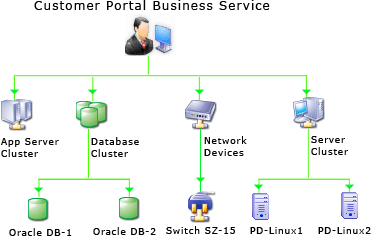
ManageEngine Applications Manager supports the ability to group resources in a hierarchical model. This along with the support for configuring dependencies ensure clustered setups and other high availability mechanisms are taken care while alarms are sent to the Operations team or when SLA reports are generated.
Reduce Application Support and Maintenance Costs
With ManageEngine Applications Manager, IT Administrators can focus on resolving problems, planning inventory and other activities that are core to the business. The support for industry best practices ensures, your infrastructure is better managed. Additionally the agentless monitoring model used reduces setup time and man power costs and adds to the savings for the enterprise.
Application Performance Monitoring Solutions
