
Password Manager Pro (PMP) is a Password Management Solution for enterprises to control the access to shared administrative/privileged passwords of any 'enterprise resource' such as servers, databases, network devices, applications et al.
PMP is centralized, web-based and enables IT managers to enforce standard password management practises such as maintaining a central repository of all passwords, usage of strong passwords, frequent changing of sensitive passwords and controlling user access to shared passwords across the enterprise.
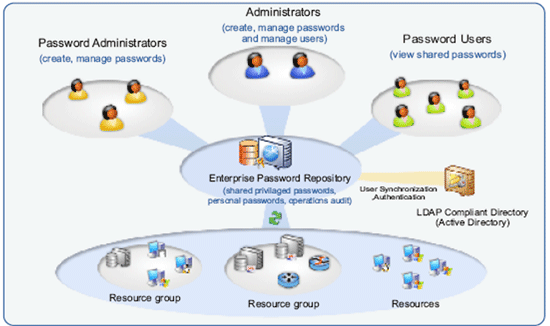
Ensuring the secure storage of passwords and offering high defence against intrusion are the mandatory requirements of PMP. The following measures ensure the high level security for the passwords:
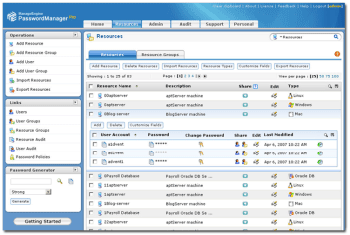
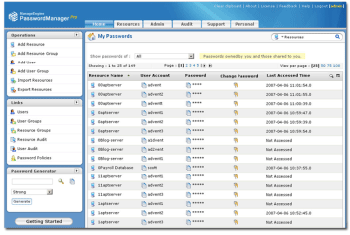
User names and passwords of enterprise resources are encrypted using the Advanced Encryption Standard (AES) algorithm and are securely stored in the database of PMP. Resources can be conveniently arranged in the form of resource groups for bulk operations. PMP database can be backed up periodically for disaster recovery.
Since privileged passwords are sensitive, PMP handles them with due care by assigning ownership for resources, user accounts and passwords. Resources owned by an administrator / user cannot be viewed by others unless they are shared. Ownership of a resource can be totally transferred to another administrator. Or others can just be permitted to view/edit passwords, while one administrator retaining the ownership.
Administrators can centrally create users, assign them with specific roles and define access levels. Users can also be imported from Active Directory and LDAP. Only authorized users will get access to view, edit or manage the permitted 'resources' (the resources assigned to them) based on their roles.
Managers/administrators can enforce standard password practices for all user accounts and resources in PMP by defining password policies. PMP comes with an in-built 'Password Generator' that helps generating passwords in accordance with the defined policies.
PMP records all operations performed by the users including the password viewing and copying operations and provides comprehensive audit trails.
Provision for storing the passwords for personal use such as Email account information, Credit Card Numbers, etc.
PMP web interface can be accessed from anywhere through standard web browsers.
System Requirements: Pentium IV 1.4 GHz, 512 MB RAM, 200 MB disk space on Windows NT/XP/2000 or RedHat Linux
Supported Browsers : Internet Explorer 6.0 and above, Firefox 1.5 and above
Website :http://www.passwordmanagerpro.com
For queries :passwordmanagerpro-support@manageengine.com
 SSL & SSH Key Management