


Although there are no prerequisite softwares required to install and start Password Manager Pro, you will need the following components in order to use Privileged account discovery and password reset features:
To check if these software requirements are configured:
In the pop-up box that opens, the configuration status will be displayed.
Except for super administrators (if configured in your Password Manager Pro set up), no one including admin users, will be able to see the resources added by you. However, if you share your resources with other administrators, they will be able to see them.
Yes, you can extend the attributes of the Password Manager Pro resource and user account to include details that are specific to your needs. Refer this document for more details.
If an administrative user leaves the organization, they can transfer the resources they own to other administrators. By doing so, they'll have no access to those resources themselves, unless they transfer the resources to themselves. Refer this document for more details.
Verify the following:
If the above verifications fail, please contact passwordmanagerpro-support@manageengine.com.
It is always recommended to run the PMP application (built over Tomcat web server) and the MySQL database in the same machine for better security. We have configured the bundled MySQL database so as it is not visible outside the machine in which it is installed (it will accept connections requested only from localhost) and you will lose this aspect when you separate them. If there is a pressing need to run MySQL elsewhere, follow the procedure detailed below:
The domain Single Sign On (Windows-integrated authentication) is achieved in the Windows environment by setting non-standard parameters in the HTTP header, which are usually stripped off by devices like firewalls / VPNs. Password Manager Pro is designed for use within the network. So, if you have users connecting from outside the network, you cannot have SSO enabled.
Yes. Password Manager Pro provides you with the following options for customization and rebranding:
To carry out the above functionalities:
Note that at any point, this configuration can be disabled. Know how.
Yes, Password Manager Pro records all operations that can be possibly performed by an user- including password viewing and copying operations. From audit trails, you can get a comprehensive list of all the actions and attempts by the users with password retrieval. Know more
This issue occurs when the backup location specified in Password Manager Pro is no longer accessible to save the backup file. In simple terms, whenever the PostgreSQL database backup fails, wal_archive folder size will start increasing.
Solution:
This will trigger an instant backup and automatically purge the wal_archive directory.
Yes, refer the High Availability document for more details.
Yes, you can change the default port as explained below:
Password Manager Pro comes bundled with a tailored version of TomCat webserver which allows users to access the webpage and also the JVM which performs the product operations. You can use the below steps to configure the Bind IP address for both these components.
Steps for changing webserver bind IP
Steps for changing JVM bind IP
In general, users are notified of their Password Manager Pro accounts only through emails. If a user does not get the notification emails, verify:
You can use one of the following three authentication mechanisms out of Password Manager Pro:
Password Manager Pro comes with five pre-defined roles:
Apart from these default roles, any administrator can be promoted as a "Super Administrator" with the privilege to view and manage all the resources. Click here for details on the access levels of the default roles.
If you were already given a valid Password Manager Pro account, you can use the 'Forgot Password?' link available in the login page to reset your password. The username/email ID pair supplied should match the one already configured for the user. The password will be reset for that user and the new password will be sent to the respective email address. However, you wouldn't need this option if AD/LDAP authentication is enabled.
The Password Manager Pro web console always uses the HTTPS protocol to communicate with the Password Manager Pro server.The Password Manager Pro server comes with a default self-signed SSL certificate, which the standard web browsers will not recognize, thereby issuing a warning. You can ignore this warning while you're testing or evaluating the product. However, if you're rolling it out in production, we recommend that you install an SSL certificate bought from an authorized Certificate Authority (CA) that is recognized by all standard web browsers. Know More
Ensuring secure storage of passwords and offering solid defense against intrusion are the top priorities of Password Manager Pro. The following measures ensure high level security for your passwords:
For detailed information, refer to our Security Specifications document.
Password Manager Pro offers RESTful APIs and SSH-based CLI APIs that can be used for Application-to-Application/Database password management. The applications connect and interact with Password Manager Pro through HTTPS. An application's identity is verified first by verifying the validity of its SSL certificate, and then by verifying the source IP/hostname in which it resides. Each application/database must be registered as an API User in Password Manager Pro. During this registration, the hostname/IP of the application server has to be supplied and a unique authentication token that uses the REST API will be generated. This token needs to be sent along with the API requests for authentication. In addition to these security checks, each application/database can only access the information that are explicitly delegated to them by an administrative user. Refer to this document to know more about sharing/delegating passwords.
Yes, you can install your own SSL certificates. Follow the steps below:
Note: The below steps are applicable for builds 9700 and above only.
Password Manager Pro runs as a HTTPS service. It requires a valid CA-signed SSL certificate with the principal name as the name of the host on which it runs. By default, on first time startup, it creates a self-signed certificate, which will not be trusted by the user browsers. Thus, while connecting to Password Manager Pro, you need to manually verify the certificate information and the host name of Password Manager Pro server carefully and should force the browser to accept the certificate.
To make the Password Manager Pro server trusted by web browsers and users:
There are different ways to generate the signed SSL certificates:
You can decide the mode of generating the signed SSL certificates based on what your security administrators recommend. The detailed steps for using each of the above methods are provided under the links below.
Note: If you already have a certificate signed by a CA, then we recommend using OpenSSL to create the keystore and configure it in Password Manager Pro (steps 4 and 5 in the instructions below).
You can generate signed SSL certificates through the Certificate Management module of Password Manager Pro and also apply the certificate changes (Certificate Keystore) directly from the Password Manager Pro console. This involves three processes:
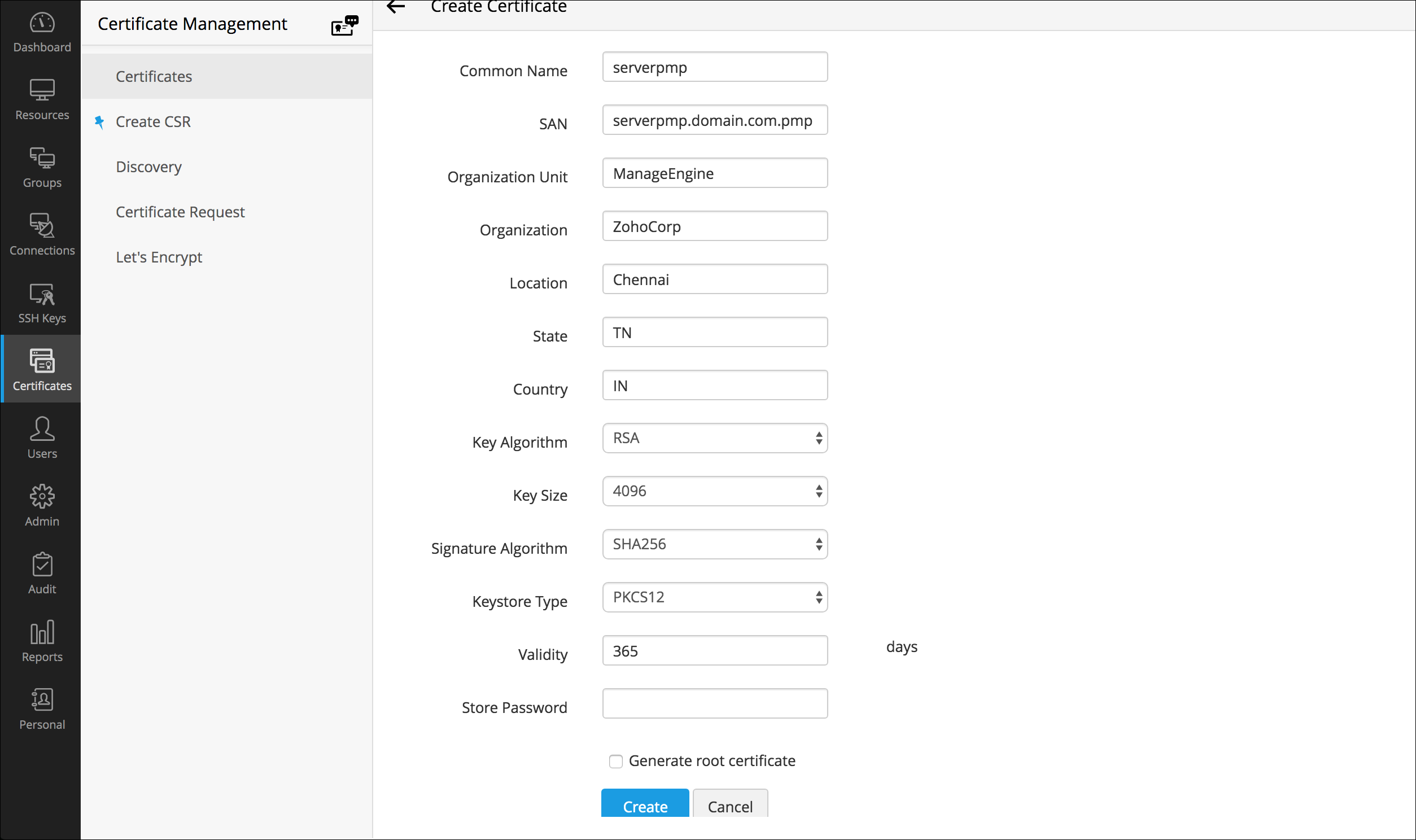
To request and acquire certificates from a Local CA through Password Manager Pro, you need to first generate a Certificate Signing Request (CSR). Here are the steps for the same:
If you have selected Create CSR, fill in the details, such as Common Name, SAN, Organization Unit, Organization Location, State, Country, Key Algorithm and Key Size. Select the Key Algorithm and Keystore Type. Enter the Validity and Store Password.
Note: The 'show passphrase' eye icon corresponding to each CSR allows the administrators to view the KeyStore passwords of the CSR files.
Password Manager Pro provides the option to sign and issue certificates to all clients in your network either from your Microsoft Certificate Authority or using a custom root CA certificate that is trusted within your environment.
Note: Remember, you should have generated a valid Certificate Signing Request (CSR) before getting your certificate signed from the local CA.
Follow the below steps to sign the certificate:
To apply the certificate Keystore, first you need to create it.
OpenSSL mostly comes bundled with the Linux distributions. If you are using the Windows server and do not have OpenSSL installed, download it from http://www.slproweb.com/products/Win32OpenSSL.html. Make sure the 'bin' folder under the OpenSSL installation is included in the 'PATH' environment variable.
Some of the prominent CAs are Verisign (http://verisign.com), Thawte (http://www.thawte.com), RapidSSL (http://www.rapidssl.com). Check their documentation / website for details on submitting CSRs and this will involve a cost to be paid to the CA. This process usually takes a few days time and you will be returned your signed SSL certificate and the CA's root certificate as .cer files. Save them both in the same working folder where files from steps 1 and 2 are stored
This is the final step in generating Signed SSL certificates using OpenSSL.
Note: step is applicable for builds 9700 and above only.
Some of the prominent CAs are Verisign (http://verisign.com), Thawte (http://www.thawte.com), RapidSSL (http://www.rapidssl.com). Check their documentation / website for details on submitting the CSRs. Please note that this is a paid service. This process usually takes a few days of time. You will receive your signed SSL certificate and the CA's certificate as .cer files. Save both the files in the <Password Manager Pro_Home>/jre/bin folder.
"keytool -import -alias Password Manager Pro -keypass <privatekey_password> -storepass <keystore_password> -keystore <keystore_filename> -trustcacerts -file <your_ssl_bundle.p7b>"
Where,
This is the final step in generating Signed SSL certificates using Keytool.
Note: This step is applicable only if you're using the version 9700 or above.
Note: Tomcat, by default, accepts only the JKS (Java Key Store) and PKCS #12 format keystores. In case, the keystore is of PKCS #12 format, include the following option in the server.xml file along with the keystore name, keystoreType="PKCS12? This notifies tomcat that the format is PKCS12. Restart the server after this change.
Note: Please refer your CA's documentation for more details and troubleshooting.
Follow the steps below to generate SSL certificate for MySQL Server. (If you want to have a self-signed key, follow all the steps. If you are using a CA signed certificate, skip steps 1, 2 and 5.)
Step 1 Create certificate authority key
Step 2 Create a self-signed certificate authority certificate
Step 3 Generate private key
Step 4 Generate a certificate request
Step 5 Create a Certificate Signing Request (CSR) for submission to a certificate authority (perform this step only if you are using a self-signed certificate. Otherwise, proceed to step 6)
Step 6 Generate .p12 file
Open wrapper (in Windows installation) and wrapper_lin.conf (in Linux installation) and search for the following line:
wrapper.java.additional.22=-Djavax.net.ssl.keyStorePassword=passtrix
In the above, replace passtrix with the password you have entered above.
Step 7 Configure the PMP server to use the keystore with your SSL certificate
Step 8 Import CAcert.pem into PMP
In Windows: importcert.bat <absolute path of the CAcert.pem file created in step 2>
In Linux: sh importcert.sh\bat <absolute path of the CAcert.pem file created in step 2>
Step 9 Put these files into MySQL
CAcert.pem to be renamed as ca-cert.pem
ServerKey.key to be renamed as server-key.pem
ServerCer.cer to be renamed as server-cert.pem
Important Note: If you are having High Availability setup, execute the steps 7, 8 and 9 in PMP secondary installation also.
Yes, you can create a certificate using SAN with an alias name and apply it in Password Manager Pro. Follow the below steps:
After creating the CSR, the next step is get the CSR verified and signed by a CA. There are two options to do this:
Once signed, you can view the certificate under 'Certificates'.
To import the certificates in your network:
Make sure you follow the below mentioned steps to create server certificate with SubjectAlternativeName using Microsoft Internal CA. Also, in Additional Attributes, specify the 'san:dns=<The URL which you use to access Password Manager Pro>', and then try creating the certificate.
Note : If you receive the error message "Failed to establish chain from reply" with the above command, it means the root and intermediate certs of your CA are not available in the trusted store of the Password Manager Pro. So, before importing the actual certificate, you have to import the root certificate with a different alias and then import the actual certificate. Also, if you have multiple root certificates, then you have to import them one by one with the different alias names. For example,
./keytool -import -alias root1 -keypass Password123 -storepass Password123 -keystore Password Manager Pro.keystore -trustcacerts -file root1.cer
./keytool -import -alias root2 -keypass Password123 -storepass Password123 -keystore Password Manager Pro.keystore -trustcacerts -file root2.cer
Based on the number of root or intermediate root certificates, you have to execute the above command with different alias names and then continue with the actual certificate.
Note : The actual certificate should be in .cer or .crt format.
Make sure you follow the below mentioned steps to get SAN certificate signed from the third party vendors.
Here, when it prompts for first and last name, specify the name which you use to access Password Manager Pro.
Note: If you receive the error message "Failed to establish chain from reply" with the above command. Then, the root and intermediate certs of your CA are not available in the trusted store of the Password Manager Pro. So, before importing the actual certificate, you have to import the root certificate with a different alias and then the actual certificate. Also, if you have multiple root certificates, then you have to import them one by one with different alias names. For example,
./keytool -import -alias root1 -keypass Password123 -storepass Password123 -keystore Password Manager Pro.keystore -trustcacerts -file root1.cer
./keytool -import -alias root2 -keypass Password123 -storepass Password123 -keystore Password Manager Pro.keystore -trustcacerts -file root2.cer
Based on the number of root or intermediate root certificates, you have to execute the above command with different alias names and then continue with the actual certificate.
Yes. Password Manager Pro can remotely reset the passwords of various end points. Password Manager Pro supports both agent-based and agent-less modes of changing passwords. Refer this document for more information.
Let us first look at the requisites for both the modes:
Based on this, you can choose which mode you want for your environment, indicated by the following tips:
Choose the agent mode when:
Choose agent less mode in all other cases as it is a more convenient and reliable way of doing password changes.
Yes, you can. As long as your resource type label contains the string 'Linux' or 'Windows', you can still configure agent less password reset for those resources.
Example of valid resource type labels to enable password reset:
Debian Linux, Linux - Cent OS, SuSE Linux, Windows XP Workstation, Windows 2003 Server
Password Manager Pro supports remote password reset for custom resource types through SSH command sets, password reset plugins, and password reset listeners.
In the agent mode:
In the agent less mode:
This happens when Password Manager Pro is run as a Windows service and the 'Log on as" property of the service is set to the local system account. Change it to any domain user account to be able to reset domain passwords. Follow the instructions below to effect that setting:
Before enabling windows service account reset, ensure if the following services are enabled in the servers where the dependent services are running:
The domain Single Sign On (windows integrated authentication) is achieved in the Windows environment by setting non-standard parameters in the HTTP header, which are usually stripped off by devices like firewalls / VPNs. Password Manager Pro is designed for use within the network. So, if you have users connecting from outside the network, you cannot have SSO this enabled.
Yes. you can migrate Password Manager Pro to another server by following the below steps:
Yes, you can. Password Manager Pro can periodically backup the entire contents of the database, which can be configured through the Password Manager Pro console. Refer this document for more details.
All sensitive data in the backup file are stored in encrypted form in a .zip file under <Password Manager Pro_Install_Directory/backUp> directory. It is recommended that you backup this file in your secure, secondary storage for disaster recovery.
There are three editions of Password Manager Pro
Evaluation Edition - Evaluation Edition allows you to have two administrators for 30 days. You can manage unlimited resources and evaluate all features of the Enterprise edition. You can also get free technical assistance during this period.
Free Edition - The download option is always valid for this edition. It can support only one administrator. You can manage a maximum of 10 resources and you can access all the functionalities of the Standard edition.
Registered Version - You need to buy a license based on the number of administrators required and the type of edition- Standard/Premium/Enterprise:
Note: Password Manager Pro comes with five user roles - Administrator, Password Administrator, Privileged Administrator, Password Auditor and Password User. The term 'administrator' denotes Administrators, Password Administrators and Privileged Administrators. So, licensing restricts the number of administrators as a whole, which includes Administrators, Password Administrators and Privileged Administrators. There is no restriction on the number of Password Users and Password Auditors. To get more details on the five user roles, refer this section of our help documentation.
See the below features comparison table for more clarity:
Though Password Manager Pro follows an annual subscription model for pricing, we also provide perpetual licensing option. The perpetual license will cost three times the annual subscription price, with 20% AMS from the second year. Contact sales@manageengine.com and support@passwordmanagerpro.com for more details.
Yes, if you buy a single Premium or Enterprise Edition license, you are entitled to have the High Availability setup. You can apply the same license on the Primary as well as the Secondary servers. Follow the below steps:
Yes, very much. If you want a license with more than 1000 administrator users, please contact sales@manageengine.com and support@passwordmanagerpro.com for more details.
Yes. Fill in the required details in the website and we will send you the license keys.
No. All the features of the Enterprise/Premium edition will automatically get activated when you apply the respective license over your current Password Manager Pro installation.
No. Password Manager Pro adopts the same approach for managing SSH user accounts and SSH service accounts. The only difference is that during resource discovery, if service / root account credentials are provided to establish connection with the resource, you acquire extended privileges to import and manage keys from all user accounts in the resource.
Whereas, when connection to the resource is established using user account credentials, you get key management privileges only for SSH keys present in that particular account.
Yes. We have a dashboard that displays the number of keys that were not rotated for the predefined time period as specified in the notification policy.
Password Manager Pro houses a key vault called "Key Store" which facilitates the storage and management of any type of digital key. However, the option to discover and import is limited to SSH keys and SSL certificates only, and isn't available for other types of digital keys.
No. Password Manager Pro supports all X.509 certificate types.
Yes. You can create scheduled tasks to perform automatic certificate discovery through which you can import and replace old certificates from target systems with their updated versions in Password Manager Pro' certificate repository. Click here for a detailed explanation on creating schedules.
No, it doesn't. The AD User Certificate and MS Certificate Store tabs appear only in the Windows version of Password Manager Pro.
Password Manager Pro differentiates certificates by their common names and records certificates with same common names as a single entry in its certificate repository. We've designed it this way because Password Manager Pro licensing is based on the number of certificates and we don't want customers to spend many license keys for the same certificate.
However, if there's a need to manage both the certificates separately, you can do so by listing them as separate entries in Password Manager Pro' certificate repository. Once listed, the newly added certificate will be counted for licensing.
To add a certificate with the same common name as a separate entry in certificate repository,
Follow the steps below to import a certificate's private key into Password Manager Pro.
Browse for the file that contains the private key, enter the keystore password, and click on 'Import'. The private key will be imported and attached to the selected certificate.
Password Manager Pro facilitates certificate deployment through which you can deploy certificates from its repository to target server's Microsoft Certificate Store.
Click here for step-by-step explanation on certificate deployment.
To map the certificate to its corresponding application, you've to manually restart the server on which the application is running for the change to take effect.
No. Password Manager Pro currently doesn't support subnet based SSL certificate discovery.
No. Currently, Password Manager Pro doesn't support automatic scheduling for certificate discovery from MS Certificate Store.
Email notifications are generated ONLY for certificates listed in Password Manager Pro's certificate repository and NOT for different versions of a certificate displayed in "Certificate History" section.
Yes. All types of SSL certificates, SSH keys and any other digital key being managed using Password Manager Pro are taken into account for licensing. There's a dashboard widget "License Details" that provides insights on the type and number of digital identities being managed using Password Manager Pro that will be taken into account for licensing.
 SSL & SSH Key Management