
In this page:
ManageEngine Log360 Cloud uses Zoho Zia, the AI-engine to deliver contextual insights from logs, alerts, and incidents by leveraging advanced summarization, threat mapping, and possible remediations. Using Universally Unique Identifiers (UUIDs) for logs, Alert IDs for alert data, and Incident IDs for incident data, Zia Insights processes raw data to streamline threat detection, investigation, remediation, and compliance audit.
This page explains how Zia Insights categorizes events, generates insights, and guides response actions within Log360 Cloud.
Log360 Cloud's Zia Insights provides six key information for effective security operations. They are:
To accelerate log analysis and generate remediation steps, Log360 Cloud's Zia Insights categorizes log data and provides tailored recommendations based on the log type. Refer the below table to learn how Zia Insights categorizes the logs, the detection indicator it uses for log categorization, and the modules it assigns to each category.
| Log type | Detection indicators | Insights provided |
|---|---|---|
| Error and crash logs | Error codes, "failed" or "fatal" keywords, or stack traces. Application crashes, or service failures that disrupt normal operations. | Troubleshooting Steps
For example, application crashes will include recommendations to analyze application logs at the time of the crash to identify any correlated events, and debug using tools like WinDbg to trace access violations. |
| Security logs | Failed authorizations, suspicious activities such as User Account Control (UAC) modifications, or triggered security alerts. | Potential Mitigation Steps
For example, office process launching PowerShell will include recommendations to investigate the source document, restrict script execution using Powershell's Constrained Language Mode, and block macros from untrusted sources. |
| Audit logs | Unauthorized access attempts, audit policy violations, or configuration changes. | Recommendations
For example, changes to audit policies will include recommendations to enforce strict access controls and alert mechanisms for critical audit events. |
| Anomaly alerts | Unusual logon times or suspicious logins | Anomaly Mitigation Guidance
For example, Windows anomaly logon will include suggestions like resetting credentials and restricting logons to approved hours. |
The Zia Insights Summary segment provides a concise overview of logs, events, alerts, and incidents. It distils crucial information from logs and incidents by using structured inputs. For incidents, it gathers details like evidence, notes, activity logs, involved parties, and basic incident context to generate the summary.
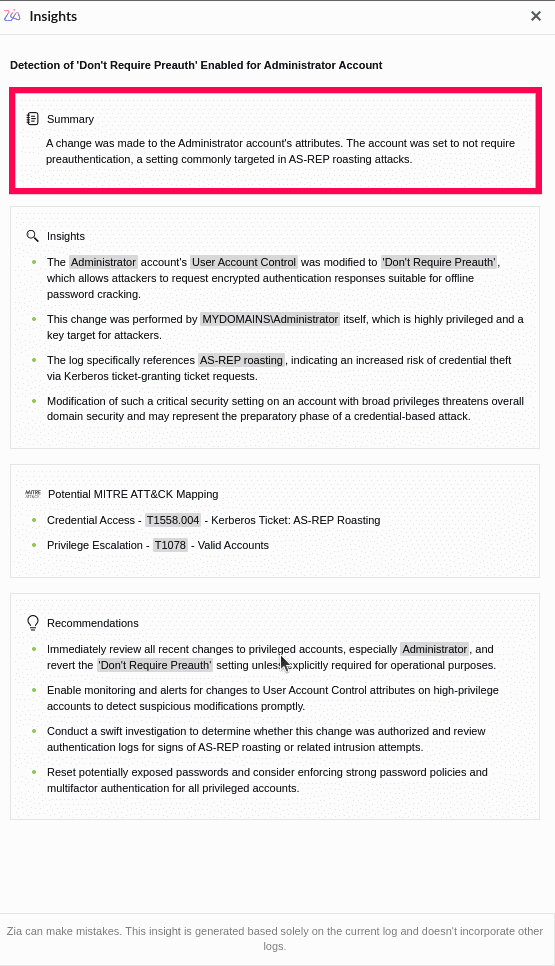
Figure 1: Zia Insights summary from Search
The Insights segment in Zia Insights provides actionable understanding derived from analyzing events leading to an alert, which enables the identification of key actors, source and destination IPs, user accounts, involved entities, example systems, and the detection of suspicious behaviors.
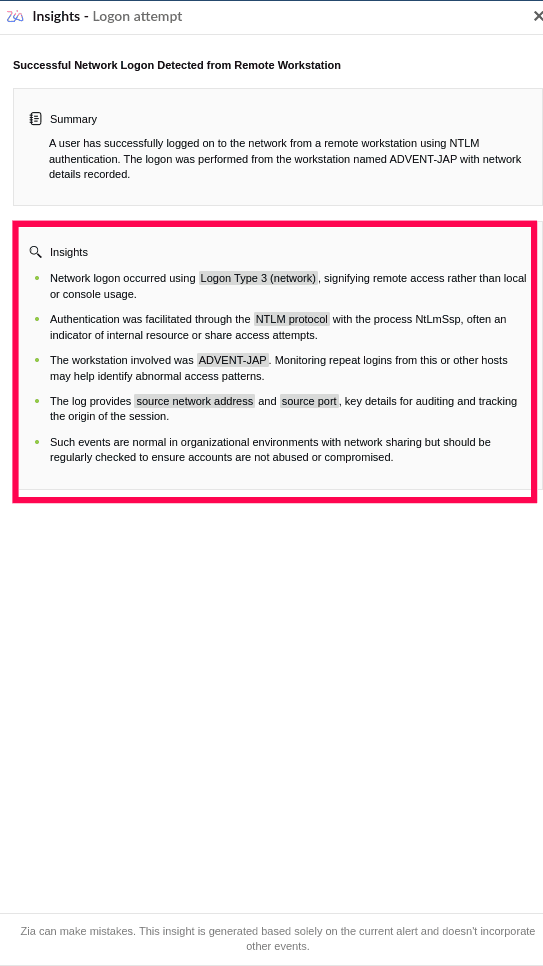
Figure 2: Insights generated by Zia based on Alert data
Timeline segment of Zia Insights provides a chronological view of key events related to the alert or incident, including timestamps and specific actions or system behaviors that led up to or followed the incident. This helps reconstruct the attack chain, verify patterns, and correlate the activity with other events.
Example: Events like login failures followed by successful logon and new services installed denote a sequence of activity by the same user. Timeline will be shown for these types of events.
Example: An alert is generated when a login failure occurs 10 times within 5 minutes, which may suggest a brute-force attack. Timeline of the login failures will be graphically shown by Zia Insights.
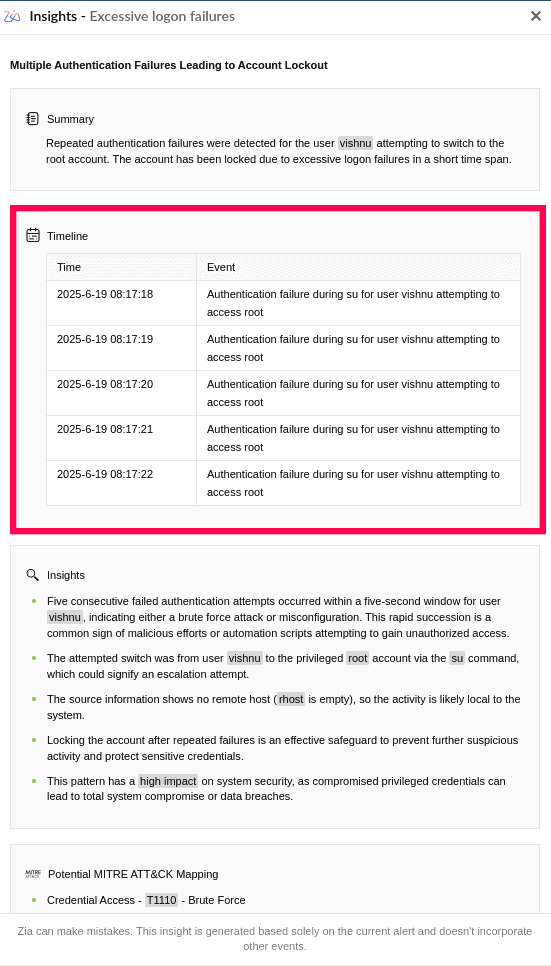
Figure 3: Overview of the event timeline by Zia Insights
Log360 Cloud's Zia Insights maps events and alerts with known tactics, techniques, and procedures (TTPs) from the MITRE ATT&CK® framework. This includes mapping the activity to the corresponding Tactic Name, Technique ID, and Technique Name.

Figure 4: Mapped MITRE ATT&CK® techniques by Zia Insights
Based on log categorization, Log360 Cloud's Zia Insights provide actionable remediation steps that help contain the incident, restore normal operations, and reduce the risk of future occurrences. Recommendations are tailored to the type of log, such as crash, error, audit, anomaly, and security.

Figure 5: Suggested mitigation actions from Zia Insights
Read also
This document elaborated on the overview, key insights, and use cases of Zia Insights in ManageEngine Log360 Cloud. For configuring and leveraging the capabilities of Zia Insights, refer to the articles below: