


What is collection in MITRE ATT&CK?
Collection is a tactic in the MITRE ATT&CK framework (TA0009) that describes how adversaries gather data from compromised systems and networks in preparation for exfiltration. After gaining access, escalating privileges, and moving laterally, attackers need to identify and consolidate the information they want to steal. Collection is that consolidation phase - the attacker systematically harvests emails, documents, database records, screenshots, and other valuable data before packaging it for extraction.
Collection is often overlooked in detection strategies because it involves activities that resemble normal business operations - reading files, accessing mailboxes, running database queries. The Mandiant M-Trends 2025 report noted that data theft occurred in 37% of all intrusions, and in nearly every case, attackers spent time collecting and staging data before exfiltrating it. The average time between initial data access and exfiltration was 9 days - a significant detection window that most organizations fail to exploit.
The distinction between collection and exfiltration is critical for defenders. Collection (TA0009) is the act of gathering and consolidating target data within the victim's environment. Exfiltration (TA0010) is transferring that data out of the network. By detecting collection activity, security teams can intervene before data leaves the organization - when the damage is still preventable.
Key insight: Collection is the last tactic where defenders have full control. Once data is exfiltrated, the breach is irreversible. Every hour of earlier detection during the collection phase is an hour of prevented data loss. Organizations that detect collection activity reduce breach costs by an average of $1.2 million compared to those that detect only at the exfiltration stage (IBM Cost of a Data Breach 2024).
This guide covers the three collection techniques that represent the highest risk and best detection opportunities Email Collection (T1114), Data Staged (T1074), and Archive Collected Data (T1560) and shows how to build comprehensive detection using ManageEngine Log360 and its 45 prebuilt detection rules for collection activity.
Why detecting collection early prevents data breaches
Collection sits at a critical inflection point in the attack lifecycle. Before collection, the attacker has access but has not yet targeted specific data. After successful collection and exfiltration, the breach is complete and irreversible. Detecting collection activity is your last reliable opportunity to prevent data loss.
- Collection precedes every data breach: No attacker exfiltrates data they have not first collected. Whether the target is intellectual property, customer PII, financial records, or email communications, the attacker must first identify, access, and consolidate that data. This creates a mandatory detection window.
- Collection activities are inherently noisy: Unlike credential access or lateral movement (which can be accomplished with single commands), collection typically involves accessing many files, many mailboxes, or many database records. This volume creates statistical anomalies that UEBA and rule-based detection can catch.
- Staging creates forensic artifacts: When attackers consolidate data into staging directories, create archives, or export mailboxes, they create file system artifacts, process execution logs, and network traces that are highly detectable with proper monitoring.
- The window is wide: Attackers typically spend days to weeks in the collection phase, accessing data incrementally to avoid triggering volume-based alerts. This extended activity window gives SOC teams multiple opportunities to detect and respond.
The collection attack chain
| Stage | ATT&CK tactic | What happens | Collection role |
|---|---|---|---|
| 1 | Initial Access (TA0001) | Attacker gains entry via phishing or exploitation | Establishes foothold for later data collection |
| 2 | Credential Access (TA0006) | Attacker steals credentials for broader access | Credentials enable access to email, file shares, databases |
| 3 | Lateral Movement (TA0008) | Attacker moves to systems containing target data | Identifies where valuable data resides |
| 4 | Collection (TA0009) | Attacker gathers emails, documents, database exports | Core data harvesting occurs here |
| 5 | Command and Control (TA0011) | Attacker maintains communication channel | C2 channel used to orchestrate collection |
| 6 | Exfiltration (TA0010) | Attacker transfers collected data out | Collected data is exfiltrated via C2 or alternate channels |
Groups like APT29 (Cozy Bear), Lazarus Group, and FIN7 spend significant time in the collection phase. APT29's SolarWinds campaign involved weeks of selective email collection from targeted mailboxes before any data was exfiltrated. The Microsoft Threat Intelligence team documented that Midnight Blizzard (APT29) specifically targeted executive email accounts, collecting messages related to the organization's knowledge of Midnight Blizzard itself.
Note: Collection detection is not just about file access monitoring. It requires correlating multiple signals such as mailbox access patterns, file share enumeration, archive creation, staging directory writes, and unusual data volumes into a coherent picture of data gathering behavior. Log360 correlates across all these signals to detect collection campaigns that individual rules would miss.
Collection techniques in MITRE ATT&CK
MITRE ATT&CK catalogs 17 techniques under Collection. Three of these represent the highest detection priority for enterprise environments because they are the most frequently observed in real-world data theft incidents and produce the strongest log signals for SIEM-based detection.
| Technique ID | Technique name | What it targets | Log360 rules | Real-world prevalence |
|---|---|---|---|---|
| T1114 | Email Collection | Mailbox data, email forwarding rules, Exchange/M365 exports | 12 | Present in 60%+ of espionage campaigns (Mandiant) |
| T1074 | Data Staged | Central staging locations on local or remote systems | 8 | Standard pre-exfiltration step in APT campaigns |
| T1560 | Archive Collected Data | Compressed/encrypted archives for exfiltration | 7 | Used in 80%+ of data theft incidents to bypass DLP |
Understanding what attackers collect
Different threat actors target different data types based on their objectives. Understanding what is being targeted helps prioritize detection:
Email and communications
Nation-state actors and corporate espionage groups prioritize email. Emails contain strategic plans, M&A discussions, intellectual property, credentials shared between employees, and internal intelligence about the organization's security posture. APT29's campaigns consistently target executive mailboxes first.
Documents and intellectual property
Engineering files, source code, research data, financial models, and legal documents are high-value targets. Attackers use file share enumeration to identify these, then stage them for bulk extraction. Manufacturing and technology sectors are primary targets.
Database records and PII
Customer databases, employee records, healthcare information, and financial data are targeted for sale on dark web marketplaces or for regulatory leverage. Attackers export database tables directly or collect backup files.
Credentials and configuration
Password files, SSH keys, API tokens, and infrastructure configurations are collected to enable future access or to sell access to other threat actors. This overlaps with Credential Access (TA0006) but the intent is data theft rather than immediate reuse.
ManageEngine Log360 for collection detection
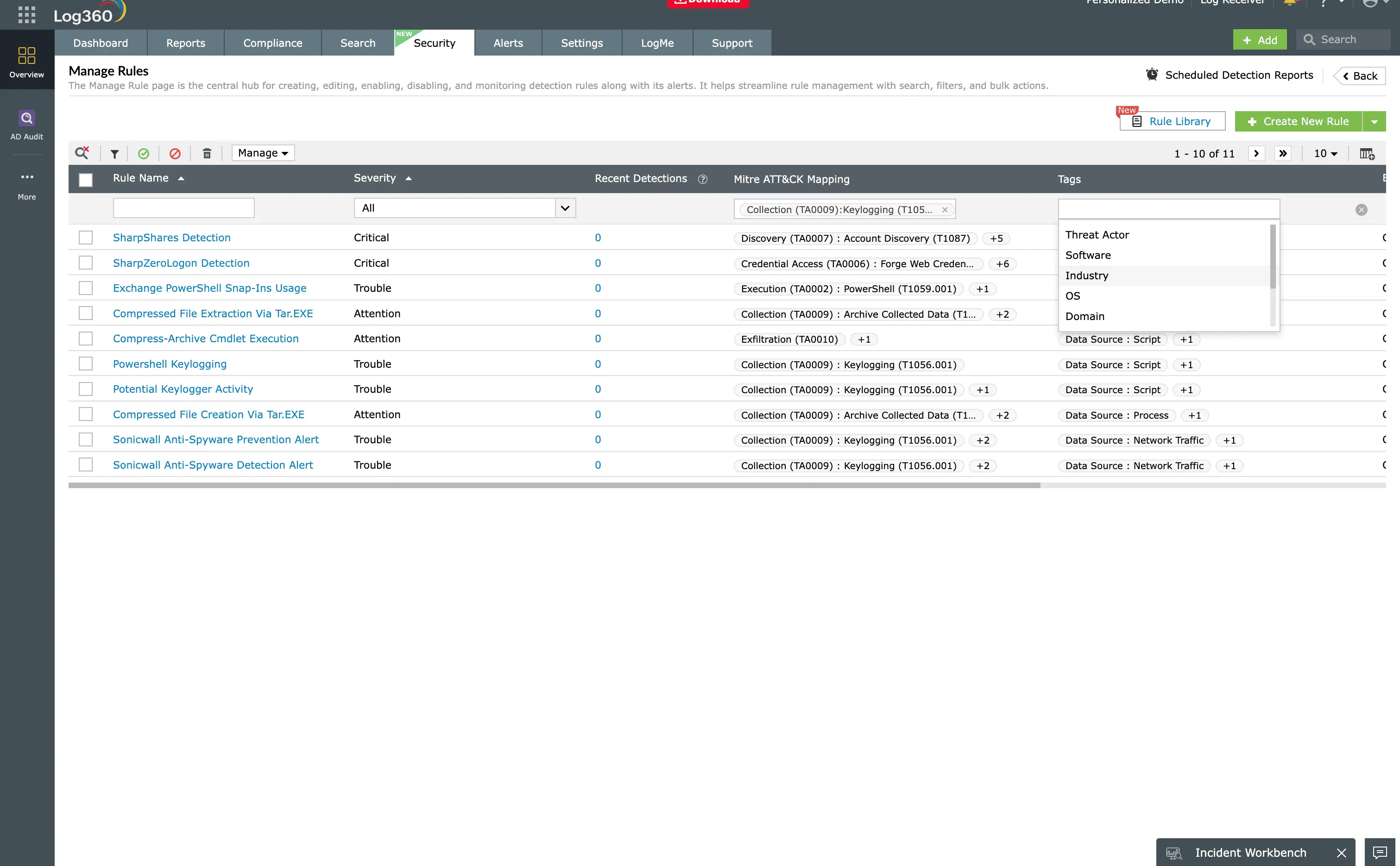
Log360 provides 45 prebuilt detection rules mapped to MITRE ATT&CK Collection (TA0009). Detect email harvesting, bulk file access, data staging, and archive creation across Windows, Exchange, Microsoft 365, and file servers - with real-time alerts, UEBA behavioral analytics, and automated response.
How collection attacks work: real-world scenarios
These scenarios reflect documented attack patterns from 2024-2025 incidents. Each shows how collection techniques chain together and where Log360 detection rules provide coverage.
Scenario 1: Executive email harvesting via compromised service account (T1114)
Attack workflow
In January 2025, Microsoft disclosed that Midnight Blizzard (APT29) used a compromised OAuth application to access executive mailboxes in Microsoft's own corporate environment. The attackers did not need to compromise individual user passwords - the service principal had sufficient permissions to read any mailbox in the tenant. They selectively collected emails related to Microsoft's knowledge of their operations.
What Log360 detects
- Unusual mailbox access by service accounts: Log360 monitors Microsoft 365 Unified Audit Log for MailItemsAccessed events from non-human identities accessing mailboxes they do not normally touch.
- Inbox rule creation for forwarding: Detection rules flag New-InboxRule operations that forward or redirect mail to external addresses.
- eDiscovery search execution: Log360 alerts when Compliance Search or eDiscovery operations target specific mailboxes, especially when initiated by accounts that have never used these tools before.
- Bulk message download patterns: UEBA detects volume anomalies when a single identity accesses hundreds or thousands of messages across multiple mailboxes within a short time window.
Scenario 2: File share enumeration and staging before ransomware (T1074 + T1560)
Attack workflow
A financially motivated threat group like Black Basta gains domain admin credentials through credential access, then systematically identifies and collects high-value data before deploying ransomware. The collection phase serves dual purposes: data theft for extortion leverage and identification of critical systems for maximum ransomware impact.
- Enumerate file shares: The attacker runs net share, Get-SmbShare, or custom scripts to discover all accessible network shares across the domain.
- Identify high-value directories: Finance, Legal, HR, Engineering, and Executive directories are prioritized based on naming conventions and access permissions.
- Stage data to central location: Documents are copied to a single staging directory (often C:\ProgramData\temp or a hidden share) for bulk processing.
- Archive with password protection: The staged data is compressed using 7-Zip or WinRAR with password encryption to bypass DLP inspection.
- Exfiltrate via C2 or cloud storage: Archives are uploaded to attacker-controlled infrastructure before ransomware deployment.
What Log360 detects
- Bulk file copy to unusual directories: File system audit rules detect when large numbers of files are written to directories not associated with normal business operations.
- Archive tool execution on sensitive paths: Process creation rules flag 7z.exe, rar.exe, or WinRAR.exe operating on network shares, ProgramData, or temp directories.
- Volume anomaly via UEBA: Behavioral baselines detect when a user account accesses 10x or more files than their normal daily pattern across multiple shares.
Building a collection detection strategy with Log360
Detection layers
Effective collection detection requires multiple overlapping detection approaches because no single rule catches all collection activity:
| Detection layer | What it catches | Log360 capability |
|---|---|---|
| Rule-based | Known collection tool signatures, specific API calls (eDiscovery, Graph), archive tool execution patterns | 45 prebuilt correlation rules with severity classifications |
| Behavioral (UEBA) | Volume anomalies in file access, unusual mailbox access patterns, first-time use of collection tools | ML-based baselines per user and entity |
| Threshold-based | Bulk file reads exceeding normal patterns, large archive creation, mass email download | Configurable threshold alerts on file and email volume |
| Cross-signal correlation | Combination of staging + archiving + unusual outbound transfer within a time window | Multi-event correlation rules linking collection to exfiltration indicators |
Critical log sources for collection detection
- Windows Security Event Log: Event IDs 4663 (object access), 4656 (handle request), 4688 (process creation with command line). Essential for detecting file access, staging, and archive tool execution.
- Microsoft 365 Unified Audit Log: MailItemsAccessed, New-InboxRule, SearchStarted, eDiscovery operations. Critical for detecting cloud email collection.
- Exchange Message Tracking: On-premises email forwarding, transport rules, and mailbox export operations.
- File server audit logs: SMB access patterns, bulk file reads across network shares, and unusual access from service accounts.
- SharePoint and OneDrive audit: Bulk file downloads, sync operations from unusual devices, and sharing link creation.
- Endpoint process logs: Archive tool execution (7z.exe, rar.exe, zip.exe, tar), PowerShell Compress-Archive usage, and custom collection scripts.
Detection rules by technique
Email collection (T1114) - 12 rules
- Inbox rule forwarding to external domain
- eDiscovery compliance search on targeted mailboxes
- Bulk MailItemsAccessed from service principal
- New-TransportRule redirecting mail externally
- Graph API mailbox access from unusual IP
- Mailbox export to PST from non-admin account
- Multiple mailbox access by single identity in short window
- OAuth application accessing mail without user interaction
- Delegate mailbox access added outside of business hours
- Exchange Web Services bulk message download
- Mail forwarding SMTP address added to mailbox
- Suspicious email search query patterns
Data staged (T1074) - 8 rules
- Bulk file copy to ProgramData or temp directories
- Large file writes to hidden network shares
- Robocopy or xcopy targeting multiple source directories
- PowerShell Copy-Item across network shares at volume
- File staging to cloud sync directories (OneDrive, Dropbox paths)
- Database export to local staging directory
- Bulk file movement after hours by non-admin account
- New directory creation with immediate high-volume writes
Archive collected data (T1560) - 7 rules
- 7-Zip execution on sensitive file share paths
- WinRAR with password-protection flags on network data
- PowerShell Compress-Archive on non-standard directories
- tar/gzip execution on Windows systems
- Large archive file creation in staging directories
- Archive tool execution by accounts that have never used them
- Sequential archive creation suggesting chunked exfiltration prep
Investigation and response workflow
When a collection alert fires
Collection alerts require rapid investigation because they indicate an attacker is actively preparing to exfiltrate data. Follow this workflow:
- Validate the alert: Confirm the activity is not a legitimate business operation (e.g., IT backup, authorized eDiscovery, scheduled data migration). Check with the account owner or application team.
- Scope the collection: Determine what data was accessed, how much, from which systems, and over what time period. Use Log360's correlated timeline to map all related events from the same identity.
- Identify the actor: Trace the account or identity performing collection back to its compromise point. Was this a stolen credential, a compromised service principal, or an insider?
- Assess exfiltration risk: Has the collected data already been archived? Are there outbound network anomalies suggesting data has already left? Check for archive creation, DNS tunneling, or unusual cloud uploads.
- Contain immediately: Disable the compromised account, revoke OAuth tokens, restrict file share permissions, and quarantine staging directories.
- Preserve evidence: Capture staging directory contents, archive files, email forwarding rules, and all audit logs before remediation destroys forensic artifacts.
Automated response with Log360
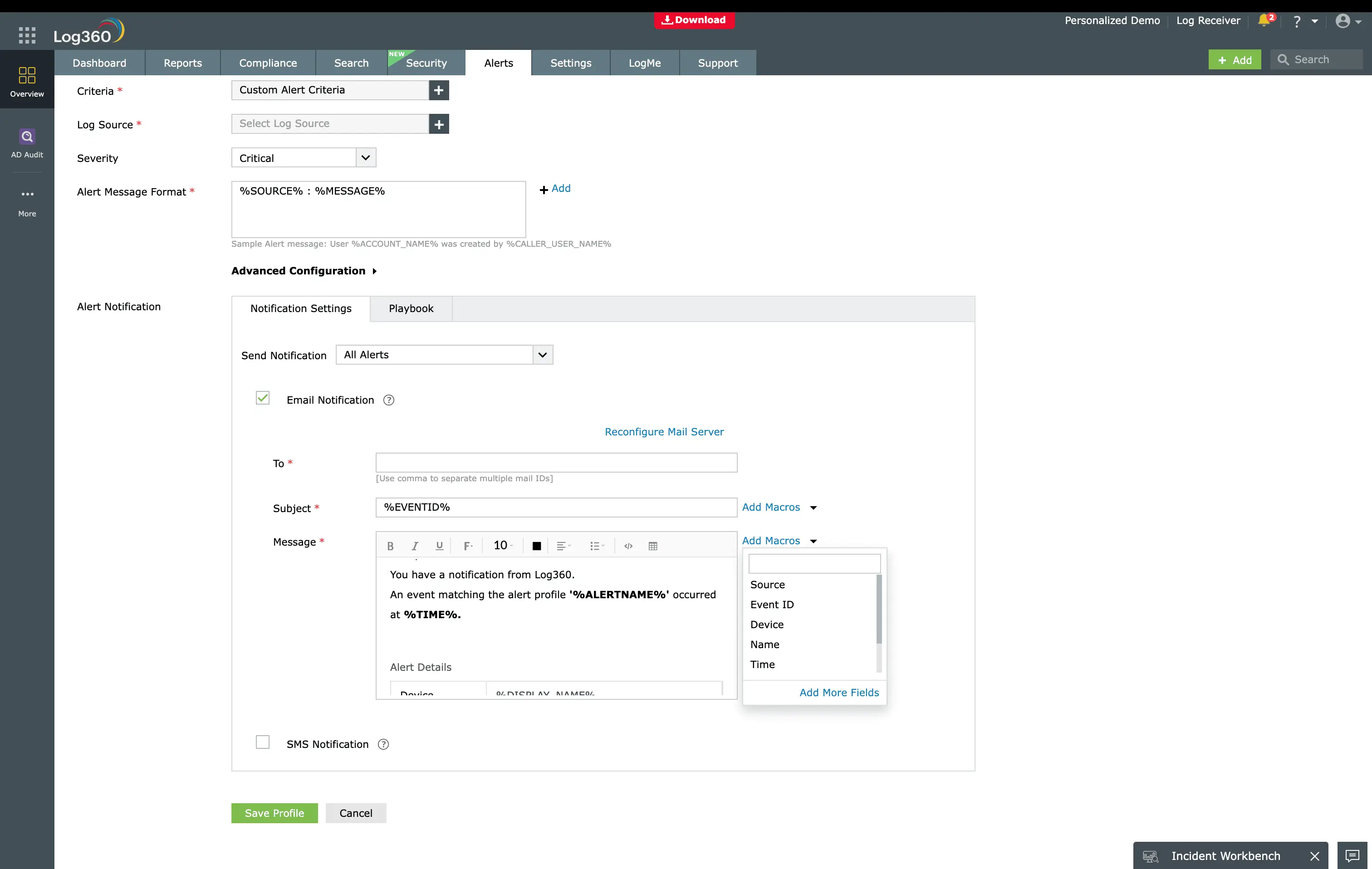
Configure Log360 workflow rules to automate initial containment when high-confidence collection alerts trigger:
- Email collection alerts: Automatically disable the offending inbox rule, revoke active sessions for the compromised identity, and create a ServiceDesk Plus incident ticket.
- Data staging alerts: Restrict write permissions on the staging directory, alert the incident response team, and capture a forensic snapshot of the directory contents.
- Archive creation alerts: Quarantine the archive file, block the creating process, and escalate to Tier 2 analysts with full context.
Preventing collection attacks
- Implement least-privilege access: Restrict mailbox access to only those accounts that genuinely need it. Remove unnecessary FullAccess and ApplicationImpersonation permissions from service accounts.
- Enable DLP policies: Deploy Microsoft Purview or equivalent DLP to detect and block bulk sensitive data movement. While attackers can bypass DLP with encryption, the policy creates friction and generates alerts.
- Restrict archive tool usage: Use application control (AppLocker, WDAC) to limit archive tool execution to approved users and approved directories. Block 7z.exe and rar.exe on servers that have no business need for them.
- Audit OAuth application permissions: Regularly review service principals and OAuth applications with Mail.Read, Mail.ReadWrite, or Files.ReadWrite.All permissions. Remove unused or overprivileged applications.
- Segment sensitive data: Place high-value data on network segments with enhanced monitoring and stricter access controls. This limits an attacker's collection scope even after lateral movement.
- Monitor for eDiscovery abuse: Restrict Compliance Search and eDiscovery permissions to authorized Legal and HR personnel only. Alert on any eDiscovery operation initiated by accounts outside this group.
Need to explore ManageEngine Log360? Schedule a personalized demo
FAQ
What is collection in MITRE ATT&CK?
Collection (TA0009) is a tactic in the MITRE ATT&CK framework that describes how adversaries gather data of interest from target systems before exfiltration. It includes techniques like email collection, data staging, screen capture, clipboard data, and archiving collected data. Detecting collection early is critical because it represents the last point where defenders can prevent data loss.
What are the most common collection techniques?
The three most frequently observed collection techniques in enterprise intrusions are Email Collection (T1114), Data Staged (T1074), and Archive Collected Data (T1560). Together these cover the full collection lifecycle from data identification through consolidation and packaging.
How do I detect data collection with SIEM?
Detect collection by monitoring mailbox access anomalies, bulk file reads across shares, archive tool execution on sensitive directories, and data consolidation to staging locations. ManageEngine Log360 provides 45 prebuilt rules for these patterns across Windows, Exchange, Microsoft 365, and file server logs.
What is the difference between collection and exfiltration?
Collection (TA0009) gathers and consolidates data within the victim's environment. Exfiltration (TA0010) transfers that data out of the network. Collection always precedes exfiltration. Detecting at the collection stage prevents data loss because data has not yet left the organization.
What log sources do I need for collection detection?
Key sources include Windows Security Event Logs (file access 4663, process creation 4688), Microsoft 365 Unified Audit Log (mailbox operations, eDiscovery), Exchange Message Tracking, SharePoint audit logs, and endpoint process execution logs. Log360 collects and correlates across all these sources natively.
How many detection rules does Log360 have for collection?
Log360 provides 45 prebuilt correlation rules for TA0009, including 12 for Email Collection (T1114), 8 for Data Staged (T1074), and 7 for Archive Collected Data (T1560). The remaining rules cover clipboard data, screen capture, audio capture, and other collection techniques.
Detect data collection before exfiltration occurs
Start your free 30-day trial of Log360 and activate 45 prebuilt Collection detection rules. Monitor email access, file staging, and archive creation in real time.
- What is collection in MITRE ATT&CK?
- Why detecting collection early prevents data breaches
- Collection techniques in MITRE ATT&CK
- How collection attacks work: real-world scenarios
- Building a collection detection strategy with Log360
- Investigation and response workflow
- Preventing collection attacks
- FAQ

