


What is account access removal (T1531)?
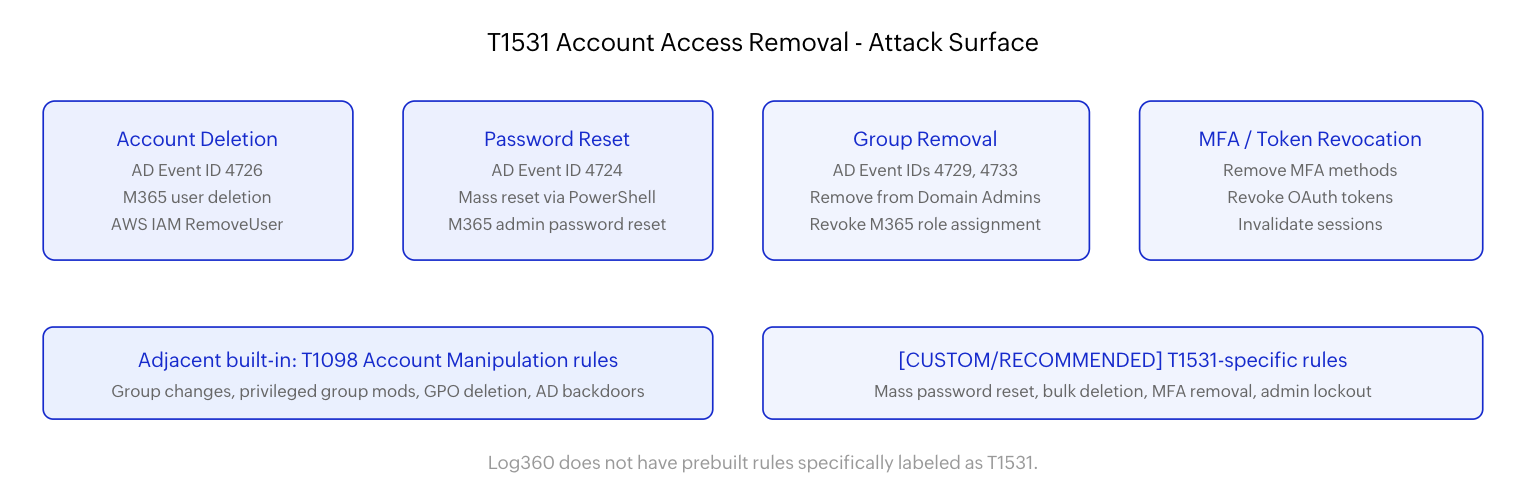
T1531 (Account Access Removal) describes adversaries interrupting the availability of system and network resources by removing access to accounts. This includes deleting user accounts, resetting passwords to values unknown to the original user, disabling accounts, removing accounts from privileged groups, and revoking authentication tokens or MFA configurations.
The adversary's intent is to lock out defenders and legitimate administrators. After gaining domain admin or equivalent privileges, the attacker modifies or removes the accounts that IT teams would use to respond to the intrusion. This creates a critical delay where defenders know something is wrong but cannot log in to their management tools to stop it. During that delay, ransomware encrypts, wipers destroy, and data exfiltrates.
This technique is observed in both external advanced persistent threat campaigns and insider threat scenarios. A disgruntled administrator resigning and deleting critical service accounts on their way out is operationally identical to an external attacker removing admin access to prevent incident response. The detection approach for both relies on monitoring account modification events in Active Directory and cloud identity providers.
Why T1531 matters in modern attacks
Account access removal has been observed in multiple high-profile ransomware campaigns. APT29 has used credential manipulation to maintain persistence while denying access to defenders. Ransomware affiliates operating under the RaaS (Ransomware-as-a-Service) model routinely reset domain admin passwords as part of the pre-encryption preparation, ensuring that the victim's IT team cannot intervene during the encryption window.
The Mandiant M-Trends report documented cases where attackers changed the passwords of every domain admin account within seconds using automated PowerShell scripts, then launched the encryption payload. By the time defenders realized what was happening, they could no longer authenticate to Active Directory. Recovery required offline access to domain controllers and DSRM (Directory Services Restore Mode) credentials - which many organizations have never tested.
In cloud environments, T1531 manifests as revoking Global Administrator roles in Azure AD, deleting IAM admin users in AWS, or removing project owner roles in GCP. These actions are captured in cloud audit logs, making them detectable - but only if the SOC is monitoring for identity modifications as impact-stage behavior, not just as routine administration.
Insider threat dimension: T1531 is commonly associated with malicious insiders. A departing administrator who deletes service accounts, resets shared credentials, or removes other admins from privileged groups can cause the same operational impact as an external adversary. Detection logic should be actor-agnostic - flag the behavior regardless of who performs it.
Adjacent Log360 detection coverage
Log360 does not have prebuilt rules specifically labeled as T1531 Account Access Removal. However, the T1098 (Account Manipulation) rule family provides operational overlap because the underlying log events and behavioral patterns are closely related.
Relevant built-in rules from T1098
The Local privileged account group modification rule (Critical severity, Windows) fires when accounts are added to or removed from local administrator groups. When an adversary removes defenders from the local Administrators group, this rule captures the event - even though the intent is T1531 access denial rather than T1098 persistence.
The User Added To Highly Privileged Group rule (Trouble severity, Windows/AD) monitors changes to Domain Admins, Enterprise Admins, Schema Admins, and other high-value groups. The inverse - member removal from these groups - is logged by the same Event IDs (4729, 4733) and can be captured with minor rule tuning.
Additional adjacent signals include the Unauthorized Group Deletion rule (Attention severity, Windows), which fires when security groups are deleted entirely, and the A Member Was Added/Removed from Security-Enabled Global Group rule (Attention severity, AD), which captures group membership modifications.
Coverage transparency: The built-in rules above were designed for persistence and privilege abuse detection (T1098), not impact-stage lockout detection (T1531). They catch group membership changes and privileged group modifications, but they do not specifically detect mass password resets, bulk account deletion, or MFA revocation. Those patterns require the custom rules below.
Custom detection recommendations
| Custom rule | Trigger logic | Severity |
|---|---|---|
| Mass Password Reset | Event ID 4724 (password reset attempt) occurring for 5+ distinct accounts within 60 seconds, initiated by a single source account. | Critical |
| Bulk Account Deletion | Event ID 4726 (account deletion) for 3+ accounts within 5 minutes from a single administrative session. | Critical |
| Admin Removed from Domain Admins | Event ID 4729 (member removed from security-enabled global group) targeting Domain Admins, Enterprise Admins, or Schema Admins group, executed by a non-standard admin account. | Critical |
| Bulk Account Disable | Event ID 4725 (account disabled) for 5+ accounts within 5 minutes from a single source. | Critical |
| MFA Method Removal - Azure AD | M365 Unified Audit Log event for Update user StrongAuthenticationMethod or Delete StrongAuthenticationPhoneAppDetail targeting admin accounts. | Critical |
| AWS IAM Admin Access Revocation | CloudTrail event for DeleteUser, RemoveUserFromGroup, or DeleteLoginProfile targeting IAM users with Admin policy attachments. | Critical |
| DSRM Account Password Change | Event indicating DSRM password modification on a domain controller. DSRM is the last-resort recovery credential - unauthorized changes indicate adversary awareness of recovery procedures. | Critical |
Log sources and detection tuning
T1531 detection spans three identity domains, each with distinct log sources:
| Identity domain | Key events | Log source |
|---|---|---|
| On-premises Active Directory | 4724 (password reset), 4725 (account disabled), 4726 (account deleted), 4728/4729 (group membership), 4733 (member removed from group), 4767 (account unlocked) | Security Event Log from domain controllers → Log360 |
| Microsoft 365 / Azure AD | Update user, Delete user, Update group membership, Update StrongAuthenticationMethod, Remove member from role | M365 Unified Audit Log → Log360 |
| AWS IAM | DeleteUser, RemoveUserFromGroup, DeleteLoginProfile, DetachUserPolicy, DeleteAccessKey | CloudTrail → Log360 |
Tuning to separate legitimate from malicious
- HR-driven account lifecycle: Employee offboarding generates legitimate account disabling and group removal events. Integrate with HR workflow or ticketing systems to correlate AD changes with approved offboarding tickets. Unmatched AD modifications should trigger alerts.
- Self-service password resets: Users resetting their own passwords generate Event ID 4723 (password change), not 4724 (password reset by another account). T1531 detection should focus on 4724 events where the source account differs from the target account.
- Admin account allowlisting: Authorized IT admin accounts that perform routine account maintenance should be documented. Modifications from undocumented accounts or from accounts that don't typically perform identity operations are high-confidence indicators.
- Velocity and volume: Single-account modifications are routine. Multiple accounts modified in rapid succession (mass password reset, bulk disable) are near-certain adversary behavior when performed outside a documented offboarding or migration event.
Investigation workflow
When an account access removal alert fires, the investigation must determine whether this is routine administration, an insider incident, or an adversary preparing for impact.
- Identify the source account: Which account performed the modification? Is it a recognized admin account? Was it recently compromised (check for suspicious logon events, impossible travel, anomalous behavior in Log360 UEBA)?
- Check for volume and velocity: A single password reset tied to a helpdesk ticket is routine. Five or more domain admin password resets within a minute is an emergency. The velocity pattern determines the response urgency.
- Correlate with concurrent impact activity: Check for simultaneous service stops (T1489), encryption activity (T1486), or data destruction (T1485). Account lockout concurrent with other impact indicators is a coordinated attack.
- Verify defender access: Can the SOC team still authenticate to Active Directory, cloud management consoles, and backup infrastructure? If not, T1531 has already succeeded and recovery must proceed through alternative channels (DSRM, break-glass accounts).
- Trace upstream: How did the adversary gain the privileges needed to modify accounts? This requires domain admin or equivalent - investigate initial access and privilege escalation events.
Critical preparation: If your organization's only domain admin accounts are compromised, you cannot recover without DSRM or break-glass credentials. Test DSRM login on your domain controllers and maintain offline break-glass credentials stored in a physical safe or hardware security module. If you never test it, recovery during an actual incident becomes uncertain.
Response playbook
If defender access is still available
- Immediately disable the attacker's account: Identify the compromised account performing the modifications and disable it.
- Restore affected accounts: Re-enable disabled accounts, restore group memberships, and reset passwords from a confirmed clean admin context.
- Revoke attacker access tokens: In Azure AD, revoke all refresh tokens for compromised accounts. In AWS, rotate access keys and invalidate sessions.
- Isolate compromised hosts: If the attacker is operating from a specific workstation, isolate it from the network to prevent further identity modifications.
- Document all changes: Record every account modification (before and after state) for forensic analysis and compliance reporting.
If defender access has been removed
- Use DSRM to access domain controllers: Boot domain controllers into Directory Services Restore Mode using the pre-configured DSRM password. This bypasses Active Directory authentication entirely.
- Activate break-glass accounts: Use the emergency admin accounts stored offline. These should have been created and tested during disaster recovery planning.
- Contact cloud provider support: For Azure AD / AWS / GCP, contact the vendor's emergency support line to regain access to locked-out tenant admin accounts.
- Restore from AD backup: If account modifications are extensive, consider restoring Active Directory from backup rather than manually reverting hundreds of changes.
- Activate incident response plan: Align with NIST SP 800-61r3 and engage external incident response support if internal resources are locked out.
Monitor every identity change with Log360
Log360's Active Directory audit capabilities track account modifications, group membership changes, and privileged access events across on-premises and cloud identity providers. Add custom correlations for mass password resets and bulk deletions to close the T1531 detection gap.
Hardening against account access removal
| Control | Implementation | Defensive benefit |
|---|---|---|
| Break-glass admin accounts | Maintain 2+ emergency admin accounts with passwords in physical safe. Exclude from routine MFA and conditional access policies. Test quarterly. | Guarantees admin access even when all standard accounts are compromised or disabled. |
| DSRM password management | Set and document DSRM passwords for every domain controller. Store offline. Test recovery login annually. | Provides offline domain controller access when AD authentication is compromised. |
| Tiered admin model | Implement CIS Controls tiered administration. Tier 0 (DC) accounts cannot modify Tier 0 from Tier 1/2 workstations. | Limits the blast radius from a single compromised admin account. |
| Protected Users group | Add high-value admin accounts to the AD Protected Users security group. | Prevents credential caching, NTLM delegation, and DES/RC4 usage for protected accounts. |
| Real-time identity change alerts | Configure Log360 to alert on any modification to Domain Admins, Enterprise Admins, and Schema Admins group membership - zero tolerance, zero suppression. | Ensures immediate visibility into the most impactful account access changes. |
| Cloud identity redundancy | In Azure AD, maintain at least two Global Administrator accounts. In AWS, maintain multiple IAM admin users with independent MFA devices. | Prevents total lockout from cloud management if one admin account is compromised. |
Cross-technique context
T1531 is typically a supporting technique deployed alongside other impact actions to amplify damage and delay response:
- T1486 (Data Encrypted for Impact): Attackers lock out admins, then launch encryption. By the time the SOC regains access, encryption is complete.
- T1485 (Data Destruction): Account lockout during wiper deployment prevents defenders from killing the wiper process or isolating hosts.
- T1489 (Service Stop): Combined service disruption and account lockout creates maximum operational paralysis.
- T1098 (Account Manipulation): The inverse of T1531. Where T1098 adds attacker persistence through account changes, T1531 removes defender access. Both techniques modify the same AD objects and generate overlapping log events.
- T1490 (Inhibit System Recovery): Locking out admin accounts is functionally recovery inhibition for any recovery procedure that requires authentication.
The Ransomware Full Kill Chain scenario traces how T1531 fits into the multi-stage progression from initial access through encryption, including the critical moment where defenders are locked out.
Need to explore ManageEngine Log360? Schedule a personalized demo
FAQ
1. What is T1531 Account Access Removal?
T1531 describes adversary actions to deny legitimate users and defenders access to accounts. This includes deleting accounts, resetting passwords, disabling accounts, removing group memberships, and revoking MFA. It is an impact technique under TA0040.
2. Does Log360 have a dedicated T1531 detection rule?
No. Log360 does not currently have rules specifically labeled as T1531. Adjacent rules from the T1098 (Account Manipulation) family - group membership changes, privileged group modifications, and unauthorized group deletion - provide operational overlap. Custom rules are recommended for mass password resets and bulk deletions. See the Log360 rule library.
3. Why do ransomware operators lock out admin accounts?
Locking out admin accounts prevents the IT team from stopping the encryption process, isolating hosts, or restoring services. The delay between lockout and admin recovery is the window in which encryption completes. See the Ransomware Full Kill Chain for how this fits into the broader attack sequence.
4. What should I do if all domain admin accounts are compromised?
Use DSRM (Directory Services Restore Mode) to boot domain controllers offline and regain access. Then use break-glass emergency accounts to restore standard admin access. If you haven't tested DSRM, contact your AD recovery vendor or external incident response immediately. See the Impact pillar for recovery planning guidance.
5. How is T1531 different from T1098 Account Manipulation?
T1098 adds or modifies accounts for attacker persistence (adding backdoor accounts, modifying ACLs). T1531 removes or denies account access for impact (deleting accounts, resetting passwords). They generate overlapping AD events, and Log360's T1098 rules provide adjacent detection for T1531 behaviors. See the Local Privileged Account Group Modification rule as an example.
- What is account access removal (T1531)?
- Why T1531 matters in modern attacks
- Adjacent Log360 detection coverage
- Custom detection recommendations
- Log sources and detection tuning
- Investigation workflow
- Response playbook
- Hardening against account access removal
- Cross-technique context
- FAQ

