

Outgoing HTTP traffic from organizations poses several security risks. Since this traffic is not encrypted, it can expose sensitive data to anyone on the internet, making organizations vulnerable to exploitation by attackers. This traffic may originate from unsafe web applications used by employees, spoofed websites, or phishing links. Monitoring HTTP traffic provides contextual insights into its frequency, the top systems or users responsible for it, and the requested URLs, enabling organizations to enforce security policies effectively.
One way to monitor HTTP requests is to use a proxy-based CASB solution, which logs all HTTP activity. This allows organizations to correlate data with threat intelligence sources, assess the reputation and risk of domains, and enforce policies by blocking malicious websites as needed.
How do HTTP requests work?
HTTP requests form the basis of communication between a client (such as a web browser or application) and a server. When you access a website or web application, your client sends an HTTP request to the server. In response, the server processes the request and returns the appropriate content—such as a webpage, file, or an error message. Since HTTP traffic is not encrypted, any data exchanged (including sensitive credentials or personal information) can be intercepted or altered by malicious actors if additional security measures are not in place.
Types of HTTP requests
Different HTTP request methods serve distinct purposes:
- GET: Retrieves data from a specified resource and is the most common method used for browsing
- POST: Sends data to the server to create or update a resource, such as submitting a form
- PUT: Updates an existing resource with new data
- DELETE: Removes a specified resource
- HEAD, OPTIONS, and PATCH: Are used for retrieving header information, discovering communication options, and making partial updates, respectively, though they are less commonly encountered in day-to-day browsing
Each method plays a crucial role in how data is exchanged over the web, and understanding these can help in identifying normal versus suspicious traffic patterns.
HTTP risks
Monitoring HTTP traffic is critical because both legitimate and malicious websites using HTTP carry inherent risks.
Risks with legitimate websites using HTTP
Legitimate websites that employ HTTP without encryption expose data transmissions to interception and manipulation. For example, a simple signup form on a webpage or usernames and passwords transmitted by a banking application can be easily intercepted and read by threat actors.
In an unencrypted HTTP connection, attackers can not only read the data but also manipulate the server’s response by inserting malicious payloads. This vulnerability extends to commonly used websites, such as free online productivity tools or software download sites. Users might trust these sites, but the lack of encryption leaves their data exposed.
Malicious websites using HTTP
Many phishing campaigns imitate trusted websites (e.g., banking portals and email login pages). These HTTP sites lack SSL certificates, which can be overlooked by unsuspecting users. Malware and botnets also frequently use HTTP for command-and-control (C2) communications, leveraging the unencrypted protocol to coordinate and control compromised systems with minimal setup. Because HTTP is simple to deploy and doesn't require the overhead of encryption, it's an attractive option for threat actors looking to maintain stealth and efficiency.
Threat actors rely on HTTP for obvious reasons. Its open communication model makes it easy to set up and exploit, whereas HTTPS requires an SSL certificate along with additional verification procedures. However, as internet users become increasingly aware of the risks associated with unencrypted HTTP connections, threat actors have started to use HTTPS maliciously. Furthermore, most modern web applications and websites employ HTTPS by default, and enterprise policies often block HTTP traffic entirely at the gateway. Nonetheless, some organizations still permit HTTP for internal testing purposes, and many legacy systems continue to use it.
How to monitor HTTP requests
Regardless of whether your organization allows HTTP traffic or has it blocked at the gateway, it is essential to monitor all outgoing HTTP requests. This practice helps you identify potential threats, whether phishing attempts, C2 communications, or misconfigurations in systems.
The CASB capability in ManageEngine Log360 Cloud helps enterprises track plain HTTP requests through a gateway server set up at the organization's perimeter. This setup offers deep insights into each attempt by providing details such as the user or endpoint making the request, cloud application involved, URL category, reputation of the domain, HTTP method, and data transfer size.
Log360 Cloud's real-time alerts further empower SecOps teams to quickly investigate and respond to suspicious activities. When investigating security incidents, analysts can use the CASB capability's information to identify anomalies or suspicious HTTP requests initiated by a specific user or endpoint. Log360 Cloud obtains the URL category and the domain's reputation details from threat intelligence sources that contain a repository of globally blocklisted malicious IPs, URLs, and domains.
Should I log all HTTP requests?
Detailed logs enable security teams to identify anomalies, track suspicious behavior, and reconstruct security incidents with precision. Organizations should carefully evaluate their specific needs and resources to determine the extent of HTTP request logging that is both feasible and effective.
HTTP monitoring use cases
- Policy violation tracking: Track the top users and endpoints making HTTP requests to identify unauthorized access or potential bypass attempts.
- Application safety: Identify the most accessed HTTP cloud apps to assess whether they are legitimate enterprise applications or spoofed websites.
- Threat detection: Recognize patterns indicative of phishing or malware C2 communications through singular or simultaneous HTTP requests.
- Data transfer oversight: Monitor for large volumes of data transfers to unsafe or unapproved cloud apps to ensure compliance and security.
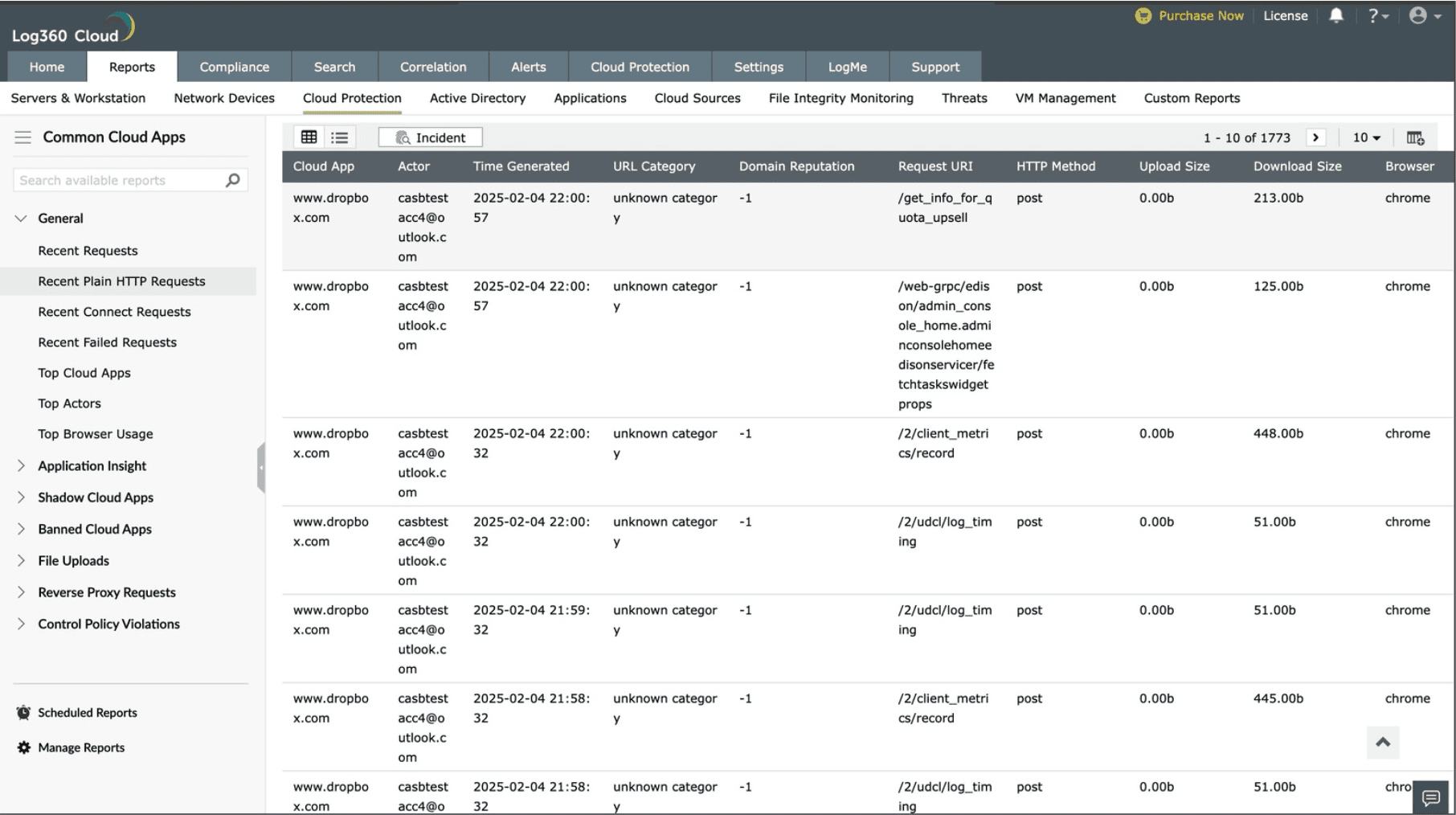
A plain HTTP requests report in Log360 Cloud

