

- Free Edition
- Quick Links
- Active Directory Auditing
- Active Directory auditor
- Active Directory monitoring
- Account lockout analyzer
- Login monitoring software
- Active Directory change notifier
- User logon audit reports
- AD logon logoff tracker
- User logon failure auditing
- Login history tracking tool
- AD change auditor
- Insider threat detection software
- Permissions change auditing
- Entra ID reporting
- Privileged user monitoring
- User behavior analytics tool
- Active Directory security monitoring
- Group Policy auditing tool
- GPO change auditor
- Entra ID auditing
- Audit user account management
- OU change auditor
- Audit group membership changes
- Active Directory auditing and reporting tool
- GPO reporting tool
- Remote desktop monitoring software
- PowerShell logging and auditing
- Azure password protection auditing
- Azure sign-in risk detection
- File Server Auditing
- Windows Server Auditing
- Employee Tracking
- Workstations Auditing
- Compliance Auditing
- Other features
- SIEM Integration
- Windows DNS - Schema Auditing
- Windows security event log monitoring
- SIEM audit solution
- Schedule Active Directory change reports
- Reports from Archived Data
- Aggregated summary reports
- AD new/old attribute changes
- Audit trail
- Audit Active Directory LAPS
- Scheduled Reports & Alerts
- Account lockout examiner
- Industry
- Documents
- Success Stories
- Related Products
- Log360 (On-Premise | Cloud) Comprehensive SIEM and UEBA
- ADManager Plus Active Directory Management & Reporting
- ADAudit Plus Real-time Active Directory Auditing and UBA
- ADSelfService Plus Identity security with MFA, SSO, and SSPR
- DataSecurity Plus File server auditing & data discovery
- Exchange Reporter Plus Exchange Server Auditing & Reporting
- M365 Manager Plus Microsoft 365 Management & Reporting Tool
- RecoveryManager Plus Enterprise backup and recovery tool
- SharePoint Manager Plus SharePoint Reporting and Auditing
- AD360 Integrated Identity & Access Management
- AD Free Tools Active Directory FREE Tools
See the bigger picture with detailed Conditional Access reporting
Log in-depth policy creation events
Track every newly created Conditional Access policy, including metadata like display name, created time, and initial access rules. Find out when each policy was configured and by whom.
Capture full policy context during updates
See when Conditional Access policies are modified and observe what aspects of the configuration were updated, such as targeted client app types.
Audit policy deletions with complete traceability
Ensure deletions of Conditional Access policies are fully recorded. Capture actor identity, timestamp, and policy ID to maintain oversight of removed protections.
Create custom alerts and automate scripts
Send real-time email and SMS alerts when Conditional Access policies are added, changed, or deleted. Automate scripted actions to flag or revert unauthorized updates instantly.
Bring clarity to every Conditional Access policy change
Ensure long-term retention of policy change logs
Avoid data loss by extending audit log retention for Conditional Access policy activities. Maintain a searchable archive for compliance reviews and security investigations.
Audit condition-level changes across policies
Monitor changes to targeting conditions, including user and sign-in risk levels, device platforms, and cloud apps. See how evolving conditions affect access decisions.
Audit-ready Conditional Access reports
Track and report Conditional Access policy changes with built-in templates designed to help meet HIPAA, PCI DSS, GDPR, and SOX requirements.
Log enforcement control adjustments
Monitor changes to enforcement settings such as MFA requirements, block access actions, and session controls like sign-in frequency. Track how these configurations evolve in response to changing security needs.
Protect Conditional Access policies from misuse with ADAudit Plus
Track policy creation
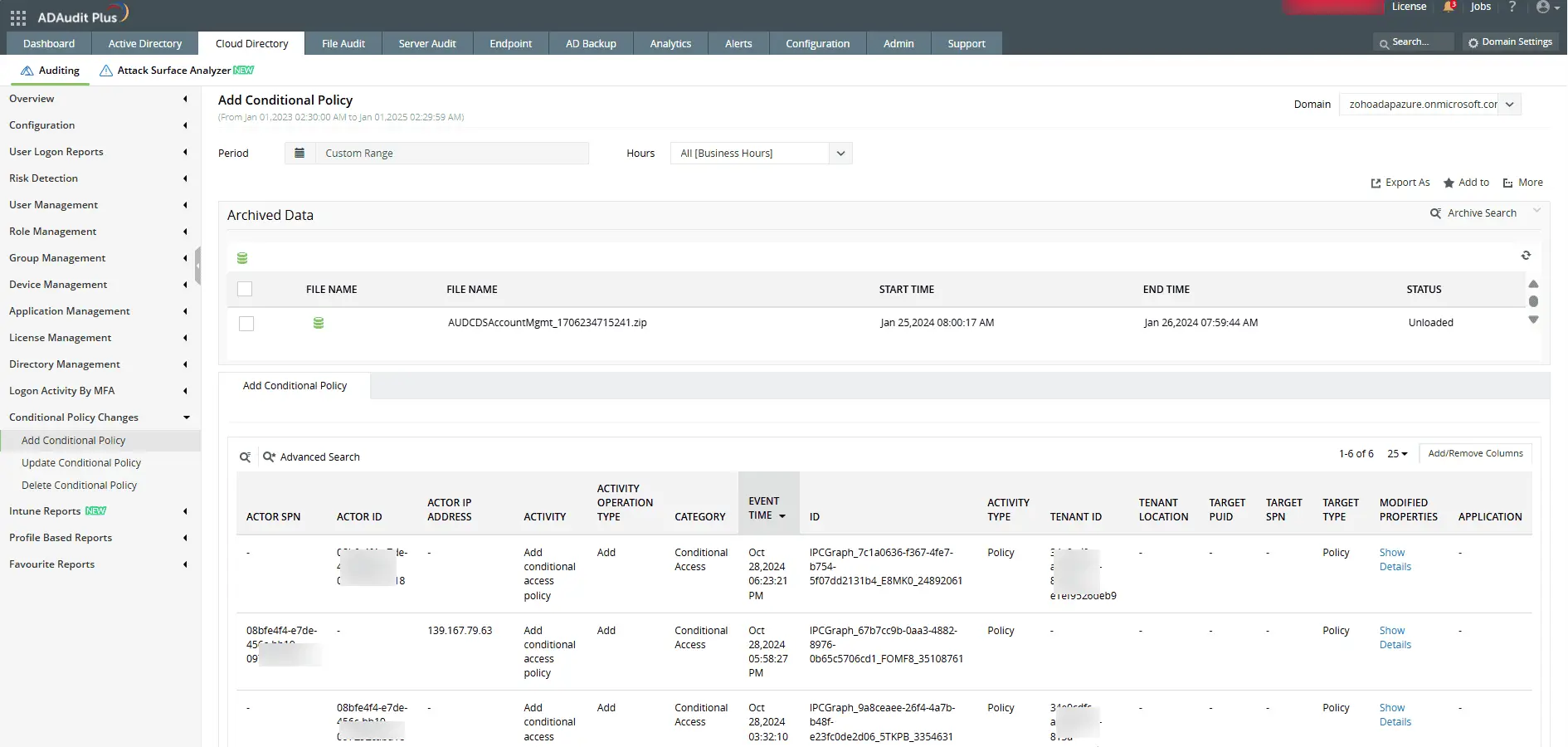
View complete details of newly created Conditional Access policies, including creator, creation time, and initial access rules.
Monitor modifications and deletions
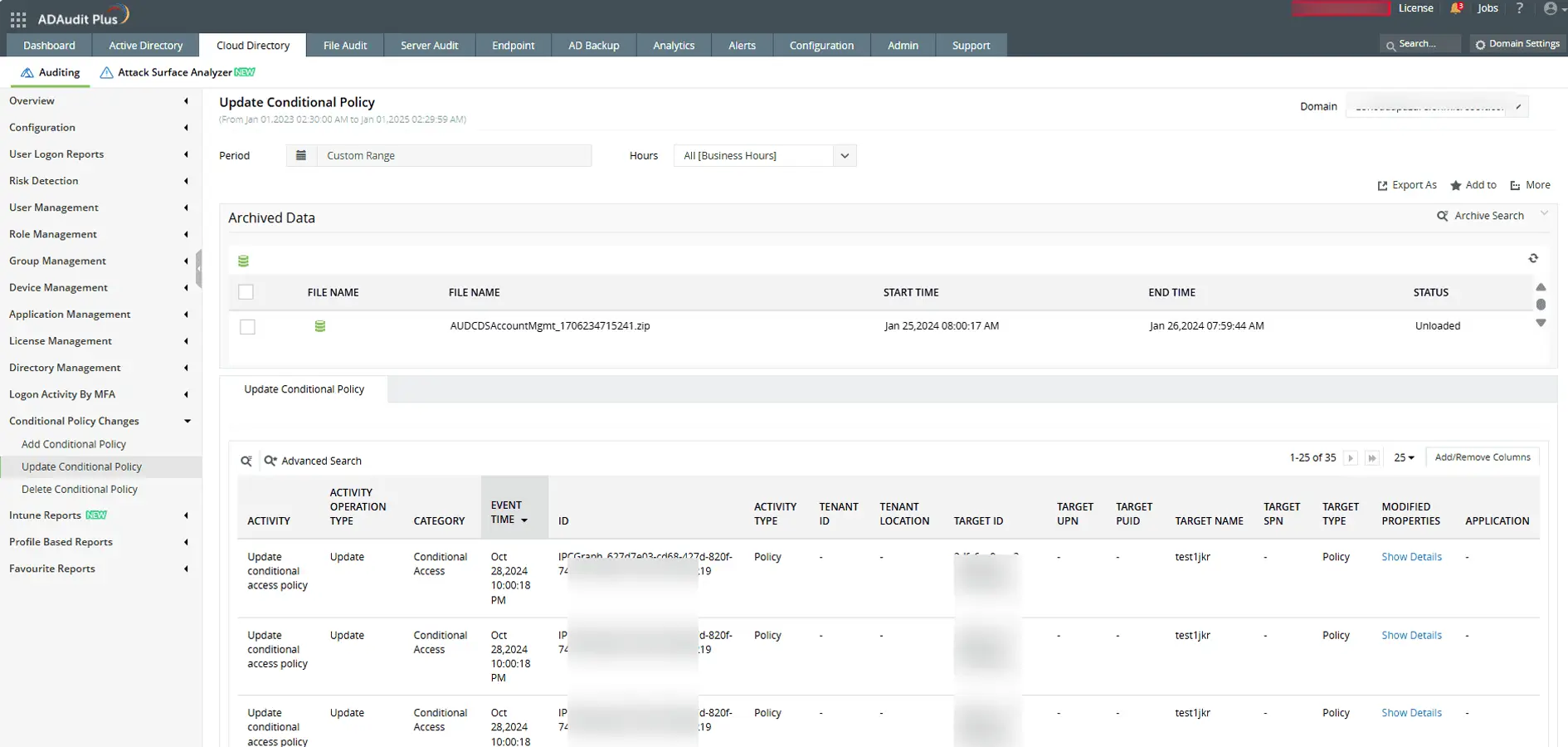
Track every change to existing policies including who modified or deleted them, what was changed, and when the change occurred.
Set up alerts and scripts
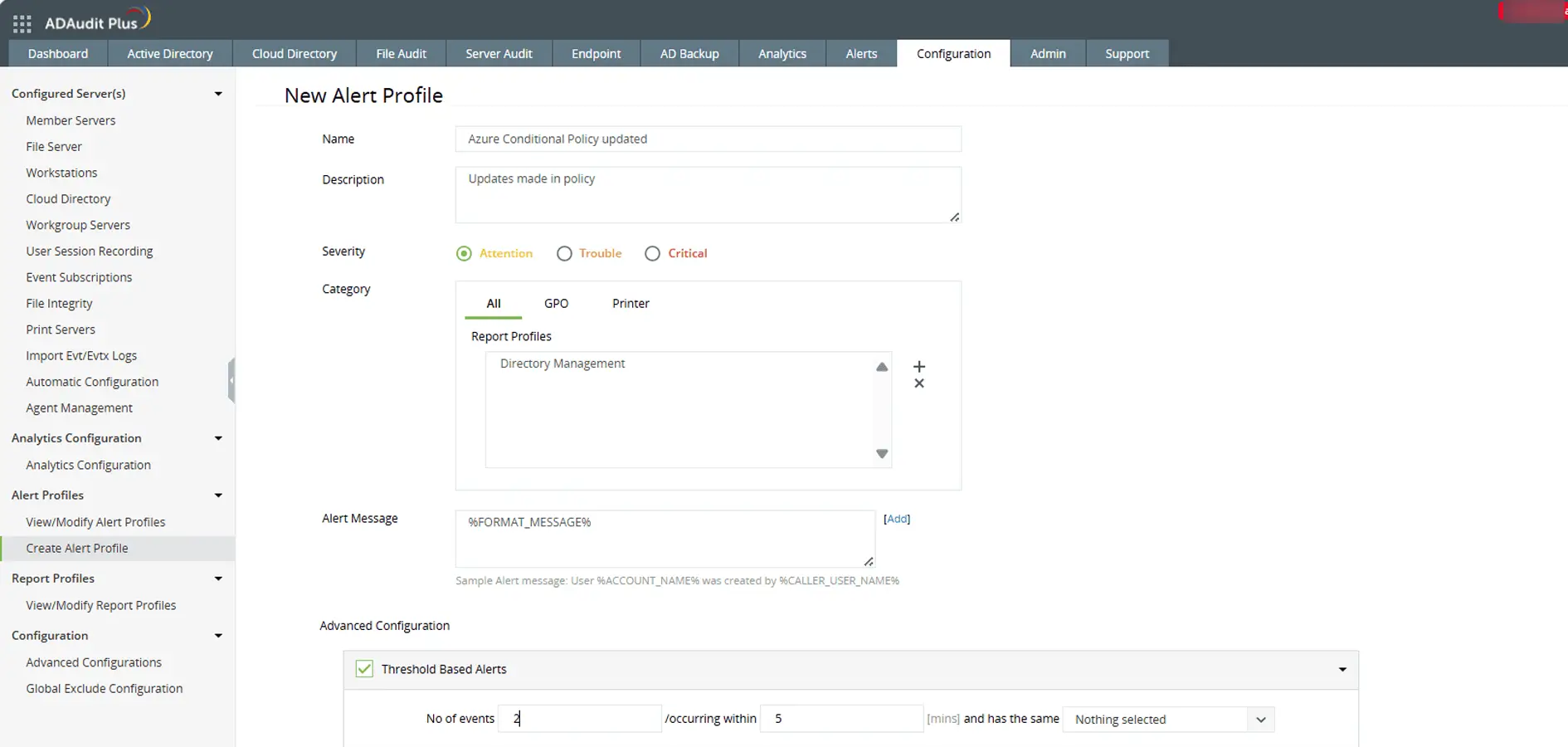
Configure threshold-based alerts for policy changes and trigger automated scripts for real-time responses.
4 compelling reasons to choose ADAudit Plus
Widely recognized
ADAudit Plus has been recognized as a Gartner Peer Insights Customers' Choice for Security Incident & Event Management (SIEM) for four consecutive years.
Easy deployment
Go from downloading ADAudit Plus to receiving predefined reports and alerts in under 30 minutes, without any professional help.
Competitive pricing
ADAudit Plus is licensed per-server, unlike other IT auditors which are licensed per-user. With per-server licensing, even with a growing number of users each year, you can continue to ingest log data without additional costs.
Unified visibility
ADAudit Plus consolidates auditing, security, and compliance across Active Directory, Entra ID, Windows servers, workstations, and file servers into a single pane of glass, eliminating the need to juggle multiple tools.
Frequently asked questions
A Microsoft Entra Conditional Access policy (formerly Azure AD Conditional Access policy) is an automated access control rule that determines how and when users can access cloud apps and services. These policies evaluate conditions such as user risk, device compliance, location, and app sensitivity, then enforce access decisions like requiring MFA, blocking access, or limiting session duration.
You can monitor changes to your Microsoft Entra Conditional Access policies using the audit logs in the Microsoft Entra admin center. For enhanced visibility, tools like ADAudit Plus offer dedicated reports that track policy additions, updates, deletions, and condition-level modifications with complete context.
Conditional Access logs help you understand how each policy is being applied. They include details such as the user, device, application, location, and risk level involved in the sign-in attempt, along with which Microsoft Entra Conditional Access policy was triggered and why.
Auditing helps ensure your Conditional Access policies in Microsoft Entra ID are not misconfigured or altered without authorization. Regular auditing helps maintain compliance with standards like HIPAA and the PCI DSS and strengthens your access security posture by enabling early detection of policy mismanagement.