

- Free Edition
- Quick Links
- Active Directory Auditing
- Active Directory auditor
- Active Directory monitoring
- Account lockout analyzer
- Login monitoring software
- Active Directory change notifier
- User logon audit reports
- AD logon logoff tracker
- User logon failure auditing
- Login history tracking tool
- AD change auditor
- Insider threat detection software
- Permissions change auditing
- Entra ID reporting
- Privileged user monitoring
- User behavior analytics tool
- Active Directory security monitoring
- Group Policy auditing tool
- GPO change auditor
- Entra ID auditing
- Audit user account management
- OU change auditor
- Audit group membership changes
- Active Directory auditing and reporting tool
- GPO reporting tool
- Remote desktop monitoring software
- PowerShell logging and auditing
- Azure password protection auditing
- Azure sign-in risk detection
- File Server Auditing
- Windows Server Auditing
- Employee Tracking
- Workstations Auditing
- Compliance Auditing
- Other features
- SIEM Integration
- Windows DNS - Schema Auditing
- Windows security event log monitoring
- SIEM audit solution
- Schedule Active Directory change reports
- Reports from Archived Data
- Aggregated summary reports
- AD new/old attribute changes
- Audit trail
- Audit Active Directory LAPS
- Scheduled Reports & Alerts
- Account lockout examiner
- Industry
- Documents
- Success Stories
- Related Products
- Log360 (On-Premise | Cloud) Comprehensive SIEM and UEBA
- ADManager Plus Active Directory Management & Reporting
- ADAudit Plus Real-time Active Directory Auditing and UBA
- ADSelfService Plus Identity security with MFA, SSO, and SSPR
- DataSecurity Plus File server auditing & data discovery
- Exchange Reporter Plus Exchange Server Auditing & Reporting
- M365 Manager Plus Microsoft 365 Management & Reporting Tool
- RecoveryManager Plus Enterprise backup and recovery tool
- SharePoint Manager Plus SharePoint Reporting and Auditing
- AD360 Integrated Identity & Access Management
- AD Free Tools Active Directory FREE Tools
What are CIS benchmarks?
Developed by the Center for Internet Security (CIS), the CIS benchmarks are essentially a checklist for configuring various technologies to reduce risks and vulnerabilities and strengthen security posture. There are over 140 CIS benchmarks to date, covering a broad range of platforms including operating systems, cloud providers, network devices, and enterprise applications.
ADAudit Plus' CIS benchmark scanner leverages the CIS configuration guidelines for the Microsoft Windows operating system—including both server and desktop platforms— to detect exposed and potentially vulnerable systems.
Evaluating exposure using ADAudit Plus' CIS risk assessment
- Scan through Domain Controllers (DCs), Windows Servers, and workstations configuration settings and compare it with 350+ predefined benchmark settings to spot misconfigurations and possible exposure.
- Compare recommended and actual values across critical policy categories, including Password Policies, Firewall Profiles, User Rights Assignment, Administrative Templates, and more to spot critical deviations.
- Assess each benchmark setting to categorize the misconfigurations and prioritize remediation based on their severity into—high, medium, or low—using the step-by-step instructions provided.
- Use the detailed CIS risk assessment summary to locate the originating GPO for each setting, along with insights such as rationale behind recommended settings, potential impact of unresolved exposure, and more.
Strengthen security posture with ADAudit Plus' CIS security scanner
- Conduct daily or point-in-time CIS risk assessment scans to validate the GPO settings employed across your Domain Controllers (DC), Windows Servers, and workstations and effectively reduce your network's attack surface.
- Create customizable profiles using CIS benchmark templates and group specific Windows machines to streamline CIS risk assessment scanning.
- Compare the Resultant Set of Policy (RSoP) with industry standards and classify scanned systems into high, medium, and low exposure tiers according to the severity of CIS compliance gaps to enable targeted remediation.
- Use multiple versions of CIS benchmarks to scan for historical comparison data and empower version-specific compliance adherence.
Harden your defenses using ADAudit Plus' CIS security scanner
CIS benchmark reports
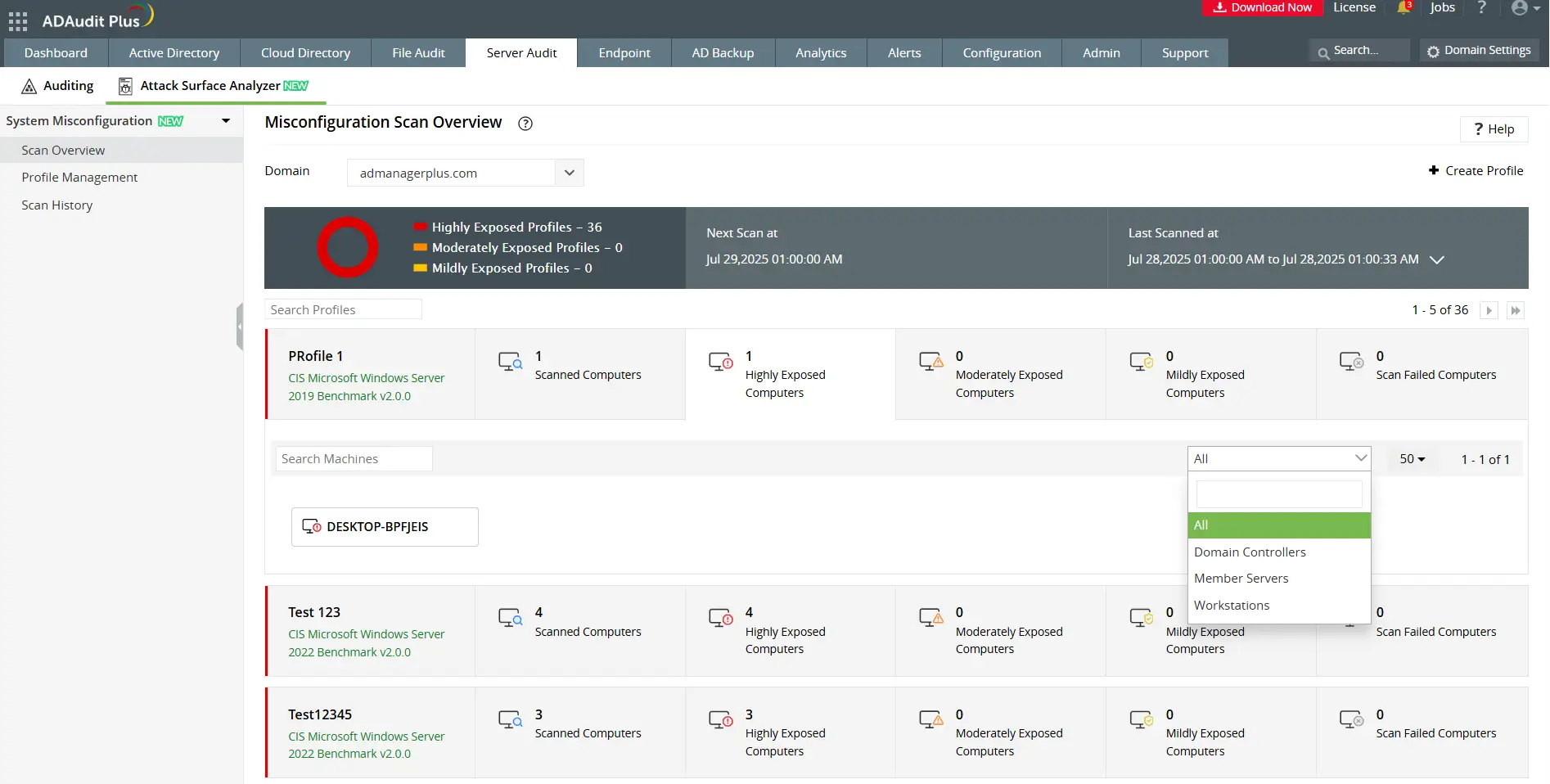
- Get a quick in-depth risk exposure visualization across multiple systems to identify the most vulnerable systems.
- Find the details relevant to the previous and upcoming scan schedule.
Configuration drift summary
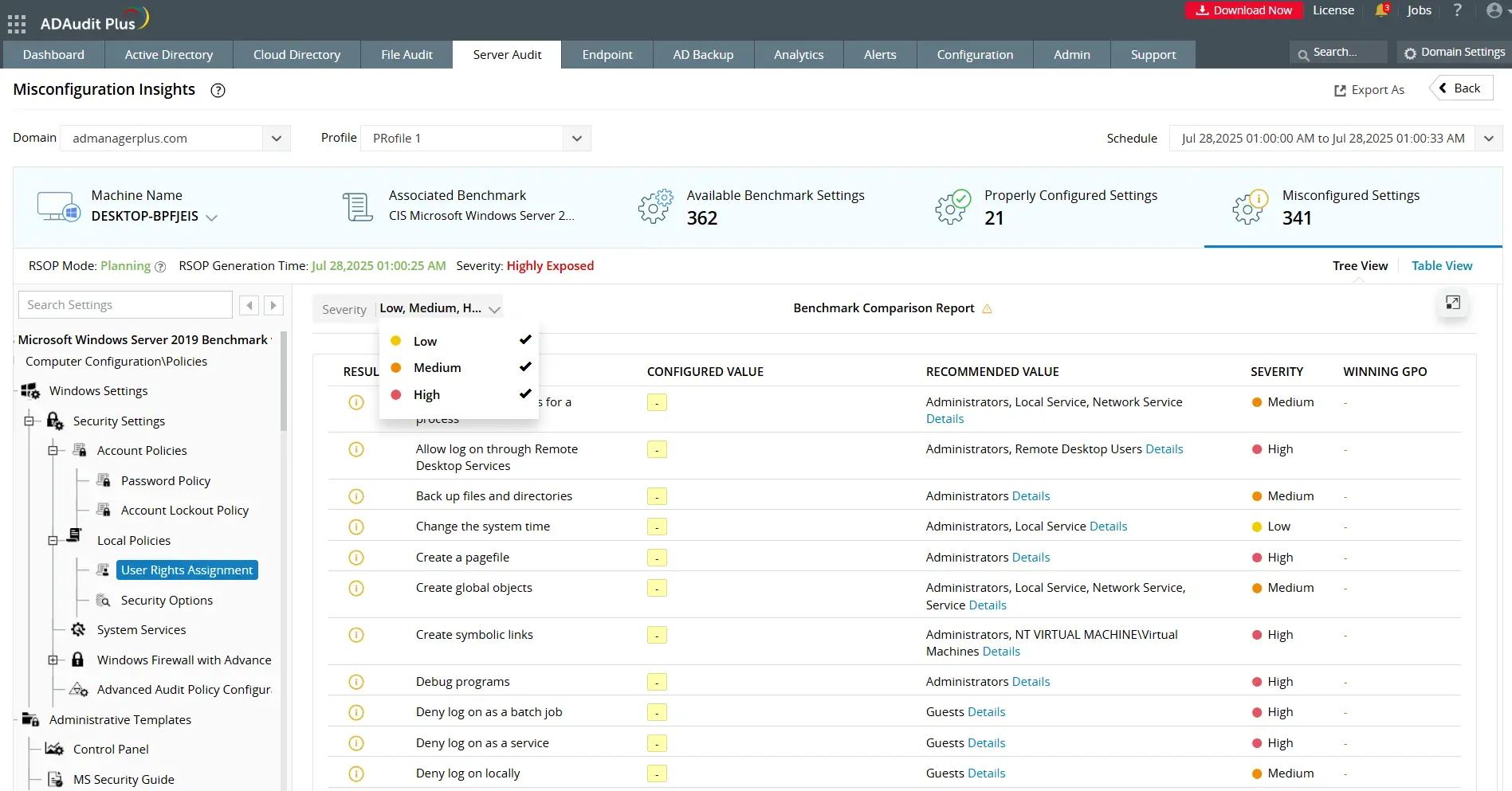
- Identify misalignments between the configured value and CIS recommended value and prioritize remediation efforts based on the risk severity.
- Trace the root cause by pinpointing the GPO responsible for the misconfigured setting.
Risk insight
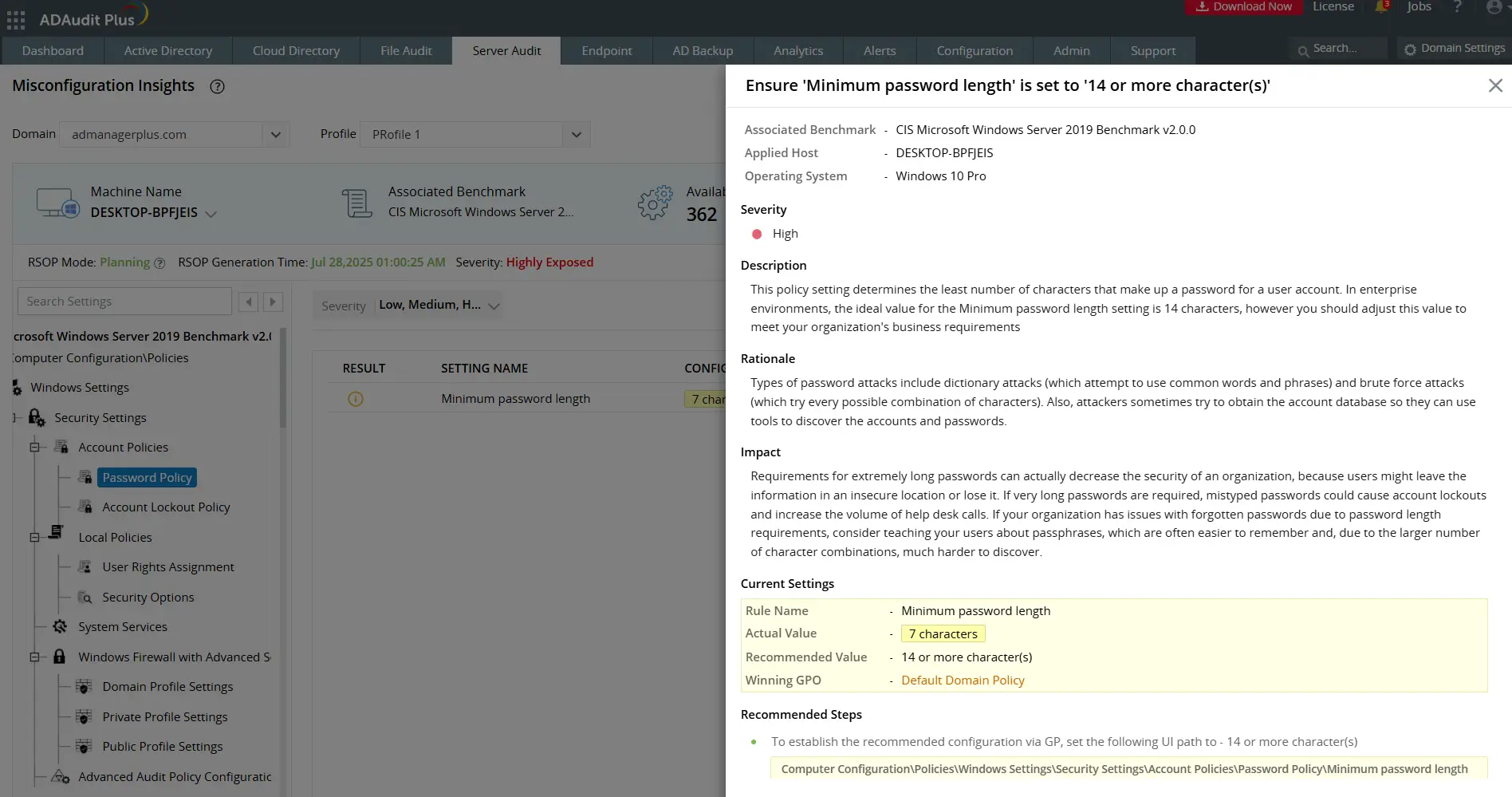
- Find more details on configuration deviation, recommended setting details, the rationale behind it, and more for each of the 350+ benchmark settings available.