

- Free Edition
- Quick Links
- Active Directory Auditing
- Active Directory auditor
- Active Directory monitoring
- Account lockout analyzer
- Login monitoring software
- Active Directory change notifier
- User logon audit reports
- AD logon logoff tracker
- User logon failure auditing
- Login history tracking tool
- AD change auditor
- Insider threat detection software
- Permissions change auditing
- Entra ID reporting
- Privileged user monitoring
- User behavior analytics tool
- Active Directory security monitoring
- Group Policy auditing tool
- GPO change auditor
- Entra ID auditing
- Audit user account management
- OU change auditor
- Audit group membership changes
- Active Directory auditing and reporting tool
- GPO reporting tool
- Remote desktop monitoring software
- PowerShell logging and auditing
- Azure password protection auditing
- Azure sign-in risk detection
- File Server Auditing
- Windows Server Auditing
- Employee Tracking
- Workstations Auditing
- Compliance Auditing
- Other features
- SIEM Integration
- Windows DNS - Schema Auditing
- Windows security event log monitoring
- SIEM audit solution
- Schedule Active Directory change reports
- Reports from Archived Data
- Aggregated summary reports
- AD new/old attribute changes
- Audit trail
- Audit Active Directory LAPS
- Scheduled Reports & Alerts
- Account lockout examiner
- Industry
- Documents
- Success Stories
- Related Products
- Log360 (On-Premise | Cloud) Comprehensive SIEM and UEBA
- ADManager Plus Active Directory Management & Reporting
- ADAudit Plus Real-time Active Directory Auditing and UBA
- ADSelfService Plus Identity security with MFA, SSO, and SSPR
- DataSecurity Plus File server auditing & data discovery
- Exchange Reporter Plus Exchange Server Auditing & Reporting
- M365 Manager Plus Microsoft 365 Management & Reporting Tool
- RecoveryManager Plus Enterprise backup and recovery tool
- SharePoint Manager Plus SharePoint Reporting and Auditing
- AD360 Integrated Identity & Access Management
- AD Free Tools Active Directory FREE Tools
Employee computer monitoring with ADAudit Plus
Track active time on workstations
ADAudit Plus measures active work hours for every user using system startup and shutdown events, screensaver invoke and dismiss actions, and console lock and unlock events.
Audit local user and group changes
Track local user and group management activities such as create, delete, and modify, along with details on who performed the action and from where.
Alert on suspicious computer activity
Configurable alert profiles fire when defined thresholds are crossed: concurrent sessions on multiple machines, logons at unusual hours, or first-time access to a workstation.
Meet compliance requirements for computer monitoring
Get pre-configured report sets mapped to SOX, HIPAA, PCI DSS, FISMA, GLBA, GDPR, and ISO 27001, with custom report profiles to save views for named users, specific actions, and audit filters.
What is employee computer monitoring software?
Monitoring what employees do on company computers is a core IT security and compliance responsibility. It supports insider threat detection, helps validate that access policies are enforced, and gives HR and management an auditable record of computer usage. For most organizations, the question is not whether to monitor but how to do it accurately, without being intrusive, and in a way that holds up to audit.
ADAudit Plus approaches computer monitoring through Active Directory (AD) identity. Every workstation event (logon, logoff, session duration, local account change, startup, shutdown, etc) is tied to a verified AD user identity, a domain controller (DC) record, and an exact timestamp. You get a complete picture of what happened on each computer without deploying screenshot tools or keystroke loggers.
Key employee computer monitoring metrics tracked by ADAudit Plus
| Area | What ADAudit Plus captures |
|---|---|
| Logon and logoff activity | Successful and failed logons, and logoffs |
| Active work hours | First logon, last logoff, and active time per day |
| Concurrent sessions | Users logged into more than one computer at the same time, with the machine names, IP addresses, and session times for each |
| Currently active sessions | A real-time view of every user currently logged into a workstation across the domain |
| Local user accounts | Local accounts created, deleted, modified, enabled, or disabled |
| Local group membership | Changes to local groups on workstations, including members added or removed |
| Remote desktop sessions | RDP connections to workstations, including session start, end, and source IP |
Track employee work hours automatically
ADAudit Plus reads Windows startup and shutdown, screensaver invoke and dismiss, console lock and unlock, and other logon related events from all monitored workstations and calculates active hours per user per day. No timesheet submission, clock-in app, or change to employee behavior is required.
- The User Work Hours report shows session start time, end time, and total hours per user per workstation, day by day, filterable by user, machine, or time range.
- Export to CSV, PDF, or XLSX for payroll reconciliation or HR records, or schedule the report for automated email delivery to HR, management, or audit teams on a recurring basis.
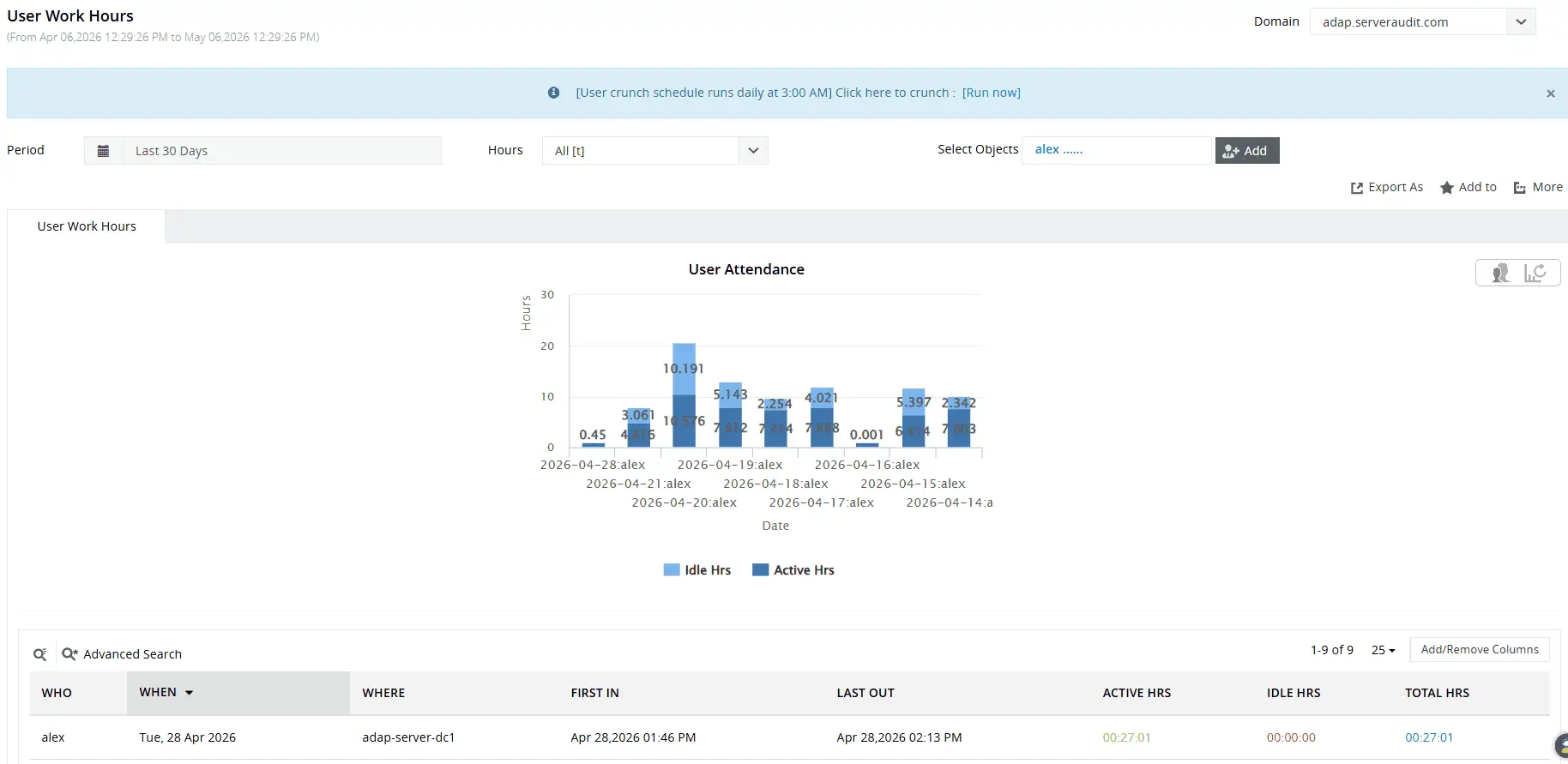
Gain quick visual insights into how users spend their workday and easily identify employees with the lowest productivity levels.
Audit local user and group changes
Workstations carry local user accounts and local groups that exist entirely outside the AD provisioning workflow. ADAudit Plus monitors local account events on workstations: accounts created, deleted, modified, enabled, disabled, locked, unlocked, and password changes, alongside local group membership additions and removals.
- Detect local accounts created on workstations outside the normal provisioning process, which may indicate an attempt to establish persistent access.
- Track additions to the local Administrators group on workstations, which grant elevated local access that bypasses domain-level controls.
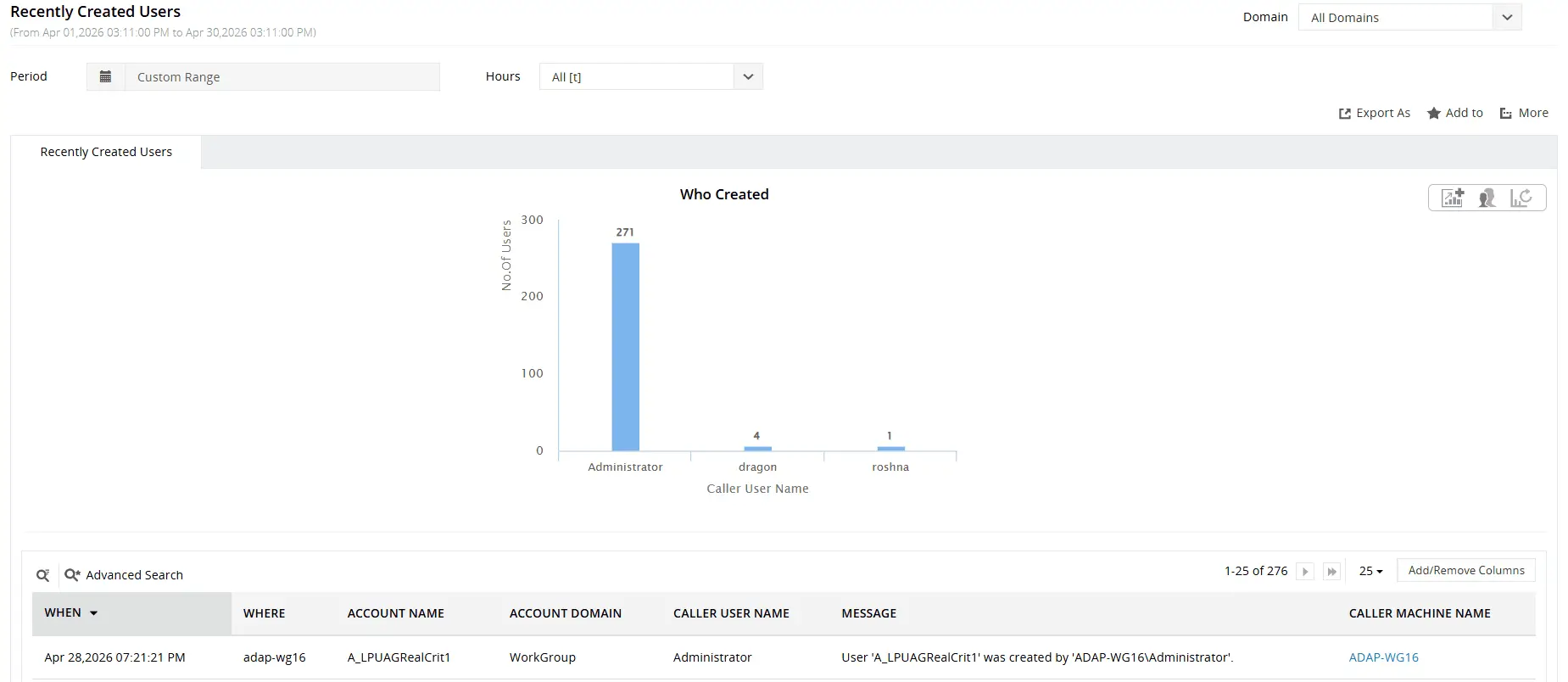
View newly created local accounts along with the workstation, creation time, and account responsible for the action.
Monitor remote and hybrid employee computers
Remote and hybrid employees present a monitoring gap when on-premises workstation events and cloud identity sign-ins are tracked in separate tools. ADAudit Plus captures RDP connections to workstations and correlates on-premises logon events with Microsoft Entra ID (previously known as Azure AD) sign-ins.
- Confirm which employees connected remotely on a given day and for how long, along with the source IP and user account involved.
- Detect first-time remote access attempts flagged as UBA anomalies.
- For hybrid environments, track sign-in activity for users in both on-premises AD and Microsoft Entra ID.
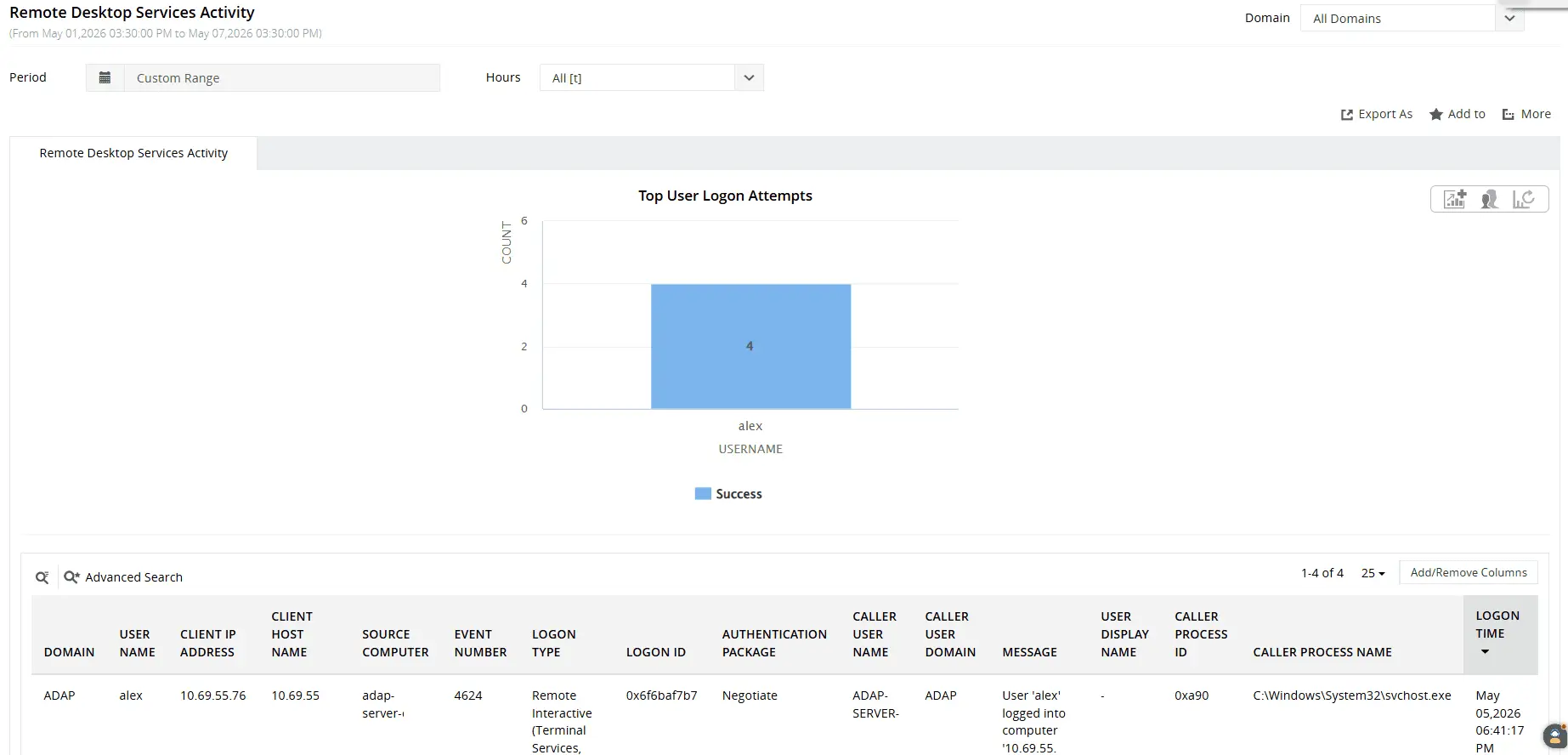
Track who logged in remotely, when the login occurred, which computer was accessed, and the source of the connection.
Get real-time alerts on employee computer activity
Reports answer historical questions. Alerts address events as they happen. ADAudit Plus ships with pre-configured alert profiles for workstation events, and you can create additional profiles scoped to specific users, computers, or activity thresholds.
- When a user authenticates to a workstation they have never previously accessed, an alert fires so your team can confirm whether the session is legitimate before any damage occurs.
- When logon failures on a single workstation spike beyond the machine's learned baseline, you receive notification in time to investigate a potential brute-force attempt rather than discovering it in the next day's report.
- When computer activity occurs at an hour outside a user's established pattern (flagged by the UBA engine against the user's own baseline, not a domain-wide rule) the alert surfaces who was active, on which machine, and at what time.
Every alert that fires can automatically generate a ticket in ServiceNow, Zendesk, Jira, ManageEngine Service Desk Plus, or Freshservice, so the responsible team is already working the issue before the admin opens the dashboard
Meet compliance requirements for employee monitoring
Several major compliance frameworks require organizations to maintain auditable records of who accessed which systems, when, and for how long. For environments subject to SOX, HIPAA, PCI-DSS, FISMA, GLBA, GDPR, or ISO 27001, workstation-level logon and access data is not optional.
ADAudit Plus includes pre-configured compliance reports for all seven standards, each mapped to the specific workstation and logon events those standards require you to capture and retain.
Beyond the pre-configured sets, custom report profiles let you build saved views combining specific users, audit actions, and date filters, so you can produce a named user's complete workstation activity record on demand rather than running a new search for each audit request.
Why native Windows tools fall short for computer monitoring
- Windows Event Viewer logs workstation events locally on each machine. While Windows Event Forwarding can centralize logs without third-party tools, configuring and maintaining it across a large workstation fleet requires significant administrative effort, and the resulting data still arrives as raw event logs with no reporting layer, no filtering by user or object, and no way to surface patterns across machines.
- PowerShell can retrieve event data from remote machines, but building and maintaining queries that cover all workstations, run on a schedule, and store results in a searchable format requires custom scripting work that most teams do not have capacity to sustain.
- Neither tool provides real-time alerting, anomaly detection, or compliance-ready report output. There are no baselines, no threshold-based notifications, and no built-in mechanism to correlate events across users, machines, and time periods into an investigation-ready audit trail.
- ADAudit Plus centralizes workstation event data from all domain-joined computers into a single console, applies machine learning baselines to detect deviations from normal activity, delivers real-time alerts on defined events, and produces audit-ready reports for seven compliance frameworks, all without manual log collection or endpoint-by-endpoint queries.
4 compelling reasons to choose ADAudit Plus
Widely recognized
ADAudit Plus has been recognized as a Gartner Peer Insights Customers' Choice for Security Incident & Event Management (SIEM) for four consecutive years.
Easy deployment
Go from downloading ADAudit Plus to receiving predefined reports and alerts in under 30 minutes, without any professional help.
Competitive pricing
ADAudit Plus is licensed per-server, unlike other IT auditors which are licensed per-user. With per-server licensing, even with a growing number of users each year, you can continue to ingest log data without additional costs.
Unified visibility
ADAudit Plus consolidates auditing, security, and compliance across Active Directory, Entra ID, Windows servers, workstations, and file servers into a single pane of glass, eliminating the need to juggle multiple tools.
Frequently asked questions
Organizations use a range of tools depending on their monitoring goals. IT security teams typically use AD-integrated platforms like ADAudit Plus, which tie workstation activity to verified user identities and produce compliance-ready audit trails. These differ from consumer-grade tools that rely on screenshot capture or keystroke logging.
In most jurisdictions, monitoring company-owned computers is permissible when employees are informed of the monitoring practice, typically through an acceptable use policy. Legal requirements vary by country and state. ADAudit Plus monitors logon activity and system events; it does not capture screenshots, keystrokes, or personal communications.
Retention is governed by your ADAudit Plus archive settings and storage configuration, and you can configure the tool to retain audit data for the period your compliance obligations require. ADAudit Plus supports configurable retention policies and archiving options to match those requirements.
Yes, you can seamlessly track user login and logout activities on your Mac workstations with ADAudit Plus.