

- Free Edition
- Quick Links
- Active Directory Auditing
- Active Directory auditor
- Active Directory monitoring
- Account lockout analyzer
- Login monitoring software
- Active Directory change notifier
- User logon audit reports
- AD logon logoff tracker
- User logon failure auditing
- Login history tracking tool
- AD change auditor
- Insider threat detection software
- Permissions change auditing
- Entra ID reporting
- Privileged user monitoring
- User behavior analytics tool
- Active Directory security monitoring
- Group Policy auditing tool
- GPO change auditor
- Entra ID auditing
- Audit user account management
- OU change auditor
- Audit group membership changes
- Active Directory auditing and reporting tool
- GPO reporting tool
- Remote desktop monitoring software
- PowerShell logging and auditing
- Azure password protection auditing
- Azure sign-in risk detection
- File Server Auditing
- Windows Server Auditing
- Employee Tracking
- Workstations Auditing
- Compliance Auditing
- Other features
- SIEM Integration
- Windows DNS - Schema Auditing
- Windows security event log monitoring
- SIEM audit solution
- Schedule Active Directory change reports
- Reports from Archived Data
- Aggregated summary reports
- AD new/old attribute changes
- Audit trail
- Audit Active Directory LAPS
- Scheduled Reports & Alerts
- Account lockout examiner
- Industry
- Documents
- Success Stories
- Related Products
- Log360 (On-Premise | Cloud) Comprehensive SIEM and UEBA
- ADManager Plus Active Directory Management & Reporting
- ADAudit Plus Real-time Active Directory Auditing and UBA
- ADSelfService Plus Identity security with MFA, SSO, and SSPR
- DataSecurity Plus File server auditing & data discovery
- Exchange Reporter Plus Exchange Server Auditing & Reporting
- M365 Manager Plus Microsoft 365 Management & Reporting Tool
- RecoveryManager Plus Enterprise backup and recovery tool
- SharePoint Manager Plus SharePoint Reporting and Auditing
- AD360 Integrated Identity & Access Management
- AD Free Tools Active Directory FREE Tools
File activity monitoring with ADAudit Plus
File activity monitoring generates huge volumes of logs and presentes difficulties in tracking the critical actions or tracking changes to critical files. With ADAudit Plus, this process is simplified.
Track all file and folder operations
ADAudit Plus captures every create, modify, delete, rename, move, and copy-paste event across Windows file servers, NAS devices, and cloud file storage.
Monitor file permissions in real time
Folder permission changes are logged with full before-and-after values, so you can see exactly what access rights changed, who changed them, and when, without any manual comparison.
Identify the process behind every file change
Dedicated process-specific reports show which application or process drove the file activity, not just which user.
Detect ransomware through file anomalies
Machine learning baselines normal file activity per individual user. A spike in file modifications or deletions for one user triggers an alert even when everyone else's activity is within range.
Audit 13+ NAS device types
ADAudit Plus audits file activity on NetApp, EMC Isilon, Synology, Amazon FSx, Azure File Share, Nutanix, Qumulo, CTERA, QNAP, Hitachi, Huawei, and more from the same console as your Windows file servers.
Monitor failed access attempts
Denied file read, write, and delete attempts are captured separately from successful operations, so you can detect users probing for access they don't have before an incident escalates.
Verify file integrity in monitored locations
File Integrity Monitoring (FIM) tracks changes to system files, configuration files, and program files in designated locations, a distinct capability from general file activity auditing and required for compliance.
Schedule reports for auditors automatically
Compliance reports can be scheduled for automatic delivery by email so auditors receive the data they need on a defined cadence without any manual export step.
Why a file activity monitoring software is necessary
File activity monitoring software records every operation performed on files and folders across a storage environment: who created, modified, read, deleted, moved, or renamed a file, from which machine, and at what time. For IT and security teams, this visibility is the difference between detecting a data incident in minutes and discovering it weeks later during a forensic review.
ADAudit Plus provides file activity monitoring across Windows file servers, NAS devices, and cloud file storage from a single console. Pre-configured reports cover all standard file event types, permission changes, failed access attempts, and file integrity verification, with no custom scripting or manual log aggregation required.
What file actions ADAudit Plus monitors
| Area | What ADAudit Plus captures |
|---|---|
| Windows file servers | All file and folder operations (create, modify, delete, rename, move, copy-paste), permission changes (DACL/SACL), failed access attempts, and share-level access |
| NAS devices | File access and change events across 13+ NAS types including NetApp, EMC Isilon, Synology, Amazon FSx, Azure File Share, Nutanix, Qumulo, CTERA, QNAP, Hitachi, and Huawei |
| Cloud file storage | File activity on Azure File Share and Amazon FSx alongside on-premises servers in the same console |
| File permissions | Folder permission changes with old and new permission values, folder ownership changes, and audit policy changes |
| File integrity locations | Changes to files in designated FIM-monitored paths, including system files, configuration files, and program files |
| Failed access attempts | Denied read, write, and delete attempts per user, machine, and file path |
| Removable storage | File operations on USB and removable devices connected to servers and workstations |
| Inactive file resources | Files and folders with no recent access activity, stale resources that may hold unnecessary permissions |
Track file and folder activity across your environment
ADAudit Plus aggregates file change events from all monitored servers and presents them in pre-configured reports ready to query immediately. Every file operation type has a dedicated report, and aggregates file activity by user, server, or process. It reports on:
- Files Created, Modified, Deleted, Renamed, Moved, and Copy-N-Pasted actions
- Per-user and per-server summary views let you spot outliers in activity volume without scrolling through thousands of individual records.
- When a script, backup agent, or rogue application is the source of a bulk operation, trace it to the process name without pivoting to another tool
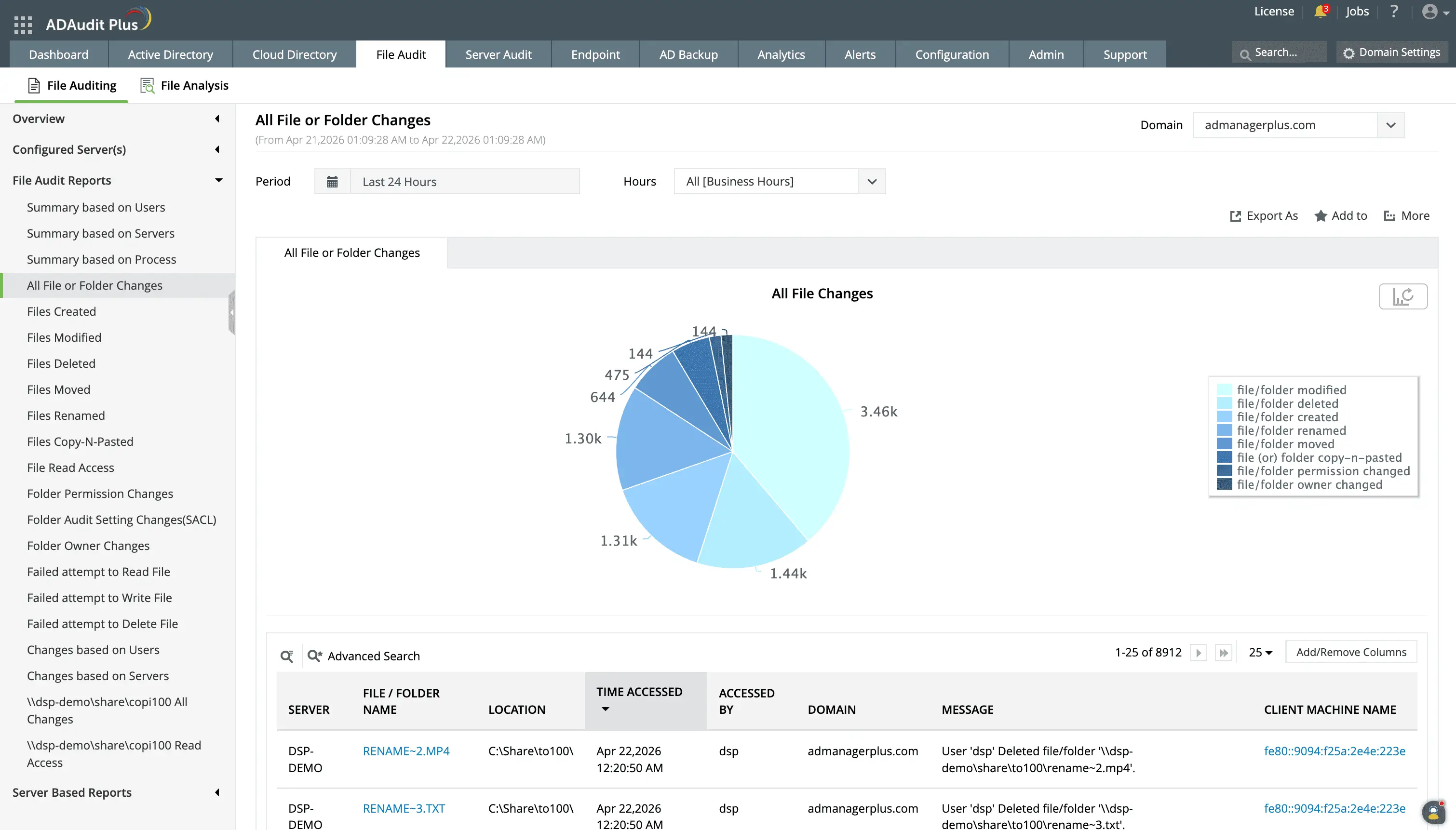
Perform in-depth file activity monitoring in your hybrid file storage environment.
Export reports for compliance requests and breeze through audits with ease.
Monitor actions in file permissions and folder access rights
Permission changes are among the highest-risk file server events. ADAudit Plus captures every permission change on Windows file servers with the full before-and-after values, so you know exactly what access was granted or removed. You can:
- Capture every DACL modification with old and new permission values.
- Track changes to audit policies on folders, detecting when monitoring itself is being altered.
- View ownership transfers are part of the common file activity audit trail.
- Keep a close eye on denied read, write, and delete actions in files.
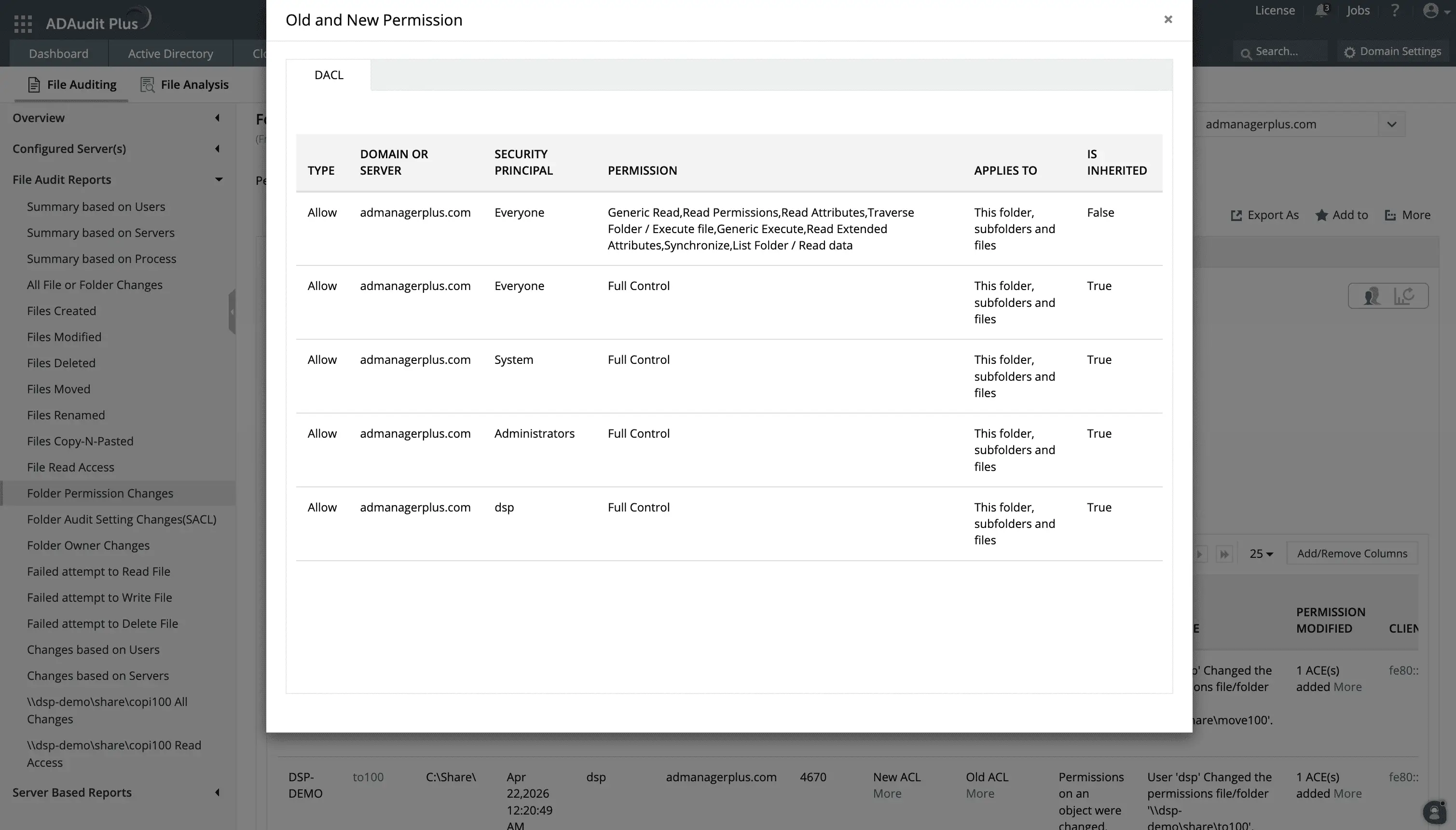
Track file permission change activities with details on the ACL values before and after the change.
Audit NAS devices and cloud file storage
Most file auditing tools cover Windows file servers and little else. ADAudit Plus audits file activity across 13+ NAS device types alongside Windows file servers and cloud storage, all visible in the same console with the same report structure across every source.
Supported data sources for file activity monitoring:
- NetApp (7-Mode and C-Mode), EMC Isilon, Hitachi NAS, Huawei OceanStor, Synology, QNAP, Nutanix Files, Qumulo, and CTERA Edge Filers
- Amazon FSx and Azure File Share are audited alongside on-premises file servers, giving you a unified view of hybrid file storage activity
Detect ransomware and abnormal file activity
Ransomware and data destruction attacks produce a recognizable pattern in file activity: a spike in modifications or deletions far outside what any individual user does under normal conditions. ADAudit Plus builds a baseline of normal file activity per individual user using machine learning, so a spike for one user triggers an alert even when overall domain activity looks normal. You can detect:
- Spikes in file modifications for a specific user above their personal baseline, the primary early signal of ransomware encryption activity.
- Mass deletion events per user, flagging both ransomware and deliberate data destruction.
- File operations outside a user's normal working hours, a common indicator of credential misuse or after-hours data exfiltration.
- The first time a user accesses a file resource they have never touched before, useful for detecting lateral movement within the file environment.
Get real-time alerts on critical file events
Knowing about a critical file event as it happens gives your team the chance to respond before damage spreads. ADAudit Plus includes pre-configured alert profiles for high-priority file events, with delivery via email and SMS and automatic ticket creation in your ITSM platform. You can set alerts for:
- When a file or folder is deleted, so accidental or malicious deletions are caught before backup windows close.
- When a folder permission change is detected, with the affected path and the identity of whoever made the change.
- When file modification or deletion patterns match the signature of encryption or destruction activity.
- When a file in a monitored system or configuration path is created, modified, or deleted, supporting continuous compliance for PCI-DSS and HIPAA.
Meet file activity monitoring compliance requirements
SOX, HIPAA, PCI-DSS, GDPR, FISMA, GLBA, and ISO 27001 all require evidence of who accessed or modified data, when, and whether access rights changed. ADAudit Plus includes pre-configured compliance report sets for all seven standards, plus archiving so reports can be generated from historical records well past the point where Windows event logs would have been overwritten.
Why native tools fall short in Windows file activity monitoring
Windows includes basic file monitoring through the Security Event Log and Group Policy audit settings. For a small single-server environment, this may be sufficient. For anything larger, the limitations become significant quickly.
- Security Event Logs are stored locally on each server with a fixed maximum size. On active file servers, audit events are overwritten before they can be reviewed, especially in environments with high file activity volumes.
- There is no built-in aggregation. Investigating a single deletion event across a file environment with multiple servers means logging into each one separately and searching individual event logs.
- Native auditing produces raw event data. Turning it into a report that answers "who deleted this file, from which machine, at what time" requires manual filtering or PowerShell scripting, neither of which scales to daily compliance reporting.
- Establishing a baseline of normal file activity and flagging deviations from it is not possible with native Windows file activity monitoring tools.
ADAudit Plus collects, aggregates, and normalises file actions from every monitored server automatically. Pre-configured reports are available the moment auditing is enabled, with no custom scripting or manual log correlation required.
4 compelling reasons to choose ADAudit Plus
Widely recognized
ADAudit Plus has been recognized as a Gartner Peer Insights Customers' Choice for Security Incident & Event Management (SIEM) for four consecutive years.
Easy deployment
Go from downloading ADAudit Plus to receiving predefined reports and alerts in under 30 minutes, without any professional help.
Competitive pricing
ADAudit Plus is licensed per-server, unlike other IT auditors which are licensed per-user. With per-server licensing, even with a growing number of users each year, you can continue to ingest log data without additional costs.
Unified visibility
ADAudit Plus consolidates auditing, security, and compliance across Active Directory, Entra ID, Windows servers, workstations, and file servers into a single pane of glass, eliminating the need to juggle multiple tools.
Frequently asked questions
File activity monitoring software centralizes event data from file servers, NAS devices, and cloud storage into a single audit trail. Each operation record carries the actor identity, source machine, IP address, and timestamp needed to investigate incidents, detect threats, and demonstrate compliance with access control requirements.
ADAudit Plus captures file creates, modifications, deletions, renames, moves, and copy-paste operations across Windows file servers, NAS devices, and cloud file storage.
Windows can log file events to the Security Event Log through audit policy settings, but logs are stored locally per server, overwritten when full, and not aggregated across servers. A dedicated tool is required to centralise, retain, and report on file audit data at scale. ADAudit Plus meets this requirement and adds alerting capabilities to respond to critical file actions.
Yes. ADAudit Plus provides per-file and per-user reports showing every modification or deletion event with the responsible user, source machine, IP address, and exact time. You can search by file name, path, user, or server, and retrieve this from historical records even if the local event log has been overwritten.
Yes. ADAudit Plus lets you schedule any file activity report for automatic delivery by email in PDF, CSV, HTML, or XLSX format. You can scope reports by user, server, date range, or event type, and save those configurations as custom report profiles for recurring auditor requests.