

- Free Edition
- Quick Links
- Active Directory Auditing
- Active Directory auditor
- Active Directory monitoring
- Account lockout analyzer
- Login monitoring software
- Active Directory change notifier
- User logon audit reports
- AD logon logoff tracker
- User logon failure auditing
- Login history tracking tool
- AD change auditor
- Insider threat detection software
- Permissions change auditing
- Entra ID reporting
- Privileged user monitoring
- User behavior analytics tool
- Active Directory security monitoring
- Group Policy auditing tool
- GPO change auditor
- Entra ID auditing
- Audit user account management
- OU change auditor
- Audit group membership changes
- Active Directory auditing and reporting tool
- GPO reporting tool
- Remote desktop monitoring software
- PowerShell logging and auditing
- Azure password protection auditing
- Azure sign-in risk detection
- File Server Auditing
- Windows Server Auditing
- Employee Tracking
- Workstations Auditing
- Compliance Auditing
- Other features
- SIEM Integration
- Windows DNS - Schema Auditing
- Windows security event log monitoring
- SIEM audit solution
- Schedule Active Directory change reports
- Reports from Archived Data
- Aggregated summary reports
- AD new/old attribute changes
- Audit trail
- Audit Active Directory LAPS
- Scheduled Reports & Alerts
- Account lockout examiner
- Industry
- Documents
- Success Stories
- Related Products
- Log360 (On-Premise | Cloud) Comprehensive SIEM and UEBA
- ADManager Plus Active Directory Management & Reporting
- ADAudit Plus Real-time Active Directory Auditing and UBA
- ADSelfService Plus Identity security with MFA, SSO, and SSPR
- DataSecurity Plus File server auditing & data discovery
- Exchange Reporter Plus Exchange Server Auditing & Reporting
- M365 Manager Plus Microsoft 365 Management & Reporting Tool
- RecoveryManager Plus Enterprise backup and recovery tool
- SharePoint Manager Plus SharePoint Reporting and Auditing
- AD360 Integrated Identity & Access Management
- AD Free Tools Active Directory FREE Tools
File server monitoring with ADAudit Plus
Track user activity in file servers
ADAudit Plus records every create, modify, delete, move, rename, and copy-paste event with the user name, machine, and file path. You can maintain a detailed audit trail through file activity monitoring and file access monitoring across all monitored servers.
Alert and respond automatically
Real-time alerts fire on critical file server events. ADAudit Plus sends notifications via email and SMS. You can also auto-create tickets in ServiceNow, Jira, ManageEngine ServiceDesk Plus, or other ITSM platforms using file server reports and alerts.
Detect anomalies with user behavior analytics
Machine learning baselines file activity per user. When modification or deletion volumes spike beyond the established pattern, ADAudit Plus raises an alert, allowing you to act quickly with user behavior analytics.
Multi-platform support
Audit your multi-platform storage environment, including Windows file server auditing, Windows file clusters, NetApp, EMC Isilon, Synology, QNAP, Nutanix Files, Qumulo, Amazon FSx, Azure File Share, and more, all from a single reporting console.
Spot failed access attempts
Every denied read, write, and delete attempt is captured, and repeated failures can be detected with alerts and preconfigured response actions to mitigate the damage caused by breaches.
Generate compliance-ready reports
Pre-configured reports map directly to GDPR, HIPAA, SOX, PCI-DSS compliance reports, FISMA, GLBA, and ISO 27001 file access requirements. You can also use custom report profiles for recurring audit configurations so you are not constantly rebuilding queries from scratch through Active Directory compliance reports.
Report on file server operations in real time
ADAudit Plus captures the full lifecycle of every file on your monitored servers, not just the current state. This means that you can:
- Confirm which user read a critical file and from which machine, no matter which server the file is stored in.
- Verify whether large volumes of events such as a bulk file deletion was deliberate or process-driven by comparing the event against the user's baseline file activity volume.
- Track copy-paste operations as events distinct from creates or modifies, so data movement between shares is auditable without relying on DLP tooling.
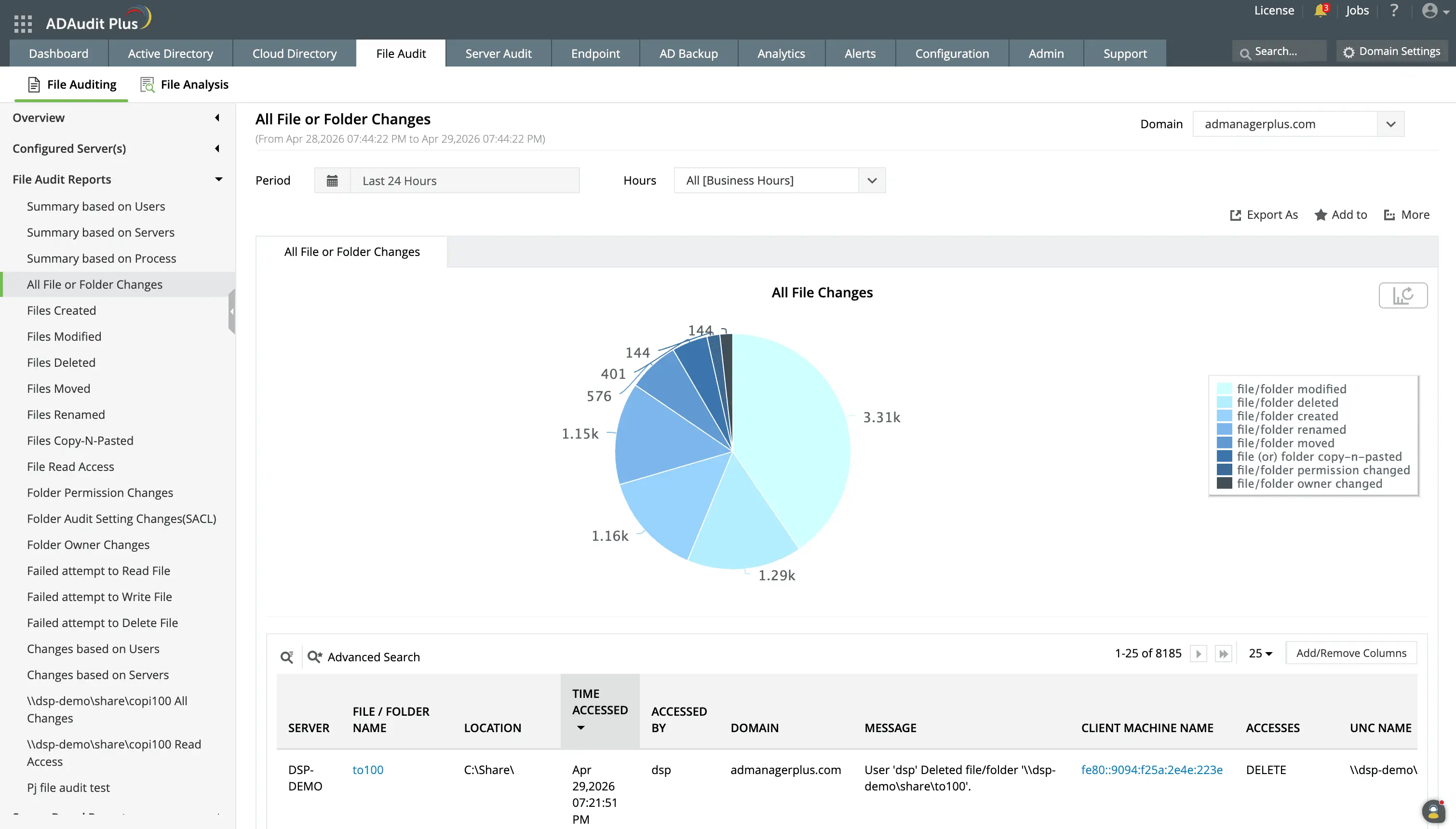
Get detailed file server change audit reports tracking file creations, deletions, permission changes, etc.
View consolidated reports from across your domain or from specific servers depending on your needs.
Track failed access attempts
Failed attempts to access files are often a significant indicator of compromise and must be investigated. ADAudit Plus can assist in these investigations by:
- Identifying which accounts are generating repeated failed file read or write attempts on critical paths, a pattern that typically precedes a targeted breach.
- Alerting about denied delete attempts on critical shares immediately, so the event is documented. Further, alert responses can be used to cut off the user from the network before the action is repeated.
- Providing user and server-based reports to identify which user accounts generated the most file activity on a specific server over a defined period, useful for spotting unusual volume before a detailed investigation.
- Reporting on process-level activity to help detect non-interactive operations, such as backup jobs, sync tools, or unauthorized scripts, generating disproportionate file event volumes.
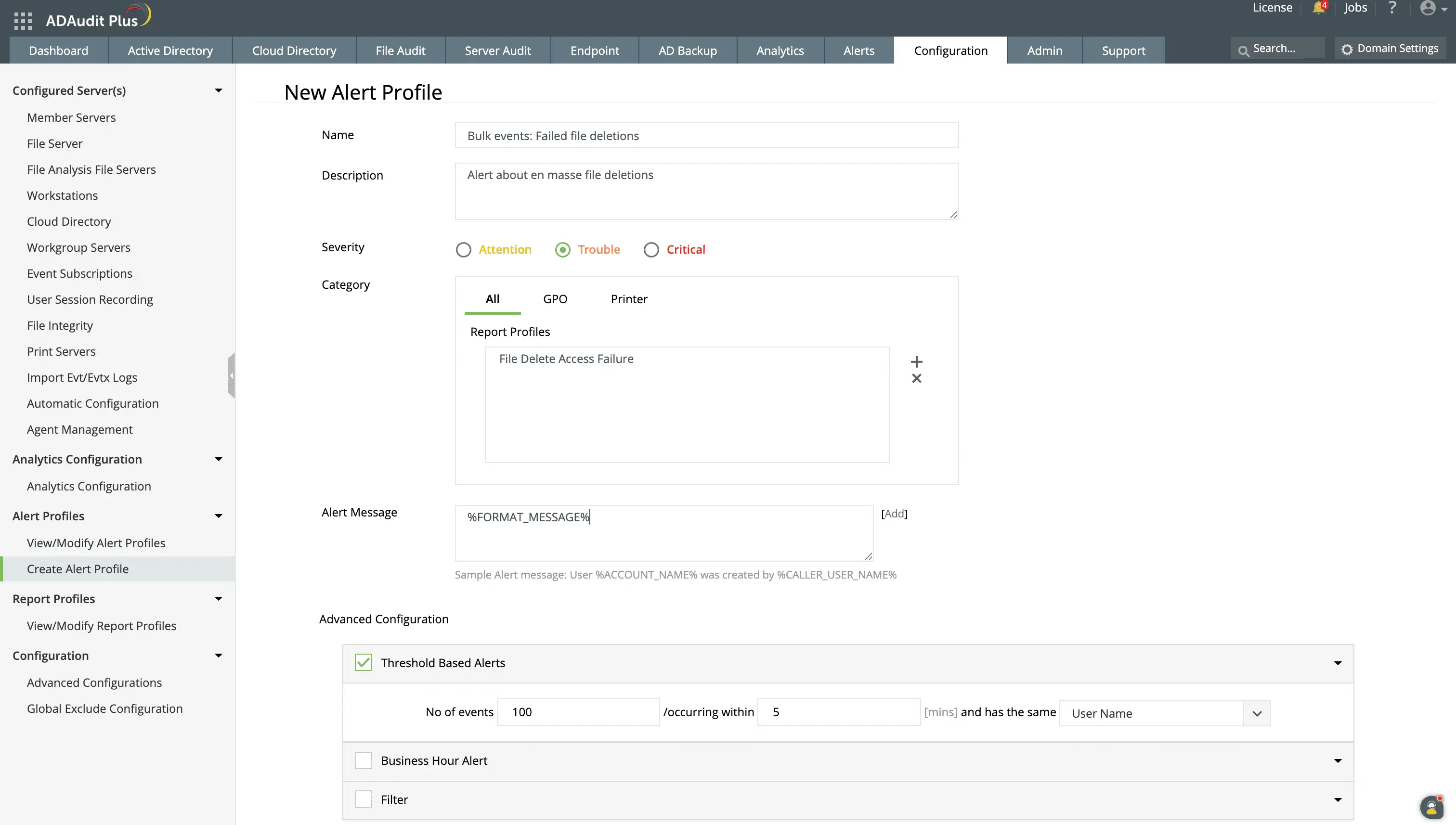
Configure alerts for file deletion counts exceeding a threshold value. You can also choose to execute automated response actions.
Audit file server permissions changes
Unauthorized permission changes are a primary method attackers use to expand access silently. A change to a folder's DACL can grant an attacker access to data they were never authorized to reach, without generating any access event until they use the new permission. ADAudit Plus captures every permission change with before-and-after ACL values so you can confirm exactly what changed with file permission change auditing. You can also:
- Detect permission escalations immediately in monitored shares, so an unauthorized change does not persist unnoticed until your next manual review.
- Verify ownership transfers with detailed reports since folder ownership changes propagate permission inheritance to all child objects, making them a high-impact event even when the change appears routine.
- Build a complete permission change history for a specific share when preparing a compliance audit, without reconstructing events from individual server logs.
- Schedule permission change reports at specified intervals so you can stay ahead of periodic access reviews.
Track file permission changes with information on who changed them, when, and in which folder.
Get details about the value of the ACLs before and after the change.
Detect file server threats with UBA
Ransomware and insider activity are often the biggest threats to file server security. They can be detected by tracking patterns in users' file activity volume, timing, or frequency and identifying deviations from what that specific user normally does. ADAudit Plus applies machine learning to build a per-user activity baseline and raises named anomaly alerts when behavior crosses the threshold through user behavior analytics. With this, ADAudit Plus can trigger alerts for:
- A spike in file modifications beyond a user's normal baseline triggers alerts. Encryption campaigns generate exactly this event pattern, and the alert fires while files are still being encrypted.
- Mass file deletions that exceed a user's established deletion pattern, which an potentially indicate ransomware payloads or deliberate data destruction.
- File access events occurring outside a user's normal working hours, which is a pattern consistent with both insider data theft and post-compromise lateral movement.
- When a user's rate of denied file operations exceeds their normal baseline. Repeated access failures across sensitive paths indicate probing activity, and this alert catches the pattern before the probing account finds a path in.
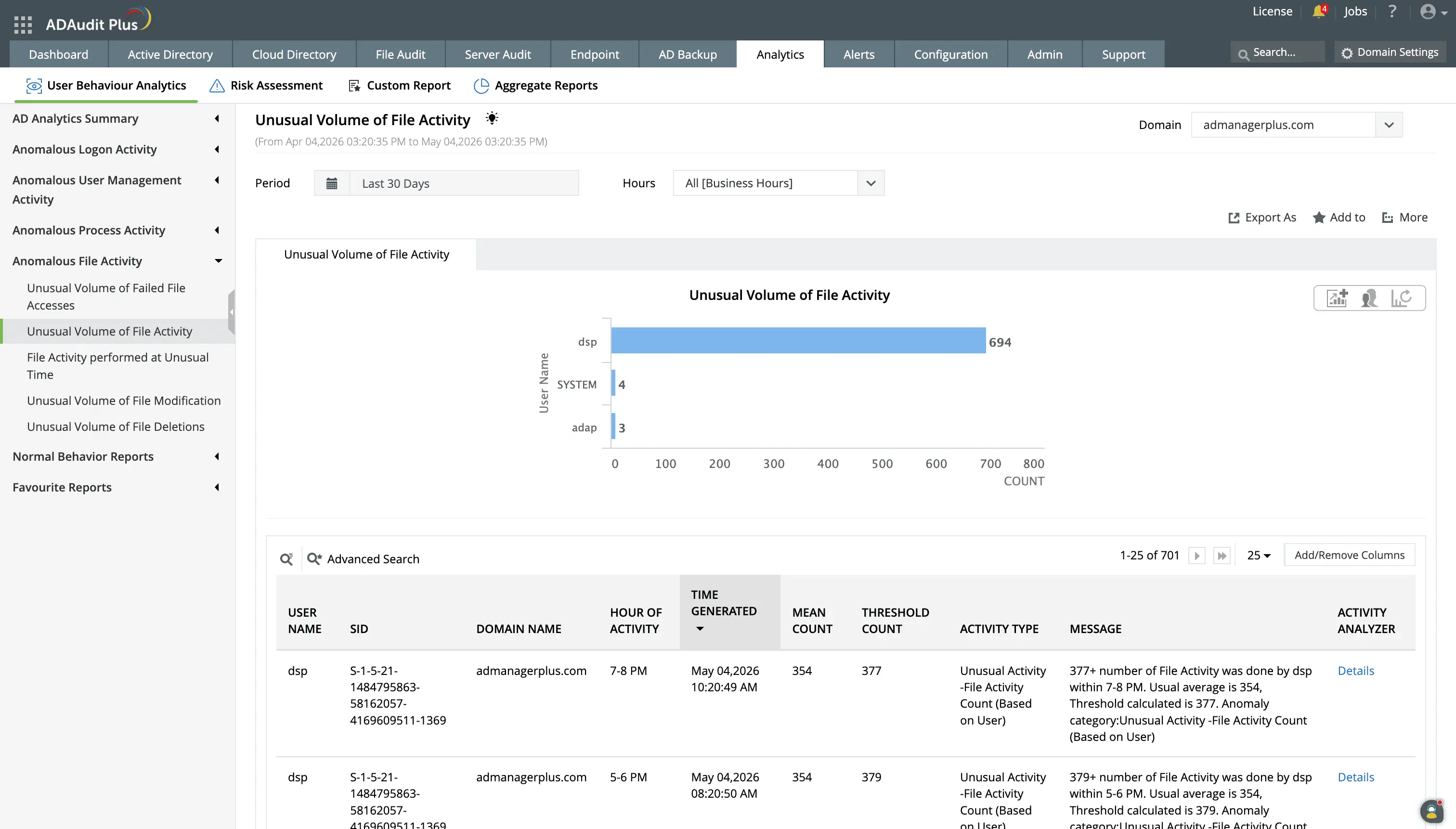
The analytics engine uses historical data on a user's file read, modify, create, delete, copy-and-paste, move, or rename activities to identify an average count, and calculate a threshold value. If the count exceeds this threshold value, it triggers an alert and reports on it.
You can view the average and calculated threshold counts for file activities carried out by a user under the Normal Behavior Reports.
Automate responses to critical file server events
Reviewing file server activity after the fact limits your ability to contain incidents. ADAudit Plus fires real-time alerts the moment a critical file server event occurs, with the user account, machine, and event detail already in the notification. With this alert data, you can:
- Deliver notifications via email and SMS to key stakeholders the second a critical event occurs.
- Automatically respond with custom scripts to carry out actions like ending a rogue user's session, shutting down infected devices, and cutting off network access.
- Auto-create a ticket in ServiceNow, Jira, or ManageEngine ServiceDesk Plus and route it to the responsible team, so the investigation starts the moment the alert fires rather than when someone checks a dashboard.
Monitor file activity across hybrid and cloud environments
File data does not sit exclusively on Windows file servers. Data is distributed across NAS appliances, cloud file shares, and hybrid environments where on-premises and cloud access overlap. ADAudit Plus audits file auditing activity across over 14 server and NAS types from a single console, using the same report structure for every platform. This allows you to investigate hybrid activity without correlating data across separate tools or consoles used for NAS auditing software.
Supported storage platforms
- Windows File Server
- Windows File Cluster
- NetApp Server (7-Mode and C-Mode)
- EMC Isilon and EMC Server
- Hitachi NAS and Huawei OceanStor
- Synology NAS and QNAP NAS
- Nutanix Files and Qumulo NAS
- CTERA Edge Filers
- Amazon FSx and Azure File Share
Meet compliance requirements with pre-configured reports
GDPR, HIPAA, SOX, and PCI-DSS all require documented file access records, and audit reports must be available without advance notice. To simplify audit efforts, ADAudit Plus provides pre-configured Active Directory compliance reports mapped to each standard's file access requirements, exportable in PDF, CSV, HTML, or XLSX format.
Custom report profiles let you save specific combinations of users, file actions, and path filters for recurring audit use cases. When a quarterly audit request arrives with the same scope as last quarter, you run the saved profile rather than rebuilding the query from scratch. You can schedule reports for automatic delivery to auditors, compliance teams, or IT managers at whatever frequency your audit cycle requires.
4 compelling reasons to choose ADAudit Plus
Widely recognized
ADAudit Plus has been recognized as a Gartner Peer Insights Customers' Choice for Security Incident & Event Management (SIEM) for four consecutive years.
Easy deployment
Go from downloading ADAudit Plus to receiving predefined reports and alerts in under 30 minutes, without any professional help.
Competitive pricing
ADAudit Plus is licensed per-server, unlike other IT auditors which are licensed per-user. With per-server licensing, even with a growing number of users each year, you can continue to ingest log data without additional costs.
Unified visibility
ADAudit Plus consolidates auditing, security, and compliance across AD, Entra ID, Windows servers, workstations, and file servers into a single pane of glass, eliminating the need to juggle multiple tools.
Frequently asked questions
A file server monitoring tool records every access, modification, deletion, and permission change event on shared file storage and makes that data searchable across your environment. It captures who accessed or changed a specific file, when, from which machine, and whether the access was successful or denied.
Security-focused file server monitoring tools like ADAudit Plus also apply behavioral analytics to file activity, so admins can distinguish a routine deletion from a ransomware-pattern spike and alert security teams in real time.
On a single Windows file server, you can enable file and folder auditing through Group Policy under Security Settings > Advanced Audit Policy Configuration > Object Access. Once audit policies are in place, file access events appear in the Security event log under Event IDs 4663, 4660, 5145, etc. For centralized monitor file changes on Windows, ADAudit Plus is used.
The limitation is that this approach is per-server only. There is no native way to aggregate or search file access events across multiple servers simultaneously, and the Security event log does not retain events indefinitely. ADAudit Plus collects file events from all your monitored Windows file servers and NAS devices into a single, searchable console where you can query by user, file path, server, or time window across your entire environment. This audit trail can be archived for long periods and reported on when required.
ADAudit Plus monitors Windows file servers, Windows file clusters, and several NAS device types: NetApp Server (7-Mode and C-Mode), EMC Isilon, EMC Server, Hitachi NAS, Huawei OceanStor, Synology NAS, QNAP NAS, CTERA Edge Filers, Nutanix Files, Qumulo NAS, Amazon FSx, and Azure File Share through NAS auditing software.
Report sets covering file creates, modifications, deletions, permission changes, and failed access attempts, are available for every supported platform. You do not need a separate console for each NAS vendor, and you can generate reports that aggregate activity across all monitored servers and NAS devices in a single view.
File server auditing is essential for regulations such as HIPAA, GDPR, PCI DSS and SOX to track access to critical data, detect unauthorized user actions, and ensure file integrity monitoring. Key requirements include logging successful and failed access attempts, monitoring permission changes, and tracking file modifications (creations, deletions, renames, etc.).
ADAudit Plus provides pre-configured reports for seven of these standards: GDPR, HIPAA, SOX, PCI-DSS, FISMA, GLBA, and ISO 27001. Each report set maps to the specific file access and permission change requirements for that standard and can be exported in PDF, CSV, HTML, or XLSX format for audit delivery.