

- Free Edition
- Quick Links
- Active Directory Auditing
- Active Directory auditor
- Active Directory monitoring
- Account lockout analyzer
- Login monitoring software
- Active Directory change notifier
- User logon audit reports
- AD logon logoff tracker
- User logon failure auditing
- Login history tracking tool
- AD change auditor
- Insider threat detection software
- Permissions change auditing
- Entra ID reporting
- Privileged user monitoring
- User behavior analytics tool
- Active Directory security monitoring
- Group Policy auditing tool
- GPO change auditor
- Entra ID auditing
- Audit user account management
- OU change auditor
- Audit group membership changes
- Active Directory auditing and reporting tool
- GPO reporting tool
- Remote desktop monitoring software
- PowerShell logging and auditing
- Azure password protection auditing
- Azure sign-in risk detection
- File Server Auditing
- Windows Server Auditing
- Employee Tracking
- Workstations Auditing
- Compliance Auditing
- Other features
- SIEM Integration
- Windows DNS - Schema Auditing
- Windows security event log monitoring
- SIEM audit solution
- Schedule Active Directory change reports
- Reports from Archived Data
- Aggregated summary reports
- AD new/old attribute changes
- Audit trail
- Audit Active Directory LAPS
- Scheduled Reports & Alerts
- Account lockout examiner
- Industry
- Documents
- Success Stories
- Related Products
- Log360 (On-Premise | Cloud) Comprehensive SIEM and UEBA
- ADManager Plus Active Directory Management & Reporting
- EventLog Analyzer Real-time Log Analysis & Reporting
- ADSelfService Plus Identity security with MFA, SSO, and SSPR
- DataSecurity Plus File server auditing & data discovery
- Exchange Reporter Plus Exchange Server Auditing & Reporting
- M365 Manager Plus Microsoft 365 Management & Reporting Tool
- RecoveryManager Plus Enterprise backup and recovery tool
- SharePoint Manager Plus SharePoint Reporting and Auditing
- AD360 Integrated Identity & Access Management
- AD Free Tools Active Directory FREE Tools
Azure AD Sign-in Error 50074
Error 50074 - User did not pass the MFA challenge.
About Azure Activity sign-in activity reports:
Azure Active Directory's (renamed as Entra ID) reporting tool generates 'Sign-in activity' reports that give you insights on who has performed the tasks that are enlisted in the Audit logs.
- All Sign-in activity reports can be found under the Activity section of Azure Active Directory.
- The default list view of Audit logs can be customized by adding additional fields.
- The reports can also be filtered to let you view only the activities that are relevant.
- Here is an example of how a sign-in activity report looks like:
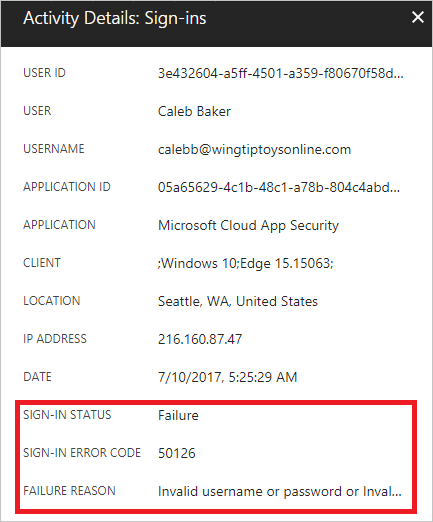
Error description:
The sign-in failed as the user did not pass the MFA challenge.
Auditing Azure AD environments with ADAudit Plus:
ADAudit Plus offers change monitoring for your Azure AD environment with the following features:
- Correlated view across hybrid environments
- Real-time alerts
- Schedulable reports
- Autonomous change remediation
- Comprehensive search
- Out-of-the-box compliance reports
Frequently asked questions
It is a sign-in failure that occurs when the user does not complete the multi-factor authentication (MFA) challenge.
A missed or denied MFA prompt, an unavailable authentication method, an expired session, or connectivity issues with the authenticator app.
Yes - repeated failed MFA challenges can signal MFA fatigue attacks or unauthorized access attempts.
ADAudit Plus alerts you to MFA-related sign-in failures in real time and helps you spot suspicious authentication patterns across users and locations.