

- Free Edition
- Quick Links
- Active Directory Auditing
- Active Directory auditor
- Active Directory monitoring
- Account lockout analyzer
- Login monitoring software
- Active Directory change notifier
- User logon audit reports
- AD logon logoff tracker
- User logon failure auditing
- Login history tracking tool
- AD change auditor
- Insider threat detection software
- Permissions change auditing
- Entra ID reporting
- Privileged user monitoring
- User behavior analytics tool
- Active Directory security monitoring
- Group Policy auditing tool
- GPO change auditor
- Entra ID auditing
- Audit user account management
- OU change auditor
- Audit group membership changes
- Active Directory auditing and reporting tool
- GPO reporting tool
- Remote desktop monitoring software
- PowerShell logging and auditing
- Azure password protection auditing
- Azure sign-in risk detection
- File Server Auditing
- Windows Server Auditing
- Employee Tracking
- Workstations Auditing
- Compliance Auditing
- Other features
- SIEM Integration
- Windows DNS - Schema Auditing
- Windows security event log monitoring
- SIEM audit solution
- Schedule Active Directory change reports
- Reports from Archived Data
- Aggregated summary reports
- AD new/old attribute changes
- Audit trail
- Audit Active Directory LAPS
- Scheduled Reports & Alerts
- Account lockout examiner
- Industry
- Documents
- Success Stories
- Related Products
- Log360 (On-Premise | Cloud) Comprehensive SIEM and UEBA
- ADManager Plus Active Directory Management & Reporting
- EventLog Analyzer Real-time Log Analysis & Reporting
- ADSelfService Plus Identity security with MFA, SSO, and SSPR
- DataSecurity Plus File server auditing & data discovery
- Exchange Reporter Plus Exchange Server Auditing & Reporting
- M365 Manager Plus Microsoft 365 Management & Reporting Tool
- RecoveryManager Plus Enterprise backup and recovery tool
- SharePoint Manager Plus SharePoint Reporting and Auditing
- AD360 Integrated Identity & Access Management
- AD Free Tools Active Directory FREE Tools
Azure AD Sign-in Error 53001
Error 53001 - Conditional Access policy requires a domain joined device, and the device is not domain joined. Have the user use a domain joined device
About Azure Activity sign-in activity reports:
Azure Active Directory's (renamed as Entra ID) reporting tool generates 'Sign-in activity' reports that give you insights on who has performed the tasks that are enlisted in the Audit logs.
- All Sign-in activity reports can be found under the Activity section of Azure Active Directory.
- The default list view of Audit logs can be customized by adding additional fields.
- The reports can also be filtered to let you view only the activities that are relevant.
- Here is an example of how a sign-in activity report looks like:
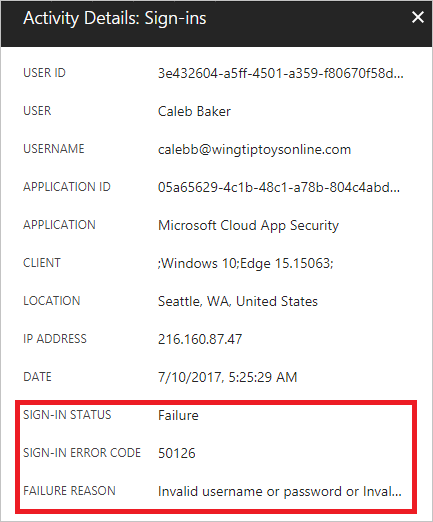
Error description:
Sign-in failed because the user needs to use a device that is part of the domain and the provided device is not part of the domain
Auditing Azure AD environments with ADAudit Plus:
ADAudit Plus offers change monitoring for your Azure AD environment with the following features:
- Correlated view across hybrid environments
- Real-time alerts
- Schedulable reports
- Autonomous change remediation
- Comprehensive search
- Out-of-the-box compliance reports
Frequently asked questions
It occurs when a Conditional Access policy requires a domain-joined (or Entra-joined) device, but the device used is not joined.
The user attempted to sign in from a device that doesn't meet the domain-join requirement set in the Conditional Access policy.
Error 53001 specifically requires the device to be domain joined, while error 53000 requires the device to be compliant.
ADAudit Plus monitors device-join-related sign-in failures, helping you quickly identify users attempting access from unmanaged devices.