

- Free Edition
- Quick Links
- Active Directory Auditing
- Active Directory auditor
- Active Directory monitoring
- Account lockout analyzer
- Login monitoring software
- Active Directory change notifier
- User logon audit reports
- AD logon logoff tracker
- User logon failure auditing
- Login history tracking tool
- AD change auditor
- Insider threat detection software
- Permissions change auditing
- Entra ID reporting
- Privileged user monitoring
- User behavior analytics tool
- Active Directory security monitoring
- Group Policy auditing tool
- GPO change auditor
- Entra ID auditing
- Audit user account management
- OU change auditor
- Audit group membership changes
- Active Directory auditing and reporting tool
- GPO reporting tool
- Remote desktop monitoring software
- PowerShell logging and auditing
- Azure password protection auditing
- Azure sign-in risk detection
- File Server Auditing
- Windows Server Auditing
- Employee Tracking
- Workstations Auditing
- Compliance Auditing
- Other features
- SIEM Integration
- Windows DNS - Schema Auditing
- Windows security event log monitoring
- SIEM audit solution
- Schedule Active Directory change reports
- Reports from Archived Data
- Aggregated summary reports
- AD new/old attribute changes
- Audit trail
- Audit Active Directory LAPS
- Scheduled Reports & Alerts
- Account lockout examiner
- Industry
- Documents
- Success Stories
- Related Products
- Log360 (On-Premise | Cloud) Comprehensive SIEM and UEBA
- ADManager Plus Active Directory Management & Reporting
- EventLog Analyzer Real-time Log Analysis & Reporting
- ADSelfService Plus Identity security with MFA, SSO, and SSPR
- DataSecurity Plus File server auditing & data discovery
- Exchange Reporter Plus Exchange Server Auditing & Reporting
- M365 Manager Plus Microsoft 365 Management & Reporting Tool
- RecoveryManager Plus Enterprise backup and recovery tool
- SharePoint Manager Plus SharePoint Reporting and Auditing
- AD360 Integrated Identity & Access Management
- AD Free Tools Active Directory FREE Tools
Windows Event ID 4776 - The domain controller attempted to validate the credentials for an account
Introduction
Event ID 4776 is logged whenever a domain controller (DC) attempts to validate the credentials of an account using NTLM over Kerberos. This event is also logged for logon attempts to the local SAM account in workstations and Windows servers, as NTLM is the default authentication mechanism for local logon.
Authentication Success - Event ID 4776 (S)
If the credentials were successfully validated, the authenticating computer logs this event ID with the Result Code field equal to “0x0”.
Authentication Failure - Event ID 4776 (F)
If the authenticating computer fails to validate the credentials, the same event ID 4776 is logged but with the Result Code field not equal to “0x0”. (See all result codes.)
In the case of domain account logon attempts, the DC validates the credentials. That means event ID 4776 is recorded on the DC.
In the case of logon attempts with a local SAM account, the workstation or the member server validate the credentials. That means event ID 4776 is recorded on the local machines.
For Kerberos authentication, see event IDs 4768, 4769, and 4771.
Although Kerberos authentication is the preferred authentication method for Active Directory environments, some applications might still use NTLM.
Here are a few common cases where NTLM is used over Kerberos in a Windows environment:
- If the client authentication is by an IP address instead of a service principal name (SPN).
- If no Kerberos trust exists between forests.
- If a firewall is blocking the Kerberos port.
Event ID 4776 - The DC attempted to validate the credentials for an account.
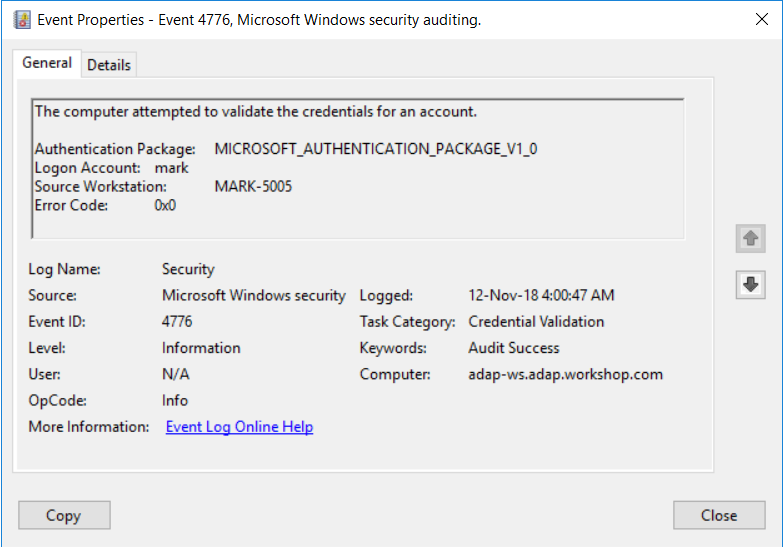
Authentication Package: This is always "MICROSOFT_AUTHENTICATION_PACKAGE_V1_0".
Logon Account: The name of the account that attempted a logon. The account can either be a user account, a computer account, or a well-known security principal (e.g. Everyone or Local System).
Source Workstation: The name of the computer the logon attempt originated from.
| Error code | Description |
|---|---|
| C0000064 | The username does not exist |
| C000006A | The username is correct but the password is wrong |
| C0000234 | The user is currently locked out |
| C0000072 | The account is currently disabled |
| C000006F | The user tried to log on outside their day-of-the-week or time-of-day restrictions |
| C0000070 | The user attempted to log on from a restricted workstation |
| C0000193 | The user tried to log on with an expired account |
| C0000071 | The user tried to log on with a stale password |
| C0000224 | The user is required to change their password at the next logon |
| C0000225 | Evidently a bug in Windows and not a risk |
Reasons to monitor event ID 4776
- NTLM should only be used for local logon attempts. You should monitor event ID 4776 to list all NTLM authentication attempts in your domain and pay close attention to events generated by accounts that should never use NTLM for authentication.
- If local accounts should only be used directly on the respective machines where their credentials are stored, and never use network logon or Remote Desktop Connection, then you need to monitor for all events where Source Workstation and Computer have different values.
- Monitor this event for multiple logon attempts with a misspelled username within a short span of time to check for reverse brute-force, password spraying, or enumeration attacks.
- Logon attempts from unauthorized endpoints, or attempts outside of business hours, could be indicators of malicious intent, especially for high-value accounts.
- Logon attempts from an expired, disabled, or locked account could indicate possible intent to compromise your network.
As discussed above, NTLM and NTLMv2 authentication is vulnerable to a variety of malicious attacks. Reducing and eliminating NTLM authentication from your environment forces Windows to use more secure protocols, such as the Kerberos version 5 protocol. However, this could cause several NTLM authentication requests to fail within the domain, decreasing productivity.
It’s recommended that you first audit your security log for instances of NTLM authentication and understand the NTLM traffic to your DCs, and then force Windows to restrict NTLM traffic and use more secure protocols.
The need for an auditing solution
Auditing solutions like ADAudit Plus offer real-time monitoring, user and entity behavior analytics, and reports; together these features help secure your AD environment.
24/7, real-time monitoring
Although you can attach a task to the security log and ask Windows to send you an email, you are limited to simply getting an email whenever event ID 4776 is generated. Windows also lacks the ability to apply more granular filters that are required to meet security recommendations.
For example, Windows can send you an email every time event ID 4776 is generated, but it will not be able to only notify you on attempts from unauthorized endpoints, attempts occurring outside business hours, or attempts from expired, disabled, or locked accounts. Getting specific alerts reduces the chance of you missing out on critical notifications amongst a heap of false-positive alerts. Threshold-based alerts let you stay on top of any signs of malicious activity within your environment.
With a tool like ADAudit Plus, not only can you apply granular filters to focus on real threats, you can get notified in real time via SMS, too.
User and entity behavior analytics (UEBA)
Leverage advanced statistical analysis and machine learning techniques to detect anomalous behavior within your network.
Compliance-ready reports
Meet various compliance standards, such as SOX, HIPAA, PCI, FISMA, GLBA, and the GDPR, with out-of-the-box compliance reports.