Support
 
Phone Get Quote
 
Support
 
US: +1 888 720 9500
US: +1 888 791 1189
Intl: +1 925 924 9500
Aus: +1 800 631 268
UK: 0800 028 6590
CN: +86 400 660 8680

Direct Inward Dialing: +1 408 916 9892


Change auditor for LDAP queries

Monitor, track, and report LDAP activity across your domain controllers with event-based reports, long-term log retention, and real-time alerts.

Comprehensive LDAP auditing and monitoring made simple

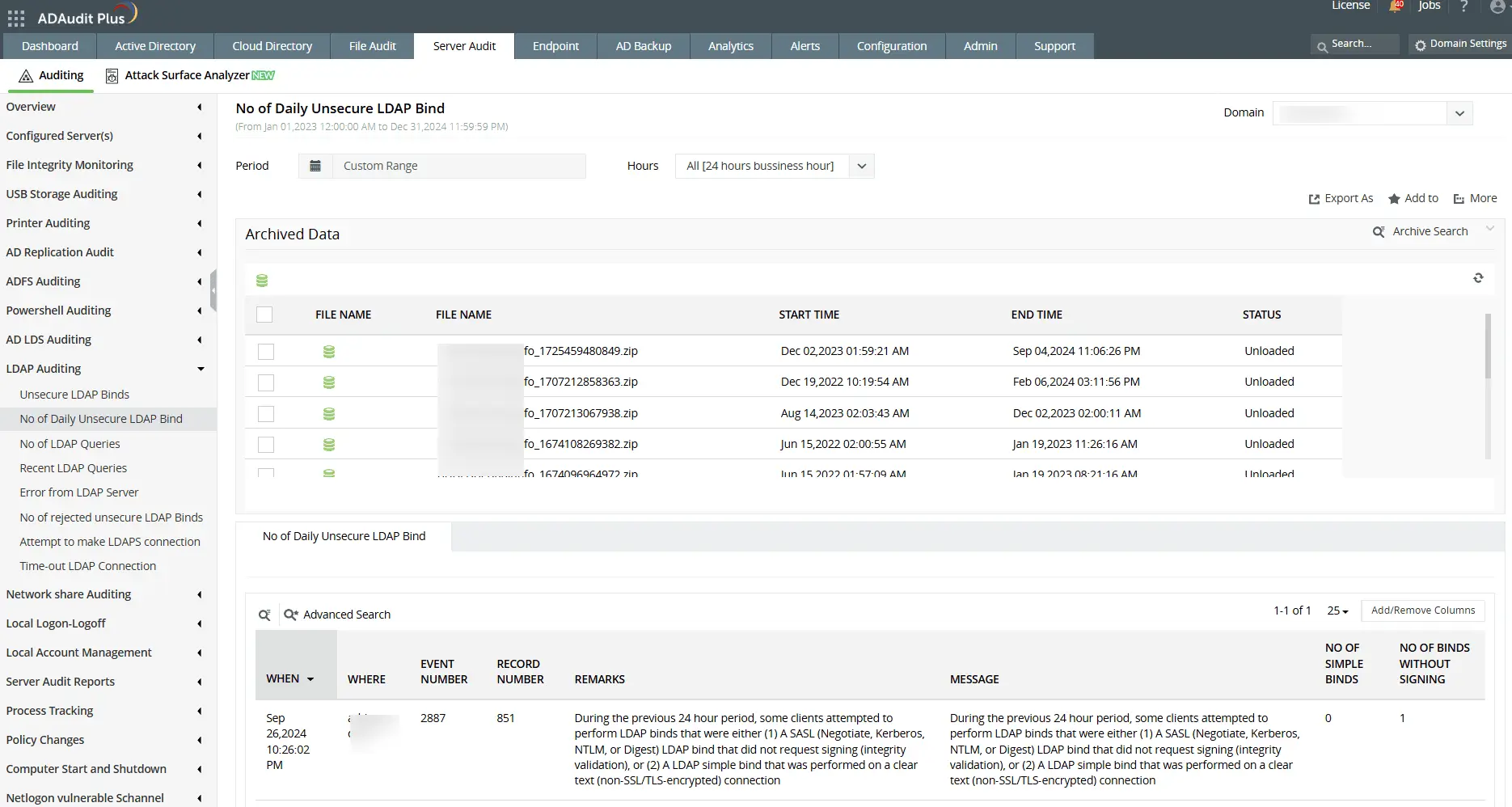
Track daily unsecure LDAP binds

Get a daily summary of unsecure LDAP bind attempts, including counts of simple binds performed over cleartext and SASL binds without signing.

Monitor LDAP query volumes

Track the number of LDAP searches within a specified interval. Spot spikes in total queries, inefficient queries, and expensive queries that can impact performance.

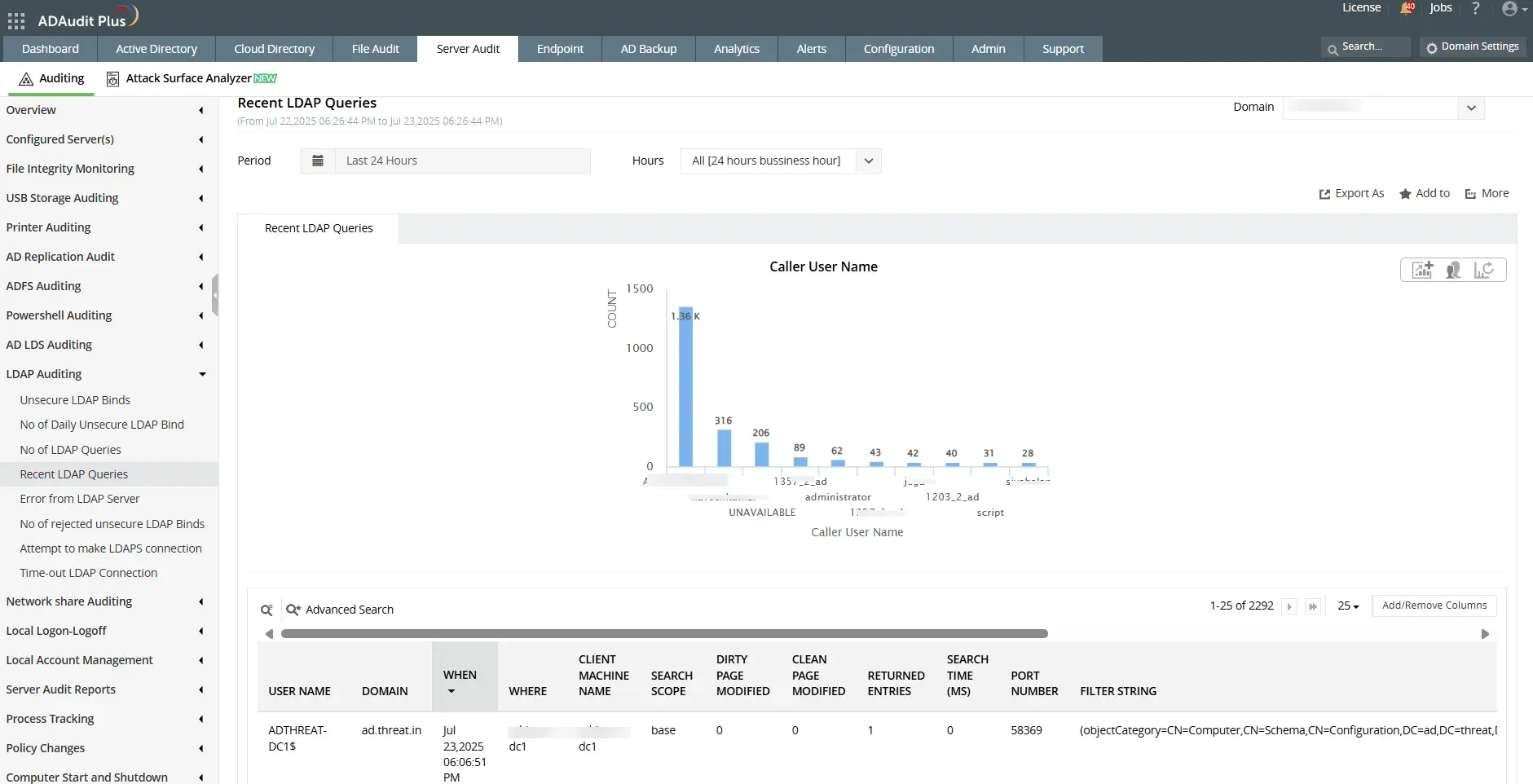
View recent LDAP queries by user

Get detailed logs of recent LDAP queries including who initiated them, from where, the filter used, and search performance.

Audit LDAPS connection attempts

Track all attempts to establish LDAP over SSL (LDAPS) connections. See when connections fail due to missing certificates or configuration issues.

Ensure LDAP availability, log retention, and secure authentication

Extend LDAP event log retention

Retain logs of LDAP queries, bind attempts, and connection events for longer periods to support historical investigations and meet audit requirements.

Detect LDAP connection timeouts

Monitor when LDAP connections are dropped due to inactivity or network issues. Capture source IP, port, and binding type for every timeout.

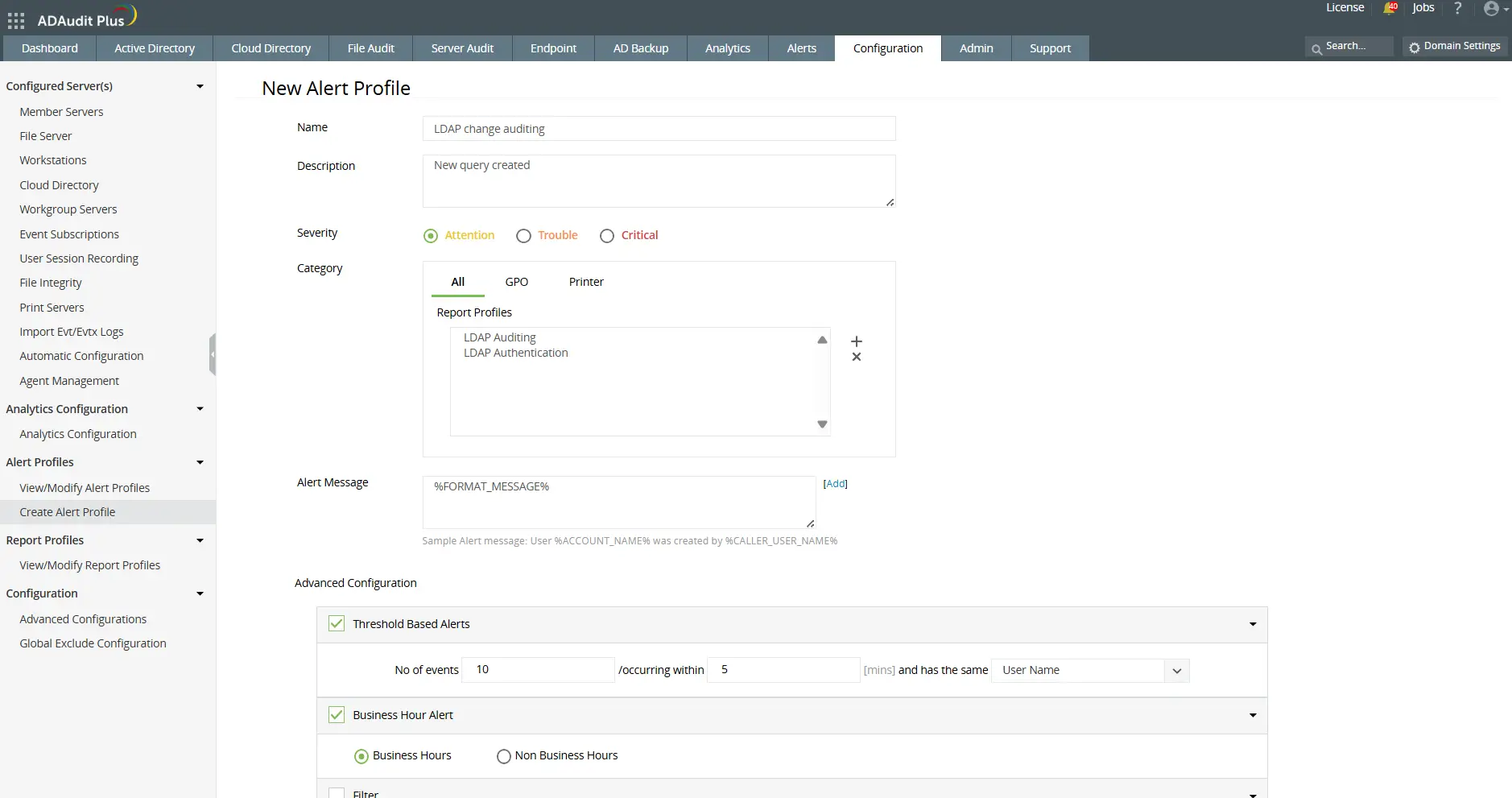
Create alerts for LDAP authentication activity

Set up alerts for specific LDAP bind events, including insecure binds and authentication anomalies. Trigger custom scripts to respond to these events in real time automatically.

Audit rejected unsecure LDAP binds

Track how often the server rejects simple or unsigned bind attempts that violate secure binding policies. Use these insights to assess compliance and enforce stricter configurations.

Audit and safeguard LDAP activity with ADAudit Plus

  • Track unsecure binds
  • Monitor LDAP queries and connections
  • Set up alerts and automation
  • Track unsecure binds


    View daily summaries of insecure LDAP bind attempts, including cleartext and unsigned binds.

  • Monitor LDAP queries and connections


    Analyze LDAP search volumes, query details, and LDAPS connection attempts to optimize performance and security.

  • Set up alerts and automation


    Configure alerts for LDAP authentication activity and trigger scripts to respond to suspicious events in real time.

FAQ

The Lightweight Directory Access Protocol (LDAP) is a directory service protocol used to access and manage information in Active Directory and other directory systems. It enables applications and users to query, authenticate, and modify objects such as users, groups, and devices within the directory.

LDAP operates using a client-server model. The client sends a request, such as a query or authentication attempt to the directory server, which processes the request and responds with the relevant information. Operations include binding (authentication), searching, comparing, and modifying entries within the directory.

LDAP transmits data in plain text, making it vulnerable to interception. LDAPS (LDAP over SSL/TLS) encrypts the communication channel, protecting sensitive credentials and data during authentication and queries. Monitoring both helps ensure your environment enforces secure connections.

  • Port 389: Used for standard (unencrypted) LDAP communication.
  • Port 636: Used for LDAPS (LDAP over SSL/TLS) to ensure encrypted and secure communication.

Monitoring both ports helps detect unauthorized or insecure LDAP traffic across your network.


Other solutions offered by ADAudit Plus

Active directoryFile serverWindows serverWorkstation
Active Directory auditor

Get reports and alerts on changes to AD objects including users, groups, OUs, GPOs, and more instantly.

 
Account lockout tool

Detect and diagnose AD account lockouts faster by identifying their root cause.

 
Login monitoring

Monitor, track, and report on both successful and failed login attempts in real time.

 
Azure AD auditing

Monitor and track all Azure Active Directory sign-ins and events across cloud or hybrid environments.

 
GPO change auditing

Audit and report on what GPO setting was changed with before and after values—all in real time.

 
Privileged user monitoring

Monitor and report on critical actions made by administrators or privileged accounts and groups.

 
File server auditing

Audit all file accesses across Windows file servers, failover clusters, NetApp, and EMC environments.

 
File permissions auditing

Audit all file and folder permission changes. Know who made those changes, when, and from where.

File integrity monitoring

Monitor and alert on unwarranted file accesses or modifications with real-time change auditing.

 
File change monitoring

Gain instant visibility into all modifications and failed access attempts made to your critical files.

Compliance requirements

Generate out-of-the-box compliance reports for regulations such as HIPAA, PCI DSS, GDPR, and more.

 
Forensic analysis

Investigate security incidents faster with actionable and accurate audit data.

Windows server auditing

Audit and monitor all user actions across the Windows server environment in real time.

 
Removable device auditing

Monitor usage of removable storage devices, such as USBs, and report on their file activities.

 
Printer monitoring

Monitor printer usage to find out who printed what critical files over the Windows network.

 
ADFS auditing

Monitor and report on both successful and failed ADFS authentication attempts in real time.

 
Audit process tracking

Track critical process creation and termination events with details on who initiated it and when.

 
File integrity monitoring

Monitor and alert on unwarranted file accesses or modifications with real-time change auditing.

 
Workstation auditing

Audit, alert, and report on critical user activities across workstations in real time.

 
Logon and logoff monitoring

Monitor and track all users' logon and logoff activities to spot anomalous user sessions.

 
File integrity monitoring

Ensure file integrity by keeping track of changes made to the system, program files, and more.

 
User login history monitoring

Track, record, and maintain an audit trail of all users' login history details.

 
Audit process tracking

Track critical process creation and termination events with details on who initiated it and when.

 
Employee time tracking software

Measure your employees' productivity by keeping track of their idle time and actual work hours.